
Mybatis三剑客之mybatis-generator配置
mybatis插件在这里:
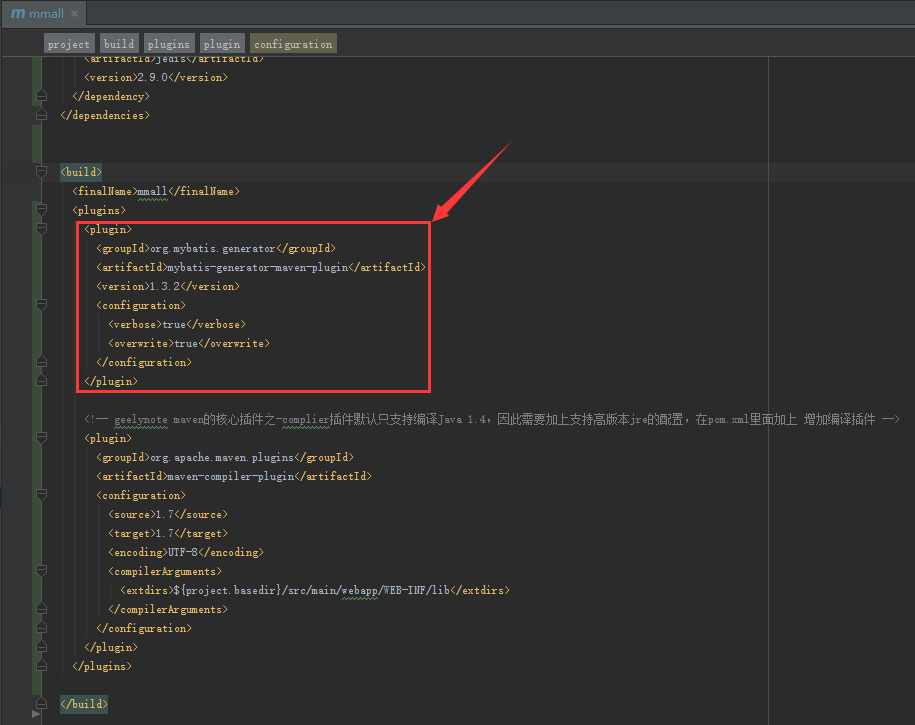
然后把generatorConfig.xml文件放在resources下:
<?xml version="1.0" encoding="UTF-8"?>

<!DOCTYPE generatorConfiguration

        PUBLIC "-//mybatis.org//DTD MyBatis Generator Configuration 1.0//EN"

        "http://mybatis.org/dtd/mybatis-generator-config_1_0.dtd">

<generatorConfiguration>

    <!--导入属性配置-->

    <properties resource="datasource.properties"></properties>

    <!--指定特定数据库的jdbc驱动jar包的位置-->

    <classPathEntry location="${db.driverLocation}"/>

    <context id="default" targetRuntime="MyBatis3">

        <!-- optional,旨在创建class时,对注释进行控制 -->

        <commentGenerator>

            <property name="suppressDate" value="true"/>

            <property name="suppressAllComments" value="true"/>

        </commentGenerator>

        <!--jdbc的数据库连接 -->

        <jdbcConnection

                driverClass="${db.driverClassName}"

                connectionURL="${db.url}"

                userId="${db.username}"

                password="${db.password}">

        </jdbcConnection>

        <!-- 非必需,类型处理器,在数据库类型和java类型之间的转换控制-->

        <javaTypeResolver>

            <property name="forceBigDecimals" value="false"/>

        </javaTypeResolver>

        <!-- Model模型生成器,用来生成含有主键key的类,记录类 以及查询Example类

            targetPackage     指定生成的model生成所在的包名

            targetProject     指定在该项目下所在的路径

        -->

        <!--<javaModelGenerator targetPackage="com.mmall.pojo" targetProject=".\src\main\java">-->

        <javaModelGenerator targetPackage="com.mmall.pojo" targetProject="./src/main/java">

            <!-- 是否允许子包,即targetPackage.schemaName.tableName -->

            <property name="enableSubPackages" value="false"/>

            <!-- 是否对model添加 构造函数 -->

            <property name="constructorBased" value="true"/>

            <!-- 是否对类CHAR类型的列的数据进行trim操作 -->

            <property name="trimStrings" value="true"/>

            <!-- 建立的Model对象是否 不可改变  即生成的Model对象不会有 setter方法,只有构造方法 -->

            <property name="immutable" value="false"/>

        </javaModelGenerator>

        <!--mapper映射文件生成所在的目录 为每一个数据库的表生成对应的SqlMap文件 -->

        <!--<sqlMapGenerator targetPackage="mappers" targetProject=".\src\main\resources">-->

        <sqlMapGenerator targetPackage="mappers" targetProject="./src/main/resources">

            <property name="enableSubPackages" value="false"/>

        </sqlMapGenerator>

        <!-- 客户端代码,生成易于使用的针对Model对象和XML配置文件 的代码

                type="ANNOTATEDMAPPER",生成Java Model 和基于注解的Mapper对象

                type="MIXEDMAPPER",生成基于注解的Java Model 和相应的Mapper对象

                type="XMLMAPPER",生成SQLMap XML文件和独立的Mapper接口

        -->

        <!-- targetPackage:mapper接口dao生成的位置 -->

        <!--<javaClientGenerator type="XMLMAPPER" targetPackage="com.mmall.dao" targetProject=".\src\main\java">-->

        <javaClientGenerator type="XMLMAPPER" targetPackage="com.mmall.dao" targetProject="./src/main/java">

            <!-- enableSubPackages:是否让schema作为包的后缀 -->

            <property name="enableSubPackages" value="false" />

        </javaClientGenerator>

        <table tableName="mmall_shipping" domainObjectName="Shipping" enableCountByExample="false" enableUpdateByExample="false" enableDeleteByExample="false" enableSelectByExample="false" selectByExampleQueryId="false"></table>

        <table tableName="mmall_cart" domainObjectName="Cart" enableCountByExample="false" enableUpdateByExample="false" enableDeleteByExample="false" enableSelectByExample="false" selectByExampleQueryId="false"></table>

        <table tableName="mmall_cart_item" domainObjectName="CartItem" enableCountByExample="false" enableUpdateByExample="false" enableDeleteByExample="false" enableSelectByExample="false" selectByExampleQueryId="false"></table>

        <table tableName="mmall_category" domainObjectName="Category" enableCountByExample="false" enableUpdateByExample="false" enableDeleteByExample="false" enableSelectByExample="false" selectByExampleQueryId="false"></table>

        <table tableName="mmall_order" domainObjectName="Order" enableCountByExample="false" enableUpdateByExample="false" enableDeleteByExample="false" enableSelectByExample="false" selectByExampleQueryId="false"></table>

        <table tableName="mmall_order_item" domainObjectName="OrderItem" enableCountByExample="false" enableUpdateByExample="false" enableDeleteByExample="false" enableSelectByExample="false" selectByExampleQueryId="false"></table>

        <table tableName="mmall_pay_info" domainObjectName="PayInfo" enableCountByExample="false" enableUpdateByExample="false" enableDeleteByExample="false" enableSelectByExample="false" selectByExampleQueryId="false"></table>

        <table tableName="mmall_product" domainObjectName="Product" enableCountByExample="false" enableUpdateByExample="false" enableDeleteByExample="false" enableSelectByExample="false" selectByExampleQueryId="false">

            <columnOverride column="detail" jdbcType="VARCHAR" />

            <columnOverride column="sub_images" jdbcType="VARCHAR" />

        </table>

        <table tableName="mmall_user" domainObjectName="User" enableCountByExample="false" enableUpdateByExample="false" enableDeleteByExample="false" enableSelectByExample="false" selectByExampleQueryId="false"></table>

        <!-- geelynote mybatis插件的搭建 -->

    </context>

</generatorConfiguration>
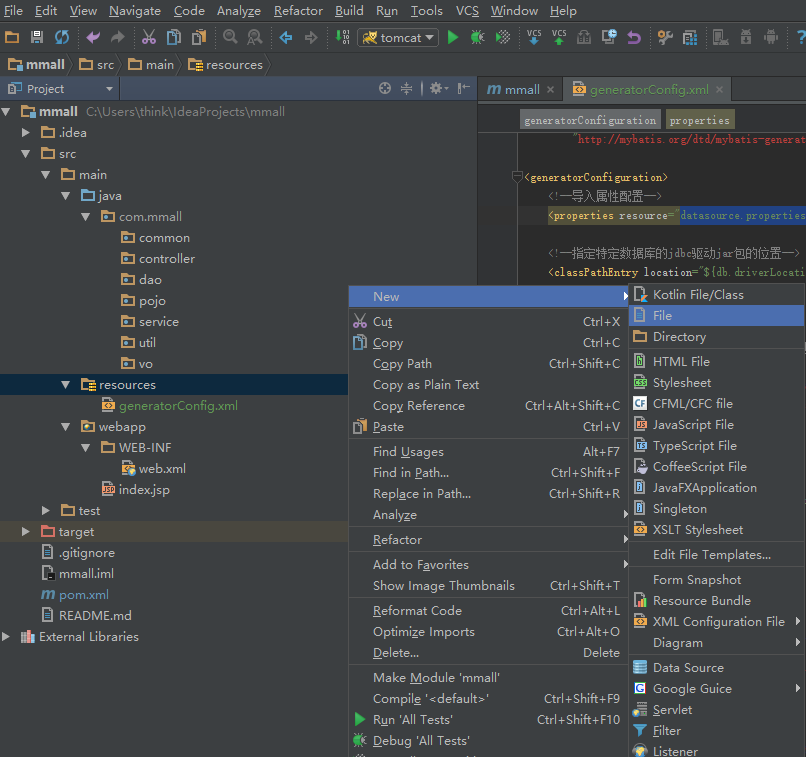
输入:datasource.properties
mysql-connector-java-5.1.6-bin.jar文件不是jar包哦,注意。

如果右边没有这些:

那么选择file-settings:
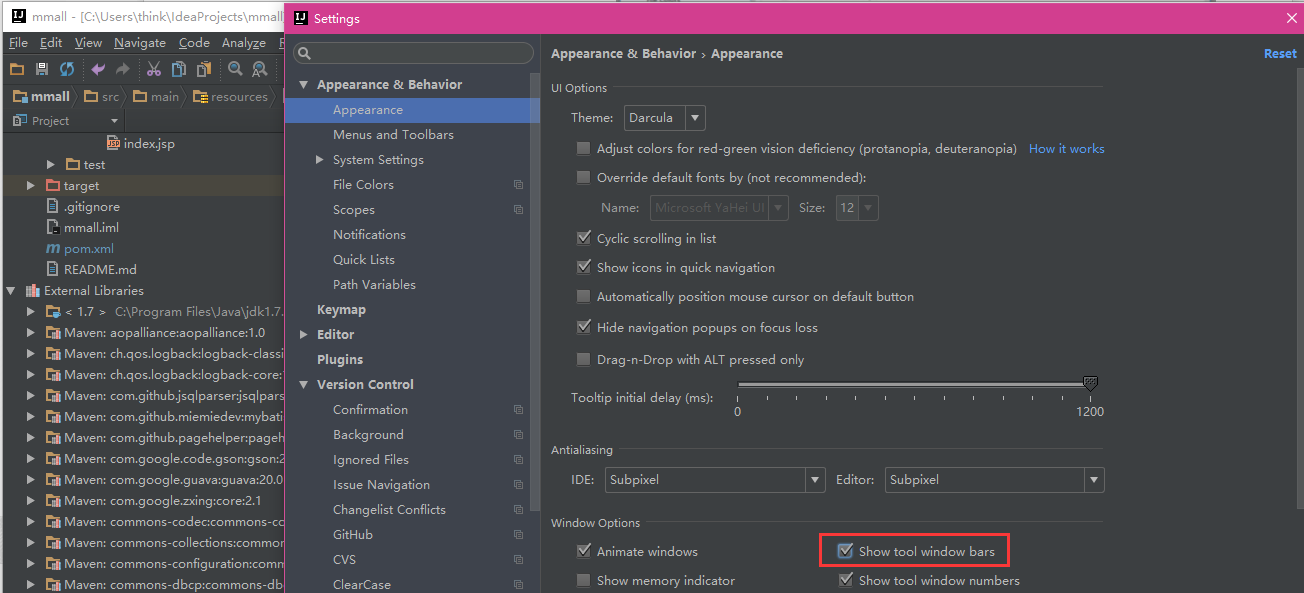
点击:

接下来我们要做修改,每张表都有update_time和create_time,所以我们可以交给mysql完成而不用再代码里操心:
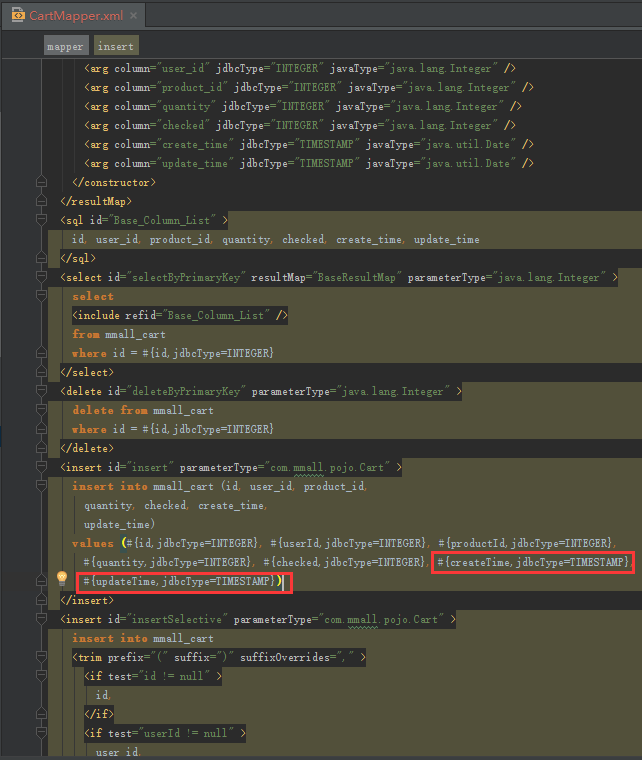
总之,insert语句两个都改成now(),update只改updateTime
最终改成如下:
<?xml version="1.0" encoding="UTF-8" ?>

<!DOCTYPE mapper PUBLIC "-//mybatis.org//DTD Mapper 3.0//EN" "http://mybatis.org/dtd/mybatis-3-mapper.dtd" >

<mapper namespace="com.mmall.dao.CartMapper" >

  <resultMap id="BaseResultMap" type="com.mmall.pojo.Cart" >

    <constructor >

      <idArg column="id" jdbcType="INTEGER" javaType="java.lang.Integer" />

      <arg column="user_id" jdbcType="INTEGER" javaType="java.lang.Integer" />

      <arg column="product_id" jdbcType="INTEGER" javaType="java.lang.Integer" />

      <arg column="quantity" jdbcType="INTEGER" javaType="java.lang.Integer" />

      <arg column="checked" jdbcType="INTEGER" javaType="java.lang.Integer" />

      <arg column="create_time" jdbcType="TIMESTAMP" javaType="java.util.Date" />

      <arg column="update_time" jdbcType="TIMESTAMP" javaType="java.util.Date" />

    </constructor>

  </resultMap>

  <sql id="Base_Column_List" >

    id, user_id, product_id, quantity, checked, create_time, update_time

  </sql>

  <select id="selectByPrimaryKey" resultMap="BaseResultMap" parameterType="java.lang.Integer" >

    select

    <include refid="Base_Column_List" />

    from mmall_cart

    where id = #{id,jdbcType=INTEGER}

  </select>

  <delete id="deleteByPrimaryKey" parameterType="java.lang.Integer" >

    delete from mmall_cart

    where id = #{id,jdbcType=INTEGER}

  </delete>

  <insert id="insert" parameterType="com.mmall.pojo.Cart" >

    insert into mmall_cart (id, user_id, product_id,

      quantity, checked, create_time,

      update_time)

    values (#{id,jdbcType=INTEGER}, #{userId,jdbcType=INTEGER}, #{productId,jdbcType=INTEGER},

      #{quantity,jdbcType=INTEGER}, #{checked,jdbcType=INTEGER},now(),

      now())

  </insert>

  <insert id="insertSelective" parameterType="com.mmall.pojo.Cart" >

    insert into mmall_cart

    <trim prefix="(" suffix=")" suffixOverrides="," >

      <if test="id != null" >

        id,

      </if>

      <if test="userId != null" >

        user_id,

      </if>

      <if test="productId != null" >

        product_id,

      </if>

      <if test="quantity != null" >

        quantity,

      </if>

      <if test="checked != null" >

        checked,

      </if>

      <if test="createTime != null" >

        create_time,

      </if>

      <if test="updateTime != null" >

        update_time,

      </if>

    </trim>

    <trim prefix="values (" suffix=")" suffixOverrides="," >

      <if test="id != null" >

        #{id,jdbcType=INTEGER},

      </if>

      <if test="userId != null" >

        #{userId,jdbcType=INTEGER},

      </if>

      <if test="productId != null" >

        #{productId,jdbcType=INTEGER},

      </if>

      <if test="quantity != null" >

        #{quantity,jdbcType=INTEGER},

      </if>

      <if test="checked != null" >

        #{checked,jdbcType=INTEGER},

      </if>

      <if test="createTime != null" >

        now(),

      </if>

      <if test="updateTime != null" >

        now(),

      </if>

    </trim>

  </insert>

  <update id="updateByPrimaryKeySelective" parameterType="com.mmall.pojo.Cart" >

    update mmall_cart

    <set >

      <if test="userId != null" >

        user_id = #{userId,jdbcType=INTEGER},

      </if>

      <if test="productId != null" >

        product_id = #{productId,jdbcType=INTEGER},

      </if>

      <if test="quantity != null" >

        quantity = #{quantity,jdbcType=INTEGER},

      </if>

      <if test="checked != null" >

        checked = #{checked,jdbcType=INTEGER},

      </if>

      <if test="createTime != null" >

        create_time = #{createTime,jdbcType=TIMESTAMP},

      </if>

      <if test="updateTime != null" >

        update_time = now(),

      </if>

    </set>

    where id = #{id,jdbcType=INTEGER}

  </update>

  <update id="updateByPrimaryKey" parameterType="com.mmall.pojo.Cart" >

    update mmall_cart

    set user_id = #{userId,jdbcType=INTEGER},

      product_id = #{productId,jdbcType=INTEGER},

      quantity = #{quantity,jdbcType=INTEGER},

      checked = #{checked,jdbcType=INTEGER},

      create_time = #{createTime,jdbcType=TIMESTAMP},

      update_time = now()

    where id = #{id,jdbcType=INTEGER}

  </update>

</mapper>
其余的请自行更改。
Mybatis三剑客之mybatis-generator配置的更多相关文章
- Java框架-MyBatis三剑客之MyBatis Generator(mybatis-generator MBG插件)详解
生成器设计思路: 连接数据库 -> 获取表结构 -> 生成文件 1 下载与安装 官网文档入口 最方便的 maven 插件使用方式 贴至pom 文件 2 新建配置文件 填充配置信息(官网示例 ...
- mybatis 三剑客 generator配置 、mybatis plugin
generator配置 1.配置pom.xml 导入mysql驱动.mybatis.mybatis-generator的依赖 <dependency> <groupId>org ...
- Mybatis—三剑客之generator使用方法
三剑客之generator主要用于自动生成POJO实体类 准备素材: mybatis-generator-core-1.3.2.jar mysql-connector-java-5.1.2 ...
- mybatis generator配置生成代码的问题
接触第二种orm两天下来,一脸懵逼.mybatis是大多数公司所推崇的,相比于hibernate性能较为好的,操作更为方便的轻量级工具,所以小富就搞起这个orm.好吧,都说mybatis有个配置可以自 ...
- MyBatis Generator配置示例
(一).MBG介绍 MyBatis Generator(MBG)是一个Mybatis的代码生成器,它可以用来生成可以访问(多个)表的基础对象.MBG解决了对数据库操作有最大影响的一些简单的CRUD(插 ...
- MyBatis generator配置 overwrite 文件覆盖失效
工具:IDEA.jdk1.8.mysql 底部有解决方法! pom.xml配置 <plugins> <!--Mybatis自动代码插入--> <plugin> &l ...
- Mybatis Generator配置详解
参考:http://www.jianshu.com/p/e09d2370b796 http://mbg.cndocs.tk <?xml version="1.0" encod ...
- mybatis generator配置,Mybatis自动生成文件配置,Mybatis自动生成实体Bean配置
mybatis generator配置,Mybatis自动生成文件配置,Mybatis自动生成实体Bean配置 ============================== 蕃薯耀 2018年3月14 ...
- Mybatis generator 配置
mybatis-generator.xml <?xml version="1.0" encoding="UTF-8"?> <!DOCTYPE ...
随机推荐
- linux 访问远程务器代码
比如用SSH 访问远程 登陆名为hadoop 的IP为192.168.1.35的主机,则用ssh hadoop@192.168.1.35,然后依据提示输入密码即可.
- js判断用户关闭页面或浏览器
<html><head><meta http-equiv="Content-Type" content="text/html; charse ...
- mongodb查询内嵌文档
mongodb查询内嵌文档 假设有这样一个文档: db.XXX.remove(); db.XXX.insert({"id":1, "members":[{& ...
- Java精选笔记_IO流(字符输入输出流、字符文件输入输出流、字符流的缓冲区)
字符流 Reader是字符输入流的基类,用于从某个源设备读取字符 Writer是字符输出流,用于向某个目标设备写入字符 字符流操作文件 字符输入流FileReader,通过此流可以从关联的文件中读取一 ...
- POJ 1947 Rebuilding Road(树形DP)
Description The cows have reconstructed Farmer John's farm, with its N barns (1 <= N <= 150, n ...
- com.thoughtworks.xstream.converters.ConversionException
使用webService调用接口,返回的是xml格式,运用xstream解析的时候,出现了如下的错误: Exception in thread "Timer-1" com.thou ...
- easyui 时间定格为 时分
$.fn.datetimebox.defaults.formatter = function (date) { console.log('dt formatting ' + date); if (!( ...
- mybatis 返回值类型是Map
<select id="selectByMemberKey" resultType="java.util.HashMap"> SELECT memb ...
- thinkjs之页面跳转-同步异步
对于刚入手thinkjs项目的新手来说,时常会犯的一个错误就是“混用”各种代码逻辑,比如:我们经常在做后台管理系统的时候用到的登录框, , 其实它原本是有一个路由专门存放自己的代码逻辑,而在点击提交按 ...
- Chrome浏览器下CSS字体大小设置小于12px无效问题
当字体大小被设置小于12px时,IE.firefox可以起作用.但chrome中仍然显示为12px大小. 解决方法为: html, body { -webkit-text-size-adjus ...