
React native中DrawerNavigator,StackNavigator,TabNavigator导航栏使用
 import React from 'react';

 import { View, Text,Button } from 'react-native';

 import { DrawerNavigator,StackNavigator,TabNavigator  } from 'react-navigation';

 /*

 * 主屏幕,可以跳转至Tab Navigator和DrawerNavigator*/

 const HomeScreen = ({ navigation }) => (

     <View style={{ flex: 1, alignItems: 'center', justifyContent: 'center' }}>

         <Text>Home Screen</Text>

         <Button

             onPress={() => navigation.navigate('Details1')}

             title="Go to details1"

         />

         <Button

             onPress={() => navigation.navigate('Details2')}

             title="Go to details2"

         />

     </View>

 );

 /*次屏幕一

 * 用于承接TabNavigator

 * */

 const DetailsScreen1 = () => (

     <View style={{ flex: 1, alignItems: 'center', justifyContent: 'center' }}>

         <Text>Details1 Screen</Text>

     </View>

 );

 /*

 * 次屏幕二

 * 用于承接DrawerNavigator

 * */

 const DetailsScreen2 = () => (

     <View style={{ flex: 1, alignItems: 'center', justifyContent: 'center' }}>

         <Text>Details2 Screen</Text>

     </View>

 );

 /*

 * TabNavigator主屏幕

 * */

 const HoScreen = () => (

     <View style={{ flex: 1, alignItems: 'center', justifyContent: 'center' }}>

         <Text>Ho Screen</Text>

     </View>

 );

 /*

 * TabNavigator次屏幕

 * */

 const ProfileScreen = () => (

     <View style={{ flex: 1, alignItems: 'center', justifyContent: 'center' }}>

         <Text>Profile Screen</Text>

     </View>

 );

 /*TabNavigator

 * */

 const RootTabs = TabNavigator({

     Ho: {

         screen: HoScreen,

     },

     Profile: {

         screen: ProfileScreen,

     },

 });

 /*

 * DrawerNavigator主屏幕

 * */

 const HScreen = ({navigation}) => (

     <View style={{ flex: 1, alignItems: 'center', justifyContent: 'center' }}>

         <Text>H Screen</Text>

         <Button

             onPress={() => navigation.navigate('DrawerToggle')}

             title="Open Drawer"

         />

     </View>

 );

 /*

 * DrawerNaivigator

 * 次屏幕

 * */

 const ProScreen = () => (

     <View style={{ flex: 1, alignItems: 'center', justifyContent: 'center' }}>

         <Text>Pro Screen</Text>

     </View>

 );

 /*

 * DrawerNavigator

 * */

 const RootDrawer = DrawerNavigator({

     H: {

         screen: HScreen,

     },

     Pro: {

         screen: ProScreen,

     },

 });

 /*

 *

 * StackNavigator

 * */

 const RootNavigator = StackNavigator({

     Home: {

         screen: HomeScreen,

         navigationOptions: {

             headerTitle: 'Home',

             headerRight: <Button title="Info" />,

         },

     },

     Details1: {

         screen: RootTabs,

         navigationOptions: {

             headerTitle: 'Details1',

         },

     },

     Details2: {

         screen: RootDrawer,

         navigationOptions: {

             headerTitle: 'Details2',

         },

     },

 });

 export default class App extends React.Component {

     render() {

         return <RootNavigator/>;

     }

 }
效果图
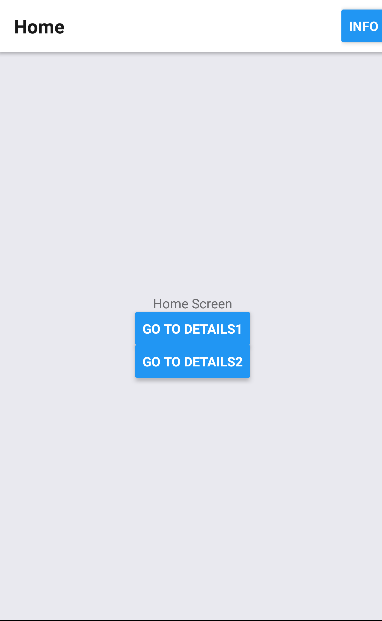
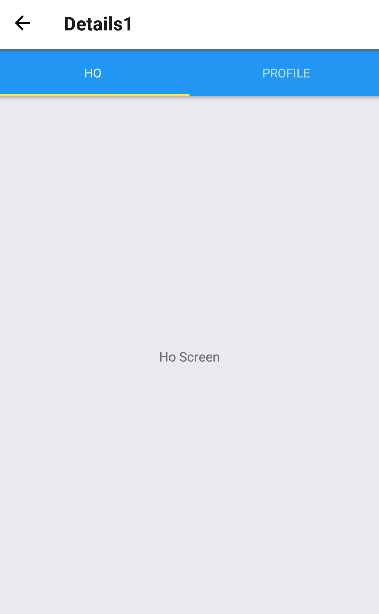
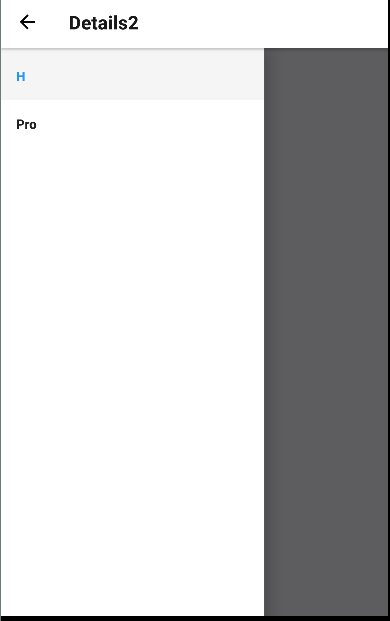
React native中DrawerNavigator,StackNavigator,TabNavigator导航栏使用的更多相关文章
- React Native(四)——顶部以及底部导航栏实现方式
效果图: 一步一步慢慢来: 其实刚入手做app的时候,就应该做出简单的顶部以及底部导航栏.无奈又在忙其他事情,导致这些现在才整理出来. 1.顶部导航栏:react-native-scrollable- ...
- React Native 的组件之底部导航栏 TabBarIOS(一)
import React,{Component}from 'react'; import { AppRegistry, StyleSheet, Text, View, TabBarIOS, } fro ...
- react native 中的ListView
ListView 的运用: 1.首先在react native中引入这个组件: 2.初始化的ListView 的相关属性: constructor(props) { super(props); con ...
- React Native 中 CSS 的使用
首先声明,此文原作者为黎 跃春 React Native中CSS 内联样式 对象样式 使用Stylesheet.Create 样式拼接 导出样式对象 下面的代码是index.ios.js中的代码: / ...
- react native中的欢迎页(解决首加载白屏)
参照网页: http://blog.csdn.net/fengyuzhengfan/article/details/52712829 首先是在原生中写一些方法,然后通过react native中js去 ...
- React Native中的网络请求fetch和简单封装
React Native中的网络请求fetch使用方法最为简单,但却可以实现大多数的网络请求,需要了解更多的可以访问: https://segmentfault.com/a/1190000003810 ...
- [转] 「指尖上的魔法」 - 谈谈 React Native 中的手势
http://gold.xitu.io/entry/55fa202960b28497519db23f React-Native是一款由Facebook开发并开源的框架,主要卖点是使用JavaScrip ...
- [转] 在React Native中使用ART
http://bbs.reactnative.cn/topic/306/%E5%9C%A8react-native%E4%B8%AD%E4%BD%BF%E7%94%A8art 前半个月捣腾了一下Rea ...
- react native中使用echarts
开发平台:mac pro node版本:v8.11.2 npm版本:6.4.1 react-native版本:0.57.8 native-echarts版本:^0.5.0 目标平台:android端收 ...
随机推荐
- ASP.NET MVC 目录介绍
- CRM 员工创建并分配用户
REPORT zjp_emp_upload. TABLES: sscrfields. DATA:gt_excel_data TYPE TABLE OF zalsmex_tabline, gs_exce ...
- python 爬虫新解
关于python爬虫多个库的选择反反复复,总是不知道选择哪个,通过试过多个晚上的选择 reques Beautifulsoup 以上两个库足够爬虫,已反爬虫网站数据的爬取.先上代码: 库的调用: 网页 ...
- HCharts随笔之简单入门
此处可以对比我的另一个Echars简单入门 直接上源码 <!DOCTYPE html> <html> <head> <meta http-equiv=&quo ...
- zzw原创_非root安装fastDFS
zzw原创_非root安装fastDFS fastDFS 想要非root安装,没找到资料,分析了一下安装脚本,原来作者是留了安装路径的,但没有放出来. 1.解包 [bdc@svr001 setup]$ ...
- 2018 HDU多校第四场赛后补题
2018 HDU多校第四场赛后补题 自己学校出的毒瘤场..吃枣药丸 hdu中的题号是6332 - 6343. K. Expression in Memories 题意: 判断一个简化版的算术表达式是否 ...
- 深入理解CADisplayLink和NSTimer
一.什么是CADisplayLink 简单地说,它就是一个定时器,每隔几毫秒刷新一次屏幕. CADisplayLink是一个能让我们以和屏幕刷新率相同的频率将内容画到屏幕上的定时器.我们在应用中创建一 ...
- 八大排序算法详解(动图演示 思路分析 实例代码java 复杂度分析 适用场景)
一.分类 1.内部排序和外部排序 内部排序:待排序记录存放在计算机随机存储器中(说简单点,就是内存)进行的排序过程. 外部排序:待排序记录的数量很大,以致于内存不能一次容纳全部记录,所以在排序过程中需 ...
- 简单的epub制作
最近在无聊看轻小说的时候,找到了一套叫<白银龙王的摇篮>的书. 台版一共出了6卷,并且wenku8都已经录入了,但是轻国的epub录入只有2卷. 我寻思着做epub也不是什么难事,就稍微百 ...
- day1 登录
#!/usr/bin/env python #Author:windtalker import os, getpass import sqlite3 from time import ctime pr ...