
vue简单的日历
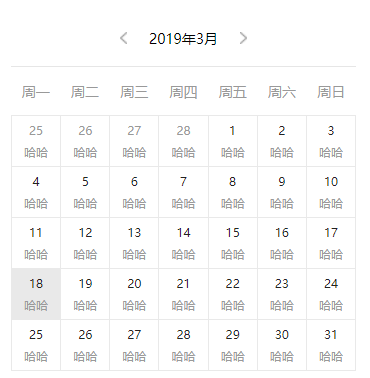
<ul class="date">
  <li v-for="(item, index) in list" :key="index" :class="{'bg-color': item.y === year && item.m === month && item.d === day}">
    <div class="day" :class="{'text-color': item.cur}">{{item.d}}</div>
    <div>哈哈</div>
  </li>
</ul>
data () {
  return {
    year: new Date().getFullYear(), // 今日年份
    month: new Date().getMonth() + 1, // 今日月份
    day: new Date().getDate(), // 今日日份
    currentYear: '', // 当前显示年份
    currentMonth: '', // 当前显示月份 0-11,显示时加一
    currentDay: '', // 当前显示日份
    monthDays: [], // 1-12月的天数
    list: []
  }
},
mounted () {
  this.showCalender()
},
methods: {
  isLeap (year) { // 判断是不是闰年
    return (year % 100 === 0 ? (year % 400 === 0 ? 1 : 0) : (year % 4 === 0 ? 1 : 0))
  },
  showCalender (type) {
    this.list = []
    this.newDate = new Date()
    if (!type) this.currentYear = this.newDate.getFullYear()
    if (!type) this.currentMonth = this.newDate.getMonth()
    this.monthDays = [31, 28 + this.isLeap(this.currentYear), 31, 30, 31, 30, 31, 31, 30, 31, 30, 31]
    this.currentDay = this.newDate.getDate()
    this.firstDay = new Date(`${this.currentYear}-${this.currentMonth + 1}-1`)
    this.firstnow = this.firstDay.getDay() // 当月第一日是星期几 1-7
    if (this.firstnow === 0) this.firstnow = 7
    if (this.firstnow > 1) {
      // 前一个月份
      let monIndex = this.currentMonth
      let year
      if (monIndex === 0) {
        year--
        monIndex = 11
      } else {
        monIndex--
      }
      for (let i = 0; i < this.firstnow - 1; i++) {
        this.list.unshift({
          y: year,
          m: monIndex + 1,
          d: this.monthDays[monIndex] - i
        })
      }
    }
    for (let i = 0; i < this.monthDays[this.currentMonth]; i++) {
      // 当前月份
      this.list.push({
        y: this.currentYear,
        m: this.currentMonth + 1,
        d: i + 1,
        cur: true
      })
    }
    const num = (this.monthDays[this.currentMonth] + this.firstnow - 1) % 7
    if (num > 0) {
      // 下个月份
      let monIndex2 = this.currentMonth
      let year2
      if (monIndex2 === 11) {
        year2++
        monIndex2 = 0
      } else {
        monIndex2++
      }
      for (let i = 0; i < 7 - num; i++) {
        this.list.push({
          y: year2,
          m: monIndex2 + 1,
          d: i + 1
        })
      }
    }
  },
  preMon () {
    if (this.currentMonth === 0) {
      this.currentYear--
      this.currentMonth = 11
    } else {
      this.currentMonth--
    }
    this.showCalender('pre')
  },
  nextMon () {
    if (this.currentMonth === 11) {
      this.currentYear++
      this.currentMonth = 0
    } else {
      this.currentMonth++
    }
    this.showCalender('next')
  }

// scss 只放了表格样式
ul{
  display: flex;
  justify-content: space-around;
  flex-wrap: wrap;
  align-items: center;
  border-top: 1rpx solid #E9E9E9;
  border-left: 1rpx solid #E9E9E9;
  li{
    flex-grow: 1;
    min-width: 44px;
    height: 50px;
    border-bottom: 1rpx solid #E9E9E9;
    border-right: 1rpx solid #E9E9E9;
    display: flex;
    justify-content: center;
    align-items: center;
    flex-direction: column;
    color: #999;
    font-size: 12px;
    .day{
      margin-bottom: 6px;
    }
    .text-color{
      color: #222;
    }
    &.bg-color{
      background-color: #E9E9E9;
    }
  }
}
vue简单的日历的更多相关文章
- vue初学实践之路——vue简单日历组件(1)
---恢复内容开始--- 最近做的项目有一个需求,需要有一个日历组件供预定功能使用,之前的代码过于繁琐复杂,所以我采用vue重写了这个组件. npm.vue等等安装. 只是一个简单的日历组件,所以并不 ...
- 【UI插件】简单的日历插件(下)—— 学习MVC思想
前言 我们上次写了一个简单的日历插件,但是只是一个半成品,而且做完后发现一些问题,于是我们今天尝试来解决这些问题 PS:距离上次貌似很久了 上次,我们大概遇到哪些问题呢: ① 既然想做一套UI库,那么 ...
- 使用JAVA写一个简单的日历
JAVA写一个简单的日历import java.text.DateFormat;import java.text.ParseException;import java.text.SimpleDateF ...
- Vue简单基础 + 实例 及 组件通信
vue的双向绑定原理:Object.defineProperty() vue实现数据双向绑定主要是:采用数据劫持结合发布者-订阅者模式的方式,通过 Object.defineProperty() 来劫 ...
- vue简单实现
vue简单实现 vue的三个核心 虚拟dom, 双向绑定 Proxy,
- html vue简单
1.Vue 简单的替换更新 <!DOCTYPE html> <html> <head> <meta charset="utf-8"> ...
- 基于java实现的简单网页日历功能,有兴趣得可以把它转换到前端实现
之前做项目的时候,因为要用到不同日期显示不同的内容,就自己做了一个日期的显示和选择功能,今天抽空把以前的代码理了一下,顺便就把之前做的日期功能给拿出来回顾一下,大家可以提点意见,帮忙完善下设计.先上一 ...
- 一篇文章带你了解网页框架——Vue简单入门
一篇文章带你了解网页框架--Vue简单入门 这篇文章将会介绍我们前端入门级别的框架--Vue的简单使用 如果你以后想从事后端程序员,又想要稍微了解前端框架知识,那么这篇文章或许可以给你带来帮助 温馨提 ...
- vue初学实践之路——vue简单日历组件(3)
这一篇我们来实现管理员修改每一天剩余数量的功能. <div id="calendar"> <div id="left"> <spa ...
随机推荐
- Web API学习笔记(Python实现)
参考指南: Web API入门指南 http://www.cnblogs.com/guyun/p/4589115.html 用Python写一个简单的Web框架 http://www.cnblogs. ...
- SpringBoot关于SpringDataJpa中findOne()方法报错问题
问题描述: 首先用的SpringDataJPA的1.11版本,可以使用findOne()方法根据id查询 然后我使用了2.0.5版本,发现findOne()方法报错了,不能用来当作根据id查询了. 当 ...
- Java使用Redis--jedis
参考:菜鸟教程 http://www.runoob.com/redis/redis-java.html 1.Java 使用 Redis 开始在 Java 中使用 Redis 前, 我们需要确保已经安装 ...
- Mac OS X 操作系统下IntelliJ IDEA激活码(Activation code)破解
Mac OS X 操作系统(版本:10.13.6)下载并安装IntelliJ IDEA: Version: 2018.2.4 Download IntelliJ IDEA 下一步对IntelliJ I ...
- filebeat-kafka日志收集
filebeat-kafka日志收集 由于线上的logstash吃掉大量的CPU,占用较多的系统资源,就想找其它的组件替代.我们的日志需要收集并发送到kafka,生成的日志已经是需要的数据,不用过滤. ...
- load data语句实验报告
1.创建和选择数据库 如果管理员在设置权限时为您创建数据库,则可以开始使用它.否则,您需要自己创建它: 创建数据库不会选择它来使用; 你必须明确地这样做.要创建menagerie当前数据库,请使用以下 ...
- PowerDesigner数据库设计导出到Excel
在PowerDesigner 中 ctrl+shift+x 弹出执行脚本界面,输入如下代码就会生成 Excel Option Explicit Dim rowsNum rowsNum = '--- ...
- Python3将xml文件解析为Python对象
一.说明 从最开始写javascript开始,我就很烦感使用getElementById()等函数来获取节点的方法,获取了一个节点要访问其子孙节点要么child半天要么就再来一个getElementB ...
- 创建nodejs服务
1.终端窗口输入:npm init 2.终端输入:npm install 3.修改代码后重启服务:ctrl+c 启动服务:node 文件名.js
- [CentOS] 环境变量设置的三种方法
在CentOS系统中添加环境变量的方法有几种,推荐第三种方法.这里以添加 TexLive 2017 的环境变量为例进行说明. 1. 修改 ~/.bash_profile 文档,在文末添加以下代码: ...