
memcached命令行、Memcached数据导出和导入、php连接memcache、php的session存储到memcached
1、memcached命令行
telnet 127.0.0.1 11211
set key2 0 30 2
ab
STORED
get key2
VALUE key2 0 2
ab
END


如:
set key3 1 100 4
abcd
STORED
get key3
VALUE key3 1 4
abcd
END
replace key3 1 200 5
abcdx
STORED
get key3
VALUE key3 1 5
abcdx
END
delete key3
DELETED
get key3
END
2、memcached数据导出和导入

查看状态:
然后导出:
导入:
memcached-tool 127.0.0.1:11211 dump
注意,在导入的时候,会有过期时间,所以,在导入的时候,要调时间值,否则导入后,就没有数据
3、php连接memcache
先安装php的memcache扩展
cd /usr/local/src/
wget -c http://pecl.php.net/get/memcache-2.2.7.tgz (php5最新稳定版)
wget -c http://pecl.php.net/get/memcache-3.0.8.tgz (php5最新开发版)
wget -c https://github.com/websupport-sk/pecl-memcache/archive/php7.zip (php7可用版)
解压:tar zxf memcache****.tgz
cd memcache***
/usr/local/php7fpm/bin/phpize
./configure --with-php-config=/usr/local/php7fpm/bin/php-config
make && make install
安装完后会有类似这样的提示:Installing shared extensions: /usr/local/php7fpm/lib/php/extensions/no-debug-non-zts-20170718/
然后修改php.ini添加一行echo "extension=memcache.so" >>/usr/local/php7fpm/etc/php.ini
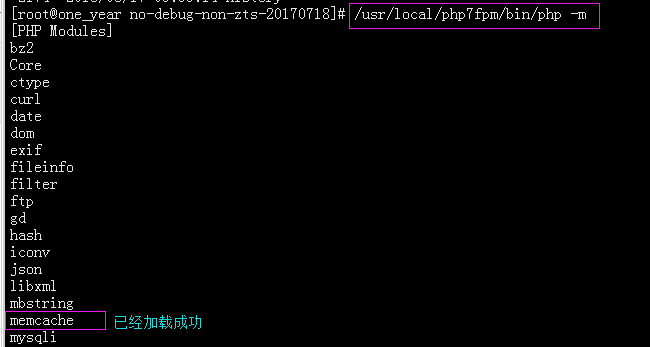
检查/usr/local/php7fpm/bin/php-fpm -m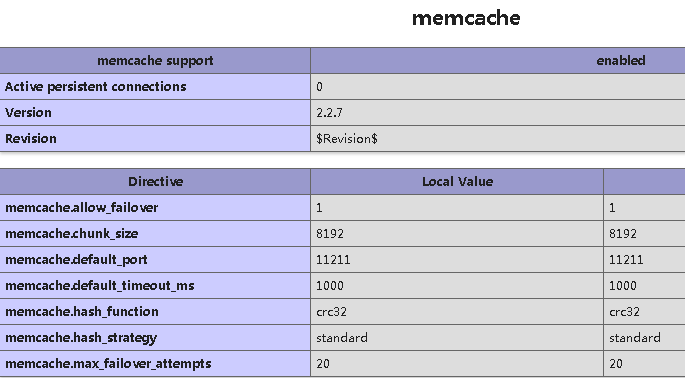
php安装memcached:
wget -c https://pecl.php.net/get/memcached-3.0.4.tgz
tar -xvf memcached-3.0.4.tgz
cd memcached-3.0.4/
/usr/local/php7fpm/bin/phpize
./configure
若缺libmemcached 需要安装这两个依赖包:yum install libmemcached libmemcached-devel
./configure
make && make install
echo "extension=memcached.so" >>/usr/local/php7fpm/etc/php.ini
/etc/init.d/php7fpm restart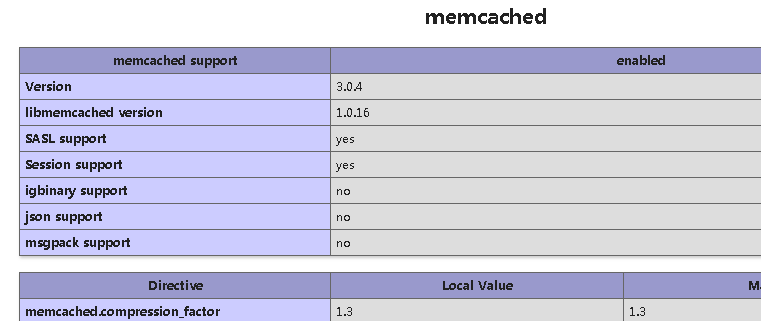

具体相关:

测试:url www.apelearn.com/study_v2/.memcache.txt > 1.php 2>/dev/null
/usr/local/php7fpm/bin/php 1.php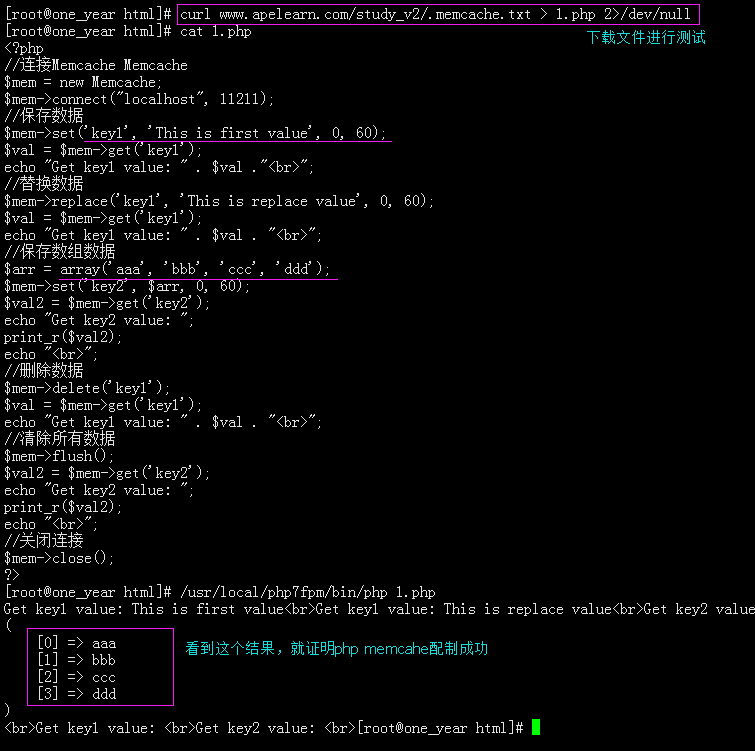
4、php的session存储到memcached
编辑php.ini添加两行
for memcache:
session.save_handler = memcache
session.save_path="tcp://192.168.0.9:11211"
for memcahed:
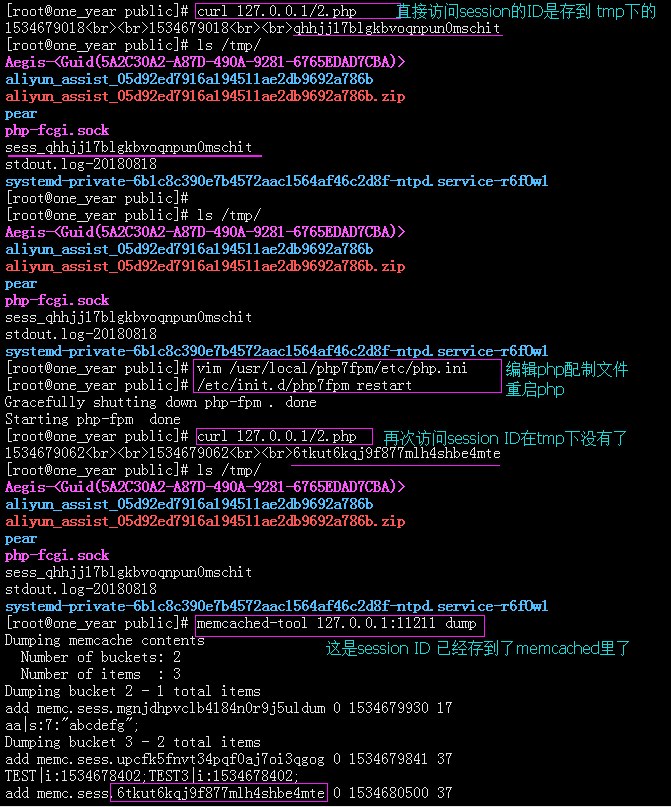
session.save_handler = memcached
session.save_path = "localhost:11211" 或 session.save_path = "127.0.0.1:11211"
或者httpd.conf中对应的虚拟主机中添加
for memcache:
php_value session.save_handler "memcache"
php_value session.save_path"tcp://192.168.0.9:11211"

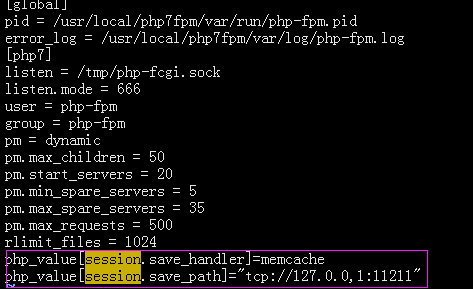
或者php-fpm.conf对应的pool中添加
for memcache:
php_value[session.save_handler]=memcache
php_value[session.save_path]="tcp://192.168.0.9:11211"
for memcahed:
php_value[session.save_handler] = memcached
php_value[session.save_path] = "127.0.0.1:11211" 或 php_value[session.save_path] = "localhost:11211"
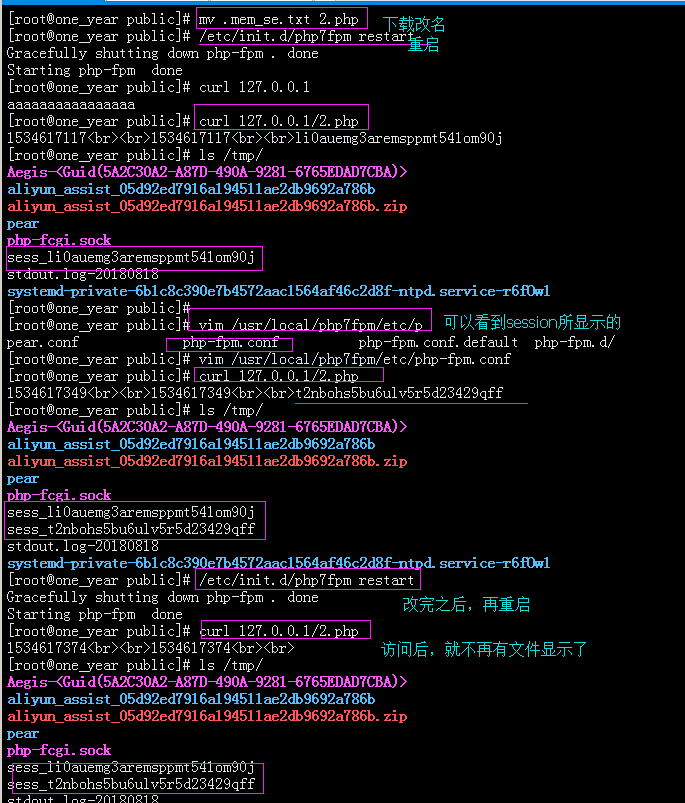
测试:
wget http://study.lishiming.net/.mem_se.txt
mv .mem_se.txt /usr/local/apache2/htdocs/session.php
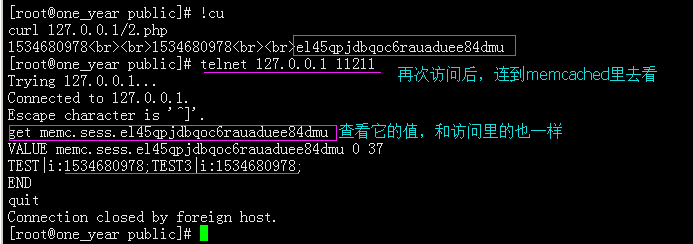
telnet 127.0.0.1 11211
for memcahed:
memcached命令行、Memcached数据导出和导入、php连接memcache、php的session存储到memcached的更多相关文章
- memcached命令行、Memcached数据导出和导入
1.memcached命令行 telnet 127.0.0.1 11211set key2 0 30 2abSTOREDget key2VALUE key2 0 2abEND 如: set key3 ...
- memcached命令行操作详解,命令选项的详细解释
连接到memcached命令行下: telnet 127.0.0.1 11211 1.set / add / replace : 格式:<command> <key> < ...
- 可以在命令行直接使用密码来进行远程连接和远程拉取文件的命令:sshpass
应用范围:可以在命令行直接使用密码来进行远程连接和远程拉取文件. 使用前提:对于未连接过的主机.而又不输入yes进行确认,需要进行sshd服务的优化: # vim /etc/ssh/ssh_con ...
- memcached命令行参数说明(转)
1.启动Memcache 常用参数 -p <num> 设置TCP端口号(默认不设置为: 11211) -U <num> UDP监听端口(默认: 11211, ...
- memcached 命令行举例
1.启动Memcache 常用参数 memcached 1.4.3 -p <num> 设置端口号(默认不设置为: 11211) -U <num> UDP监听端口 (默 ...
- Memcached 命令行操作
telnet 用于连接 Memcached: [root@localhost ~]# telnet Trying 127.0.0.1... Connected to 127.0.0.1. Escape ...
- mongoDB 数据导出与导入
一.导出 命令格式:在mongodb/bin目录下 mongoexport -h IP --port 端口 -u 用户名 -p 密码 -d 数据库 -c 表名 -f 字段 -q 条件导出 --csv ...
- Elasticsearch的数据导出和导入操作(elasticdump工具),以及删除指定type的数据(delete-by-query插件)
Elasticseach目前作为查询搜索平台,的确非常实用方便.我们今天在这里要讨论的是如何做数据备份和type删除.我的ES的版本是2.4.1. ES的备份,可不像MySQL的mysqldump这么 ...
- 使用Scrapy命令行工具【导出JSON文件】时编码设置
Windows 10家庭中文版,Python 3.6.4,virtualenv 16.0.0,Scrapy 1.5.0, 使用scrapy命令行工具建立了爬虫项目(startproject),并使用s ...
随机推荐
- eclipse光标变粗解决方法
如上图,光标变成黑块好像没那么顺眼,原因是我们不小心按到了insert键造成的,再按一下insert键就OK了,如果delete和insert是一个键那么就用FN键+delete/insert键就可以 ...
- ie11~ie9兼容的布局写法。bootsteap的12栅格,栅格化就可以实现。
全局 CSS 样式 设置全局 CSS 样式:基本的 HTML 元素均可以通过 class 设置样式并得到增强效果:还有先进的栅格系统. 概览 深入了解 Bootstrap 底层结构的关键部分,包括我们 ...
- UML之领域建模
一 定义:领域建模是对领域内的概念类或现实世界中对象的可视化表示.又称概念模型.领域对象模型.分析对象模型.它专注于分析问题领域本身,发掘重要的业务领域概念,并建立业务领域概念之间的关系.业务对象模型 ...
- <转载> UE4的Actor类C++简单尝试
原文链接: 简书小小酥XX https://www.jianshu.com/p/2bcc80f0e789 一开始我用了一段时间UE4,发现如果用蓝图系统真的不太适合我的风格.因为之前一直都是用Un ...
- CEPH集群操作入门--部署和运维
部署 预检和安装Ceph 参考 虚拟机使用ceph-deploy安装ceph 创建群集 添加/删除监视器 密钥管理 添加/删除OSD 添加/删除MDS 清除主机 管理任务 运维 操作群集 健康检查 ...
- jenkins+svn完整打包并上传到linux服务器上
因为公司用的是svn版本管理工具并且部署在了windows服务器上,所以测试环使用jenkins需要部署两套环境, 一套是在本地windows服务器,jenkins从svn下载代码完成打包并上传到li ...
- 第十三次作业——回归模型与房价预测&第十一次作业——sklearn中朴素贝叶斯模型及其应用&第七次作业——numpy统计分布显示
第十三次作业——回归模型与房价预测 1. 导入boston房价数据集 2. 一元线性回归模型,建立一个变量与房价之间的预测模型,并图形化显示. 3. 多元线性回归模型,建立13个变量与房价之间的预测模 ...
- 超低质量的超低起点PYQT ------前言
由于年后要赶一个小工程,以前一直用VB6+sqL2K的做些小玩具一样的桌面项目,低级的不能再低级了,某日幡然醒悟,决定努力跟进潮流的尾巴..匆匆撸了一遍网上的PYTHON基础知识,面向对象,装饰器.. ...
- div不固定高度垂直居中
父容器的css属性 display:table;overflow:hidden;子容器的css属性 vertical-align:middle;display:table-cell; <!DOC ...
- xpath | 计算两个节点集
url = li.xpath("./div/div[2]/a/@href | ./div/div[2]/div[2]/a/@href").extract_first()