
OpenGL学习 Introduction
OpenGL and Graphics Pipeline
The word pipeline is from production lines in factories.Generating a product at high efficiency and volume generally requires two things: scalability and parallelism.While one worker installs the engine in a car, another can be installing the doors and yet another can be installing the wheels.That is parallelism.
Just as a car plant can build multiple cars simultaneously, so can OpenGL break up the work you give it and work on its fundamental elements in parallel.Though a combination of pipelining and parallelism,incredible performance of modern graphics processors is realized.
Current GPUs consist of large number of small programmable processors called shader cores which run mini-programs called shaders. Each core has a relatively low throughput , processing a single instruction of the shader in one or more clock cycles and normally lacking advanced features such as out-of-order execution,branch prediction, super-scalar issue,and together the can perform an immense amount of work.
Figure:
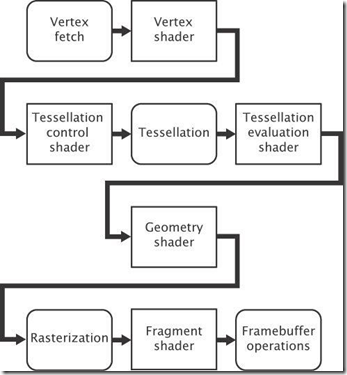
In Figure,the boxes with rounded corners are considered fixed-function stages whereas the boxes with square corners are programmable, which means that they execute shaders that you supply.In practice,some or all of the fixed-function stages may really be implemented in shader code too——it is just that you don’t supply that code, but rather the GPU manufacturer would generally supply it as part of a driver, firmware, or other system software.
The version numbers and dates of publication of 17 editions of the OpenGL specification are shown in follow Table:
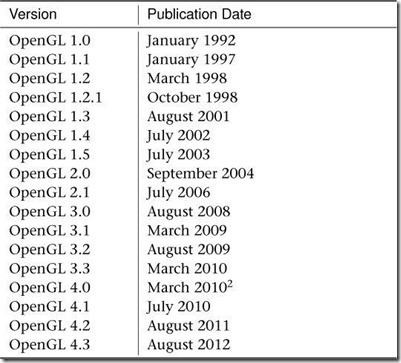
OpenGL 4.4 July 2013
OpenGL 4.4 pipeline:
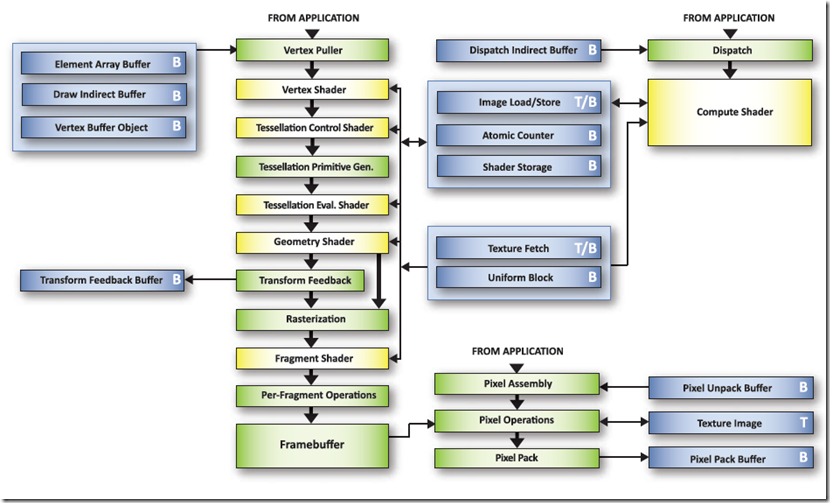
Core Profile OpenGL
In 2008,the ARB fork the OpenGL specification into two profiles.The first is the modern ,core profile ,which remove a number of legacy features leaving only those that are truly accelerated by current graphics hardware.The other is the compatibility profile which maintains backwards compatibility with all revisions of OpenGL back to version 1.0.The core profile is strongly recommended by most OpenGL experts to be the profile that should be used for new application development.
Primitives, Pipelines, and Pixels
The fundamental unit of rendering in OpenGL is known as the primitive.
Primitive A group of one or more vertices formed into a geometric shape by OpenGL such as a line, point, or triangle. All objects and scenes are composed of various combinations of primitives.
Three basic renderable primitive types in OpenGL:
- Points
- Lines
- Triangles
Applications will normally break complex surfaces into a very large number of triangles and send them to OpenGL where they are rendered using a hardware accelerator called a rasterizer.
As polygons, triangles are always convex, and therefore filling rules are easy to devise and follow.
A vertex is simply a point within a coordinate space.
Vertex A single point in space. Except when used for point and line primitives, it also defines the point at which two edges of a polygon meet.
The graphics pipeline is broken down into two major parts:
The first part:
Often known as the front end, processes vertices and primitives, eventually forming them into the points, lines, and triangles that will be handed off to the rasterizer. (primitive assembly)
The second part:
After the rasterizer, the geometry has been converted from what is essentially a vector representation into a large number of independent pixels. These are handed off to the back end, which includes depth and stencil testing, fragment shading, blending, and updating the output image.
OpenGL is really a large collection of fairly simple concepts, built upon each other.
Having a good foundation and big-picture view of the system is essential.
See you later.
OpenGL学习 Introduction的更多相关文章
- OpenGL学习笔记3——缓冲区对象
在GL中特别提出了缓冲区对象这一概念,是针对提高绘图效率的一个手段.由于GL的架构是基于客户——服务器模型建立的,因此默认所有的绘图数据均是存储在本地客户端,通过GL内核渲染处理以后再将数据发往GPU ...
- OpenGL学习进程(12)第九课:矩阵乘法实现3D变换
本节是OpenGL学习的第九个课时,下面将详细介绍OpenGL的多种3D变换和如何操作矩阵堆栈. (1)3D变换: OpenGL中绘制3D世界的空间变换包括:模型变换.视图变换.投影变换和视口 ...
- OpenGL学习进程(11)第八课:颜色绘制的详解
本节是OpenGL学习的第八个课时,下面将详细介绍OpenGL的颜色模式,颜色混合以及抗锯齿. (1)颜色模式: OpenGL支持两种颜色模式:一种是RGBA,一种是颜色索引模式. R ...
- OpenGL学习笔记:拾取与选择
转自:OpenGL学习笔记:拾取与选择 在开发OpenGL程序时,一个重要的问题就是互动,假设一个场景里面有很多元素,当用鼠标点击不同元素时,期待作出不同的反应,那么在OpenGL里面,是怎么知道我当 ...
- OpenGL学习之路(一)
1 引子 虽然是计算机科班出身,但从小对几何方面的东西就不太感冒,空间想象能力也较差,所以从本科到研究生,基本没接触过<计算机图形学>.为什么说基本没学过呢?因为好奇(尤其是惊叹于三维游戏 ...
- OpenGL学习之路(三)
1 引子 这些天公司一次次的软件发布节点忙的博主不可开交,另外还有其它的一些事也占用了很多时间.现在坐在电脑前,在很安静的环境下,与大家分享自己的OpenGL学习笔记和理解心得,感到格外舒服.这让我回 ...
- OpenGL学习之路(四)
1 引子 上次读书笔记主要是学习了应用三维坐标变换矩阵对二维的图形进行变换,并附带介绍了GLSL语言的编译.链接相关的知识,之后介绍了GLSL中变量的修饰符,着重介绍了uniform修饰符,来向着色器 ...
- OpenGL学习之路(五)
1 引子 不知不觉我们已经进入到读书笔记(五)了,我们先对前四次读书笔记做一个总结.前四次读书笔记主要是学习了如何使用OpenGL来绘制几何图形(包括二维几何体和三维几何体),并学习了平移.旋转.缩放 ...
- OpenGL学习之windows下安装opengl的glut库
OpenGL学习之windows下安装opengl的glut库 GLUT不是OpenGL所必须的,但它会给我们的学习带来一定的方便,推荐安装. Windows环境下的GLUT下载地址:(大小约为15 ...
随机推荐
- 1005 继续(3n+1)猜想(25 分)
卡拉兹(Callatz)猜想已经在1001中给出了描述.在这个题目里,情况稍微有些复杂. 当我们验证卡拉兹猜想的时候,为了避免重复计算,可以记录下递推过程中遇到的每一个数.例如对 n=3 进行验证的时 ...
- poj2002 数正方形 (哈希+几何)
题目传送门 题目大意:给你一堆点,问你能组成几个正方形. 思路:一开始想的是用对角线的长度来当哈希的key,但判断正方形会太复杂,然后就去找了一下正方形的判断方法,发现 已知: (x1,y1) (x2 ...
- 江西财经大学第一届程序设计竞赛 E
链接:https://www.nowcoder.com/acm/contest/115/E来源:牛客网 题目描述 当你的好友给你发来一条消息,你的消息列表上就会置顶显示该好友的名字以及该好友发给你的消 ...
- CF 520 B. Two Buttons(bfs)
/*题意:一个数,就是输入的第一个数,让它变成第二个数最少用几步.可以点红色按钮,蓝色按钮来改变数字,红色:*2,蓝色:-1,如果变成负数,就变成原来的数.CF 520 B. Two Buttons思 ...
- Dev GridView RowCellClick事件与MouseDown事件
GridView处于可编辑状态,左键点击默认为“进入编辑”. 将GridView的OptionsColumn.AllowEdit设置为false后左键可触发RowCellClick.但有时候,既希望G ...
- 匿名类与lambda区别
第一种是继承Thread, 重写了Thread.run() getClass()返回的是匿名类 java.long.Thread$1 第二种是lambda, 重写了Runnable.run() ...
- nginx 资源重定向
背景:有时候我一些资源(.js .css etc.)等不想访问我本地的,我想重定向到其他 URL 解决:直接修改 nginx 的配置文件 conf,添加下面的代码 #avoid processing ...
- java——最大堆 MaxHeap
使用数组来实现最大堆 堆是平衡二叉树 import Date_pacage.Array; public class MaxHeap<E extends Comparable <E>& ...
- Unity Screen Screen.SetResolution 设置分辨率
Screen.SetResolution 设置分辨率 C# => public static void SetResolution(int width, int height, bool ful ...
- DRF-->1 序列化组件的使用和接口设计---get
定义序列化器(本质就是一个类),一般包括模型类的字段,有自己的字段类型规则.实现了序列化器后,就可以创建序列化对象以及查询集进行序列化操作,通过序列化对象.data来获取数据(不用自己构造字典,再返回 ...