
微软消息队列MessageQueue(MQ)
首先本地安装微软的消息队列服务器。
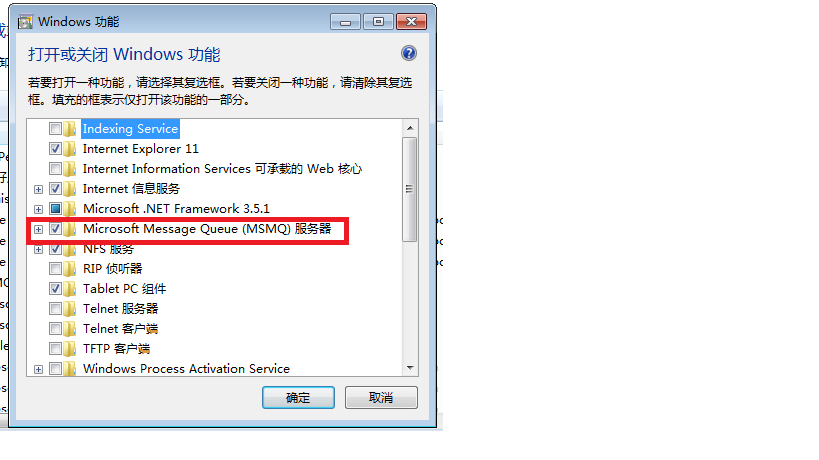
基础类:
namespace Core.MessageQueueTest

{

    public class TestQueue : IDisposable

    {

        protected MessageQueueTransactionType transactionType = MessageQueueTransactionType.Automatic;

        protected MessageQueue queue;

        protected TimeSpan timeout;

        public TestQueue(string queuePath, int timeoutSeconds)

        {

            queue = new MessageQueue(queuePath);

            timeout = TimeSpan.FromSeconds(Convert.ToDouble(timeoutSeconds));

            // Performance optimization since we don't need these features

            queue.DefaultPropertiesToSend.AttachSenderId = false;

            queue.DefaultPropertiesToSend.UseAuthentication = false;

            queue.DefaultPropertiesToSend.UseEncryption = false;

            queue.DefaultPropertiesToSend.AcknowledgeType = AcknowledgeTypes.None;

            queue.DefaultPropertiesToSend.UseJournalQueue = false;

        }

        /// <summary>

        /// Derived classes call this from their own Receive methods but cast

        /// the return value to something meaningful.

        /// </summary>

        public virtual object Receive()

        {

            try

            {

                using (Message message = queue.Receive(timeout, transactionType))

                    return message;

            }

            catch (MessageQueueException mqex)

            {

                if (mqex.MessageQueueErrorCode == MessageQueueErrorCode.IOTimeout)

                    throw new TimeoutException();

                throw;

            }

        }

        /// <summary>

        /// Derived classes may call this from their own Send methods that

        /// accept meaningful objects.

        /// </summary>

        public virtual void Send(object msg)

        {

            queue.Send(msg, transactionType);

        }

        #region IDisposable Members

        public void Dispose()

        {

            queue.Dispose();

        }

        #endregion

    }

}
测试类:
namespace Core.MessageQueueTest

{

    public class QueueTestOrder : TestQueue

    {

        // Path example - FormatName:DIRECT=OS:MyMachineName\Private$\OrderQueueName

        private static readonly string queuePath =System.Configuration.ConfigurationSettings.AppSettings["OrderQueuePath"];

        private static int queueTimeout = ;

        public QueueTestOrder()

            : base(queuePath, queueTimeout)

        {

            // Set the queue to use Binary formatter for smaller foot print and performance

            queue.Formatter = new BinaryMessageFormatter();

        }

        /// <summary>

        /// Method to retrieve order messages from Message Queue

        /// </summary>

        /// <returns>All information for an order</returns>

        public new OrderInfo Receive()

        {

            // This method involves in distributed transaction and need Automatic Transaction type

            base.transactionType = MessageQueueTransactionType.Automatic;

            return (OrderInfo)((Message)base.Receive()).Body;

        }

        public OrderInfo Receive(int timeout)

        {

            base.timeout = TimeSpan.FromSeconds(Convert.ToDouble(timeout));

            return Receive();

        }

        /// <summary>

        /// Method to send asynchronous order to  Message Queue

        /// </summary>

        /// <param name="orderMessage">All information for an order</param>

        public void Send(OrderInfo orderMessage)

        {

            // This method does not involve in distributed transaction and optimizes performance using Single type

            base.transactionType = MessageQueueTransactionType.Single;

            base.Send(orderMessage);

        }

    }

     [Serializable]

    public class OrderInfo

    {

        public string Id { get; set; }

        public string Name { get; set; }

    }

}
测试:
 protected void btn_testSendToQueue_Click(object sender, EventArgs e)

        {

            OrderInfo model = new OrderInfo();

            model.Id = "";

            model.Name = "测试MQ";

            QueueTestOrder order = new QueueTestOrder();

            order.Send(model);

        }

        protected void btn_reciveFromQueue_Click(object sender, EventArgs e)

        {

            QueueTestOrder order = new QueueTestOrder();

            OrderInfo model = new OrderInfo();

            model = (OrderInfo)order.Receive();

        }
测试结果:发送\接收信息 正常
微软消息队列MessageQueue(MQ)的更多相关文章
- 微软 消息队列 MessageQueue 简单使用
1.在服务电脑上打开 消息队列 ①进入控制面板>程序>启用或关闭windows功能 ②将需要的勾选(我自己全选了哈哈哈) ③我的电脑 右键 打开管理 见到消息队列 在专用队列上新建专用队列 ...
- .Net下的MSMQ(微软消息队列)的同步异步调用
一.MSMQ简介 MSMQ(微软消息队列)是Windows操作系统中消息应用程序的基础,是用于创建分布式.松散连接的消息通讯应用程序的开发工具.消息队列 和电子邮件有着很多相似处,他们都包含多个属性, ...
- 微软消息队列-MicroSoft Message Queue(MSMQ)队列的C#使用
目录 定义的接口 接口实现 建立队列工厂 写入队列 获取消息 什么是MSMQ Message Queuing(MSMQ) 是微软开发的消息中间件,可应用于程序内部或程序之间的异步通信.主要的机制是:消 ...
- 分布式服务(RPC)+分布式消息队列(MQ)面试题精选
分布式系统(distributed system)是建立在网络之上的软件系统.正是因为软件的特性,所以分布式系统具有高度的内聚性和透明性.因此,网络和分布式系统之间的区别更多的在于高层软件(特别是 ...
- 【转】MSMQ 微软消息队列 简单 示例
MSMQ它的实现原理是:消息的发送者把自己想要发送的信息放入一个容器中(我们称之为Message),然后把它保存至一个系统公用空间的消息队列(Message Queue)中:本地或者是异地的消息接收程 ...
- .net微软消息队列(msmq)简单案例
1.首先我们需要安装消息队列服务,它是独立的消息记录的服务,并保存在硬盘文件中. 我们添加名为:DMImgUpload的私有消息队列. 2.定义消息队列的连接字符串建议采用IP: (1)FormatN ...
- 阿里云消息队列(MQ)服务
A.首先在阿里云上申请消息队列MQ服务: B.然后创建一个Topic(主题,一级主题):然后创建生产者与消费者: C.不过此时还没有结束 ,还需要创建一个AccessKey和AccessSecret( ...
- 常用的消息队列中间件mq对比
原文地址:https://blog.csdn.net/qq_30764991/article/details/80239076 消息队列中间件是分布式系统中重要的组件,主要解决应用耦合,异步消息,流量 ...
- 消息队列(MQ)
什么是消息队列 消息队列,即MQ,Message Queue. 消息队列是典型的:生产者.消费者模型.生产者不断向消息队列中生产消息,消费者不断的从队列中获取消息.因为消息的生产和消费都是异步的,而且 ...
随机推荐
- NHibernate3.2学习笔记
一.开发环境 数据库:SQLServer2008 编译器:VS2010 .Net版本:.Net Framework 4.0 二.涉及第三方程序集 NHibernate.dll:版本3.2 Iesi.C ...
- 1807. [NOIP2014]寻找道路P2296 寻找道路
题目描述 在有向图G 中,每条边的长度均为1 ,现给定起点和终点,请你在图中找一条从起点到终点的路径,该路径满足以下条件: 1 .路径上的所有点的出边所指向的点都直接或间接与终点连通. 2 .在满足条 ...
- Android 6.0权限分组
Android系统从6.0开始将权限分为一般权限和危险权限,一般权限指不涉及用户隐私的一些权限,比如Internet权限.危险权限指涉及获取用户隐私的一些操作所需要的权限,比如读取用户地理位置的权限. ...
- Pro ASP.NET Core MVC 第6版 第二章(前半章)
目录 第二章 第一个MVC 应用程序 学习一个软件开发框架的最好方法是跳进他的内部并使用它.在本章,你将用ASP.NET Core MVC创建一个简单的数据登录应用.我将它一步一步地展示,以便你能看清 ...
- Xcode 动态库及Framework 安装路径设置
使用Xcode开发动态库及Framework时,需要为其设置Install path.在设置Install path时,可能会使用到以下几个路径: 1)绝对路径: 绝对路径 ...
- 北大ACM(POJ1019-Number Sequence)
Question:http://poj.org/problem?id=1019 问题点:打表. Memory: 392K Time: 16MS Language: C++ Result: Accept ...
- DIV自动居中
<!DOCTYPE html PUBLIC "-//W3C//DTD XHTML 1.0 Transitional//EN" "http://www.w3.org/ ...
- codeforces_304C_数学题
C. Lucky Permutation Triple time limit per test 2 seconds memory limit per test 256 megabytes input ...
- ThinkPHP---thinkphp视图(V)
配置文件分3类:系统配置文件,分组配置文件,应用配置文件 ①系统配置文件ThinkPHP/Conf/convention.php: ②分组 / 模块 /平台配置文件Home/Conf/config.p ...
- 12Microsoft SQL Server 索引
Microsoft SQL Server 索引 8.1创建索引 CREATE INDEX idx_name ON table_name(列名) --创建非聚集索引 use student go cre ...