
Ubuntu16.04下安装Tensorflow CPU版本(图文详解)
不多说,直接上干货!
推荐
全网最详细的基于Ubuntu14.04/16.04 + Anaconda2 / Anaconda3 + Python2.7/3.4/3.5/3.6安装Tensorflow详细步骤(图文)(博主推荐)
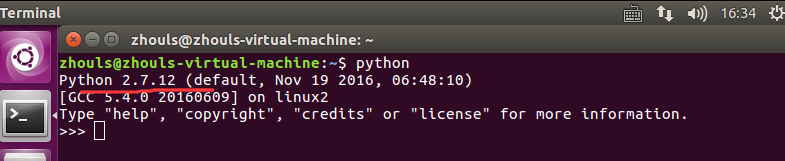
其实啊,不难。对于Ubuntu而言,大家都知道,系统自带就已经有了python(蟒蛇)。
输入以下命令安装pip
sudo apt-get install python-pip python-dev
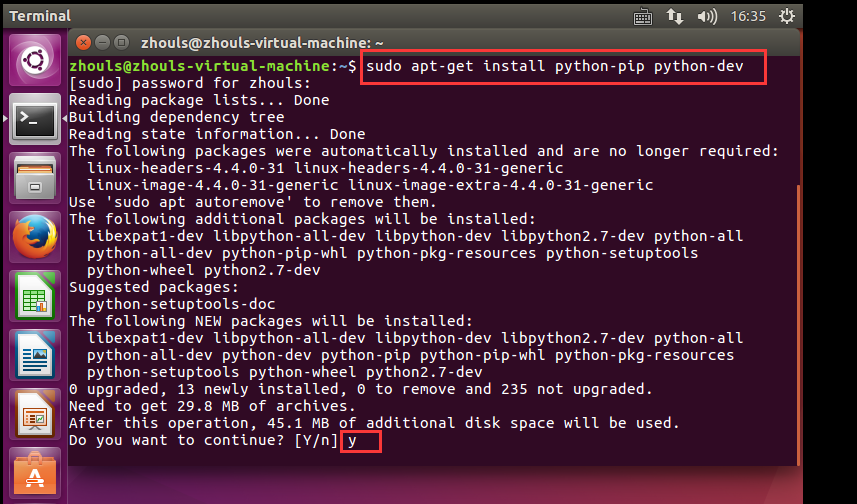
zhouls@zhouls-virtual-machine:~$ sudo apt-get install python-pip python-dev

[sudo] password for zhouls:

Reading package lists... Done

Building dependency tree

Reading state information... Done

The following packages were automatically installed and are no longer required:

  linux-headers-4.4.- linux-headers-4.4.--generic

  linux-image-4.4.--generic linux-image-extra-4.4.--generic

Use 'sudo apt autoremove' to remove them.

The following additional packages will be installed:

  libexpat1-dev libpython-all-dev libpython-dev libpython2.-dev python-all

  python-all-dev python-pip-whl python-pkg-resources python-setuptools

  python-wheel python2.-dev

Suggested packages:

  python-setuptools-doc

The following NEW packages will be installed:

  libexpat1-dev libpython-all-dev libpython-dev libpython2.-dev python-all

  python-all-dev python-dev python-pip python-pip-whl python-pkg-resources

  python-setuptools python-wheel python2.-dev

 upgraded,  newly installed,  to remove and  not upgraded.

Need to get 29.8 MB of archives.

After this operation, 45.1 MB of additional disk space will be used.

Do you want to continue? [Y/n] y

Get: http://cn.archive.ubuntu.com/ubuntu xenial-updates/main amd64 libexpat1-dev amd64 2.1.0-7ubuntu0.16.04.2 [115 kB]

Get: http://cn.archive.ubuntu.com/ubuntu xenial-updates/main amd64 libpython2.7-dev amd64 2.7.12-1ubuntu0~16.04.1 [27.8 MB]

Get: http://cn.archive.ubuntu.com/ubuntu xenial/main amd64 libpython-dev amd64 2.7.11-1 [7,728 B]

Get: http://cn.archive.ubuntu.com/ubuntu xenial/main amd64 libpython-all-dev amd64 2.7.11-1 [992 B]

Get: http://cn.archive.ubuntu.com/ubuntu xenial/main amd64 python-all amd64 2.7.11-1 [978 B]

Get: http://cn.archive.ubuntu.com/ubuntu xenial-updates/main amd64 python2.7-dev amd64 2.7.12-1ubuntu0~16.04.1 [276 kB]

Get: http://cn.archive.ubuntu.com/ubuntu xenial/main amd64 python-dev amd64 2.7.11-1 [1,160 B]

Get: http://cn.archive.ubuntu.com/ubuntu xenial/main amd64 python-all-dev amd64 2.7.11-1 [1,000 B]

Get: http://cn.archive.ubuntu.com/ubuntu xenial-updates/universe amd64 python-pip-whl all 8.1.1-2ubuntu0.4 [1,110 kB]

Get: http://cn.archive.ubuntu.com/ubuntu xenial-updates/universe amd64 python-pip all 8.1.1-2ubuntu0.4 [144 kB]

Get: http://cn.archive.ubuntu.com/ubuntu xenial/main amd64 python-pkg-resources all 20.7.0-1 [108 kB]

Get: http://cn.archive.ubuntu.com/ubuntu xenial/main amd64 python-setuptools all 20.7.0-1 [169 kB]

Get: http://cn.archive.ubuntu.com/ubuntu xenial/universe amd64 python-wheel all 0.29.0-1 [48.0 kB]

Fetched 29.8 MB in 29s (, kB/s)

Selecting previously unselected package libexpat1-dev:amd64.

(Reading database ...  files and directories currently installed.)

Preparing to unpack .../libexpat1-dev_2.1.0-7ubuntu0.16.04.2_amd64.deb ...

Unpacking libexpat1-dev:amd64 (2.1.-7ubuntu0.16.04.) ...

Selecting previously unselected package libpython2.-dev:amd64.

Preparing to unpack .../libpython2.-dev_2.7.12-1ubuntu0~16.04.1_amd64.deb ...

Unpacking libpython2.-dev:amd64 (2.7.-1ubuntu0~16.04.) ...

Selecting previously unselected package libpython-dev:amd64.

Preparing to unpack .../libpython-dev_2.7.11-1_amd64.deb ...

Unpacking libpython-dev:amd64 (2.7.-) ...

Selecting previously unselected package libpython-all-dev:amd64.

Preparing to unpack .../libpython-all-dev_2.7.11-1_amd64.deb ...

Unpacking libpython-all-dev:amd64 (2.7.-) ...

Selecting previously unselected package python-all.

Preparing to unpack .../python-all_2.7.11-1_amd64.deb ...

Unpacking python-all (2.7.-) ...

Selecting previously unselected package python2.-dev.

Preparing to unpack .../python2.-dev_2.7.12-1ubuntu0~16.04.1_amd64.deb ...

Unpacking python2.-dev (2.7.-1ubuntu0~16.04.) ...

Selecting previously unselected package python-dev.

Preparing to unpack .../python-dev_2.7.11-1_amd64.deb ...

Unpacking python-dev (2.7.-) ...

Selecting previously unselected package python-all-dev.

Preparing to unpack .../python-all-dev_2.7.11-1_amd64.deb ...

Unpacking python-all-dev (2.7.-) ...

Selecting previously unselected package python-pip-whl.

Preparing to unpack .../python-pip-whl_8.1.1-2ubuntu0.4_all.deb ...

Unpacking python-pip-whl (8.1.-2ubuntu0.) ...

Selecting previously unselected package python-pip.

Preparing to unpack .../python-pip_8.1.1-2ubuntu0.4_all.deb ...

Unpacking python-pip (8.1.-2ubuntu0.) ...

Selecting previously unselected package python-pkg-resources.

Preparing to unpack .../python-pkg-resources_20.7.0-1_all.deb ...

Unpacking python-pkg-resources (20.7.-) ...

Selecting previously unselected package python-setuptools.

Preparing to unpack .../python-setuptools_20.7.0-1_all.deb ...

Unpacking python-setuptools (20.7.-) ...

Selecting previously unselected package python-wheel.

Preparing to unpack .../python-wheel_0.29.0-1_all.deb ...

Unpacking python-wheel (0.29.-) ...

Processing triggers for doc-base (0.10.) ...

Processing  added doc-base file...

Processing triggers for man-db (2.7.-) ...

Setting up libexpat1-dev:amd64 (2.1.-7ubuntu0.16.04.) ...

Setting up libpython2.-dev:amd64 (2.7.-1ubuntu0~16.04.) ...

Setting up libpython-dev:amd64 (2.7.-) ...

Setting up libpython-all-dev:amd64 (2.7.-) ...

Setting up python-all (2.7.-) ...

Setting up python2.-dev (2.7.-1ubuntu0~16.04.) ...

Setting up python-dev (2.7.-) ...

Setting up python-all-dev (2.7.-) ...

Setting up python-pip-whl (8.1.-2ubuntu0.) ...

Setting up python-pip (8.1.-2ubuntu0.) ...

Setting up python-pkg-resources (20.7.-) ...

Setting up python-setuptools (20.7.-) ...

Setting up python-wheel (0.29.-) ...

zhouls@zhouls-virtual-machine:~$
3、需要更新pip
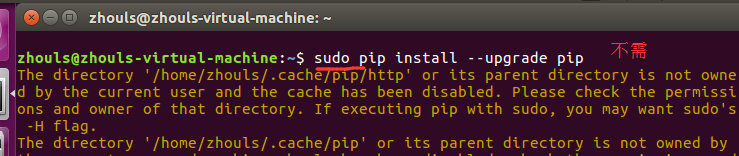
自带的pip版本较低,需要更新。
pip install --upgrade pip

不是
sudo pip install --upgrade pip

4、安装pip
sudo pip install --upgrade https://ci.tensorflow.org/view/Nightly/job/nightly-matrix-cpu/TF_BUILD_IS_OPT=OPT,TF_BUILD_IS_PIP=PIP,TF_BUILD_PYTHON_VERSION=PYTHON2,label=cpu-slave/lastSuccessfulBuild/artifact/pip_test/whl/tensorflow-1.2.0rc1-cp27-none-linux_x86_64.whl
此处的链接为:https://github.com/tensorflow/tensorflow寻找自己需要的软件包。
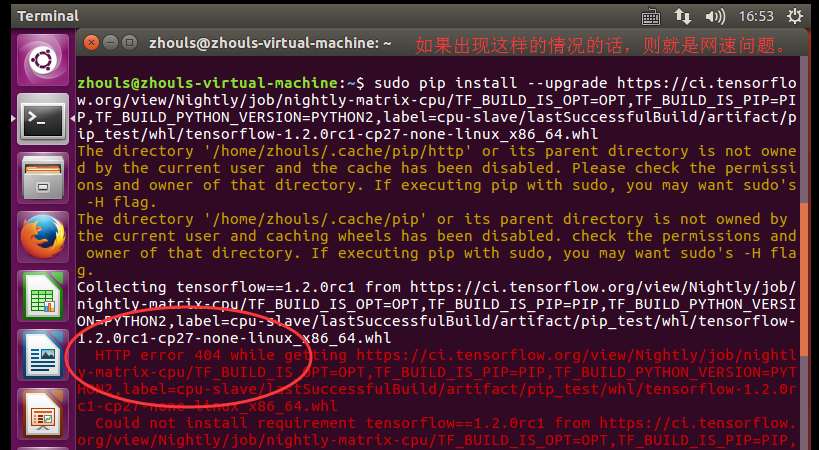
zhouls@zhouls-virtual-machine:~$ sudo pip install --upgrade https://ci.tensorflow.org/view/Nightly/job/nightly-matrix-cpu/TF_BUILD_IS_OPT=OPT,TF_BUILD_IS_PIP=PIP,TF_BUILD_PYTHON_VERSION=PYTHON2,label=cpu-slave/lastSuccessfulBuild/artifact/pip_test/whl/tensorflow-1.2.0rc1-cp27-none-linux_x86_64.whl

The directory '/home/zhouls/.cache/pip/http' or its parent directory is not owned by the current user and the cache has been disabled. Please check the permissions and owner of that directory. If executing pip with sudo, you may want sudo's -H flag.

The directory '/home/zhouls/.cache/pip' or its parent directory is not owned by the current user and caching wheels has been disabled. check the permissions and owner of that directory. If executing pip with sudo, you may want sudo's -H flag.

Collecting tensorflow==1.2.0rc1 from https://ci.tensorflow.org/view/Nightly/job/nightly-matrix-cpu/TF_BUILD_IS_OPT=OPT,TF_BUILD_IS_PIP=PIP,TF_BUILD_PYTHON_VERSION=PYTHON2,label=cpu-slave/lastSuccessfulBuild/artifact/pip_test/whl/tensorflow-1.2.0rc1-cp27-none-linux_x86_64.whl

  HTTP error  while getting https://ci.tensorflow.org/view/Nightly/job/nightly-matrix-cpu/TF_BUILD_IS_OPT=OPT,TF_BUILD_IS_PIP=PIP,TF_BUILD_PYTHON_VERSION=PYTHON2,label=cpu-slave/lastSuccessfulBuild/artifact/pip_test/whl/tensorflow-1.2.0rc1-cp27-none-linux_x86_64.whl

  Could not install requirement tensorflow==1.2.0rc1 from https://ci.tensorflow.org/view/Nightly/job/nightly-matrix-cpu/TF_BUILD_IS_OPT=OPT,TF_BUILD_IS_PIP=PIP,TF_BUILD_PYTHON_VERSION=PYTHON2,label=cpu-slave/lastSuccessfulBuild/artifact/pip_test/whl/tensorflow-1.2.0rc1-cp27-none-linux_x86_64.whl because of error 404 Client Error: Not Found for url: https://ci.tensorflow.org/view/Nightly/job/nightly-matrix-cpu/TF_BUILD_IS_OPT=OPT,TF_BUILD_IS_PIP=PIP,TF_BUILD_PYTHON_VERSION=PYTHON2,label=cpu-slave/lastSuccessfulBuild/artifact/pip_test/whl/tensorflow-1.2.0rc1-cp27-none-linux_x86_64.whl

Could not install requirement tensorflow==1.2.0rc1 from https://ci.tensorflow.org/view/Nightly/job/nightly-matrix-cpu/TF_BUILD_IS_OPT=OPT,TF_BUILD_IS_PIP=PIP,TF_BUILD_PYTHON_VERSION=PYTHON2,label=cpu-slave/lastSuccessfulBuild/artifact/pip_test/whl/tensorflow-1.2.0rc1-cp27-none-linux_x86_64.whl because of HTTP error 404 Client Error: Not Found for url: https://ci.tensorflow.org/view/Nightly/job/nightly-matrix-cpu/TF_BUILD_IS_OPT=OPT,TF_BUILD_IS_PIP=PIP,TF_BUILD_PYTHON_VERSION=PYTHON2,label=cpu-slave/lastSuccessfulBuild/artifact/pip_test/whl/tensorflow-1.2.0rc1-cp27-none-linux_x86_64.whl for URL https://ci.tensorflow.org/view/Nightly/job/nightly-matrix-cpu/TF_BUILD_IS_OPT=OPT,TF_BUILD_IS_PIP=PIP,TF_BUILD_PYTHON_VERSION=PYTHON2,label=cpu-slave/lastSuccessfulBuild/artifact/pip_test/whl/tensorflow-1.2.0rc1-cp27-none-linux_x86_64.whl

zhouls@zhouls-virtual-machine:~$
大家,找个网速好的时间段,执行就是了。
同时,大家可以关注我的个人博客:
http://www.cnblogs.com/zlslch/ 和 http://www.cnblogs.com/lchzls/ http://www.cnblogs.com/sunnyDream/
详情请见:http://www.cnblogs.com/zlslch/p/7473861.html
人生苦短,我愿分享。本公众号将秉持活到老学到老学习无休止的交流分享开源精神,汇聚于互联网和个人学习工作的精华干货知识,一切来于互联网,反馈回互联网。
目前研究领域:大数据、机器学习、深度学习、人工智能、数据挖掘、数据分析。 语言涉及:Java、Scala、Python、Shell、Linux等 。同时还涉及平常所使用的手机、电脑和互联网上的使用技巧、问题和实用软件。 只要你一直关注和呆在群里,每天必须有收获
对应本平台的讨论和答疑QQ群:大数据和人工智能躺过的坑(总群)(161156071)



Ubuntu16.04下安装Tensorflow CPU版本(图文详解)的更多相关文章
- Ubuntu16.04下安装Tensorflow GPU版本(图文详解)
不多说,直接上干货! 推荐 全网最详细的基于Ubuntu14.04/16.04 + Anaconda2 / Anaconda3 + Python2.7/3.4/3.5/3.6安装Tensorflow详 ...
- 通过Anaconda在Ubuntu16.04上安装 TensorFlow(GPU版本)
一. 安装环境 Ubuntu16.04.3 LST GPU: GeForce GTX1070 Python: 3.5 CUDA Toolkit 8.0 GA1 (Sept 2016) cuDNN v6 ...
- Windows7 64bits下安装TensorFlow CPU版本(图文详解)
不多说,直接上干货! Installing TensorFlow on Windows的官网 https://www.tensorflow.org/install/install_windows 首先 ...
- ubuntu16.04下安装TensorFlow(GPU加速)----详细图文教程【转】
本文转载自:https://blog.csdn.net/zhaoyu106/article/details/52793183 le/details/52793183 写在前面 一些废话 接触深度学习已 ...
- Ubuntu16.04下安装tensorflow(GPU加速)【转】
本文转载自:https://blog.csdn.net/qq_30520759/article/details/78947034 版权声明:本文为博主原创文章,未经博主允许不得转载. https:// ...
- 全网最全最详细的Windows下安装Anaconda2 / Anaconda3(图文详解)
不多说,直接上干货! 说明: Anaconda2-5.0.0-Windows-x86_64.exe安装下来,默认的Python2.7 Anaconda3-4.2.0-Windows-x86_64.ex ...
- Ubuntu16.04下Mongodb(离线安装方式|非apt-get)安装部署步骤(图文详解)(博主推荐)
不多说,直接上干货! 说在前面的话 首先,查看下你的操作系统的版本. root@zhouls-virtual-machine:~# cat /etc/issue Ubuntu LTS \n \l r ...
- Ubuntu16.04下Mongodb官网安装部署步骤(图文详解)(博主推荐)
不多说,直接上干货! 在这篇博客里,我采用了非官网的安装步骤,来进行安装.走了弯路,同时,也是不建议.因为在大数据领域和实际生产里,还是要走正规的为好. Ubuntu16.04下Mongodb(离线安 ...
- Ubuntu16.04下安装多版本cuda和cudnn
Ubuntu16.04下安装多版本cuda和cudnn 原文 https://blog.csdn.net/tunhuzhuang1836/article/details/79545625 前言 因为之 ...
随机推荐
- 【MySQL】索引和锁
前言 本文摘自数据库两大神器[索引和锁] 声明:如果没有说明具体的数据库和存储引擎,默认指的是MySQL中的InnoDB存储引擎 索引 在之前,我对索引有以下的认知: 索引可以加快数据库的检索速度 表 ...
- 9. FILES
9. FILES FILES表提供有关存储MySQL表空间数据的文件的信息. FILES表提供有关InnoDB数据文件的信息. 在NDB Cluster中,此表还提供有关存储NDB Cluster D ...
- (9) openssl enc(对称加密)
对称加密工具,了解对称加密的原理后就很简单了,原理部分见下文. openssl enc -ciphername [-in filename] [-out filename] [-pa ...
- fork 和 exec
https://blog.csdn.net/disadministrator/article/details/39347333 进程创建方法:fork.exec.clone,父进程等待子进程结束是用w ...
- 南邮CTF--SQL注入题
南邮CTF--SQL注入题 题目:GBK SQL injection 解析: 1.判断注入点:加入单引号发现被反斜杠转移掉了,换一个,看清题目,GBK,接下来利用宽字节进行注入 2.使用'%df' ' ...
- POJ 2728 Desert King(最优比率生成树, 01分数规划)
题意: 给定n个村子的坐标(x,y)和高度z, 求出修n-1条路连通所有村子, 并且让 修路花费/修路长度 最少的值 两个村子修一条路, 修路花费 = abs(高度差), 修路长度 = 欧氏距离 分析 ...
- 实验:iscsi共享存储
实验名称: iscsi共享存储 实验环境: 我们需要准备一个磁盘,对于这个磁盘我们需要使用,将这个磁盘空间共享给iscsi客户端: 实验需求: 我们这里使用两台服务器来实现iscsi共享存储: 1.指 ...
- ServletContext作用功能详解
ServletContext,是一个全局的储存信息的空间,服务器开始,其就存在,服务器关闭,其才释放.request,一个用户可有多个:session,一个用户一个:而servletContext,所 ...
- js总结(二):函数、作用域和this
function Container( properties ) { var objthis = this; for ( var i in properties ) { (function(){ // ...
- SQL中varchar和nvarchar的基本介绍及其区别
SQL中varchar和nvarchar的基本介绍及其区别 varchar(n) 长度为 n 个字节的可变长度且非 Unicode 的字符数据.n 必须是一个介于 1 和 8,000 之间的数值.存储 ...