
(转)淘淘商城系列——SSM框架整合之Service层整合
http://blog.csdn.net/yerenyuan_pku/article/details/72721108
上文我们一起学习了Dao层的整合,本文将教大家如何整合Service层。
我们需要在taotao-manager-service工程的src/main/resources/spring目录下新建一个applicationContext-service.xml文件,如下图所示。 
applicationContext-service.xml文件的内容如下所示,可以看到我们配置包扫描器,扫描所有带@Service注解的类。
<?xml version="1.0" encoding="UTF-8"?>

<beans xmlns="http://www.springframework.org/schema/beans"

    xmlns:context="http://www.springframework.org/schema/context" xmlns:p="http://www.springframework.org/schema/p"

    xmlns:aop="http://www.springframework.org/schema/aop" xmlns:tx="http://www.springframework.org/schema/tx"

    xmlns:xsi="http://www.w3.org/2001/XMLSchema-instance"

    xsi:schemaLocation="http://www.springframework.org/schema/beans http://www.springframework.org/schema/beans/spring-beans-4.2.xsd

    http://www.springframework.org/schema/context http://www.springframework.org/schema/context/spring-context-4.2.xsd

    http://www.springframework.org/schema/aop http://www.springframework.org/schema/aop/spring-aop-4.2.xsd http://www.springframework.org/schema/tx http://www.springframework.org/schema/tx/spring-tx-4.2.xsd

    http://www.springframework.org/schema/util http://www.springframework.org/schema/util/spring-util-4.2.xsd">

    <context:component-scan base-package="com.taotao.service"></context:component-scan>

</beans>
service一般是由接口和实现类组成,因此我们需要先新建接口所在的目录,我们把它放在taotao-manager-interface工程下,接口的实现类放在taotao-manager-service工程下,我们在taotao-manager-interface工程的src/main/java目录下新建com.taotao.service包,在taotao-manager-service工程的src/main/java目录下新建com.taotao.service.impl包,如下图所示。 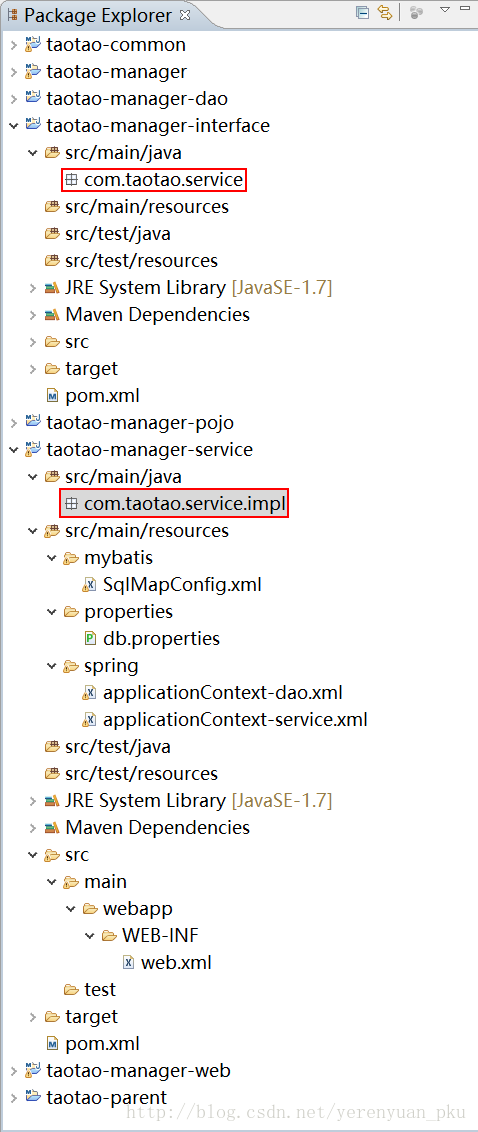
下面我们来配置事务,我们把事务单独提出来进行配置,我们在taotao-manager-service工程的src/main/resources/spring目录下新建一个applicationContext-trans.xml文件,如下图所示。 
applicationContext-trans.xml文件的内容如下所示。其中事务的传播行为需要说明一下,当接口名以save、insert、add、create、delete、upate开头时spring会自动帮我们开启事务(前提是我们配置了事务传播行为),而find、select、get开头的接口是查询,不涉及更改数据库,因此不需要事务,spring不会为查询接口自动开启事务。下面再说说切面,也就是事务的作用范围,execution(* com.taotao.service.*.*(..))的意思是,com.taotao.service包下的任意类的任意方法的任意参数及任意返回值都是事务的切入点。
<beans xmlns="http://www.springframework.org/schema/beans"

    xmlns:context="http://www.springframework.org/schema/context" xmlns:p="http://www.springframework.org/schema/p"

    xmlns:aop="http://www.springframework.org/schema/aop" xmlns:tx="http://www.springframework.org/schema/tx"

    xmlns:xsi="http://www.w3.org/2001/XMLSchema-instance"

    xsi:schemaLocation="http://www.springframework.org/schema/beans http://www.springframework.org/schema/beans/spring-beans-4.2.xsd

    http://www.springframework.org/schema/context http://www.springframework.org/schema/context/spring-context-4.2.xsd

    http://www.springframework.org/schema/aop http://www.springframework.org/schema/aop/spring-aop-4.2.xsd http://www.springframework.org/schema/tx http://www.springframework.org/schema/tx/spring-tx-4.2.xsd

    http://www.springframework.org/schema/util http://www.springframework.org/schema/util/spring-util-4.2.xsd">

    <!-- 事务管理器 -->

    <bean id="transactionManager"

        class="org.springframework.jdbc.datasource.DataSourceTransactionManager">

        <!-- 数据源 -->

        <property name="dataSource" ref="dataSource" />

    </bean>

    <!-- 通知 -->

    <tx:advice id="txAdvice" transaction-manager="transactionManager">

        <tx:attributes>

            <!-- 传播行为 -->

            <tx:method name="save*" propagation="REQUIRED" />

            <tx:method name="insert*" propagation="REQUIRED" />

            <tx:method name="add*" propagation="REQUIRED" />

            <tx:method name="create*" propagation="REQUIRED" />

            <tx:method name="delete*" propagation="REQUIRED" />

            <tx:method name="update*" propagation="REQUIRED" />

            <tx:method name="find*" propagation="SUPPORTS" read-only="true" />

            <tx:method name="select*" propagation="SUPPORTS" read-only="true" />

            <tx:method name="get*" propagation="SUPPORTS" read-only="true" />

        </tx:attributes>

    </tx:advice>

    <!-- 切面 -->

    <aop:config>

        <aop:advisor advice-ref="txAdvice"

            pointcut="execution(* com.taotao.service.*.*(..))" />

    </aop:config>

</beans>
我们在服务层新建了三个配置文件,那么程序是怎么知道这三个文件的呢?这就需要在服务层初始化spring容器了,方法是在taotao-manager-service工程下的web.xml文件中进行配置,web.xml文件所在的位置如下图所示。
web.xml文件的内容如下:
<?xml version="1.0" encoding="UTF-8"?>

<web-app xmlns:xsi="http://www.w3.org/2001/XMLSchema-instance"

    xmlns="http://java.sun.com/xml/ns/javaee" xmlns:web="http://java.sun.com/xml/ns/javaee/web-app_2_5.xsd"

    xsi:schemaLocation="http://java.sun.com/xml/ns/javaee http://java.sun.com/xml/ns/javaee/web-app_2_5.xsd"

    id="WebApp_ID" version="2.5">

    <display-name>taotao-manager</display-name>

    <welcome-file-list>

        <welcome-file>index.jsp</welcome-file>

    </welcome-file-list>

    <!-- 初始化Spring容器,目的就是为了发布服务 -->

    <!-- 加载spring容器 -->

    <context-param>

        <param-name>contextConfigLocation</param-name>

        <param-value>classpath:spring/applicationContext-*.xml</param-value>

    </context-param>

    <listener>

        <listener-class>org.springframework.web.context.ContextLoaderListener</listener-class>

    </listener>

</web-app>
至此,我们的Service层便整合完了。
(转)淘淘商城系列——SSM框架整合之Service层整合的更多相关文章
- (转)淘淘商城系列——SSM框架整合之Dao层整合
http://blog.csdn.net/yerenyuan_pku/article/details/72721093 一个项目中往往有三层即Dao层.Service层和Web层,看标题就知道了,本文 ...
- (转)淘淘商城系列——SSM框架整合之表现层整合
http://blog.csdn.net/yerenyuan_pku/article/details/72721120 上文我们一起学习了Service层的整合,本文将教大家如何整合表现层. 我们在t ...
- (转)淘淘商城系列——SSM框架整合之逆向工程
http://blog.csdn.net/yerenyuan_pku/article/details/72758590 我们知道在开发中有些工作是非常耗时但是又没有什么技术含量的,比如创建mapper ...
- 淘淘商城之SSM框架整合概要
一.后台系统所用的技术 1)框架:Spring + SpringMVC + Mybatis: 2)前端:EasyUI: 3)数据库:mysql 二.创建数据库 1)安装mysql数据库: 2)在mys ...
- maven项目创建5 service层整合
创建service相关文件 创建applicationContext-service.xml文件 <?xml version="1.0" encoding="UTF ...
- SSM框架整合的最新打开方式(打造最详细的SSM整合教程)
SSM整合 文章已托管到GitHub,大家可以去GitHub查看阅读,欢迎老板们前来Star!搜索关注微信公众号 [码出Offer] 领取各种学习资料! SSM 一.创建一个Maven项目 File ...
- JavaWeb开发SSM框架搭建详解
1.需要用到的jar包:由于很多的jar包不好下载,我直接上传到百度网盘: 很多,而且不好下载,我已经整理好好了: 链接:https://pan.baidu.com/s/1iIFprmstp86uKz ...
- java SSM框架单元测试最佳实战代码
具体的代码参考链接:https://pan.baidu.com/s/1e9UTyidi4OMBwYydhwH-0g 密码:rmvs 本教程采用的是对单元测试的dao层.service层.control ...
- SSM框架中的前后端分离
认识前后端分离 在传统的web应用开发中,大多数的程序员会将浏览器作为前后端的分界线.将浏览器中为用户进行页面展示的部分称之为前端,而将运行在服务器,为前端提供业务逻辑和数据准备的所有代码统称为后端. ...
随机推荐
- ubuntu安装ibus-goolepinyin通用方法
1:获取安装包 http://code.google.com/p/libgooglepinyin/downloads/list
- CMake使用总结【转】
本文转载自:https://www.mawenbao.com/note/cmake.html 总结CMake的常用命令,并介绍有用的CMake资源. CMake意为cross-platform mak ...
- HDU - 1255 覆盖的面积(线段树求矩形面积交 扫描线+离散化)
链接:线段树求矩形面积并 扫描线+离散化 1.给定平面上若干矩形,求出被这些矩形覆盖过至少两次的区域的面积. 2.看完线段树求矩形面积并 的方法后,再看这题,求的是矩形面积交,类同. 求面积时,用被覆 ...
- python名片管理系统
1.代码: (1)主程序 #!/usr/bin/env python # -*- coding: UTF-8 -*- import cards_tools # 无限循环,由用户主动决定什么时候退出循环 ...
- FB 对话框接口
官方文档: https://developers.facebook.com/docs/dialogs FB的对话框主要是调用 FB.ui(); 方法. 有问题上官网看文档是最好的. 1. send D ...
- redis info 参数说明
原文: redis info 参数说明 redis 127.0.0.1:6381> info redis_version:2.4.16 # Redis 的版本redis_git_sha1:000 ...
- 【194】Windows 上使用 wget
本文包括两部分,首先就是在 Windows 使用 wget 来下载文件,这样固然很好,然而问题并非这么简单,在 PowerShell 4.0 版本中增加了 Invoke-WebRequest 的别名 ...
- asp.net mvc 多字段排序
以下代码可实现多字段排序,通过点击列标题,实现排序. 控制器: public ActionResult Index(string sortOrder) { ViewBag.FirstNameSortP ...
- 视图模板中 使用boottstrap 将各表单字段排成一行
如果需要创建一个表单,它的所有元素是内联的,向左对齐的,标签是并排的,请向 <form> 标签添加 class .form-inline. <form class="for ...
- 清除当前文件夹下.svn文件的方法
把如下命令拷贝到一个文件中,并保存为bat后缀的文件:然后把这个bat文件保存到相应文件夹下. @echo on color 2f mode con: cols=80 lines=25 @REM @e ...