
mysql 关联查询技巧
废话不多说,直接进入正题
#数据准备
班级表class:
CREATE TABLE `class` (

  `class_no` int(2) unsigned zerofill NOT NULL AUTO_INCREMENT COMMENT '班级编号',

  `class_name` varchar(30) CHARACTER SET utf8 NOT NULL COMMENT '班级名称',

  PRIMARY KEY (`class_no`)

) ENGINE=MyISAM DEFAULT CHARSET=latin1;

insert into class values(1, '培优班');

insert into class values(2, '普通班');

insert into class values(3, '提升班');
学生表student:
CREATE TABLE `student` (

  `stu_no` int(2) unsigned zerofill NOT NULL AUTO_INCREMENT COMMENT '学员编号',

  `stu_name` varchar(30) CHARACTER SET utf8 NOT NULL COMMENT '学员姓名',

  `stu_sex` varchar(3) CHARACTER SET utf8 NOT NULL COMMENT '学员性别',

  `stu_age` tinyint(2) unsigned zerofill DEFAULT NULL COMMENT '学员年代',

  `grade` double(5,2) unsigned zerofill DEFAULT NULL COMMENT '成绩',

  `class_no` int(2) unsigned zerofill DEFAULT NULL COMMENT '所在班级编号',

  PRIMARY KEY (`stu_no`),

  KEY `class_no` (`class_no`)

) ENGINE=MyISAM AUTO_INCREMENT=11 DEFAULT CHARSET=latin1;

insert into student values(01, '李白', '男', 18, 60, 01);

insert into student values(02, '杜甫', '男', 20, 76, 01);

insert into student values(03, '张飞', '男', 32, 80, 02);

insert into student values(04, '韩信', '男', 26, 98, 02);

insert into student values(05, '了龙', '男', 27, 56, 02);

insert into student values(06, '大乔', '女', 17, 88, 01);

insert into student values(07, '小乔', '女', 16, 96, 01);

insert into student values(08, '小乔', '女', 16, 90, 01);

insert into student values(09, '关哥', '男', 32, 80, 02);

insert into student values(10, '刘备', '男', 36, 98, null);
1: exists子查询
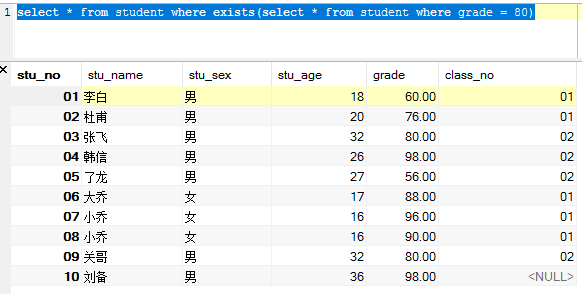
如果子查询有返回结果则为true,如果没有返回值则为false
select * from student where exists(select * from student where grade = 80)
比如not exists:
select * from student where not exists(select * from student where grade = 80);
以上结果返回空,因为 not exists 返回了 false
select * from student where exists (select * from class where class.class_no = student.class_no);
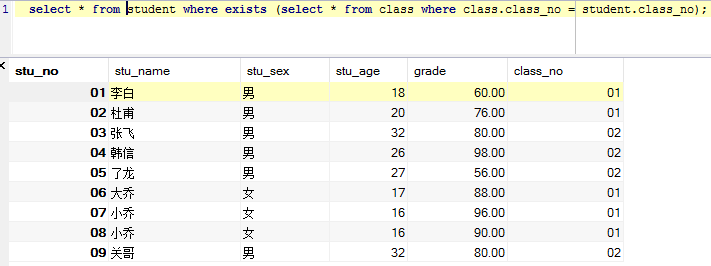
上面的查询可以看到,我们少了一条数据,第十条的clas_no 是null。。。所以这条数据是flase....而
class.class_no = student.class_no 为true的,就全部返回了
2: [union] 并合查询
需求: 拿到01班级的最高成绩 和 02班级的最低成绩
我们一般会这样
select max(grade) from student where class_no = 01;

select min(grade) from student where class_no = 02;
优化这个查询我们可以这样:
(select concat('1号班级最高成绩:', max(grade)) '成绩' from student where class_no = 01)

union

(select concat('2号班级最低成绩:', min(grade)) '成绩' from student where class_no = 02);

这里再说下union 和union all的区别:
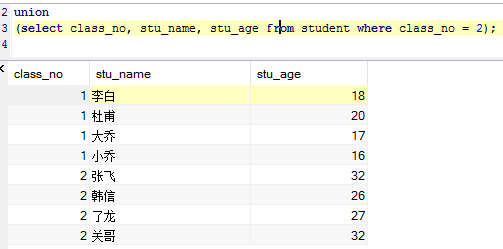
union:
(select class_no, stu_name, stu_age from student where class_no = 1)

union

(select class_no, stu_name, stu_age from student where class_no = 2);
union all:
(select class_no, stu_name, stu_age from student where class_no = 1)

union all

(select class_no, stu_name, stu_age from student where class_no = 2);

通过以上两个查询,我们可以看到:union并合查询它会自动的去重复的记录, 如果不想要去掉重复的记录则可以使用 union all;
我们加个排序:
(select class_no, stu_name, stu_age from student where class_no = 1)

union all

(select class_no, stu_name, stu_age from student where class_no = 2) order by stu_age desc;

连接查询的分类
1: 内连接
2: 外连接
3: 自然连接
1: inner join(内连接)
需求: 查询出学员的学号, 姓名, 所在的班级名称
select stu_no, stu_name, class_name from student join class where `student`.class_no = `class`.class_no;

以上sql等同于:
select stu_no, stu_name, class_name from student join class where `student`.class_no = `class`.class_no;

select stu_no,stu_name,class_name from student,class where student.class_no = class.class_no;
内连接的inner字符可以不用写
2: cross join(交叉连接,迪卡尔集) 没有条件的内连接
例: select * from student cross join class;
例: select * from student inner join class;
例: select * from student cross join class where `student`.class_no = `class`.class_no;
ps: cross join 与 inner join 在使用上没有区分,只是在mysql中把cross join定义成交叉连接而已
就写到这把。。其他的连接方式也简单,资料也很多啦。。。
mysql 关联查询技巧的更多相关文章
- MySQL关联查询总结
MySQL中经常使用关联查询,有机会总结下: 1 left join(左联查询): 返回包括左表中的所有记录和右表中联接字段相等的记录 例:select * from a left join b on ...
- mysql 关联查询 索引不起作用原因记录
业务逻辑如下:查询某篇文章的评论列表,且列出评论人及被评论人的昵称.头像. 先看一下表结构 评论表: 评论表的索引: 用户表: 用户表的索引: 查询语句如下: SELECT t1.comment_id ...
- mysql关联查询和联合查询
一.内联方式 1.传统关联查询 "select * from students,transcript where students.sid=transcript.sid and transc ...
- MySQL☞关联查询
关联查询:所需要的数据来源于多张表,通过表的连接查询(关联查询)来查询多张表中的数据 格式: select 别名1 . */列名 , 别名2 . */列名 from 表名1 别名1 , 表名2 别 ...
- [MySQL]多表关联查询技巧
示例表A: author_id author_name 1 Kimmy 2 Abel 3 Bill 4 Berton 示例表B: book_id author_id start_date end_da ...
- [mysql] 关联查询sql记录
//查询账单关联订单 select o.id as id, o.order_no as orderNo, o.case_no as caseNo, o.send_time as sendTime, o ...
- MySQL 关联查询 内连接
内连接 [INNER| CROSS] JOIN无条件内连接:无条件内连接,又名交叉连接/笛卡尔连接第一张表种的每一项会和另一张表的每一项依次组合#例:mysql> select * ...
- mysql关联查询
mysql数据库的统计------生成统计信息 1.distinct:在一组之中将各个唯一的值找出来,如找出所有的品牌种类 mysql>select distinct brand_kind fr ...
- mysql 关联查询的执行顺序
STRAIGHT JOIN : 能强制按照顺序关联表(应该是)
随机推荐
- Java编程题(1):n个数里出现次数大于等于n/2的数
题目描述:输入n个整数,输出出现次数大于等于数组长度一半的数. 输入描述:每个测试输入包含 n个空格分割的n个整数,n不超过100,其中有一个整数出现次数大于等于n/2. 输出描述:输出出现次数大于等 ...
- day23_雷神_git
git 版本控制工具 下载: https://git-scm.com/ git clone: 是用来拉代码的,git pull是更新当前分支的代码,拿到最新的代码,git pull是获取已经存在的仓库 ...
- QEMU KVM libvirt 手册(3) - Storage Media
访问Hard Drive 使用-hda –hdb qemu-system-x86_64 -enable-kvm -name ubuntutest -m 2048 -hda ubuntutest.im ...
- sqlserver使用存储过程跟踪SQL
为跟踪EF生成的SQL /1.添加存储过程/ USE [master] GO /****** Object: StoredProcedure [dbo].[sp_perfworkload_trace_ ...
- (爬虫向)python_json学习笔记
JSON学习笔记 - 在线工具 - https://www.sojson.com/ - http://www.w3school.com.cn/json/ - http://www.runoob.com ...
- 终端(命令行)连接MySQL
语法: mysql -h 主机名(ip) -u 用户名 -P 端口 -p 说明: -h: 主机名,表示要连接的数据库的主机名或者IP -u: 用户名,表示连接数据库的用户名 -P: 端口,表示要连接的 ...
- 深入浅出 Java 中的包装类
前阵子,我们分享了<Java中的基本数据类型转换>这篇文章,对许多粉丝还是有带来帮助的,今天讲一下 Java 包装类的的由来,及自动装箱.拆箱的概念和原理. 什么是包装类型 Java 设计 ...
- [CXF REST标准实战系列] 一、JAXB xml与javaBean的转换
Writer:BYSocket(泥沙砖瓦浆木匠) 微博:BYSocket 豆瓣:BYSocket Reprint it anywhere u want. 文章Points: 1.不认识到犯错,然后得到 ...
- 上传文件报错--Unable to find 'struts.multipart.saveDir' property setting.
struts2 上传文件时,有时候会报这个错误. Unable to find 'struts.multipart.saveDir' property setting. Defaulting to j ...
- leetcode — sort-colors
import java.util.Arrays; /** * Source : https://oj.leetcode.com/problems/sort-colors/ * * * Given an ...