
js2wordcloud 词云包的使用
js文件下载:
https://github.com/liangbizhi/js2wordcloud/tree/master/
dist文件夹内
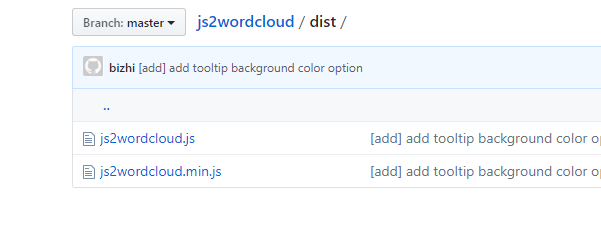
引用:
<script src="****/js2wordcloud.min.js"></script>
用法:
html标签body的内部新建一个div, id设置为container
<div id="container"></div>
var wc = new Js2WordCloud(document.getElementById('container'))

#当然这里也可以改成 var wc = new Js2WordCloud($('container')[0])

wc.setOption({

    tooltip: {

        show: true

    },

    list: [['谈笑风生', ], ['谈笑风生', ], ['谈笑风生', ], ['谈笑风生', ], ['谈笑风生', ], ['谈笑风生', ]],

    color: '#15a4fa'

})
API
setOption(options)
options必须通过此API进行设置,才能显示词云
在wordcloud2.js原options基础上增加:
{

    // ...

    imageShape: 'https://example.com/images/shape.png',     // 提供一张图片,根据其形状进行词云渲染,默认为null

    fontSizeFactor: 0.1,                                    // 当词云值相差太大,可设置此值进字体行大小微调,默认0.1

    maxFontSize: 60,                                        // 最大fontSize,用来控制weightFactor,默认60

    minFontSize: 12,                                        // 最小fontSize,用来控制weightFactor,默认12

    tooltip: {

        show: true,                                         // 默认:false

        backgroundColor: 'rgba(0, 0, 0, 0.701961)',         // 默认:'rgba(0, 0, 0, 0.701961)'

        formatter: function(item) {                         // 数据格式化函数,item为list的一项

        }

    },

    noDataLoadingOption: {                                  // 无数据提示。

        backgroundColor: '#eee',

        text: '暂无数据',

        textStyle: {

            color: '#888',

            fontSize: 14

        }

    }

    // ...

}
showLoading([loadingOption])
过渡控制,显示loading(读取中)。可选。
loadingOption:{

    backgroundColor: '#eee',

    text: '正在加载...',

    effect: 'spin'                      // 默认:null, { String | Function } 可选:'spin|normal';也可为回调函数,回调函数生成HTML

}
hideLoading()
隐藏loading
resize()
当容器大小变化时,调用此方法进行重绘
demo调用源码
<!DOCTYPE html>

<html lang="en">

<head>

    <meta charset="UTF-8">

    <title>Demo</title>

</head>

<body>

    <h1>一般</h1>

    <div id="container" style="height: 400px;"></div>

    <h1>无数据</h1>

    <div id="container1" style="height: 400px;"></div>

    <script src="dist/js2wordcloud.js"></script>

    <script>

        var option = {

            tooltip: {

                show: true,

                formatter: function(item) {

                    return item[0] + ': 价值¥' + item[1] + '<br>' + '词云图'

                }

            },

            list: [['谈笑风生', 500000], ['谈笑风生', 50], ['谈笑风生', 40], ['谈笑风生', 40], ['谈笑风生', 30], ['谈笑风生', 30], ['谈笑风生', 20], ['谈笑风生', 20], ['谈笑风生', 1], ['谈笑风生', 1], ['谈笑风生', 500000], ['谈笑风生', 50], ['谈笑风生', 40], ['谈笑风生', 40], ['谈笑风生', 30], ['谈笑风生', 30], ['谈笑风生', 20], ['谈笑风生', 20], ['谈笑风生', 1], ['谈笑风生', 1], ['谈笑风生', 500000], ['谈笑风生', 50], ['谈笑风生', 40], ['谈笑风生', 40], ['谈笑风生', 30], ['谈笑风生', 30], ['谈笑风生', 20], ['谈笑风生', 20], ['谈笑风生', 1], ['谈笑风生', 1], ['谈笑风生', 500000], ['谈笑风生', 50], ['谈笑风生', 40], ['谈笑风生', 40], ['谈笑风生', 30], ['谈笑风生', 30], ['谈笑风生', 20], ['谈笑风生', 20], ['谈笑风生', 1], ['谈笑风生', 1], ['谈笑风生', 500000], ['谈笑风生', 50], ['谈笑风生', 40], ['谈笑风生', 40], ['谈笑风生', 30], ['谈笑风生', 30], ['谈笑风生', 20], ['谈笑风生', 20], ['谈笑风生', 1], ['谈笑风生', 1], ['谈笑风生', 500000], ['谈笑风生', 50], ['谈笑风生', 40], ['谈笑风生', 40], ['谈笑风生', 30], ['谈笑风生', 30], ['谈笑风生', 20], ['谈笑风生', 20], ['谈笑风生', 1], ['谈笑风生', 1], ['谈笑风生', 500000], ['谈笑风生', 50], ['谈笑风生', 40], ['谈笑风生', 40], ['谈笑风生', 30], ['谈笑风生', 30], ['谈笑风生', 20], ['谈笑风生', 20], ['谈笑风生', 1], ['谈笑风生', 1], ['谈笑风生', 500000], ['谈笑风生', 50], ['谈笑风生', 40], ['谈笑风生', 40], ['谈笑风生', 30], ['谈笑风生', 30], ['谈笑风生', 20], ['谈笑风生', 20], ['谈笑风生', 1], ['谈笑风生', 1], ['谈笑风生', 500000], ['谈笑风生', 50], ['谈笑风生', 40], ['谈笑风生', 40], ['谈笑风生', 30], ['谈笑风生', 30], ['谈笑风生', 20], ['谈笑风生', 20], ['谈笑风生', 1], ['谈笑风生', 1], ['谈笑风生', 500000], ['谈笑风生', 50], ['谈笑风生', 40], ['谈笑风生', 40], ['谈笑风生', 30], ['谈笑风生', 30], ['谈笑风生', 20], ['谈笑风生', 20], ['谈笑风生', 1], ['谈笑风生', 1], ['谈笑风生', 500000], ['谈笑风生', 50], ['谈笑风生', 40], ['谈笑风生', 40], ['谈笑风生', 30], ['谈笑风生', 30], ['谈笑风生', 20], ['谈笑风生', 20], ['谈笑风生', 1], ['谈笑风生', 1], ['谈笑风生', 500000], ['谈笑风生', 50], ['谈笑风生', 40], ['谈笑风生', 40], ['谈笑风生', 30], ['谈笑风生', 30], ['谈笑风生', 20], ['谈笑风生', 20], ['谈笑风生', 1], ['谈笑风生', 1]],

            // list:[["玻璃瓶",941],["塑料瓶",15],["易拉罐",3]],

            color: '#15a4fa',

            shape: 'circle',

            ellipticity: 1

        }

        var wc = new Js2WordCloud(document.getElementById('container'))

        wc.showLoading({

            backgroundColor: '#fff',

            text: '看见了福建省的附件里是卡洛斯的家乐福就爱上了克拉家乐福及爱丽丝垃圾堆里发简历到复健科了会计师两地分居阿里拉客积分的垃圾费浪费据了解乐山大佛',

            effect: 'spin'

        })

        setTimeout(function() {

            wc.hideLoading()

            wc.setOption(option)

        }, 2000)

        setTimeout(function() {

            wc.setOption({

                noDataLoadingOption: {

                    backgroundColor: '#f00',

                    text: '暂无数据'

                }

            })

        }, 4000)

        setTimeout(function() {

            wc.setOption(option)

        }, 6000)

        /////////////////

        var option1 = {

            color: '#15a4fa',

            noDataLoadingOption: {

                backgroundColor: '#eee',

                text: '暂无数据',

                textStyle: {

                    color: '#f00',

                    fontSize: 20

                }

            }

        }

        var wc1 = new Js2WordCloud(document.getElementById('container1'))

        wc1.showLoading()

        setTimeout(function() {

            wc1.hideLoading()

            wc1.setOption(option1)

        }, 2000)

        var option8 = {

            tooltip: {

                show: true,

                formatter: function(item) {

                    return item[0] + ': 价值¥' + item[1] + '<br>' + '词云图'

                }

            },

            list: [['华莱士', 500000], ['华莱士', 50], ['华莱士', 40], ['华莱士', 40], ['华莱士', 30], ['华莱士', 30], ['华莱士', 20], ['华莱士', 20], ['华莱士', 1], ['华莱士', 1]],

            color: 'red'

        }

        setTimeout(function() {

            wc1.setOption(option8)

        }, 4000)

        window.onresize = function() {

            wc.resize()

            wc1.resize()

        }

    </script>

</body>

</html>
js2wordcloud 词云包的使用的更多相关文章
- Js2WordCloud 词云用法
1.引入 npm 安装: npm install js2wordcloud --save 通过script引入: <script src="dist/js2wordcloud.min. ...
- WordCloud词云包的安装
1,下载 https://www.lfd.uci.edu/~gohlke/pythonlibs/#wordcloud 2,安装 (window环境安装) 找的下载文件的路径 安装 pip instal ...
- windows下python 正确安装词云包wordcloud的方法
安装wordcloud的时候果然还是出现了问题,试了网上说的好多办法,最后找到了一种成功率高的,可以优先尝试一下 下载.whl文件http://www.lfd.uci.edu/~gohlke/pyth ...
- 用Python玩转词云
第一步:引入相关的库包: #coding:utf-8 __author__ = 'Administrator' import jieba #分词包 import numpy #numpy计算包 imp ...
- 如何用Python做词云(收藏)
看过之后你有什么感觉?想不想自己做一张出来? 如果你的答案是肯定的,我们就不要拖延了,今天就来一步步从零开始做个词云分析图.当然,做为基础的词云图,肯定比不上刚才那两张信息图酷炫.不过不要紧,好的开始 ...
- python爬虫——词云分析最热门电影《后来的我们》
1 模块库使用说明 1.1 requests库 requests 是用Python语言编写,基于 urllib,采用 Apache2 Licensed 开源协议的 HTTP 库.它比 urllib 更 ...
- 用Python爬虫对豆瓣《敦刻尔克》影评进行词云展示
最近很想看的一个电影,去知乎上看一下评论,刚好在学Python爬虫,就做个小实例. 代码基于第三方修改 原文链接 http://python.jobbole.com/88325/#comment-9 ...
- R语言︱文本挖掘——词云wordcloud2包
每每以为攀得众山小,可.每每又切实来到起点,大牛们,缓缓脚步来俺笔记葩分享一下吧,please~ --------------------------- 笔者看到微信公众号探数寻理中提到郎大为Chif ...
- 词云(wordcloud2.js js2wordcloud.js)
npm安装: npm install js2wordcloud --save 用法 var wc = new Js2WordCloud(document.getElementById('contain ...
随机推荐
- redis的操作
redis相当于是一个在内存中创建的大字典 redis的value有5大数据类型: redis的value有5大数据类型: 字符串 import redis conn = redis.Redis(ho ...
- JS学习笔记Day6
一.数组 1.数组就是个容器,里面可以存放任意类型的数 2.定义数组:1)var arr = []: 2)var arr = new Array():构造函数定义方式,如果括号中有一个整数,该正数代表 ...
- logistics回归简单应用——梯度下降,梯度上升,牛顿算法(一)
警告:本文为小白入门学习笔记 由于之前写过详细的过程,所以接下来就简单描述,主要写实现中遇到的问题. 数据集是关于80人两门成绩来区分能否入学: 数据集: http://openclassroom.s ...
- (BFS 二叉树) leetcode 515. Find Largest Value in Each Tree Row
You need to find the largest value in each row of a binary tree. Example: Input: 1 / \ 3 2 / \ \ 5 3 ...
- 基于C语言libvirt API简单小程序
libvirt API简单小程序 1.程序代码如下 #include<stdio.h> #include<libvirt/libvirt.h> int getDomainInf ...
- 网络编程基础【day10】:我是一个线程(四)
本节内容 1.第一回 初生牛犊 2.第二回 渐入佳境 3.第三回 虎口脱险 4.第四回 江湖再见 第一回 初生牛犊 我是一个线程,我一出生就被编了个号:0x3704,然后被领到一个昏暗的屋子里,在这里 ...
- java io系列26之 RandomAccessFile
本文主要介绍 RandomAccessFile. 转载请注明出处:http://www.cnblogs.com/skywang12345/p/io_26.html 更多内容请参考:java io系列0 ...
- vue @blur v-model数据没有更新问题
今天遇到一个问题,是一个输入框绑定了一个失去焦点事件,要发送一个客户填写的数据给后台查询然后拿到返回值把它渲染到页面上,但是从后台获取到的数据却没有在页面上渲染出来,console.log打印时显示数 ...
- Hudson持续集成管理平台搭建
IP: 10.0.70.106 8G 内存 (Hudson 多 个 工程 在 同 时 构建 的情况下 比 较耗内存) 环 境: CentOS 6.5 . JDK7 注:Hudson 只是一个持续集成 ...
- golang 缓冲区的终端输入
bufio包实现了有缓冲的I/O.它包装一个io.Reader或io.Writer接口对象,os.stdin就是实现了这个接口 package main import ( "bufio&qu ...