
JProfile 9.2 linux安装及windows客户端远程监控
http://blog.csdn.net/fengzhou0920/article/details/52119039
1. 测试环境
服务器:Linux X64;tomcat 7.0;jdk 1.7;jprofiler_linux_9_2.sh
客户端:Windows10;jprofiler_windows-x64_9_2.exe
2. JProfiler软件下载地址:http://www.ej-technologies.com/download/jprofiler/files
3. 客户端 JProfiler 安装 略
4. 服务器端 JProfiler 安装:
把 jprofiler_linux_9_2.sh 上传到到服务器,假设路径为 /home/devweb/soft
# cd/home/devweb/soft
# chmod +x jprofiler_linux_9_2.sh
# ./ jprofiler_linux_9_2.sh -c
注意,这里的 -c 意思是用字符方式来安装,如果机器上没有X,则加上该参数
提示:
(1) 下载的服务器和客户端版本必须符合操作系统的类型,jprofiler支持操作系统类型为windows、MAC os、linux、Solaris、Aix、FreeBSD、HP-UX;
(2) 客户端需要licence,可以通过在http://www.ej-technologies.com网站上输入用户名和邮箱来获取试用版licence,服务器端不需要licence;
(3) 客户端和服务器端的版本号要一致,此例中均为9.2。
5. 客户端连接配置:
(1) 运行 Jprofiler,使用向导配置,或者选择Session->Integration Wizard->New Remote Integratation;

(2) 选择服务器操作系统内容:

(3) 选择JDK信息:

选择启动模式:

(5) 输入服务器IP地址

输入服务器中

输入服务器中

(8) 最后生成一个配置说明(这个很重要!!!):

按照以上配置说明的含义是:
首先,在配置结束后将客户端自动生成的配置文件(一般win10在C:\Users\[用户名]\.jprofiler9路径下)拷贝至以上第六步中输入的服务器端jprofiler配置文件所放位置;
其次,将生成的启动项参数加入服务器端的启动文件中(tomcat是catalina.sh或startup.sh)
JAVA_OPTS="$JAVA_OPTS -agentlib:jprofilerti=port=8849,nowait,id=118,config=/home/devweb/jprofiler9/config/config.xml -Xbootclasspath/a:/home/devweb/jprofiler9/bin/agent.jar "
其中id=118为config.xml中生成的id
再次,添加jprofiler相关环境变量
修改环境变量配置文件.bash_profile
JPROFILER_HOME=/home/devweb/jprofiler9
export LD_LIBRARY_PATH=$JPROFILER_HOME/bin/linux-x64
source .bash_profile 使之生效
提示:
(1) 如果以上所有步骤都完成之后,启动这个session监控,报连接失败的错误,一般情况下需要检查服务器端jprofiler相关环境变量配置是否已经配置,或者是否即时生效了;另外一种情况有可能是添加jprofiler的启动项参数不正确;
(2) 如果报JProfiler> Could not find session with id: 128的提示,说明运行java程序时,VM参数-agentlib:jprofilerti=port=8849,nowait,id=128,中最后指定的ID有误。将其修改为与config.Xml中指定的<session id="XX" name="XX" ....>...</session>相匹配的ID;
(3) 如果出现License Key Not Valid的情况,则找到正确的Key,将其写入到config.xml中即可。不过这个key与windows版本破解时得到的key不同,可以考虑去jprofiler的官网上申请试用版的key。
6. 全部配置完成之后,可以启动客户端的jprofiler,选择session>start center>Open Session
Available session configurations中列出了刚才配置的连接,选中使用就OK了!!
启动时服务器端日志输出包括以下内容:
JProfiler> Protocol version 27
JProfiler> Using JVMTI
JProfiler> 32-bit library
JProfiler> Don't wait for frontend to connect.
JProfiler> Using config file /zpool1/gpdb_m/crmtest/menglr_18092/jprofiler5/config/config.xml (id: 105)
JProfiler> Listening on port: 8849.
JProfiler> Native library initialized
JProfiler> VM initialized
JProfiler> Using dynamic instrumentation
JProfiler> Time measurement: elapsed time
JProfiler> CPU profiling enabled
JProfiler> Hotspot compiler enabled
JProfiler> Starting org/apache/catalina/startup/Bootstrap ...
当jprofiler终端监控时,会出现:
JProfiler> Disconnected. Waiting for reconnection.
JProfiler> Listening on port: 8849
==============================================================
开发过程中本地 idea 配置jprofile
1,安装插件,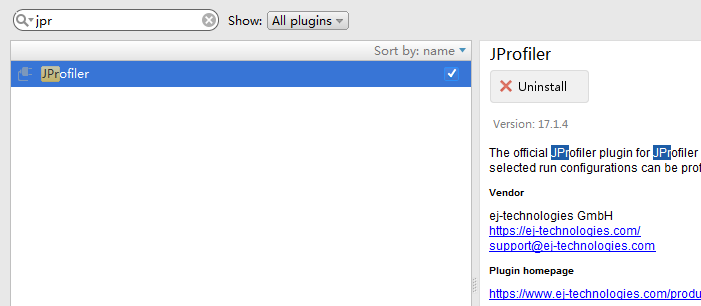
2,安装客户端,
3,制定到客户端,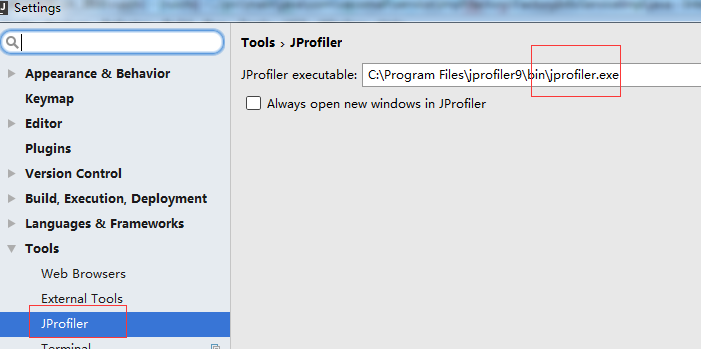
4,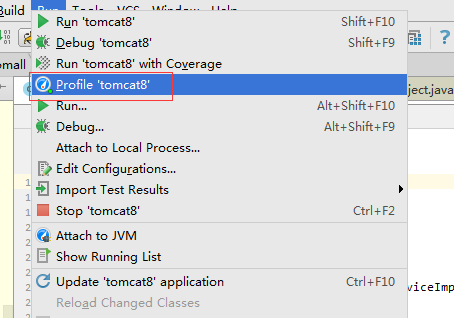
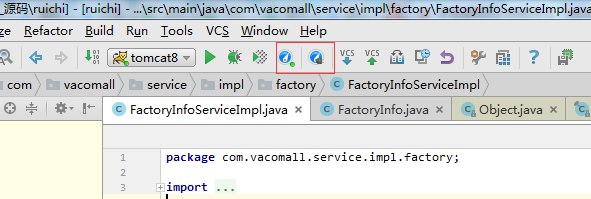
ok,可以了,直接启动图标就可以了,会先启动jprofile,然后会自动启动tomcat
JProfile 9.2 linux安装及windows客户端远程监控的更多相关文章
- git的CentOS服务端安装和windows客户端的使用
git的CentOS服务端安装和windows客户端的使用 此教程以 搬瓦工vps CentOS 6 x64 的系统为环境,搭建 git 服务端.windows 7 系统为客户端. git客户端 在W ...
- centos6.4下面安装postgresql以及客户端远程连接
一.安装 centos6.4服务器IP:192.168.220.131 window7客户端IP:192.168.199.218 在centos官网http://www.postgresql.org/ ...
- Linux 安装图形界面及远程连接
#可查询哪些组件是否已经安装(可用来对照组件名称) yum grouplist yum groupinstall 'X Window System' -y #安装GNOME桌面环境 yum group ...
- linux下连接windows的远程桌面
拿ubuntu来举例: 1安装rdesktop 2 rdesktop -f 196.168.1.11:3389 3 哦鸟
- [Linux] 安装grafana并且添加influxdb监控
安装grafana,官网提供了ubuntu的安装包,直接进行安装 wget https://dl.grafana.com/oss/release/grafana_6.5.1_amd64.deb dpk ...
- Linux安装了mysql 无法远程连接
问题: 本地安装完mysql,无法远程连接 1.检查mysql进程是否启动 ps -ef|grep -i mysql 2.查看端口是否监听 netstat -ntlp 3.查看iptables配置 v ...
- 3. Netbackup 7.6客户端的安装(windows/linux)
1 客户端的安装 1.1 Windows客户端安装 1.1.1 客户端hosts修改 windows xp/2003/vista/2008/7/8用户HOSTS文件是在“c:\windows\syst ...
- Ubuntu上安装和使用SSH,Xming+PuTTY在Windows下远程Linux主机使用图形界面的程序
自:http://blog.csdn.net/neofung/article/details/6574002 Ubuntu上安装和使用SSH 网上有很多介绍在Ubuntu下开启SSH服务的文章,但大 ...
- linux redis 和 windows redis 的安装
Linux 下安装 下载地址:http://redis.io/download,下载最新文档版本. 本教程使用的最新文档版本为 2.8.17,下载并安装: $ wget http://download ...
随机推荐
- python入门:最基本的用户登录用户登录,三次错误机会
#!/usr/bin/env python # -*- coding:utf-8 -*- #用户登录,三次错误机会 """ 导入getpass,给x赋值为1,while真 ...
- 不依赖Hibernate的万能BaseDao---模仿了Hibernate底层的原理
今天写了个万能的BaseDao:有了这个BaseDao以后的Dao层直接继承这个BaseDao就能直接操作数据库了,增删改查,这是一个简易的Hibernate模型.写这个BaseDao的原因是最近在学 ...
- OwinStartupAttribute出错
尝试加载应用时出现了以下错误.- 找不到包含 OwinStartupAttribute 的程序集.- 找不到包含 Startup 或 [AssemblyName].Startup 类的程序集.若要禁用 ...
- Lecture 1
Principles of GIS( UNSW Metternicht ) outline:data input---data management---data manipulation+data ...
- exp分析
1 from pwn import* 2 3 local =1 4 debug = 1 5 6 if local: 7 p = process('./pwn1') 8 else: 9 p = remo ...
- Divisibility by 25 CodeForces - 988E
You are given an integer nn from 11 to 10181018 without leading zeroes. In one move you can swap any ...
- Counting Cliques HDU - 5952 单向边dfs
题目:题目链接 思路:这道题vj上Time limit:4000 ms,HDU上Time Limit: 8000/4000 MS (Java/Others),且不考虑oj测评机比现场赛慢很多,但10月 ...
- huu 1251
#include <iostream> #include <cstdio> #include <cstring> #include <string> # ...
- 笔记-python-*号解包
笔记-python-*号解包 在码代码时发现*号可以这样使用: str = ["abcd", "abce", "abcf"]st = &qu ...
- 配置hibernate常见问题
连接MySql时出现:The server time zone value '�й���ʱ��' is unrecognized or represents more than one time z ...