
Mecanim Control
http://www.ufe3d.com/doku.php/mecanimcontrol
Mecanim Control
Your ultimate solution for Mecanim based games!
Mecanim Control is a coding tool made that allow for a wider variety of common methods used by the Animation
component with Mecanim (Humanoid/Generic) animations. It allows you to not only dynamically load any animation clip during runtime, but also tap into several methods currently missing in this magnificent system.
Mecanim
Control is a sub-tool of Universal
Fighting Engine. It's source code is available entirely free in the Source
versions of UFE.
Overview
You can use MecanimControl much like you would use the animation component.
To play a simple animation use MecanimControl.Play
To cross-fade between animations use MecanimControl.CrossFade -or- one of the MecanimControl.Play alternatives.
To change how animations wrap (Loop, Once, PingPong) change the WrapMode of the respective AnimationClip in their import settings, or useMecanimControl.SetWrapMode to change it at runtime.
AnimationData can be used to modify the clip, playback speed, and direct control over blending.
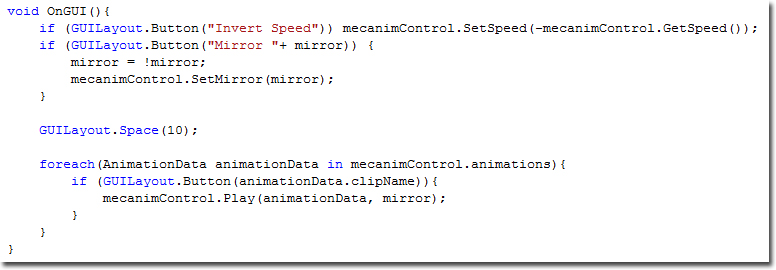
MecanimControl also supports enumerators so you can loop through all AnimationData like this:
using UnityEngine;

using System.Collections;


public class AnimationControlDemo : MonoBehaviour {


	private MecanimControl mecanimControl;


	void Start () {

		mecanimControl = gameObject.GetComponent<MecanimControl>();

	}


	void OnGUI(){

		foreach(AnimationData animationData in mecanimControl.animations){

			if (GUILayout.Button(animationData.clipName)){

				mecanimControl.Play(animationData, mirror);

			}

		}

	}

}
Public Variables
Index:
Default Animation
AnimationData defaultAnimation;
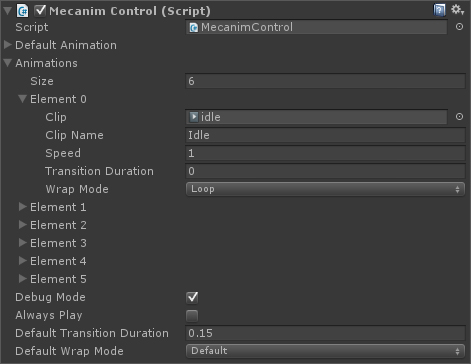
By default, if no order is given, the animator will play the animation stored in this AnimationData. If you don't assign an animation, Mecanim Control will instantiate the first animation listed on animations.
void Start () {

	mecanimControl = gameObject.GetComponent<MecanimControl>();

	mecanimControl.defaultAnimationData.speed = .5f;

}
Animations
AnimationData[] animations;
Properties
AnimationClip clip - The AnimationClip file.
string clipName - Animation name.
float speed - Animation speed.
float transitionDuration - Blending Duration.
WrapMode wrapMode - The animation's default WrapMode.
bool applyRootMotion - If this and Override Root Motion is toggled this animation will toggle the Animator's Root
Motion
Description
This array contain all the AnimationData stored by either the UI or by using AddClip. Its then used to emulate a state machine under the Animator Controller.
void Start () {

	mecanimControl = gameObject.GetComponent<MecanimControl>();

	foreach(AnimationData animationData in mecanimControl.animations) {

		animationData.speed = .5f;

	}

}
Debug Mode
bool debugMode;
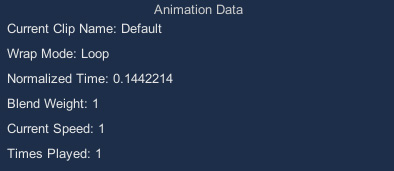
Toggles a GUI box containing all the information about the current clip playing as well as its blending weight.
void Start () {

	mecanimControl = gameObject.GetComponent<MecanimControl>();

	mecanimControl.debugMode = true;

}
Always Play
bool alwaysPlay;
If an animation is set to WrapMode.Once and alwaysPlay is toggled on, after the clip ends it will immediately play the default animation.
void Start () {

	mecanimControl = gameObject.GetComponent<MecanimControl>();

	mecanimControl.alwaysPlay = true;

}
Override Root Motion
bool overrideRootMotion;
If both applyRootMotion (under the animation element) and this variable is true, this animation will toggle the Animator's Root
Motion.
void Start () {

	mecanimControl = gameObject.GetComponent<MecanimControl>();

	mecanimControl.overrideRootMotion = true;

	mecanimControl.animationData[0].applyRootMotion = true;

}
Default Transition Duration
float defaultTransitionDuration;
If an animation has its blending speed set to 0, it will use this value instead.
void Start () {

	mecanimControl = gameObject.GetComponent<MecanimControl>();

	mecanimControl.defaultTransitionDuration = .2f;

}
Default Wrap Mode
float defaultWrapMode;
If an animation has its wrapmode set to default, it will use this value instead.
void Start () {

	mecanimControl = gameObject.GetComponent<MecanimControl>();

	mecanimControl.defaultWrapMode = WrapMode.Once;

}
Public Functions
Index:
AddClip
void AddClip(AnimationClip clip, string name);
void AddClip(AnimationClip clip, string name, float speed, WrapMode wrapMode);
Parameters
clip - The AnimationClip file.
name - Animation name.
speed - Animation speed.
wrapMode - The animation's default WrapMode.
Description: Adds a clip to animations with the name newName.
using UnityEngine;

using System.Collections;


public class Example : MonoBehaviour {

	public AnimationClip walkClip;

	void Start () {

		mecanimControl = gameObject.GetComponent<MecanimControl>();

		mecanimControl.AddClip(walkClip, "walk");

	}

}
CrossFade
void CrossFade(string clipName, float blendingTime);
void CrossFade(string clipName, float blendingTime, float normalizedTime, bool mirror);
void CrossFade(AnimationData animationData, float blendingTime, float normalizedTime, bool mirror);
Parameters
clipName - Animation name.
animationData - The correspondent animation data.
blendingTime - The blending duration between the 2 animations.
normalizedTime - The timeline's position of the animation to be played (0-1)
mirror - Should the animation be mirrored?
Description: Fades the animation with name clipName in over a period of blendingTime seconds as it fades other animations out.
You can also set normalizedTime to set where, in its timeline, you want the animation to start (0-1) as well as toggle mirror.
using UnityEngine;

using System.Collections;


public class Example : MonoBehaviour {

	public AnimationClip walkClip;

	void Start () {

		mecanimControl = gameObject.GetComponent<MecanimControl>();

		mecanimControl.CrossFade("walk", .2f);

	}

}
GetAnimationData
AnimationData GetAnimationData(AnimationClip clip);
AnimationData GetAnimationData(string clipName);
Parameters
clip - Animation clip.
clipName - Clip name.
Description: Returns the AnimationData related to that animation name or clip.
using UnityEngine;

using System.Collections;


public class Example : MonoBehaviour {

	public AnimationClip walkClip;

	void Start () {

		mecanimControl = gameObject.GetComponent<MecanimControl>();

		mecanimControl.AddClip(walkClip, "walk");

		Debug("Animation Name:"+ mecanimControl.GetAnimationData(walkClip).clipName);

	}

}
GetCurrentAnimationData
AnimationData GetCurrentAnimationData();
Description: Get the AnimationData currently running.
using UnityEngine;

using System.Collections;


public class Example : MonoBehaviour {

	public AnimationClip walkClip;

	void Start () {

		mecanimControl = gameObject.GetComponent<MecanimControl>();

		Debug("Animation Name:"+ mecanimControl.GetCurrentAnimationData().clipName);

	}

}
GetCurrentClipName
string GetCurrentClipName();
Description: Get the name of the current running clip.
using UnityEngine;

using System.Collections;


public class Example : MonoBehaviour {

	void Start () {

		mecanimControl = gameObject.GetComponent<MecanimControl>();

		Debug("Animation Name:"+ mecanimControl.GetCurrentClipName());

	}

}
GetCurrentClipPosition
float GetCurrentClipPosition();
Description: Get the normalized time of the current running clip. (0-1)
void CheckProgress() {

	mecanimControl = gameObject.GetComponent<MecanimControl>();

	Debug("Animation Progress (%):"+ mecanimControl.GetCurrentClipPosition() * 100);

}
GetCurrentClipPlayCount
int GetCurrentClipPlayCount();
Description: Get the number of times the current clip has played. Only works if the animation's WrapMode is set to either WrapMode.Loop orWrapMode.PingPong
void CheckProgress() {

	mecanimControl = gameObject.GetComponent<MecanimControl>();

	Debug("Times Played:"+ mecanimControl.GetCurrentClipPlayCount());

}
GetMirror
bool GetMirror();
Description: Get the current mirror state
of the emulated runtime animator.
void FaceLeft () {

	mecanimControl = gameObject.GetComponent<MecanimControl>();

	if (!mecanimControl.GetMirror()) mecanimControl.setMirror(true);

}
GetSpeed
float GetSpeed();
float GetSpeed(AnimationClip clip);
float GetSpeed(string clipName);
Parameters
clip - Animation clip.
clipName - Clip name.
Description: Get the speed value set for animationClip/clipName.
no parameters - Get the speed the animator is running based on the current running animation.
void SlowDown() {

	mecanimControl = gameObject.GetComponent<MecanimControl>();

	if (mecanimControl.GetSpeed() > 1) mecanimControl.SetSpeed(1);

}
IsPlaying
bool IsPlaying(string clipName);
bool IsPlaying(AnimationClip clip);
bool IsPlaying(AnimationData animationData);
Description: Returns true if clipName, clip or animationData is playing.
void Example() {

	mecanimControl = gameObject.GetComponent<MecanimControl>();

	if (mecanimControl.IsPlaying("walk")) Debug.Log("Walk is playing");

}
Pause
void Pause();
Description: Pauses the animator component.
void Example() {

	mecanimControl = gameObject.GetComponent<MecanimControl>();

	mecanimControl.Pause();

}
Play
void Play();
void Play(string clipName);
void Play(AnimationClip clip);
void Play(AnimationData animationData);
void Play(string clipName, bool mirror);
void Play(AnimationClip clip, bool mirror);
void Play(AnimationData animationData, bool mirror);
void Play(string clipName, float blendingTime, float normalizedTime, bool mirror);
void Play(AnimationClip clip, float blendingTime, float normalizedTime, bool mirror);
Parameters
clip - Animation clip.
clipName - Animation name.
animationData - The correspondent animation data.
blendingTime - The blending duration between the 2 animations.
normalizedTime - The timeline's position of the animation to be played (0-1)
mirror - Should the animation be mirrored?
Description: Plays animation. Play can be used in several ways, including blending. If no blending is set, Play will try using the default blending value. If blending is set to -1, the animation will be played abruptly without any
blending.
If the animation is not set to be looping and alwaysPlay is toggled off it will be stopped after playing.
If no parameters are used, Play can be used as a follow up to Pause. It restores the speed of the Animator to the current animation speed value.
Normalized Time lets you start the animation from a predefined position in the animation timeline (0-1).
void Example() {

	mecanimControl = gameObject.GetComponent<MecanimControl>();

	mecanimControl.Play();

}
void Example() {

	mecanimControl = gameObject.GetComponent<MecanimControl>();

	mecanimControl.Play("walk", .2f, 0, true);

}
RemoveClip
void RemoveClip(string clipName);
void RemoveClip(AnimationClip clip);
Description: Removes the AnimationData from animations related to clipName/clip.
void RemoveAnimation(string animation) {

	mecanimControl = gameObject.GetComponent<MecanimControl>();

	mecanimControl.RemoveClip(animation);

}
RestoreSpeed
void RestoreSpeed();
Description: Restores the speed of the animator component to the original value from the current animation being played.
using UnityEngine;

using System.Collections;


public class Example : MonoBehaviour {


	private MecanimControl mecanimControl;


	void SlowMo(string animation) {

		mecanimControl.SetSpeed(.01f);

		Invoke("Restore", 2);

	}


	void Restore() {

		mecanimControl.RestoreSpeed();

	}

}
Rewind
void Rewind();
Description: Inverts the speed of the animator component.
void Example() {

	mecanimControl = gameObject.GetComponent<MecanimControl>();

	mecanimControl.Rewind();

}
SetCurrentClipPosition
void SetCurrentClipPosition(float normalizedTime);
void SetCurrentClipPosition(float normalizedTime, bool pause);
Description: Set the position in the timeline of the current playing clip (0-1). If pause is toggled on, the animation will be paused afterwards.
void Example() {

	mecanimControl = gameObject.GetComponent<MecanimControl>();

	mecanimControl.SetCurrentClipPosition(.3f, true);

}
SetDefaultClip
void SetDefaultClip(AnimationClip clip, string name, float speed, WrapMode wrapMode);
Description: Sets the defaultclip through code (instead of the UI).
using UnityEngine;

using System.Collections;


public class Example : MonoBehaviour {


	private MecanimControl mecanimControl;

	private AnimationClip idle;


	void Start() {

		mecanimControl.SetDefaultClip(idle,"Idle", 1, WrapMode.Loop);

	}

}
SetMirror
void SetMirror(bool mirror);
void SetMirror(bool mirror, float blendingTime);
void SetMirror(bool mirror, float blendingTime, bool forceMirror);
Description: When toggled on, every animation will be played with the mirror tag
toggled on.
void FaceLeft () {

	mecanimControl = gameObject.GetComponent<MecanimControl>();

	if (!mecanimControl.GetMirror()) mecanimControl.setMirror(true);

}
SetSpeed
void SetSpeed(float speed);
void SetSpeed(string clipName, float speed);
void SetSpeed(AnimationClip clip, float speed);
Description: Change the speed value of the Animator component or AnimationData based on clipName/clip.
If no parameters are used, SetSpeed will change the global speed from the Animator component.
void SlowDown() {

	mecanimControl = gameObject.GetComponent<MecanimControl>();

	if (mecanimControl.GetSpeed() > 1) mecanimControl.SetSpeed(1);

}
SetWrapMode
void SetWrapMode(WrapMode wrapMode);
void SetWrapMode(AnimationData animationData, WrapMode wrapMode);
void SetWrapMode(AnimationClip clip, WrapMode wrapMode);
void SetWrapMode(string clipName, WrapMode wrapMode);
Description: Sets the Wrap Mode of an AnimationData based on clipName/clip.
If no parameters are used, SetWrapMode will change defaultWrapMode.
void ClampCurrentClip() {

	mecanimControl = gameObject.GetComponent<MecanimControl>();

	mecanimControl.SetWrapMode(mecanimControl.GetCurrentAnimationData, WrapMode.Clamp);

}
Stop
void Stop();
Description: Stops any animation from playing and starts playing the default animation.
void PlayDefaultAnimation() {

	mecanimControl = gameObject.GetComponent<MecanimControl>();

	mecanimControl.Stop();

}
Public Events
Index:
OnAnimationBegin
void AnimEvent(AnimationData animationData);
Description: Fires when an animation begins.
void OnAnimationBegin(AnimationData animData) {

	if (animData.clipName == "walk") Debug.Log("character is walking");

}
OnAnimationEnd
void AnimEvent(AnimationData animationData);
Description: Fires when an animation ends.
void OnAnimationEnd(AnimationData animData) {

	if (animData.clipName == "walk") Debug.Log("character has stopped walking");

}
OnAnimationLoop
void AnimEvent(AnimationData animationData);
Description: Fires when an animation loops. This is only triggered if the animation WrapMode is set to either WrapMode.Loop orWrapMode.PingPong
void OnAnimationLoop(AnimationData animData) {

	if (animData.clipName == "walk")

		Debug.Log("walking animation has looped "+ animData.timesPlayed + " times.");

}
Mecanim Control的更多相关文章
- Unity Mecanim在大型mmo中的应用
http://blog.csdn.net/langresser_king/article/details/37760091?utm_source=tuicool&utm_medium=refe ...
- 收集一些Unity插件
MCS Male 系列,人形角色插件,表情+体型 Mecanim Control Mecanim Control is a coding tool made that allow for a wide ...
- MecAnim
[MecAnim] MecAnim是Unity 4.0推出的新的动画系统,新系统使用Animator组件来控制动画,老系统使用Animation组件来控制动画.此篇讲述MecAnim系统. What ...
- 企业管理软件开发架构之七 Object Control设计与运用
在做查询时,经常遇到一类需求.请看下面的SQL语句查询 SELECT * FROM Company WHERE CompanyCode='Kingston' AND Suspended='N' AND ...
- 文字处理控件TX Text Control的使用
这几天一直在研究TX Text Control的使用,由于这方面的资料相对比较少,主要靠下载版本的案例代码进行研究,以及官方的一些博客案例进行学习,使用总结了一些心得,特将其总结出来,供大家分享学习. ...
- Sublime text 2/3 中 Package Control 的安装与使用方法
Package Control 插件是一个方便 Sublime text 管理插件的插件,但因为 Sublime Text 3 更新了 Python 的函数,API不同了,导致基于 Python 开发 ...
- Java 性能分析工具 , 第 3 部分: Java Mission Control
引言 本文为 Java 性能分析工具系列文章第三篇,这里将介绍如何使用 Java 任务控制器 Java Mission Control 深入分析 Java 应用程序的性能,为程序开发人员在使用 Jav ...
- Job for httpd.service failed because the control process exited with error code. See "systemctl status httpd.service" and "journalctl -xe" for details
thinkphp 在Apache上配置启用伪静态,重启Apache1 restart 竟然失败了,报错 Job for httpd.service failed because the control ...
- Neural Pathways of Interaction Mediating the Central Control of Autonomic Bodily State 自主神经系统-大脑调节神经通路
Figure above: Critchley H D, Harrison N A. Visceral influences on brain and behavior[J]. Neuron, 201 ...
随机推荐
- CI框架常识
1.有两种方法来加载自定义配置文件(如enums.php): <?php if (! defined('BASEPATH')) exit('No direct script access all ...
- apktool + eclipse 动态调试APK
用了会AndBug,尽管挺强大的可是作为习惯了OD.EDB作为动态调试工具的人,自然有些不习惯,于是乎寻求新的动态调试解决方式.但大多数都是NetBeans + apktool.想着还得多下一个IDE ...
- FireMonkey 结构性初略分析
Delphi 下的FireMonkey,很好地实现了 DirectUI与跨平台.学习了解他,对DirectUI编程及项目的跨平台实现有一定帮助.虽然作为开发者个体,并不需要了解太多这些东西,只要求拿来 ...
- Could not get unknown property 'packageForR' for task ':app:processDebugReso
butterknife 注解框架的问题 删除项目中的有关butterknife 的 apply plgin.classpath 字段 把注解框架改为最新版本 implementation 'com.j ...
- Ubuntu下声卡驱动解决方法alsa
一.首先介绍一下什么是ALSA : Advanced Linux Sound Architecture 的简称为 ALSA ,译成中文的意思是先进的Linux声音架构(这是google翻译的):一谈到 ...
- BZOJ1086 王室联邦 —— 树分块
题目链接:https://vjudge.net/problem/HYSBZ-1086 1086: [SCOI2005]王室联邦 Time Limit: 10 Sec Memory Limit: 16 ...
- 对xml文件的sax解析(增删改查)之二
先上代码: package com.saxparsetest; //the filename of this file is :saxparse.java import javax.xml.parse ...
- codeforces 466A. Cheap Travel 解题报告
题目链接:http://codeforces.com/problemset/problem/466/A 题目意思:一个 ride 需要 a 卢布,m 个 ride 需要 b 卢布,这两种方案都可以无限 ...
- codeforces A. Point on Spiral 解题报告
题目链接:http://codeforces.com/problemset/problem/279/A 题目意思:给出一个坐标点(x, y),问当从(0, 0) 开始到达该点转过的拐角有多少个.(拐角 ...
- 网页上传FLV视频文件
上传 flv格式文件一致提示文件类型不允许,是因为CI中的配置文件没有支持这个格式 在 application/config/mimes.php中加入 'flv' => array('video ...