
Kotlin实践记录
kotlin中is来判断一个对象与指定的类型是否一致:
var a: Any = "a"

if (a is String) {

    println("a是String类型")

}

if (a !is Int) {

    println("a不是Int类型")

}
Kotlin相等判断:
equals()或 ==:判断两个结构是否相等
var a = "1"

var b = "1"

if (a.equals(b)) {

    println("a 和 b 结构相等")

    // 输出结果为:a 和 b 结构相等

}

var a = 1

var b = 1

if (a == b) {

    println("a 和 b 结构相等")

    // 输出结果为:a 和 b 结构相等

}
引用相等:=== :判断两个引用是否指向同一对象
data class User(var name: String, var age: Int)

// 设置值

var a = User("Czh", 22)

var b = User("Czh", 22)

var c = b

var d = a

// 对比两个对象的的引用

if (c === d) {

    println("a 和 b 引用相等")

} else {

    println("a 和 b 引用不相等")

}
Kotlin中的let处理:
// 使用Java

if( mVar != null ){

    mVar.function1();

}

// 使用kotlin(无使用let函数)

mVar?.function1()

// 使用kotlin(使用let函数)

// 方便了统一判空的处理 & 确定了mVar变量的作用域

mVar?.let {

       it.function1()

}
Kotlin空安全:
!!操作符将任何值转换为非空类型,若该值为空则抛出异常
var a = null

a!!

// 抛出KotlinNullPointerException
若要允许为空,可声明一个变量为可空字符串:在字符串类型后面加一个问号?
var b: String? = "b"

b = null
Kotlin中网络请求和Json解析:
Request(url).run()为Kotlin中的网络请求方式,Json解析是自己封装类的操作。
Json.get().toObject(Request(url).run(), GankNewsList::class.java).results 是将返回结果转换为具体的bean对象
DataLoader.kt
import com.soyoungboy.kotlinapp.util.json.Json

/**

 * Created by soyoungboy on 2018/1/29.

 */

class DataLoader {

    fun getGankNewsList(date: String): List<GankNews> {

        val url = Request.BASE_URL + date

        return Json.get().toObject(Request(url).run(), GankNewsList::class.java).results

    }

    fun getGankPictureList(date: String): ArrayList<GankPicture> {

        val url = Request.BASE_URL + date

        return Json.get().toObject(Request(url).run(), GankPictureList::class.java).results

    }

}
Json.kt
package com.soyoungboy.kotlinapp.util.json

abstract class Json internal constructor() {

    abstract fun toJson(src: Any): String

    abstract fun <T> toObject(json: String, claxx: Class<T>): T

    abstract fun <T> toObject(bytes: ByteArray, claxx: Class<T>): T

    abstract fun <T> toList(json: String, claxx: Class<T>): List<T>?

    companion object {

        private var json: Json? = null

        fun get(): Json {

            if (json == null) {

                json = GsonImpl()

            }

            return json as Json

        }

    }

}
具体的json解析封装:
package com.soyoungboy.kotlinapp.util.json

import com.google.gson.Gson

import com.google.gson.reflect.TypeToken

import java.util.*

/**

 * Created by soyoungboy on 2017/12/25.

 */

class GsonImpl : Json() {

    private val gson = Gson()

    override fun toJson(src: Any): String {

        return gson.toJson(src)

    }

    override fun <T> toObject(json: String, claxx: Class<T>): T {

        return gson.fromJson(json, claxx)

    }

    override fun <T> toObject(bytes: ByteArray, claxx: Class<T>): T {

        return gson.fromJson(String(bytes), claxx)

    }

    override fun <T> toList(json: String, claxx: Class<T>): List<T>? {

        val type = object : TypeToken<ArrayList<T>>() {

        }.type

        return gson.fromJson<List<T>>(json, type)

    }

}
bean对象:
GankNewsList.kt
package com.soyoungboy.kotlinapp.bean

/**

 * Created by soyoungboy on 2018/1/29.

 */

class GankNewsList(val error: Boolean, val results: List<GankNews>)
GankNews.kt
package com.soyoungboy.kotlinapp.bean

/**

 * Created by soyoungboy on 2018/1/29.

 */

data class GankNews(val _id: String,

                    val createdAt: String,

                    val desc: String,

                    val publishedAt: String,

                    val type: String,

                    val url: String,

                    val used: Boolean,

                    val who: String)
Kotlin异步线程和主线程之间的切换
async {}为异步代码块
uiThread {}为主线程代码块
private fun getGanksNewsList() = async {

        val news = DataLoader().getGankNewsList("data/all/20/2")

        uiThread {

            forecast_list.adapter = GankNewsAdapter(news) {

                val intent = Intent()

                intent.setClass(this@GankNewsListActivity, WebActivity::class.java)

                intent.putExtra("url", it.url)

                startActivity(intent)

            }

        }

    }
kotlin跳转和数据传递:
intent跳转并携带数据:
val intent = Intent()

intent.setClass(this@GankNewsListActivity, WebActivity::class.java)

intent.putExtra("url", it.url)

startActivity(intent)
接收数据:
intent.getStringExtra("url")为接收数据操作
override fun getUrl(): String {

        return intent.getStringExtra("url")

    }
kotlin图片加载:
由于Kotlin和Java代码之间可以相互操作,所以Kotlin可以调用Android相关的图片加载库,这里用Glide举例子:
引入Glide
compile 'com.github.bumptech.glide:glide:4.1.1'

annotationProcessor 'com.github.bumptech.glide:compiler:4.1.1'

compile 'com.github.bumptech.glide:okhttp3-integration:4.0.0'
对Glide的封装
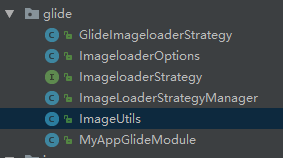
代码见:
https://github.com/soyoungboy/KotlinApp/tree/master/app/src/main/java/com/soyoungboy/kotlinapp/util/glide
调用如上ImageUtils进行图片加载缓存
class ViewHolder(val view: View, val itemClickListener: (GankPicture) -> Unit) : RecyclerView.ViewHolder(view) {

        fun bind(pictures: GankPicture) {

            val meizi = view.meizi as ImageView

            ImageUtils.loadImage(pictures.url,meizi)

            view.title.text = pictures.desc

            view.setOnClickListener {

                itemClickListener(pictures)

                view.context.longToast(pictures.url)

            }

        }

    }
kotlin之RecyclerView对应的Adapter
val items: List<GankPicture> 为要传进来进行展示的数据
view.setOnClickListener {

                itemClickListener(pictures)

                view.context.longToast(pictures.url)

            }
为点击事件
package com.soyoungboy.kotlinapp.adapter

import android.support.v7.widget.RecyclerView

import android.view.LayoutInflater

import android.view.View

import android.view.ViewGroup

import android.widget.ImageView

import com.soyoungboy.kotlinapp.R

import com.soyoungboy.kotlinapp.bean.GankPicture

import com.soyoungboy.kotlinapp.util.glide.ImageUtils

import kotlinx.android.synthetic.main.item_meizi.view.*

import org.jetbrains.anko.longToast

/**

 * Created by soyoungboy on 2018/1/29.

 */

class GankPictureAdapter(val items: List<GankPicture>, val itemClickListener: (GankPicture) -> Unit) : RecyclerView.Adapter<GankPictureAdapter.ViewHolder>() {

    override fun onCreateViewHolder(parent: ViewGroup, viewType: Int): ViewHolder {

        val view = LayoutInflater.from(parent.context).inflate(R.layout.item_meizi, parent, false)

        return ViewHolder(view, itemClickListener)

    }

    override fun getItemCount(): Int = items.size

    override fun onBindViewHolder(holder: ViewHolder, position: Int) {

        holder.bind(items[position])

    }

    class ViewHolder(val view: View, val itemClickListener: (GankPicture) -> Unit) : RecyclerView.ViewHolder(view) {

        fun bind(pictures: GankPicture) {

            val meizi = view.meizi as ImageView

            ImageUtils.loadImage(pictures.url,meizi)

            view.title.text = pictures.desc

            view.setOnClickListener {

                itemClickListener(pictures)

                view.context.longToast(pictures.url)

            }

        }

    }

}
intent传值和返回
btn_act_response.setOnClickListener {

val response = MessageInfo(et_response.text.toString(), DateUtil.no

wTime)

val intent = Intent()

intent.putExtra("message", response)

setResult(Activity.RESULT_OK, intent)

finish()

}
//从下一个页面返回到本页面回调onActivityResult方法

override fun onActivityResult(requestCode: Int, resultCode: Int, data:

Intent?) {

if (data != null) {

//获取下一个页面的应答参数

val response = data.extras.getParcelable<MessageInfo>

("message")

tv_request.text = " 收到返回消息: \n 应答时间为

${response.send_time}\n应答内容为${response.content}"

}

}
Kotlin Spinner简化写法
通过selector来实现Android Java里面Spinner的实现,代码也变得极其简洁。
tv_spinner为布局里面的TextView控件
class SpinnerActivity : AppCompatActivity() {

    val satellites = listOf("金星", "木星", "水星", "火星")

    override fun onCreate(savedInstanceState: Bundle?) {

        super.onCreate(savedInstanceState)

        setContentView(R.layout.activity_spinner)

        tv_spinner.text = satellites[0]

        tv_spinner.setOnClickListener {

            selector("请选择星星", satellites) { i ->

                tv_spinner.text = satellites[i]

                toast("你选择的是${tv_spinner.text}")

            }

        }

    }

}
实践的代码见我的github:https://github.com/soyoungboy/KotlinApp,里面是我学习Kotlin的一些小练习
Kotlin实践记录的更多相关文章
- Spring Boot 2 实践记录之 封装依赖及尽可能不创建静态方法以避免在 Service 和 Controller 的单元测试中使用 Powermock
在前面的文章中(Spring Boot 2 实践记录之 Powermock 和 SpringBootTest)提到了使用 Powermock 结合 SpringBootTest.WebMvcTest ...
- Spring Boot 2 实践记录之 使用 ConfigurationProperties 注解将配置属性匹配至配置类的属性
在 Spring Boot 2 实践记录之 条件装配 一文中,曾经使用 Condition 类的 ConditionContext 参数获取了配置文件中的配置属性.但那是因为 Spring 提供了将上 ...
- Spring Boot 2 实践记录之 MyBatis 集成的启动时警告信息问题
按笔者 Spring Boot 2 实践记录之 MySQL + MyBatis 配置 中的方式,如果想正确运行,需要在 Mapper 类上添加 @Mapper 注解. 但是加入此注解之后,启动时会出现 ...
- Ionic3项目实践记录
Ionic3首次项目实践记录 标签(空格分隔): Angular Ionic Ionic3踩坑 1. 路由懒加载(lazy load) 如果设置了懒加载,就必须全部懒加载(包括TabsPage),否则 ...
- k8s1.4.3安装实践记录(2)-k8s安装
前面一篇已经安装好了ETCD.docker与flannel(k8s1.4.3安装实践记录(1)),现在可以开始安装k8s了 1.K8S 目前centos yum上的kubernetes还是1.2.0, ...
- ElasticSearch5.0+版本分词热更新实践记录
前言 刚开始接触ElasticSearch的时候,版本才是2.3.4,短短的时间,现在都更新到5.0+版本了.分词和head插件好像用法也不一样了,本博客记录如何配置Elasticsearch的Hea ...
- 9-2、大型项目的接口自动化实践记录----递归判断两个json串是否相等
1.已知json串构成的情况下判断 先构造一下场景,假设已经把各个数据都移除掉不对比的字段 图1 预期.实际结果,复杂接口返回多层嵌套json时,同下 图2 预期.实际结果值为:{child_json ...
- 9-1、大型项目的接口自动化实践记录----数据库结果、JSON对比
上一篇写了如何从DB获取预期.实际结果,这一篇分别对不同情况说下怎么进行对比. PS:这部分在JSON对比中也适用. 1.结果只有一张表,只有一条数据 数据格式:因为返回的是dicts_list的格式 ...
- 8、大型项目的接口自动化实践记录----DB分别获取预期结果、实际结果
上一篇实现数据分离升级版--从DB获取数据,以及对应的请求实现,作为一个case,还缺少了预期结果与实际结果的获取及对比.因为前面的文章已经说过接口返回值的获取及对比,所以这篇不说这块了,这篇说一下D ...
随机推荐
- 1033. To Fill or Not to Fill (25) -贪心算法
题目如下: With highways available, driving a car from Hangzhou to any other city is easy. But since the ...
- phantomjs的使用+Java代码+依赖js(兼容Linux和windows版本)
1. 在使用phantomjs的时候需要下载phantomjs,网上有window版本和Linux版本.将phantomjs放在Linux上的指定位置之后(如下面的/home/tpl/phantom ...
- Red Hat Enterprise Linux 5 64-bit chinese language support config steps
Red Hat Enterprise Linux 5 64-bit 系统下安装中文语言支持方法 测试环境:Windows2012+Vmvare9.0+Red Hat Enterprise Linux ...
- Workflow相关表简单分析
静态定义表(没有ITEM_KEY,因为ITEM_KEY代表一个wf实例) --获取item_type定义. SELECT * FROM wf_item_types t WHEREt.name= 'CU ...
- 《java入门第一季》之正则表达式常见规则
正则表达式规则不用记住,只是知道是做什么用的即可.常见规则如下: A:字符 x 字符 x.举例:'a'表示字符a \\ 反斜线字符. \n 新行(换行)符 ('\u000A') (\\n来表示换行) ...
- ORACLE 多表关联 UPDATE 语句
为了方便起见,建立了以下简单模型,和构造了部分测试数据: 在某个业务受理子系统BSS中, SQL 代码 --客户资料表 create table customers ( customer_id num ...
- 对Linux0.11 中 进程0 和 进程1分析
1. 背景 进程的创建过程无疑是最重要的操作系统处理过程之一,很多书和教材上说的最多的还是一些原理的部分,忽略了很多细节.比如,子进程复制父进程所拥有的资源,或者子进程和父进程共享相同的物理页面,拥有 ...
- UE4 创建第三人称角色
一.C++创建 1. 创建一个C++类,继承自Character,取名MyThirdCharacter 2. 在头文件中声明一个摄像机目标点CameraBoom,一个摄像机Foll ...
- com.android.dex.DexException: Multiple dex files define(jar包重复引用) 错误解决
前段时间开始转入Android studio,不料果真使用时候遇到些错误,在此记下! 出现这个错误往往是在libs目录下有个jar包,然后在gradle文件中又引用了,即: 共同引用了. 解决方法: ...
- Unity3D学习笔记(一)GUI控件的调用
GUI控件:1.在Start中初始化,在OnGUI中调整.2.公有变量才会出现在Inspector面板.3.GUI控件的初始化和处理在OnGUI内完成.4.JavaScript的中文为UTF-8编码可 ...