
[debian]use ISO as debian apt source / 使用ISO文件作为apt源
准备文件:
debian-9.8.0-amd64-DVD-1.iso
debian-9.8.0-amd64-DVD-2.iso
debian-9.8.0-amd64-DVD-3.iso
挂载:
root@debian:~# mount -t iso9660 -o loop /debian/debian-9.8.0-amd64-DVD-1.iso /mnt/debian1

mount: /dev/loop0 is write-protected, mounting read-only

root@debian:~# mount -t iso9660 -o loop /debian/debian-9.8.0-amd64-DVD-2.iso /mnt/debian2

mount: /dev/loop1 is write-protected, mounting read-only

root@debian:~# mount -t iso9660 -o loop /debian/debian-9.8.0-amd64-DVD-3.iso /mnt/debian3

mount: /dev/loop2 is write-protected, mounting read-only
查看mount:
/dev/sda1 on /home type ext4 (rw,relatime,data=ordered)

tmpfs on /run/user/108 type tmpfs (rw,nosuid,nodev,relatime,size=405056k,mode=700,uid=108,gid=113)

tmpfs on /run/user/0 type tmpfs (rw,nosuid,nodev,relatime,size=405056k,mode=700)

/debian/debian-9.8.0-amd64-DVD-2.iso on /mnt/debian2 type iso9660 (ro,relatime)

/debian/debian-9.8.0-amd64-DVD-3.iso on /mnt/debian3 type iso9660 (ro,relatime)

/debian/debian-9.8.0-amd64-DVD-1.iso on /mnt/debian1 type iso9660 (ro,relatime)
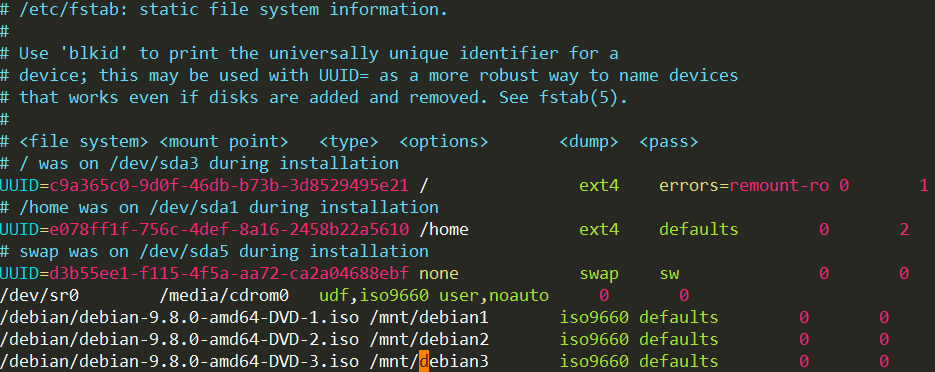
修改/etc/fstab:
[defaults 可以改为 user,loop]
添加apt源:
#vim /etc/apt/sources.list
删除这个文件
apt-cdrom -m -d=/mnt/debian1 add

apt-cdrom -m -d=/mnt/debian2 add

apt-cdrom -m -d=/mnt/debian3 add
新增apt.conf
Acquire::cdrom::mount "/mnt/debian1";

Acquire::cdrom::mount "/mnt/debian2";

Acquire::cdrom::mount "/mnt/debian3";

APT::CDROM::NoMount;
目前只能安装第一张DVD中的包 如果在后两个磁盘(如lsscsi)会提示需要插入磁盘:
root@debian:~# apt install lsscsi

Reading package lists... Done

Building dependency tree

Reading state information... Done

The following NEW packages will be installed:

  lsscsi

 upgraded,  newly installed,  to remove and  not upgraded.

Need to get  B/35.6 kB of archives.

After this operation, 89.1 kB of additional disk space will be used.

Media change: please insert the disc labeled

 'Debian GNU/Linux 9.8.0 _Stretch_ - Official amd64 DVD Binary-2 20190216-11:59'

in the drive '/mnt/debian1/' and press [Enter]
[debian]use ISO as debian apt source / 使用ISO文件作为apt源的更多相关文章
- Debian 8 升级到 9 Debian 9 How to upgrade Debian 8 Jessie to Debian 9 Stretch
How to upgrade Debian 8 Jessie to Debian 9 Stretch Contents 1. Objective 2. What's New 3. Preparatio ...
- pip apt source images
~/.pip/pip.conf [global] index-url = https://pypi.douban.com/simple download_cache = ~/.cache/pip [i ...
- 在centos中搭建基于nginx的apt源服务器,整合yum源和apt源在一台服务器
1.首先关闭防护墙或者设置规则通过且关闭selinux 2.nginx-1.14.2版本(编译安装)-自定义安装路径 3.开启nginx目录浏览 以上步骤请参考前文:https://www.cnblo ...
- linux常用命令大全2--挂载/dpkg/文件系统分析/apt/光盘/关机
挂载一个文件系统 mount /dev/hda2 /mnt/hda2 挂载一个叫做hda2的盘 - 确定目录 '/ mnt/hda2' 已经存在 umount /dev/hda2 卸载一个叫做hda2 ...
- 参考 https://raspberrypi.stackexchange.com/questions/3617/how-to-install-unrar-nonfree > 1.卸载unrar-free。 $ sudo apt-get remove unrar-free \ 2.通过编辑确保您拥有源存储库/etc/apt/sources.list。 $ cat /etc/apt/sources.
from my CSDN: https://blog.csdn.net/su_cicada/article/details/86939944 参考 https://raspberrypi.stacke ...
- mysql source命令超大文件导入方法总结
本文章来给各位朋友介绍利用mysql source命令超大文件导入方法总结,下面收集了两种解决办法,一种是把数据库分文件导出然后再导入,另一种是修改my.ini配置文件,下面我一一给各位朋友介绍. 导 ...
- RHEL7下用本地光盘或镜像iso文件做yum源
应用场境:Redhat 系统想要直接在线通过yum的条件时需要注册,一般用户都是非注册的,这个时候如果要想通过yum安装新软件,我们可以通过将安装盘或者镜像iso文件设置为yum源的方式来进行. 测试 ...
- 3.3. Mapping methods with several source parameters(具有多个源参数的映射方法)
3.3. Mapping methods with several source parameters(具有多个源参数的映射方法) MapStruct 还支持具有多个源参数的映射方法.这是比较实用的, ...
- kali linux /etc/apt/source.list
this list is very important , you can not download what you want like fictx , flash-plugin , vm-tool ...
随机推荐
- jQuery获取或设置元素的宽度和高度
jQuery获取或设置元素的宽度和高度: 可使用以下3种方法: 1,jQuery width() 和 height() 方法: 2,innerWidth() 和 innerHeight() 方法: 3 ...
- C#打印模板设计,E店宝打印模板设置,winfrom打印模板设计,DevExpress.XtraReports.UI.XRTable 表格代码生成。
一.打印效果 二.代码编辑 1 .table1 : table控件的Name: 2.label33 :label控件 实现绑定[外部平台单号]的控件: 3.label32:绑定[E店宝订单编号](S开 ...
- 一些android开发实用性网站记录
android开发一些有用的网站有很多,可以方便我们开发,记录一下哈. 1.Android源代码在线阅读:https://www.androidos.net.cn/sourcecode 2.在线Jso ...
- 智能ERP收银统计-优惠统计计算规则
1.报表统计->收银统计->优惠统计规则 第三方平台优惠:(堂食订单:支付宝口碑券优惠)+(外卖订单:商家承担优惠) 自平台优惠:(堂食订单:商家后台优 ...
- SQL Server 事务日志文件已满,收缩日志文件(9002)
错误如下图: 1.数据库 → 属性 → 选项 → 恢复模式 → 选择‘简单’:如下图: 2.任务 → 收缩 → 文件类型‘文件’ → 收缩模式‘在释放未使用的空间前重新组织页’,将文件收缩到K,大小填 ...
- 标识符and数据类型
一,标识符 1.标识符用来给类,变量,包,方法等起名字的. 2.只能由字符,下滑线,美元符组成:这里的字符有大小写字母,中文字符,数字字符,但是符号只能有两个下划线和美元符. 3.不能由数字开头. 4 ...
- June 28th. 2018, Week 26th. Thursday
You cannot change the circumstances but you can change yourself. 既然改变不了环境,那就改变自己. From Jim Rohn. Rec ...
- python接口自动化-post请求4
云盘登录实操案例: 代码参考: # coding:utf-8 import requests ''' https的请求相对于http安全级别高,需要验证SSL证书 import urllib3 使用这 ...
- ubuntu tree 查看目录结构
首先需要安装tree这个软件 sudo apt install tree tree -L target_dir/ 2代表列举的目录结构深度
- java 开发工具记录
jenkins 持续构建项目 lombok 优雅代码插件 sonarqube 代码检测插件