
搭建一个简单的本地的dubbo-demo案例
一、创建一个Maven工程,然后创建三个module模块
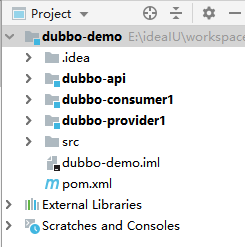
二、dubbo-api(maven模块)
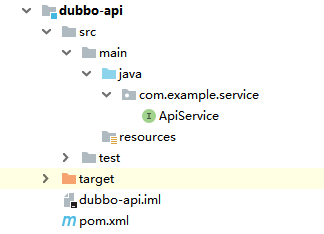
创建一个api类,命名为ApiService.java
package com.example.service;

public interface ApiService  {

   public String say(String hello);

}
三、dubbo-provider(springboot模块)
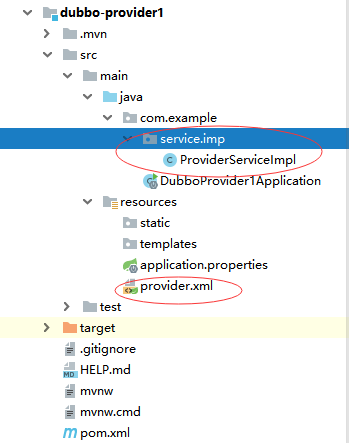
1.配置pom.xml,添加依赖
<!-- dubbo-api模块打成jar包,然后导入依赖 -->

        <dependency>

            <groupId>com.example</groupId>

            <artifactId>dubbo-api</artifactId>

            <version>1.0-SNAPSHOT</version>

        </dependency>

        <!-- 导入阿里的依赖 -->

        <dependency>

            <groupId>com.alibaba</groupId>

            <artifactId>dubbo</artifactId>

            <version>2.8.4</version>

        </dependency>

        <!-- 导入zookeeper的依赖 -->

        <dependency>

            <groupId>com.101tec</groupId>

            <artifactId>zkclient</artifactId>

            <version>0.10</version>

        </dependency>
2.创建一个ProviderServiceImpl.java
package com.example.service.imp;

import com.example.service.ApiService;

import org.springframework.stereotype.Service;

@Service

public class ProviderServiceImpl implements ApiService {

    @Override

    public String say(String hello) {

        System.err.println("provider调用成功");

        return hello;

    }

}
3.在src/main/java/resources下创建一个provider.xml并配置dubbo的端口
<?xml version="1.0" encoding="UTF-8"?>

<beans xmlns="http://www.springframework.org/schema/beans"

       xmlns:xsi="http://www.w3.org/2001/XMLSchema-instance"

       xmlns:dubbo="http://code.alibabatech.com/schema/dubbo"

       xsi:schemaLocation="http://www.springframework.org/schema/beans

       http://www.springframework.org/schema/beans/spring-beans.xsd

       http://code.alibabatech.com/schema/dubbo

       http://code.alibabatech.com/schema/dubbo/dubbo.xsd">

    <!--定义了提供方应用信息,用于计算依赖关系;在 dubbo-admin 或 dubbo-monitor 会显示这个名字,方便辨识-->

    <dubbo:application name="demotest-provider" owner="programmer" organization="dubbox" />

    <!--使用 zookeeper 注册中心暴露服务,注意要先开启 zookeeper,这里配置的adress是集群模式,个人用修改为本地:localhost:2181-->

    <dubbo:registry port="8086" protocol="zookeeper" address="172.30.0.177:2181,172.30.0.178:2181,172.30.0.180:2181"/>

    <!-- 用dubbo协议在20880端口暴露服务 -->

    <dubbo:protocol name="dubbo" port="20878" />

    <!--使用 dubbo 协议实现定义好的 api.PermissionService 接口,黑色字体部分修改为创建类的包目录 -->
    <dubbo:service interface="com.example.service.ApiService" ref="apiService" protocol="dubbo" />
    <!--具体实现该接口的 bean-->
    <bean id="apiService" class="com.example.service.imp.ProviderServiceImpl"/> </beans>
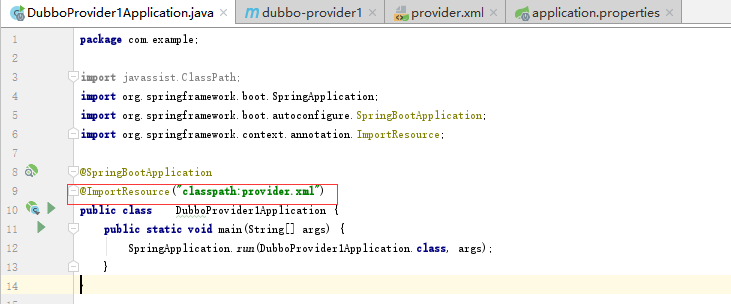
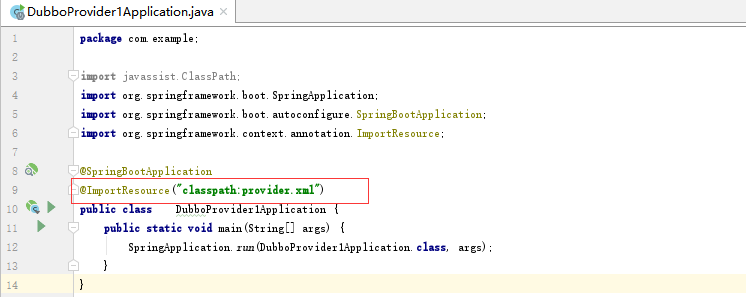
4.在DubboProvider1Application内导入配置的xml文件,然后在运行
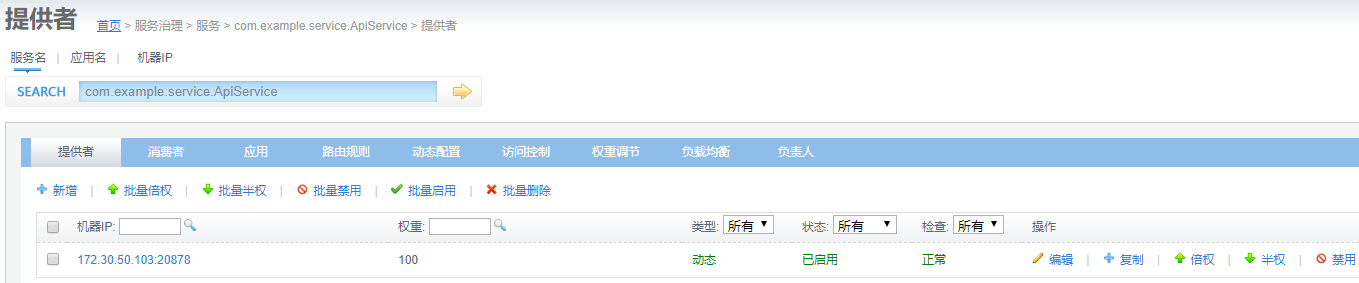
5.如果注册成功可以在DUBBO注册中心查看 http://172.30.0.82:4000/ ,账号:root 密码:root
四、dubbo-consumer(spring boot模块)
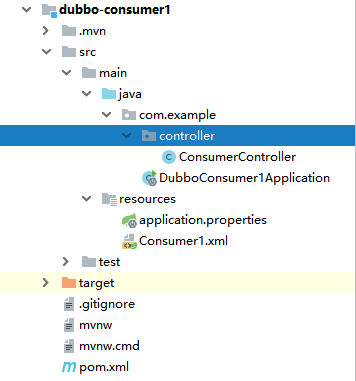
1.配置pom.xml
<!-- dubbo-api模块打成jar包,然后导入依赖 -->

        <dependency>

            <groupId>com.example</groupId>

            <artifactId>dubbo-api</artifactId>

            <version>1.0-SNAPSHOT</version>

        </dependency>

        <!-- 导入阿里的依赖 -->

        <dependency>

            <groupId>com.alibaba</groupId>

            <artifactId>dubbo</artifactId>

            <version>2.8.4</version>

        </dependency>

        <!-- 导入zookeeper的依赖 -->

        <dependency>

            <groupId>com.101tec</groupId>

            <artifactId>zkclient</artifactId>

            <version>0.10</version>

        </dependency>
2.创建一个控制类ConsumerController.java
package com.example.controller;

import com.example.service.ApiService;

import org.springframework.web.bind.annotation.GetMapping;

import org.springframework.web.bind.annotation.RestController;

import javax.annotation.Resource;

@RestController

public class ConsumerController {

    @Resource

    ApiService apiService;

    @GetMapping("/consumer")

    public String consumer() {

        return apiService.say("hello");

    }

}
3.创建Consumer.xml
<?xml version="1.0" encoding="UTF-8"?>

<beans xmlns="http://www.springframework.org/schema/beans"

       xmlns:xsi="http://www.w3.org/2001/XMLSchema-instance"

       xmlns:dubbo="http://code.alibabatech.com/schema/dubbo"

       xsi:schemaLocation="http://www.springframework.org/schema/beans http://www.springframework.org/schema/beans/spring-beans.xsd

       http://code.alibabatech.com/schema/dubbo http://code.alibabatech.com/schema/dubbo/dubbo.xsd">

    <dubbo:application name="demotest-consumer"/>

    <!--向 zookeeper 订阅 provider 的地址,由 zookeeper 定时推送-->

    <dubbo:registry protocol="zookeeper" address="172.30.0.177:2181,172.30.0.178:2181,172.30.0.180:2181"/>

    <!--使用 dubbo 协议调用定义好的 api.PermissionService 接口-->

    <dubbo:reference id="apiService" interface="com.example.service.ApiService"/>

</beans>
4.配置application.properties文件
#配置访问端口

server.port=8085
5.运行DubboConsumer1Application
五、打开浏览器,输入 localhost:8085/consumer
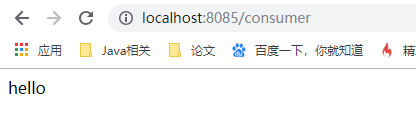
访问成功,做完后,最好将api,provider做成一个项目,consumer做成另一个项目,consumer通过RPC的方式调用provider,这样感知dubbo更明显
搭建一个简单的本地的dubbo-demo案例的更多相关文章
- Vue学习——使用vue-cli搭建一个简单的本地vue项目
前提 安装好node.js.npm.vue-cli.为什么要先安装这些,建议查看https://www.cnblogs.com/jixue/p/10673875.html,这个对于vue-cli理解很 ...
- 超详细,新手都能看懂 !使用SpringBoot+Dubbo 搭建一个简单的分布式服务
来自:JavaGuide Github 地址:https://github.com/Snailclimb/springboot-integration-examples 目录: 使用 SpringBo ...
- 使用 SpringBoot+Dubbo 搭建一个简单分布式服务
实战之前,先来看几个重要的概念 开始实战之前,我们先来简单的了解一下这样几个概念:Dubbo.RPC.分布式.由于本文的目的是带大家使用SpringBoot+Dubbo 搭建一个简单的分布式服务,所以 ...
- 使用gitblit搭建一个简单的局域网服务器
使用gitblit搭建一个简单的局域网服务器 1.使用背景 现在很多使用github管理代码,但是github需要互联网的支持,而且私有的git库需要收费.有一些项目的代码不能外泄,所以,搭建一个局域 ...
- 初学Node(六)搭建一个简单的服务器
搭建一个简单的服务器 通过下面的代码可以搭建一个简单的服务器: var http = require("http"); http.createServer(function(req ...
- Prism for WPF 搭建一个简单的模块化开发框架(四)异步调用WCF服务、WCF消息头添加安全验证Token
原文:Prism for WPF 搭建一个简单的模块化开发框架(四)异步调用WCF服务.WCF消息头添加安全验证Token 为什么选择wcf? 因为好像wcf和wpf就是哥俩,,, 为什么选择异步 ...
- Prism for WPF 搭建一个简单的模块化开发框架(一)
原文:Prism for WPF 搭建一个简单的模块化开发框架(一) 最近闲来无事又想搞搞WPF..... 做个框架吧,可能又是半途而废....总是坚持不下来 不废话了, 先看一下工程结构 布局大概是 ...
- 用nodejs搭建一个简单的服务器
使用nodejs搭建一个简单的服务器 nodejs优点:性能高(读写文件) 数据操作能力强 官网:www.nodejs.org 验证是否安装成功:cmd命令行中输入node -v 如果显示版本号表示安 ...
- 【netty】(2)---搭建一个简单服务器
netty(2)---搭建一个简单服务器 说明:本篇博客是基于学习慕课网有关视频教学.效果:当用户访问:localhost:8088 后 服务器返回 "hello netty"; ...
随机推荐
- Nginx学习笔记~目录索引
回到占占推荐博客索引 前几天整理了<Docker的学习笔记索引>,受到了很多朋友的关注,今天把Nginx的文章也整理一下,以后将永久更新,像大叔之前的<EF文章系列>,< ...
- iview起步
ivew是一套基于vue的高质量的ui组件库.使用它我们可以非常简单的得到非常美观的页面和非常棒的用户体验. 1. 获取源码 前往github下载源码,下载地址:https://github.com/ ...
- DevExpress AspxGridView分页使用隐藏系统默认英文分页
1第一篇文章研究了怎么汉化,但是在实际使用过程中发现汉化的有小问题,DevExpress支持自定义按钮,也可以在属性中设置成中文,这样避免汉化不准确的问题 <dx:ASPxGridView ID ...
- c#实战开发:以太坊Geth 命令发布智能合约 (五)
Token的合约代码我们参考Token-Factory的代码. 打开 https://remix.ethereum.org/#optimize=false&version=soljson-v ...
- 【Json】fastjson与jackson常用操作记录
本文只是记录fastjson.jackson一些常用的操作方法,没作比较,网上写比较的文章很多啦. 1.对象转Json串 // fastjson String objStr = JSON.toJSON ...
- CSS3制作上下跳动动画箭头效果
动画效果如下: 代码如下: 1 <!DOCTYPE html> 2 <html> 3 <head> 4 <meta charset="utf-8&q ...
- Django之模板系统
变量的使用: def test(request): num=1 s='hello' li=[1,2,['a','b']] dic={'name':'w','age':1} se={1,2,3} tup ...
- wordpress的excerpt()函数
问题:在wordpres中的single页面,本身引用的<?php the_excerpt(); ?>,但是在页面上显示的却是文章的内容 原因:the_excerpt(); 在excerp ...
- java工作流引擎证照库类型的流程设计 实现方案与演示案例
关键词:.Net开源工作流 工作流引擎 工作流引擎常用信息存储 流程前置导航 证照库的概念&应用场景: 我们在梳理流程的时候,会发现有一些流程的发起是基于一个实体信息的. 比如:纳 ...
- Dynamics 365-OnPremise V9 安装系统要求
Dynamics 365 V9 OnPremise发布之后,博主率真地直接下载安装,首先就遇到了操作系统不支持的问题,但是通过CRM安装报错提示,发现给的链接参考信息也不对. document的链接调 ...