
Spark:如何替换sc.parallelize(List(item1,item2)).collect().foreach(row=>{})为并行?
代码场景:
1)设定的几种数据场景,遍历所有场景:依次统计满足每种场景条件下的数据,并把统计结果存入hive;
2)已有代码如下:
    case class IndoorOTTCalibrateBuildingVecotrLegend(oid: Int, minHeight: Int, maxHeight: Int, minGridIDCount: Int, maxGridIDCount: Int, heightType: Int) extends Serializable

    //  实例化建筑物区间段:按照栅格的个数(面积)、楼的高度(商场等场景)来划分场景

    val buildingHeightLegends = List(

      IndoorOTTCalibrateBuildingVecotrLegend(1, 1, 30, 1, 21, BuildingCalibrateHeightType.HeightType1.toString.toInt),

      IndoorOTTCalibrateBuildingVecotrLegend(2, 1, 30, 21, 45, BuildingCalibrateHeightType.HeightType2.toString.toInt),

      IndoorOTTCalibrateBuildingVecotrLegend(3, 1, 30, 45, 100, BuildingCalibrateHeightType.HeightType3.toString.toInt),

      IndoorOTTCalibrateBuildingVecotrLegend(4, 30, 50, 1, 21, BuildingCalibrateHeightType.HeightType4.toString.toInt),

      IndoorOTTCalibrateBuildingVecotrLegend(5, 30, 50, 21, 45, BuildingCalibrateHeightType.HeightType5.toString.toInt),

      IndoorOTTCalibrateBuildingVecotrLegend(6, 30, 50, 45, 100, BuildingCalibrateHeightType.HeightType6.toString.toInt),

      IndoorOTTCalibrateBuildingVecotrLegend(7, 50, 5000, 1, 100, BuildingCalibrateHeightType.HeightType7.toString.toInt)

    )

    spark.sparkContext.parallelize(buildingHeightLegends).collect().foreach(buildingHeightLegend => {

      generateSampleBySenceType(spark, p_city, p_hour_start, p_hour_end, p_fpb_day, p_day_sample, linkLossCalibrateParameter, buildingHeightLegend)

    })
备注:
在generateSampleBySenceType()函数内部包含有:
spark.sql(s"""
|xxx

|where t10.heihgt>=${buildingHieghtLegend.MinHeight} and t10.height<${buildingHieghtLegend.MaxHeight}

|and t10.gridcount<=${buildingHieghtLegend.MinGridIDCount} and  t10.gridcount>${buildingHieghtLegend.MaxGridIDCount}
|""".stripMargin)
如果把代码修改:
    val buildingHeightLegends_df = spark.sqlContext.createDataFrame(buildingHeightLegends)

    buildingHeightLegends_df.createOrReplaceTempView("temp_buildingheightlegends")

    sql(s"""|select * from temp_buildingheightlegends""".stripMargin).repartition(buildingHeightLegends.length).foreachPartition(rows => {

      for (row <- rows) {

        val buildingHeightLegend = new IndoorOTTCalibrateBuildingVecotrLegend(

          row.getAs[Int]("oid"),

          row.getAs[Int]("minheight"),

          row.getAs[Int]("maxheight"),

          row.getAs[Int]("mingrididcount"),

          row.getAs[Int]("maxgrididcount"),

          row.getAs[Int]("heighttype"))

        generateSampleBySenceType(spark, p_city, p_hour_start, p_hour_end, p_fpb_day, p_day_sample, linkLossCalibrateParameter, buildingHeightLegend)

      }

    })
则会提示:generateSampleBySenceType()内部sql代码位置抛出SparkSession为NULL的异常。
修改方案:
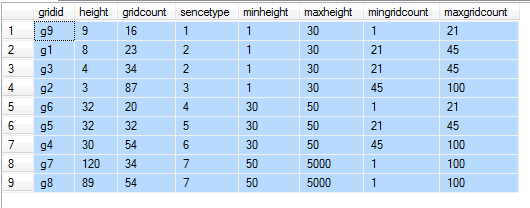
把buildingHeightLegends注册为临时表temp_buildingHeightLegends,去掉外层的foreach,之后在generateSampleBySenceType()内部把temp_buildingHeightLegends与其他结果集合进行cross join:
测试代码如下:
-- 场景表

CREATE TABLE [dbo].[test_senceitems](

    [sencetype] [int] NULL,

    [minheight] [int] NULL,

    [maxheight] [int] NULL,

    [mingridcount] [int] NULL,

    [maxgridcount] [int] NULL

)

INSERT [dbo].[test_senceitems] ([sencetype], [minheight], [maxheight], [mingridcount], [maxgridcount]) VALUES (1, 1, 30, 1, 21)

INSERT [dbo].[test_senceitems] ([sencetype], [minheight], [maxheight], [mingridcount], [maxgridcount]) VALUES (2, 1, 30, 21, 45)

INSERT [dbo].[test_senceitems] ([sencetype], [minheight], [maxheight], [mingridcount], [maxgridcount]) VALUES (3, 1, 30, 45, 100)

INSERT [dbo].[test_senceitems] ([sencetype], [minheight], [maxheight], [mingridcount], [maxgridcount]) VALUES (4, 30, 50, 1, 21)

INSERT [dbo].[test_senceitems] ([sencetype], [minheight], [maxheight], [mingridcount], [maxgridcount]) VALUES (5, 30, 50, 21, 45)

INSERT [dbo].[test_senceitems] ([sencetype], [minheight], [maxheight], [mingridcount], [maxgridcount]) VALUES (6, 30, 50, 45, 100)

INSERT [dbo].[test_senceitems] ([sencetype], [minheight], [maxheight], [mingridcount], [maxgridcount]) VALUES (7, 50, 5000, 1, 100)

-- 业务过滤统计表

CREATE TABLE [dbo].[test_grid](

    [gridid] [nvarchar](50) NULL,

    [height] [int] NULL,

    [gridcount] [int] NULL

)

INSERT [dbo].[test_grid] ([gridid], [height], [gridcount]) VALUES (N'g1', 8, 23)

INSERT [dbo].[test_grid] ([gridid], [height], [gridcount]) VALUES (N'g2', 3, 87)

INSERT [dbo].[test_grid] ([gridid], [height], [gridcount]) VALUES (N'g3', 4, 34)

INSERT [dbo].[test_grid] ([gridid], [height], [gridcount]) VALUES (N'g4', 30, 54)

INSERT [dbo].[test_grid] ([gridid], [height], [gridcount]) VALUES (N'g5', 32, 32)

INSERT [dbo].[test_grid] ([gridid], [height], [gridcount]) VALUES (N'g6', 32, 20)

INSERT [dbo].[test_grid] ([gridid], [height], [gridcount]) VALUES (N'g7', 120, 34)

INSERT [dbo].[test_grid] ([gridid], [height], [gridcount]) VALUES (N'g8', 89, 54)

INSERT [dbo].[test_grid] ([gridid], [height], [gridcount]) VALUES (N'g9', 9, 16)
替换generateSampleBySenceType()内部sql(s"""|""".stripMargin)代码类似如下:
select t10.*,t11.*

from test_grid t10

cross join test_senceitems t11

where t10.height>=t11.minheight and t10.height<t11.maxheight

and t10.gridcount>=t11.mingridcount and t10.gridcount<t11.maxgridcount
Spark:如何替换sc.parallelize(List(item1,item2)).collect().foreach(row=>{})为并行?的更多相关文章
- 单表千亿电信大数据场景,使用Spark+CarbonData替换Impala案例
[背景介绍] 国内某移动局点使用Impala组件处理电信业务详单,每天处理约100TB左右详单,详单表记录每天大于百亿级别,在使用impala过程中存在以下问题: 详单采用Parquet格式存储,数据 ...
- arrayObj.splice(start, deleteCount, [item1[, item2[, . . . [,itemN]]]])
测试方法 function test(){ var arr = [0,1,2,3]; arr.splice(1,1,'a');//case console.dir(arr); } case1: arr ...
- Spark(二)【sc.textfile的分区策略源码分析】
sparkcontext.textFile()返回的是HadoopRDD! 关于HadoopRDD的官方介绍,使用的是旧版的hadoop api ctrl+F12搜索 HadoopRDD的getPar ...
- Spark算子--first、count、reduce、collect、lookup
转载请标明出处http://www.cnblogs.com/haozhengfei/p/4b8582c8dde1529abb11e4ccc8296171.html first.count.reduce ...
- Spark学习之路(四)—— RDD常用算子详解
一.Transformation spark常用的Transformation算子如下表: Transformation算子 Meaning(含义) map(func) 对原RDD中每个元素运用 fu ...
- Spark 系列(四)—— RDD常用算子详解
一.Transformation spark 常用的 Transformation 算子如下表: Transformation 算子 Meaning(含义) map(func) 对原 RDD 中每个元 ...
- 【spark】常用转换操作:sortByKey()和sortBy()
1.sortByKey() 功能: 返回一个根据键排序的RDD 示例 val list = List(("a",3),("b",2),("c" ...
- Spark_Transformation和Action算子
Transformation 和 Action 常用算子 一.Transformation 1.1 map 1.2 filter 1.3 flatMap ...
- 入门大数据---Spark_Transformation和Action算子
一.Transformation spark 常用的 Transformation 算子如下表: Transformation 算子 Meaning(含义) map(func) 对原 RDD 中每个元 ...
随机推荐
- Navicat通过跳板机连接数据库
完成对应设置后,即可连接数据库,本人亲测!
- SpringtMVC中配置 <mvc:annotation-driven/> 与 <mvc:default-servlet-handler/> 源码解析
上一篇有提到,当有.无这两个标签时,SpringtMVC 底层所采用的 HandlerMapping 以及 HandlerAdapter 是不一样的.现在就来进行源码调试,揭开 SpringtMVC ...
- 二分查找的变种(Java实现)
普通二分查找: 先回顾一下普通的二分查找 注意:二分查找有这样一个问题:当数组中数有重复时,比如 {3,3,3,3} 这个数组,二分查找3时,返回的是arr[1],也就是说二分查找并不会返回3第一次出 ...
- shiro授权
一.shiro-permission.ini shiro-permission.ini里面的内容相当于在数据库 #用户 [users] #用户zhang的密码是123,此用户具有role1和role2 ...
- 笔记:Spring Cloud Hystrix 服务容错保护
由于每个单元都在不同的进程中运行,依赖通过远程调用的方式执行,这样就有可能因为网络原因或是依赖服务自身问题出现调用故障或延迟,而这些问题会直接导致调用方的对外服务也出现延迟,若此时调用方的请求不断增加 ...
- 笔记:Maven 聚合和继承
聚合模块 我们希望一次构建两个或更多项目,而不是到每个模块的目录下分别执行mvn命令,Maven 聚合这一特性就是为该需求服务的, 为了使用聚合,我们必须创建一个聚合模块,通过该模块与其他项目聚合,并 ...
- java 10 中 var关键字用法
引用:https://mp.weixin.qq.com/s/n1tcJ0CywSi0j-YycGPwxg what java10引入了局部变量折断 var用于声明局部变量. 如var user=new ...
- [luogu2831][noip d2t3]愤怒的小鸟_状压dp
愤怒的小鸟 noip-d2t3 luogu-2831 题目大意:给你n个点,问最少需要多少条经过原点的抛物线将其覆盖. 注释:1<=点数<=18,1<=数据组数<=30.且规定 ...
- nginx日志切割配置
编辑虚拟主机文件 /etc/nginx/conf.d/default.conf 在server段添加如下配置 if ($time_iso8601 ~ "^(\d{4})-(\d{2})-( ...
- 使用Java理解逻辑程序
1.Java常见的注释有哪些,语法是怎样的? 1)单行注释用//表示,编译器看到//会忽略该行//后的所文本 2)多行注释/* */表示,编译器看到/*时会搜索接下来的*/,忽略掉/* */之间的文本 ...