
qml demo分析(threadedanimation-线程动画)
一、效果预览
使用过qml的同学都知道,使用qml做动画效果是非常简单的,再也不需要像QWidget那样,自己模拟一个动画,费时又费力,往往还达不到效果。今天我们就来分析下qml的两种动画实现方式,如图1所示,窗口底部的提示信息文本“This application shows two spinners. The one to the right is animated on the scene graph thread (when applicable) and the left one is using the normal Qt Quick animation system.”意思就是左边的窗口使用quick animation实现,右侧窗口使用opengl scene graph实现,细心的同学就会发现,当Not blocked字样变为Blocked时,左侧的旋转动画每过大概400ms就会停顿下,而右侧窗口丝毫不受影响。好了废话不多说,我们这就来分析下这个示例程序的源码,这个现象就不难理解啦。
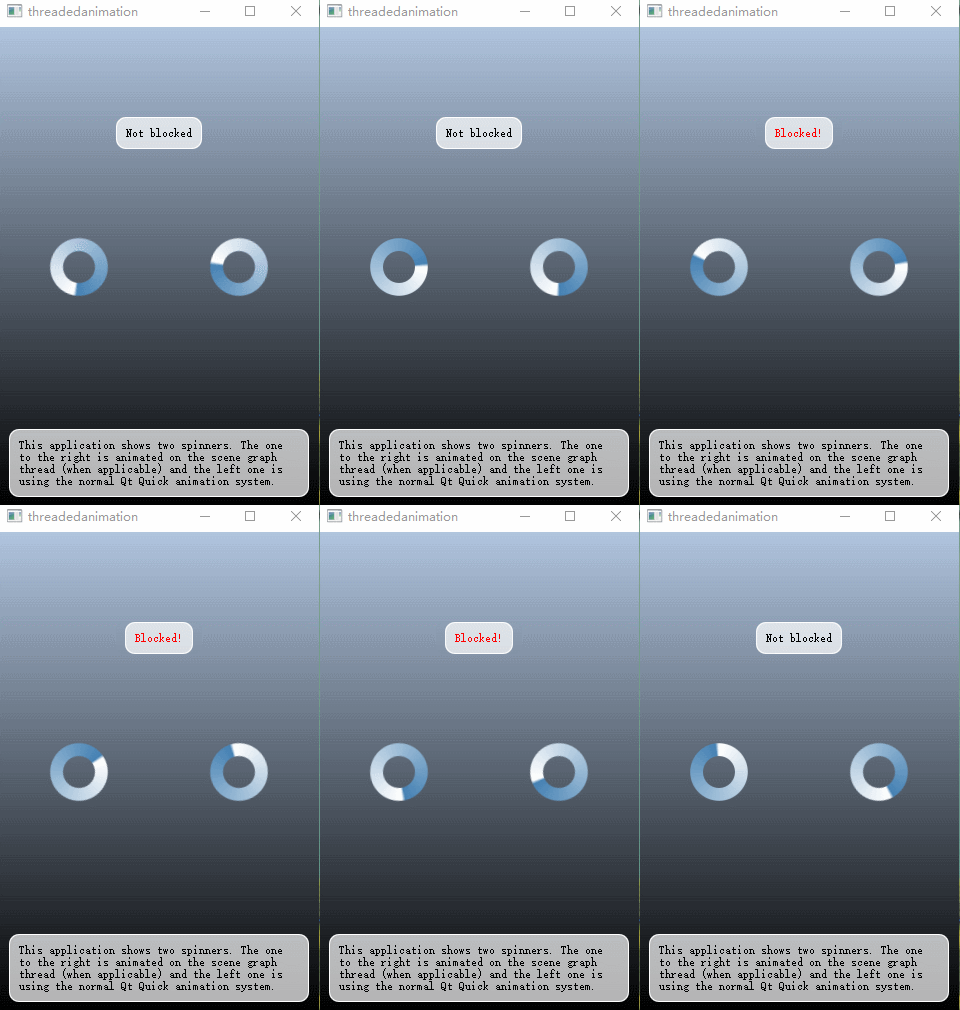
图1 旋转动画
二、源码分析
首先我们先来分析下该示例代码的工程目录,如图1所示,spinner一个C++类,其重写了QQuickItem组件,QQuickItem其实在qml中就相当于Item组件,重写QQuickItem是为了注册到qml系统中,把spinner当qml的一个组件使用,在spinner的实现过程中,使用了opengl的方式来进行绘图。

图2 工程目录
该示例代码的main.cpp文件与qml demo分析(abstractitemmodel-数据分离)文章中分析的一样,都是注册了一个自定义QQuickItem对象到qml上下文中,并使用QQuickView加载main.qml文件并显示,在此就不贴代码啦。
1、opengl scene graph
由于这是第一次分析opengl的示例程序,这里我将会把spinner的头文件和实现代码都贴上。首先先来看下spinner类头文件
 #ifndef SPINNER_H

 #define SPINNER_H

 #include <QtQuick/QQuickItem>

 class Spinner : public QQuickItem

 {

     Q_OBJECT

     Q_PROPERTY(bool spinning READ spinning WRITE setSpinning NOTIFY spinningChanged)

 public:

     Spinner();

     bool spinning() const { return m_spinning; }

     void setSpinning(bool spinning);

 protected:

     QSGNode *updatePaintNode(QSGNode *, UpdatePaintNodeData *);

 signals:

     void spinningChanged();

 private:

     bool m_spinning;

 };
头文件中声明了一个SPinner类,继承自QQuickItem类,重写该类是为了使用opengl绘制旋转效果。代码中使用了Q_PROPERTY宏将m_spinning成员变量注册到了qml系统中,qml代码直接可以通过spinning:值的方式修改该变量,该宏在之前的文章中也有简单的介绍,具体参见qml demo分析(customgeometry-贝塞尔曲线)。
 Spinner::Spinner()

     : m_spinning(false)

 {

     setSize(QSize(, ));

     setFlag(ItemHasContents);

 }

 void Spinner::setSpinning(bool spinning)

 {

     if (spinning == m_spinning)

         return;

     m_spinning = spinning;

     emit spinningChanged();

     update();

 }

 QSGNode *Spinner::updatePaintNode(QSGNode *old, UpdatePaintNodeData *)

 {

     SpinnerNode *n = static_cast<SpinnerNode *>(old);

     if (!n)

         n = new SpinnerNode(window());

     n->setSpinning(m_spinning);

     return n;

 }
在Spinner类实现中,updatePaintNode接口中构造了一个SpinnerNode类,具体的绘制操作就是在SpinnerNode类中实现。
 class SpinnerNode : public QObject, public QSGTransformNode

 {

     Q_OBJECT

 public:

     SpinnerNode(QQuickWindow *window)

         : m_rotation()

         , m_spinning(false)

         , m_window(window)

     {

         connect(window, &QQuickWindow::beforeRendering, this, &SpinnerNode::maybeRotate);

         connect(window, &QQuickWindow::frameSwapped, this, &SpinnerNode::maybeUpdate);

         QImage image(":/scenegraph/threadedanimation/spinner.png");

         m_texture = window->createTextureFromImage(image);//创建一个纹理

         QSGSimpleTextureNode *textureNode = new QSGSimpleTextureNode();//简单纹理节点  加入场景前必须有一个纹理

         textureNode->setTexture(m_texture);//设置纹理

         textureNode->setRect(, , image.width(), image.height());

         textureNode->setFiltering(QSGTexture::Linear);

         appendChildNode(textureNode);

     }

     ~SpinnerNode() {

         delete m_texture;

     }

     void setSpinning(bool spinning)

     {

         m_spinning = spinning;

     }

 public slots:

     void maybeRotate() {

         if (m_spinning) {

             m_rotation += ( / m_window->screen()->refreshRate());

             QMatrix4x4 matrix;

             matrix.translate(, );

             matrix.rotate(m_rotation, , , );//绕z轴旋转

             matrix.translate(-, -);

             setMatrix(matrix);

         }

     }

     void maybeUpdate() {

         if (m_spinning) {

             m_window->update();

         }

     }

 private:

     qreal m_rotation;

     bool m_spinning;

     QSGTexture *m_texture;

     QQuickWindow *m_window;

 };
SpinnerNode类继承自QSGTransformNode,构造函数中使用图片构造了一个纹理,并将纹理设置到QSGSimpleTextureNode对象中,进而将该对象添加到场景,添加到场景的顺序决定他们在场景中被绘制的顺序。
SpinnerNode类中使用maybeRotate方法将纹理进行了旋转,代码如上32-41行所示。
2、quick animation
使用qml属性动画进行旋转操作相对来说比较简单,只需要使用NumberAnimation on rotation即可,具体代码如下64-66行
 Rectangle {

     width:

     height:

     gradient: Gradient {//设置背景色

         GradientStop { position: ; color: "lightsteelblue" }

         GradientStop { position: ; color: "black" }

     }

     Rectangle {//与blockingLabel组成一个提示框

         color: Qt.rgba(, , , 0.7);

         radius:

         border.width:

         border.color: "white"

         anchors.fill: blockingLabel;

         anchors.margins: -

     }

     Text {

         id: blockingLabel

         color: blocker.running ? "red" : "black"//根据定时器状态 修改提示框文本信息和字体颜色

         text: blocker.running ? "Blocked!" : "Not blocked"

         anchors.horizontalCenter: parent.horizontalCenter

         anchors.top: parent.top

         anchors.topMargin:

     }

     Timer {

         id: blocker

         interval: //触发间隔

         running: false;//默认没有启动

         repeat: true

         onTriggered: {//该槽的作用就是为了模拟一个延迟  说明opengl的渲染不在主线程进行  而quick animation在主线程进行渲染

             var d = new Date();

             var x = ;

             var wait =  + Math.random() * ;

             while ((new Date().getTime() - d.getTime()) < ) {

                 x += ;

             }

         }

     }

     Timer {

         id: blockerEnabler

         interval:

         running: true

         repeat: true

         onTriggered: {

             blocker.running = !blocker.running//定时器状态修改  4s中置反

         }

     }

     Spinner {//opengl

         anchors.centerIn: parent

         anchors.horizontalCenterOffset:

         spinning: true//通过setSpinning接口设置该属性值

     }

     Image {//quick animation

         anchors.centerIn: parent

         anchors.horizontalCenterOffset: -

         source: "spinner.png"

         NumberAnimation on rotation {

             from: ; to: ; duration: ; loops: Animation.Infinite//1s转动一圈

         }

     }

     Rectangle {//与label文本组成底部提示框

         color: Qt.rgba(, , , 0.7)

         radius:

         border.width:

         border.color: "white"

         anchors.fill: label

         anchors.margins: -

     }

     Text {

         id: label

         color: "black"

         wrapMode: Text.WordWrap

         text: "This application shows two spinners. The one to the right is animated on the scene graph thread (when applicable) and the left one is using the normal Qt Quick animation system."

         anchors.right: parent.right

         anchors.left: parent.left

         anchors.bottom: parent.bottom

         anchors.margins:

     }

 }
总结:使用qml有两种方式实现旋转,往大的说就是动画,有两种方式:opengl scene or quick animation。
opengl scene:实现比较麻烦,但是线程独立,不会因为复杂计算而阻塞ui绘制
quick animation:使用简单,但是是在主线程进行绘制。
qml demo分析(threadedanimation-线程动画)的更多相关文章
- qml demo分析(maskedmousearea-异形窗口)
一.效果展示 如本文的标题所示,这篇文章分析的demo是一个异形窗口,主要展示鼠标在和异形区域交互的使用,效果如图1所示,当鼠标移动到白云或者月亮上时,相应的物体会高亮,当鼠标按下时,物体会有一个放大 ...
- qml demo分析(customgeometry-贝塞尔曲线)
一.效果展示 本篇文章还是带来一个简单的qt示例分析,且看图1效果. 图1 贝塞尔曲线 二.源码分析 该示例代码所在目录quick\scenegraph\customgeometry,感兴趣的同学可以 ...
- qml demo分析(maroon-小游戏)
1.效果展示 这篇文章我还是分析一个qt源码中的qml程序,程序运行效果如下图所示. 图1 游戏开始 图2 游戏中 2.源码分析 这个游戏的源码文件比较多,为了能更清楚的了解整个代码,我先整体分析 ...
- qml demo分析(threading-线程任务)
一.关键类说明 qml内置了WorkerScript组件,该组件有一个source属性,可以加载js文件,含有一个名为message的信号,意味着他有一个默认的onMessage槽函数,除此之外他还有 ...
- qml demo分析(text-字体展示)
上一篇文章分析了一个小游戏,使用qml编写界面+js进行复杂逻辑控制,算是一个比较完整的qml示例代码了,今天就不那么继续变态啦,来看一个简单的字体示例程序吧,该示例代码比较简单,主要是展示了几个简单 ...
- qml demo分析(samegame-拼图游戏)
一.效果展示 相信大家都玩儿过连连看游戏,而且此款游戏也是闲时一款打发时间的趣事,那么接下来我将分析一款类似的游戏,完全使用qml编写界面,复杂逻辑使用js完成.由于此游戏包含4种游戏模式,因此本篇文 ...
- qml demo分析(photosurface-图片涅拉)
阅读qml示例代码已有一小段时间,也陆续的写了一些自己关于qml示例代码的理解,可能由于自己没有大量的qml开发经验,总感觉复杂的ui交互qml处理起来可能会比较棘手,但事实总是会出人意料,今天我们就 ...
- qml demo分析(clocks-时钟)
一.效果展示 效果如图1所示,时钟列表支持鼠标左右拖动,带有黑色背景的是晚上时钟,无黑色背景的是白天时钟 二.源码分析 1.main.cpp文件中只包含了一个宏,该宏的具体解释请看qml 示例中的关键 ...
- qml demo分析(abstractitemmodel-数据分离)
一.概述 qt5之后qml也可以被用于桌面程序开发,今天我就拿出qt demo中的一个qml示例程序进行分析.这个demo主要是展示了qml数据和展示分离的使用方式,qml只专注于快速高效的绘制界面, ...
随机推荐
- Python——pip安装报错:is not a supported wheel on this platform
pip安装报错:is not a supported wheel on this platform 可能的原因1:安装的不是对应python版本的库,下载的库名中cp35代表python3.5,其它同 ...
- http2.0与http1.X的区别
此文只是方便重看,原文在:http://www.mamicode.com/info-detail-1199706.html 1.1 HTTP应用场景 http诞生之初主要是应用于web端内容获取,那时 ...
- .Net Core版开源跨平台框架SkyMallCore
相互学习提升,有不足之处请指教!有需要急速开发的朋友可以拿来用哦! SkyMallCore 该项目目前放在github上,功能仍在完善,已Fork的园友已给了一些建议, 我会继续完善,并将开发过程遇到 ...
- Django rest_framework快速入门
一.什么是REST 面向资源是REST最明显的特征,资源是一种看待服务器的方式,将服务器看作是由很多离散的资源组成.每个资源是服务器上一个可命名的抽象概念.因为资源是一个抽象的概念,所以它不仅仅能代表 ...
- hdu 2899 Strange fuction 模拟退火
求 F(x) = 6 * x^7+8*x^6+7*x^3+5*x^2-y*x (0 <= x <=100)的最小值 模拟退火,每次根据温度随机下个状态,再根据温度转移 #include& ...
- exgcd学习笔记
扩展欧几里得算法是当已知a和b时,求得一组x和y使得 首先,根据数论中的相关定理,解一定存在 //留坑待填 之后我们可以推一推式子 将a替换掉 展开括号 提出b,合并 且 设 现在已经将 ...
- RVM 安装 Ruby
RVM 是一个命令行工具,可以提供一个便捷的多版本 Ruby 环境的管理和切换. https://rvm.io/ 如果你打算学习 Ruby / Rails, RVM 是必不可少的工具之一. 这里所有的 ...
- 对Javascript 类、原型链、继承的理解
一.序言 和其他面向对象的语言(如Java)不同,Javascript语言对类的实现和继承的实现没有标准的定义,而是将这些交给了程序员,让程序员更加灵活地(当然刚开始也更加头疼)去定义类,实现继承 ...
- 深度学习之注意力机制(Attention Mechanism)和Seq2Seq
这篇文章整理有关注意力机制(Attention Mechanism )的知识,主要涉及以下几点内容: 1.注意力机制是为了解决什么问题而提出来的? 2.软性注意力机制的数学原理: 3.软性注意力机制. ...
- [Active Learning] 01 A Brief Introduction to Active Learning 主动学习简介
目录 什么是主动学习? 主动学习 vs. 被动学习 为什么需要主动学习? 主动学习与监督学习.弱监督学习.半监督学习.无监督学习之间的关系 主动学习的种类 主动学习的一个例子 主动学习工具包 ALiP ...