
安卓开发_数据存储技术_sqlite
一、SQLite
SQLite第一个Alpha版本诞生于2000年5月,它是一款轻量级数据库,它的设计目标是嵌入式的,占用资源非常的低,只需要几百K的内存就够了。SQLite已经被多种软件和产品使用
二、SQLite特性
  、轻量级

 SQLite和C\S模式的数据库软件不同,它是进程内的数据库引擎,因此不存在数据库的客户端和服务器。使用SQLite一般只需要带上它的一个动态库,就可以享受它的全部功能。而且那个动态库的尺寸也相当小。

 、独立性

 SQLite数据库的核心引擎本身不依赖第三方软件,使用它也不需要“安装”,所以在使用的时候能够省去不少麻烦。

 、隔离性

 SQLite数据库中的所有信息(比如表、视图、触发器)都包含在一个文件内,方便管理和维护。

 、跨平台

 SQLite数据库支持大部分操作系统,除了我们在电脑上使用的操作系统之外,很多手机操作系统同样可以运行,比如Android、Windows Mobile、Symbian、Palm等。

 、多语言接口

 SQLite数据库支持很多语言编程接口,比如C\C++、Java、Python、dotNet、Ruby、Perl等,得到更多开发者的喜爱。

 、安全性

 SQLite数据库通过数据库级上的独占性和共享锁来实现独立事务处理。这意味着多个进程可以在同一时间从同一数据库读取数据,但只有一个可以写入数据。在某个进程或线程向数据库执行写操作之前,必须获得独占锁定。在发出独占锁定后,其他的读或写操作将不会再发生。
三、SQLiteDatabase方法
1、添加
 public long insert (String table, String nullColumnHack, ContentValues values)

 Added in API level

 Convenience method for inserting a row into the database.

 Parameters

 table  the table to insert the row into

 nullColumnHack  optional; may be null. SQL doesn't allow inserting a completely empty row without naming at least one column name. If your provided values is empty, no column names are known and an empty row can't be inserted. If not set to null, the nullColumnHack parameter provides the name of nullable column name to explicitly insert a NULL into in the case where your values is empty.

 values  this map contains the initial column values for the row. The keys should be the column names and the values the column values

 Returns

 the row ID of the newly inserted row, or - if an error occurred
2、删除
 public int delete (String table, String whereClause, String[] whereArgs)

 Added in API level

 Convenience method for deleting rows in the database.

 Parameters

 table  the table to delete from

 whereClause  the optional WHERE clause to apply when deleting. Passing null will delete all rows.

 whereArgs  You may include ?s in the where clause, which will be replaced by the values from whereArgs. The values will be bound as Strings.

 Returns

 the number of rows affected if a whereClause is passed in,  otherwise. To remove all rows and get a count pass "" as the whereClause.
3、修改
 public int update (String table, ContentValues values, String whereClause, String[] whereArgs)

 Added in API level

 Convenience method for updating rows in the database.

 Parameters

 table  the table to update in

 values  a map from column names to new column values. null is a valid value that will be translated to NULL.

 whereClause  the optional WHERE clause to apply when updating. Passing null will update all rows.

 whereArgs  You may include ?s in the where clause, which will be replaced by the values from whereArgs. The values will be bound as Strings.

 Returns

 the number of rows affected
4、查询
 public Cursor query (String table, String[] columns, String selection, String[] selectionArgs, String groupBy, String having, String orderBy)

 Added in API level

 Query the given table, returning a Cursor over the result set.

 Parameters

 table  The table name to compile the query against.

 columns  A list of which columns to return. Passing null will return all columns, which is discouraged to prevent reading data from storage that isn't going to be used.

 selection  A filter declaring which rows to return, formatted as an SQL WHERE clause (excluding the WHERE itself). Passing null will return all rows for the given table.

 selectionArgs  You may include ?s in selection, which will be replaced by the values from selectionArgs, in order that they appear in the selection. The values will be bound as Strings.

 groupBy  A filter declaring how to group rows, formatted as an SQL GROUP BY clause (excluding the GROUP BY itself). Passing null will cause the rows to not be grouped.

 having  A filter declare which row groups to include in the cursor, if row grouping is being used, formatted as an SQL HAVING clause (excluding the HAVING itself). Passing null will cause all row groups to be included, and is required when row grouping is not being used.

 orderBy  How to order the rows, formatted as an SQL ORDER BY clause (excluding the ORDER BY itself). Passing null will use the default sort order, which may be unordered.

 Returns

 A Cursor object, which is positioned before the first entry. Note that Cursors are not synchronized, see the documentation for more details.

 See Also

 Cursor
四、Demo
 package com.example.demosql;

 import android.content.Context;

 import android.database.sqlite.SQLiteDatabase;

 import android.database.sqlite.SQLiteOpenHelper;

 public class DBHelper extends SQLiteOpenHelper{

     public DBHelper(Context context)

     {

         super(context, "mydata.db", null, );

     }

     @Override

     public void onCreate(SQLiteDatabase db) {

         //建立数据表

         db.execSQL("create table mydatabase(_id integer primary key,name text,age text)");

     }

     @Override

     public void onUpgrade(SQLiteDatabase db, int oldVersion, int newVersion) {

         //版本更新

         if(newVersion>oldVersion)

         {

             db.execSQL("drop table if exists mydatabase");

         }

     }

 }
--------------------------------------------------------------------------------------------------------------------------------------
Activity
 package com.example.demosql;

 import android.app.Activity;

 import android.content.ContentValues;

 import android.database.Cursor;

 import android.database.sqlite.SQLiteDatabase;

 import android.os.Bundle;

 public class MainActivity extends Activity {

     private DBHelper dbhelper ;

     private SQLiteDatabase sqldb;

     private int num = ;

     @Override

     protected void onCreate(Bundle savedInstanceState) {

         super.onCreate(savedInstanceState);

         setContentView(R.layout.activity_main);

         dbhelper = new DBHelper(this);

         //添加数据

         addData("Alice");

         selectData();

         System.out.println("---------------------------");

         //修改数据

         updataData();

         selectData();

         System.out.println("---------------------------");

         //删除数据

         deleteData();

         selectData();

         System.out.println("---------------------------");

         //添加数据

         addData("Tom");

         addData("Mark");

         selectData();

         clearData();

         selectData();

         System.out.println("---------------------------");

     }

     //添加数据

     public void addData(String name)

     {

         sqldb = dbhelper.getWritableDatabase();

         ContentValues value = new ContentValues();

         value.put("name", name);

         value.put("age", "");

         //第一个参数是要修改的数据库名称,第三个参数是数据源(数组格式),返回成功添加的数据条数

         int num = (int) sqldb.insert("mydatabase", null, value);

         if(num>)

             System.out.println("添加数据成功");

         //关闭数据库

         sqldb.close();

     }

     //删除数据

     public void deleteData()

     {

         sqldb = dbhelper.getWritableDatabase();

         String[] name = {"Alice"};

         //第一个参数是修改的数据库名称,第二个参数是删除数据要符合的条件,第三个参数是修改的数据源(数组格式),对应第二个参数?的位置

         int num = sqldb.delete("mydatabase", "name=?", name);

         if(num>)

             System.out.println("删除数据成功");

         //关闭数据库

         sqldb.close();

     }

     //修改数据

     public void updataData()

     {

         sqldb = dbhelper.getWritableDatabase();

         ContentValues value = new ContentValues();

         value.put("name", "Alice");

         value.put("age", "");

         String names[] = {"Alice"};

         //第一个参数为要修改的数据库名称,第二个参数为数据源,第三个参数为修改要符合的条件,第四个参数是对应第三个参数?位置的值

         int num = sqldb.update("mydatabase", value, "name=?",names );

         if(num>)

             System.out.println("修改数据成功");

         sqldb.close();

     }

     //查询数据

     public void selectData()

     {

         //注意,查询不用修改 getReadableDatabase()而不是getWritableDatabase()

         sqldb = dbhelper.getReadableDatabase();

         String columns[] = {"name","age"};

         //第一个参数为数据库名称,第二个参数为要查询的字段,

         Cursor cursor = sqldb.query("mydatabase", columns, null, null, null, null, null);

         System.out.println("此时的数据为:");

         while(cursor.moveToNext())

         {

             //参数为第几个字段,注意第0个字段不是id

             String name = cursor.getString();

             String age = cursor.getString();

             System.out.println("name:"+name+",age:"+age);

         }

         sqldb.close();

     }

     //清空数据库

     public void clearData()

     {

         sqldb = dbhelper.getWritableDatabase();

         sqldb.delete("mydatabase", null, null);

         System.out.println("执行清空数据库操作");

         sqldb.close();

     }

 }
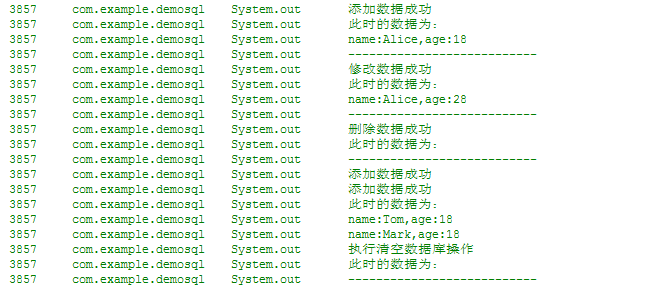
看一下打印结果:
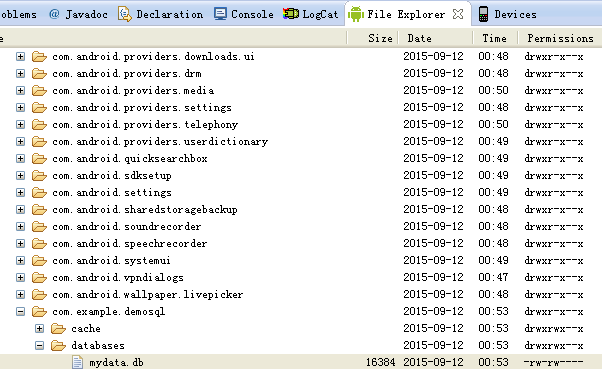
数据库存放位置:
data/data/包名/数据库名
----------------------------------------------------------------------------------------------------------------------------------
相关知识:
安卓开发_数据存储技术_SharedPreferences类
安卓开发_数据存储技术_sqlite的更多相关文章
- 安卓开发_数据存储技术_SharedPreferences类
SharedPreferences类 供开发人员保存和获取基本数据类型的键值对. 该类主要用于基本类型,例如:booleans,ints,longs,strings.在应用程序结束后,数据仍旧会保存. ...
- iOS开发_数据存储方式
对于数据持久化的问题,博主并不准备在博文内放很多的代码进行更深一步解释,只是简单的介绍一下四种数据持久化,如有时间,会另外针对各个数据持久化的方法进行更进一步的阐述. 直接进入主题: 〈1.NSUse ...
- 安卓开发_深入学习ViewPager控件
一.概述 ViewPager是android扩展包v4包(android.support.v4.view.ViewPager)中的类,这个类可以让用户左右切换当前的view. ViewPager特点: ...
- 安卓开发_浅谈ListView(SimpleAdapter数组适配器)
安卓开发_浅谈ListView(ArrayAdapter数组适配器) 学习使用ListView组件和SimapleAdapter适配器实现一个带图标的ListView列表 总共3部分 一.MainAc ...
- Android实现数据存储技术
转载:Android实现数据存储技术 本文介绍Android中的5种数据存储方式. 数据存储在开发中是使用最频繁的,在这里主要介绍Android平台中实现数据存储的5种方式,分别是: 1 使用Shar ...
- Android数据存储技术
Android提供了4种数据存储技术,分别是SharedPreferences.Files.SQLite数据库和网络存储数据.(有的开发者认为使用ContentProvider也可以算是一种,但我觉得 ...
- 安卓开发_浅谈ListView(自定义适配器)
ListView作为一个实际开发中使用率非常高的视图,一般的系统自带的适配器都无法满足开发中的需求,这时候就需要开发人员来自定义适配器使得ListView能够有一个不错的显示效果 有这样一个Demo ...
- 安卓开发_浅谈Fragment之ListFragment
ListFragment,即Fragment的一个子类,当我们用的一个Fragment只需要一个listview视图的时候使用 该类有几个特点: 1.ListFragment 本身具只有一个ListV ...
- 安卓开发_浅谈Android动画(四)
Property动画 概念:属性动画,即通过改变对象属性的动画. 特点:属性动画真正改变了一个UI控件,包括其事件触发焦点的位置 一.重要的动画类及属性值: 1. ValueAnimator 基本属 ...
随机推荐
- Performance面板看js加载
概述 前几天研究了一个下开发者工具的performance面板,挺有意思的.文件的加载顺序又对页面性能有着至关重要的影响.所以我用performance面板研究了以下几种配置的加载顺序,把过程和结果记 ...
- 解决SpringBoot jar包太大的问题
转载 2017年09月18日 09:21:53 577 SpringBoot的web应用一般都添加了spring-boot-maven-plugin插件. Maven xml代码 <buil ...
- Python模块练习题
练习题: 1.logging模块有几个日志级别? #INFO,WARNING,DEBUG,CRITICAL,ERROR 2.请配置logging模块,使其在屏幕和文件里同时打印以下格式的日志 2017 ...
- 求一个集合的所有真子集 Python
给定一个集合,元素均为正整数且不重复,求该集合的所有子集 # -*- coding: utf-8 -*- """ Created on Tue Oct 10 09:04: ...
- spring cloud+.net core搭建微服务架构:配置中心续(五)
前言 上一章最后讲了,更新配置以后需要重启客户端才能生效,这在实际的场景中是不可取的.由于目前Steeltoe配置的重载只能由客户端发起,没有实现处理程序侦听服务器更改事件,所以还没办法实现彻底实现这 ...
- android开发(1):底部导航条的实现 | navigation tab | activity的创建
底部导航条,在iOS中叫tabbar,在android中叫bottombar或bottom navigation,是一个常用的切换页面的导航条. 同样,如果有良好的第三方库,我们应该优先考虑,能用好别 ...
- IntelliJ Idea编译报错:javacTask: 源发行版 1.7 需要目标发行版 1.7
1.项目编译时,IntelliJ Idea编译报错:javacTask: 源发行版 1.7 需要目标发行版 1.7很显然是jdk版本冲突,于是查阅资料,作如下修改:File-->Other Se ...
- gbk转utf-8
1.文件转码:使用脚本 gbk转u8的脚本文件: #!/bin/bash FILE_SUFFIX="java xml html vm js" # FILE_SUFFIX=&qu ...
- Solidity中uint转string
在<Solidity中uint转bytes>中,我们知道unit如何转换成bytes,其实把uint转换成string,就是在最后加上string(bytes变量)即可,如下所示: pra ...
- Angular学习第一步
前端开发越来越流行了,作为后端开发人员,也开始需要学习前端了.随着前端技术的发展,前端技术也越来越复杂,复杂程度不亚于后端,各种框架各种设计模式前端都用上了,什么AngularJS,Angular, ...