
Flutter & Dart 安装在window系统
一、系统环境
flutter最低要求
1,windows7 SP1 64位版本以上,我的系统就是windows 7 sp1 64bit
2,git for windows ,没有安装的需要到这里下载 并安装
3,powershell 5.0及以上,这个据说只有windows10和2016版windows server满足要求
window7 sp1以及自带Powershell,但是版本较低,我的系统中版本居然是2.0
启动:系统左下角-开始-点击搜索框-输入powershell-回车键

在powershell中输入 $PSVersionTable 然后回车,查看其中的PSVersion一行

Windows PowerShell

版权所有 (C)  Microsoft Corporation。保留所有权利。

PS C:\Users\gzg> $PSVersionTable

Name                           Value

----                           -----

CLRVersion                     2.0.50727.8793

BuildVersion                   6.1.7601.17514

PSVersion                      2.0

WSManStackVersion              2.0

PSCompatibleVersions           {1.0, 2.0}

SerializationVersion           1.1.0.1

PSRemotingProtocolVersion      2.1

PS C:\Users\gzg>
如何查看PowerShell版本
由于PS没有单独的发行包,只能下载WMF5.1的发行包
下载后展开,包含如下两个文件,右键点击Install-WMF5.1.ps1,选择用powershell运行安装,过程不赘述。
4,安装配置好android SDK,并建立一个模拟器
5,Android Studio,如果没有请安装http://www.androiddevtools.cn/。
二、下载安装flutter sdk
1,进入预存放flutter目录的父目录中,从github克隆flutter beta版
git clone -b beta https://github.com/flutter/flutter.git
2,设置环境变量
1)将 *\flutter\bin目录加入到环境变量path中
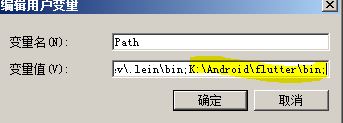
2)添加ANDROID_HOME环境变量,指向android SDK所在目录
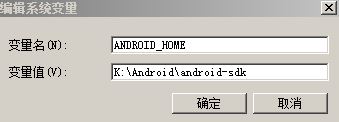
3, 设置国内镜像代理,然后执行flutter doctor
打开dos窗口,设置国内镜像
 set PUB_HOSTED_URL=https://pub.flutter-io.cn

 set FLUTTER_STORAGE_BASE_URL=https://storage.flutter-io.cn
备注:或者也可以直接添加系统变量,以备以后升级安装方便。
4,进行下一步之前,首先关闭杀毒杀木马程序,例如360之类,否则“flutter\bin\cache\artifacts\engine\android-arm64-release\windows-x64\gen_snapshot.exe” 会被认成木马,造成运行失败!
我这里的报错信息如下:
K:\Android\flutter>flutter doctor

Flutter assets will be downloaded from https://storage.flutter-io.cn. Make sure you trust this source!

Oops; flutter has exited unexpectedly.

Sending crash report to Google.
或者,给目录“flutter\bin”添加到信任白名单。如果还有问题,看一看flutter目录下的“flutter_##.log”文件查找原因,然后在解决即可。
5,运行flutter设置命令
flutter doctor
flutter会检测flutter SDK安装情况,然后下载dart SDK和其他依赖项目,由于网络问题运行时间较长,期间不免发生失败情况,需要多运行几次。
PS C:\Users\gzg> flutter doctor
Downloading android-arm-release/windows-x64 tools...
Download failed -- attempting retry 1 in 1 second...
Download failed -- attempting retry 2 in 2 seconds...
Download failed -- attempting retry 3 in 4 seconds...
Download failed -- attempting retry 4 in 8 seconds...
Download failed -- attempting retry 5 in 16 seconds...
Download failed -- attempting retry 6 in 32 seconds...
Download failed -- attempting retry 7 in 64 seconds...
Download failed -- attempting retry 8 in 64 seconds...
365.2s
Downloading android-arm64-profile/windows-x64 tools... 8.2s
Downloading android-arm64-release/windows-x64 tools... 7.6s
Downloading android-x86 tools...
Download failed -- attempting retry 1 in 1 second...
Download failed -- attempting retry 2 in 2 seconds...
142.8s
Downloading android-x64 tools... 53.4s
Downloading android-arm tools... 24.4s
Downloading android-arm-profile tools... Oops; flutter has exited unexpectedly.
Sending crash report to Google.
Failed to send crash report due to a network error: SocketException: OS Error: ä¿¡å·ç¯è¶…时时间已到
, errno = 121, address = clients2.google.com, port = 60527
Crash report written to C:\Users\gzg\flutter_03.log;
please let us know at https://github.com/flutter/flutter/issues.
PS C:\Users\gzg> flutter doctor
Downloading android-arm-profile tools...
Download failed -- attempting retry 1 in 1 second...
Download failed -- attempting retry 2 in 2 seconds...
Download failed -- attempting retry 3 in 4 seconds...
Download failed -- attempting retry 4 in 8 seconds...
Download failed -- attempting retry 5 in 16 seconds...
Download failed -- attempting retry 6 in 32 seconds...
254.5s
Downloading android-arm-release tools...
Download failed -- attempting retry 1 in 1 second...
61.0s
Downloading android-arm64 tools... 27.6s
Downloading android-arm64-profile tools...
Download failed -- attempting retry 1 in 1 second...
71.0s
Downloading android-arm64-release tools...
Download failed -- attempting retry 1 in 1 second...
Download failed -- attempting retry 2 in 2 seconds...
Download failed -- attempting retry 3 in 4 seconds...
Download failed -- attempting retry 4 in 8 seconds...
Download failed -- attempting retry 5 in 16 seconds...
6,最后,flutter doctor命令会给出环境检测结果,如果有些项目有问题,则按照其中说明修正,例如,我这里有两项有问题:
Doctor summary (to see all details, run flutter doctor -v):

[√] Flutter (Channel unknown, v0.0.0-unknown, on Microsoft Windows [Version 6.1.7601], locale zh-CN)

[!] Android toolchain - develop for Android devices (Android SDK 28.0.3)

    ! Some Android licenses not accepted.  To resolve this, run: flutter doctor --android-licenses

[√] Android Studio (version 3.2)

[√] IntelliJ IDEA Community Edition (version 2018.2)

[!] Connected device

    ! No devices available

! Doctor found issues in 2 categories.
第二项问题依照蓝色提示操作即可解决。最后一项虚拟机,建立一个虚拟机并启动,再次运行检测,没问题了!
C:\Users\gzg>flutter doctor

Doctor summary (to see all details, run flutter doctor -v):

[√] Flutter (Channel unknown, v0.0.0-unknown, on Microsoft Windows [Version 6.1.7601], locale zh-CN)

[√] Android toolchain - develop for Android devices (Android SDK 28.0.3)

[√] Android Studio (version 3.2)

[√] IntelliJ IDEA Community Edition (version 2018.2)

[√] Connected device (1 available)

• No issues found!
三、开始flutter之旅
在android studio中建立flutter项目
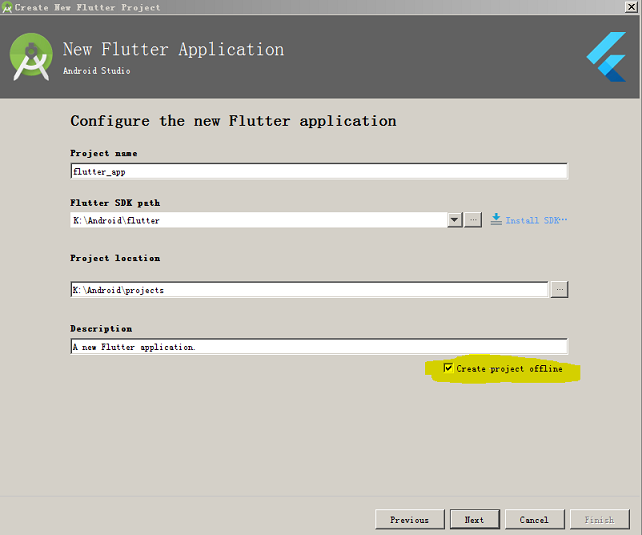
菜单“File--New--New Flutter Project...”,第一步选择“Flutter Application”,第二部输入项目名称,注意一定要选中下面的选项“create project offline”,否则在我的网络环境下就进行不下去了。
Flutter & Dart 安装在window系统的更多相关文章
- [flutter+dart] windows7下开发环境的安装与配置
前言 博主是做嵌入式的,参加工作时间也不久,而且是非科班出身,之前从未接触过移动开发.最近了解到了flutter框架和dart语言,想作为第二语言学习一下,因此会从最基础的环节开始,以此博客作为记录, ...
- 【Flutter 1-2】在 Windows 10下安装Flutter+Dart+Android Studio 配置Flutter开发环境
在 Windows 10下安装Flutter+Dart+Android Studio 配置Flutter开发环境 文章首发地址 配置环境变量 由于部分网站被墙的原因,我们需要先配置Flutter国内镜 ...
- vsftpd安装和使用 Linux系统和window系统
vsftpd 安装(Linux)一.安装系统环境 centos 6.9 64位二.vsftpd版本 vsftpd-2.2.2-24.el6.x86_64三.安装步骤1.安装 执行 yum -y ins ...
- 在window系统下安装Sass
1.Ruby下载 因为Sass依赖于Ruby环境,所以应先在window系统下安装Ruby,Ruby安装包下载链接:http://rubyinstaller.org/downloads/ 2.Ruby ...
- U盘安装window系统
U盘安装window系统: 1. 制作系统启动U盘,推荐使用老毛桃. 2. 电脑上插入U盘,启动系统,选择U盘启动. 3. 进入老毛桃选择界面,选择生成PE系统.推荐win8,之前在一个戴尔电脑上使用 ...
- mac系统 flutter从安装到第一个应用
mac系统 安装flutter 分三步: 1. 安装flutter sdk 2. flutter环境变量配置 3. 建立flutter应用 Flutter SDK下载 打开终端执行命令 git clo ...
- kvm安装window系统及使用NFS动态迁移
验证是否开启虚拟化 # grep -E 'svm|vmx' /proc/cpuinfo - vmx is for Intel processors - svm is for AMD processor ...
- mysql 学习之1 mysql在window系统下的安装
转载: https://blog.csdn.net/weixin_43295278/article/details/8287440 此方法只 适用 于window系统 坑 此篇文章在使用 alter ...
- Flutter开发环境(Window)配置及踩坑记录
Flutter 是 Google 用以帮助开发者在 iOS 和 Android 两个平台开发高质量原生 UI 的移动 SDK.Flutter 兼容现有的代码,免费且开源,在全球开发者中广泛被使用. F ...
随机推荐
- XX.exe 系统找不到指定文件
错误:unable to start ... XX.exe 系统找不到指定文件 今天调试一个项目,关于泊松融合的,项目名叫PoissonEditing,编译通过之后一直再报错,找不到PoissonEd ...
- Redis设计与实现:读书笔记之二
1.数据库 Redis服务器一般包含多个db,默认16个. 切换数据库 每个redis客户端都有自己的目标数据库,默认为0,可以通过select 1,切换数据库. 设置键的生存周期和过期时间 PTTL ...
- Nginx (LNMP+https)
单向认证与双向认证的概念 什么是单向认证 单项认证就是比如你有个密码用户名然后和服务器上的用户信息进行比对一致的话你们就可以建立连接. 什么是双向认证 SSL的双向认证就是客户端要获取服务端的证书,检 ...
- redis的主从服务器配置
1. redis的主从配置: (1)把redis的配置文件(reids.conf)拷贝2份 [root@192 redis]# cp redis.conf redis6380.conf [root@1 ...
- 小甲鱼Python第十四课后习题
字符串格式化符号含义 符 号 说 明 %c 格式化字符及其ASCII码[>>> '%c' %97 'a'] %s ...
- PHP03
PHP03 1.提交地址: action.用户点击提交后,发送请求的地址.一般为了便于维护,最常见的是提交给当前文件,然后在当前文件判断是否为表单提交请求,表单的处理逻辑放在Html之前,为了避免写死 ...
- JS自学笔记01
JS自学笔记01 1.开发工具 webstorm 2.js(javascript) 是一门脚本.解释性.动态类型.基于对象的语言 含三个部分: ECMAScript标准–java基本语法 DOM(Do ...
- JSP显示页面和数据库乱码
页面 和 数据库编码都是UTF-8,但就是奇怪. 指定Tomcat的编码为UTF-8 就行了
- 咏南APP(手机)开发框架
咏南APP(手机)开发框架 有意者可向咏南索取DEMO. 基于DELPHI官方的FIREMONKEY类库构建,不使用任何三方控件. 原生手机框架,支持各种手机硬件操作. 主界面 聊天 照相并分享 短信 ...
- 机器人中的轨迹规划(Trajectory Planning )
Figure. Several possible path shapes for a single joint 五次多项式曲线(quintic polynomial) $$\theta(t)=a_0+ ...