
Android 获得图片并解码成缩略图以减少内存消耗
本文内容
- 环境
- 演示
环境
- Windows 2008 R2 64 位
- Eclipse ADT V22.6.2,Android 4.4.3
- SAMSUNG GT-I9008L,Android OS 2.2.2
演示
缩略图能减少手机内存的消耗。网络上的资源一般对手机来说,大了点,把图片解码,减少其尺寸,从而减少手机内存的消耗。
本文采用的歌曲列表是 Android_Music_Demo_json_h_array.xml 文件,虽然文件后缀名是 .xml,但内部其实是 JSON 格式,因为 cnblog 不让上传 .json 格式的文件,该文件里的缩略图都较大,是 .jpg 格式,而与之对应的 Android_Music_Demo_json_array.xml 文件里的缩略图,都很小,都是才不到10k的 .png 格式。
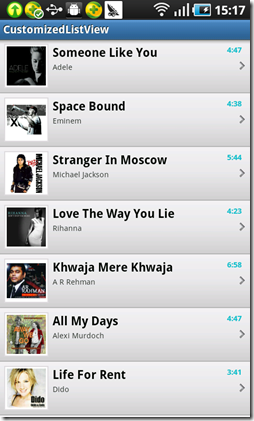
图 1
假设给定一个图片链接地址,想获得图片缩略图,核心代码如下所示,点击此处下载:
private Bitmap getBitmap(String url) {
File f = fileCache.getFile(url);
// from SD cache
Bitmap b = decodeFile(f);
if (b != null)
return b;
// from web
try {
Bitmap bitmap = null;
URL imageUrl = new URL(url);
HttpURLConnection conn = (HttpURLConnection) imageUrl
.openConnection();
conn.setRequestMethod("GET");
// Sets the flag indicating whether this URLConnection allows input.
// conn.setDoInput(true);
conn.setConnectTimeout(3000);
conn.setReadTimeout(3000);
// Flag to define whether the protocol will automatically follow
// redirects or not.
conn.setInstanceFollowRedirects(true);
int response_code = conn.getResponseCode();
if (response_code == 200) {
InputStream is = conn.getInputStream();
OutputStream os = new FileOutputStream(f);
StreamUtils.CopyStream(is, os);
os.close();
conn.disconnect();
bitmap = decodeFile(f);
return bitmap;
} else {
conn.disconnect();
return null;
}
} catch (Throwable ex) {
ex.printStackTrace();
if (ex instanceof OutOfMemoryError)
memoryCache.clear();
return null;
}
}
.csharpcode, .csharpcode pre
{
font-size: small;
color: black;
font-family: consolas, "Courier New", courier, monospace;
background-color: #ffffff;
/*white-space: pre;*/
}
.csharpcode pre { margin: 0em; }
.csharpcode .rem { color: #008000; }
.csharpcode .kwrd { color: #0000ff; }
.csharpcode .str { color: #006080; }
.csharpcode .op { color: #0000c0; }
.csharpcode .preproc { color: #cc6633; }
.csharpcode .asp { background-color: #ffff00; }
.csharpcode .html { color: #800000; }
.csharpcode .attr { color: #ff0000; }
.csharpcode .alt
{
background-color: #f4f4f4;
width: 100%;
margin: 0em;
}
.csharpcode .lnum { color: #606060; }
private Bitmap decodeFile(File f) {
try {
// decode image size
BitmapFactory.Options o = new BitmapFactory.Options();
o.inJustDecodeBounds = true;
FileInputStream stream1 = new FileInputStream(f);
BitmapFactory.decodeStream(stream1, null, o);
stream1.close();
// Find the correct scale value. It should be the power of 2.
final int REQUIRED_SIZE = 70;
int width_tmp = o.outWidth, height_tmp = o.outHeight;
int scale = 1;
while (true) {
if (width_tmp / 2 < REQUIRED_SIZE
|| height_tmp / 2 < REQUIRED_SIZE)
break;
width_tmp /= 2;
height_tmp /= 2;
scale *= 2;
}
// decode with inSampleSize
BitmapFactory.Options o2 = new BitmapFactory.Options();
o2.inSampleSize = scale;
FileInputStream stream2 = new FileInputStream(f);
Bitmap bitmap = BitmapFactory.decodeStream(stream2, null, o2);
stream2.close();
return bitmap;
} catch (FileNotFoundException e) {
} catch (IOException e) {
e.printStackTrace();
}
return null;
}
.csharpcode, .csharpcode pre
{
font-size: small;
color: black;
font-family: consolas, "Courier New", courier, monospace;
background-color: #ffffff;
/*white-space: pre;*/
}
.csharpcode pre { margin: 0em; }
.csharpcode .rem { color: #008000; }
.csharpcode .kwrd { color: #0000ff; }
.csharpcode .str { color: #006080; }
.csharpcode .op { color: #0000c0; }
.csharpcode .preproc { color: #cc6633; }
.csharpcode .asp { background-color: #ffff00; }
.csharpcode .html { color: #800000; }
.csharpcode .attr { color: #ff0000; }
.csharpcode .alt
{
background-color: #f4f4f4;
width: 100%;
margin: 0em;
}
.csharpcode .lnum { color: #606060; }
Android 获得图片并解码成缩略图以减少内存消耗的更多相关文章
- iOS的图片:解码(CPU)与内存(缓存)
图片的数据:资源数据(地址).原始数据(Data).显示数据(解码后的数据) 解压图片 - PNG或者JPEG压缩之后的图片文件会比同质量的位图小得多.但是在图片绘制到屏幕上之前,必须把它扩展成完整的 ...
- Android 三大图片加载框架的对比——ImageLoader,Picasso,Glide
一.ImageLaoder介绍 << Universal ImageLoader 是很早开源的图片缓存,在早期被很多应用使用 多线程下载图片,图片可以来源于网络,文件系统,项目文件夹ass ...
- Android大图片之缩略图,以及对原图依照指定宽高裁剪成缩略图
<Android大图片之变换缩略图,以及对原始大图片依照指定宽.高裁剪成缩略图> 在Android的ImageView载入图像资源过程中,出于性能和内存开销的须要.有时候须要把一个原 ...
- Android 获取SDCard上图片和视频的缩略图
获取图片缩略图和视频缩略图的方法: Java代码: import java.io.File; import android.app.Activity; import android.graphics. ...
- Java乔晓松-android中获取图片的缩略图(解决OutOfMemoryError)内存溢出的Bug
由于android获取图片过大是会出现内存溢出的Bug 07-02 05:10:13.792: E/AndroidRuntime(6016): java.lang.OutOfMemoryError 解 ...
- javacpp-FFmpeg系列之1:视频拉流解码成YUVJ420P,并保存为jpg图片
javacpp-ffmpeg系列: javacpp-FFmpeg系列之1:视频拉流解码成YUVJ420P,并保存为jpg图片 javacpp-FFmpeg系列之2:通用拉流解码器,支持视频拉流解码并转 ...
- Android开发之常用必备工具类图片bitmap转成字符串string与String字符串转换为bitmap图片格式
作者:程序员小冰,CSDN博客:http://blog.csdn.net/qq_21376985 QQ986945193 博客园主页:http://www.cnblogs.com/mcxiaobing ...
- Android压缩图片到100K以下并保持不失真的高效方法
前言:目前一般手机的相机都能达到800万像素,像我的Galaxy Nexus才500万像素,拍摄的照片也有1.5M左右.这么大的照片上传到服务器,不仅浪费流量,同时还浪费时间. 在开发Android企 ...
- Android大图片裁剪终极解决方案(上:原理分析)
转载声明:Ryan的博客文章欢迎您的转载,但在转载的同时,请注明文章的来源出处,不胜感激! :-) http://my.oschina.net/ryanhoo/blog/86842 约几个月前,我正 ...
随机推荐
- 微信emoji表情编码 、MySQL 存储 emoji 表情符号字符集
相关资料 微信emoji表情编码 微信用户名显示「emoji表情」 PHP处理微信中带Emoji表情的消息发送和接收(Unicode字符转码编码) MySQL 存储emoji表情 MySQL 存储 e ...
- Using Dtrace OEL 6.X
http://www.hhutzler.de/blog/using-dtrace/ http://docs.oracle.com/cd/E37670_01/E38608/html/dt_sdtparg ...
- 自己动手写Vue插件Toast
<style> .vue-toast { width: 100%; height: 100%; position: fixed; top: 0px; left: 0px; backgrou ...
- 怎样连接REDIS服务端
怎样连接REDIS服务端 REDIS服务器是TCP/IP SERVER,因此客户端要访问,必须先同服务器建立SOCKET连接,然后才可以发送各种REDIS COMMAND(指令). 首先要引用单元文件 ...
- UIView 的旋转和缩放
原文地址:http://www.cnblogs.com/gaoxiao228/archive/2012/05/04/2483577.html label.transform = CGAffineTra ...
- eclipse 大括号 改为C语言风格
http://lishunli.iteye.com/blog/1051701 一.原Eclipse生成的花括号情形 public class test { public static void mai ...
- JS 判断 undefined 类型
typeof 返回的是字符串,有六种可能:"number"."string"."boolean"."object".&q ...
- cloudera项目源代码
以下项目都需要安装git,Linux的git还是比较容易安装的,windows的git安装参考项目区域:软件版本控制-在Windows中使用Git视频介绍 git相关软件安装参考win7安装 git软 ...
- centos7更改为启动桌面或命令行模式
进入cenos7的命令行模式 终端输入“init 3”回车进入命令行模式 登录成功后 # systemctl get-default //获取当前系统启动模式 查看配置文件 # cat /etc/in ...
- [转]php curl经典最常用的5个例子
转自: http://www.jb100.net/html/content-22-821-1.html php curl常用的5个例子 我用php ,curl主要是抓取数据,当然我们可以用其他的方法来 ...