
Android控件进阶-自定义流式布局和热门标签控件
概述
详细
一、概述:
在日常的app使用中,我们会在android 的app中看见 热门标签等自动换行的流式布局,今天,我们就来看看如何
自定义一个类似热门标签那样的流式布局吧
类似的自定义换行流式布局控件。下面我们就来详细介绍流式布局的应用特点以及用的的技术点:
1.流式布局的特点以及应用场景
特点:当上面一行的空间不够容纳新的TextView时候,
才开辟下一行的空间
原理图:
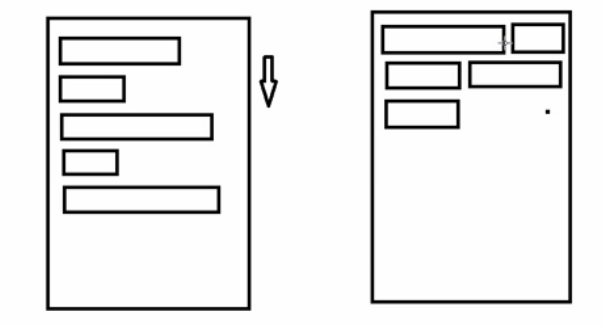
场景:主要用于关键词搜索或者热门标签等场景
2.自定义ViewGroup,重点重写下面两个方法
1、onMeasure:测量子view的宽高,设置自己的宽和高
2、onLayout:设置子view的位置
onMeasure:根据子view的布局文件中属性,来为子view设置测量模式和测量值
测量=测量模式+测量值;
测量模式有3种:
EXACTLY:表示设置了精确的值,一般当childView设置其宽、高为精确值、match_parent时,ViewGroup会将其设置为EXACTLY;
AT_MOST:表示子布局被限制在一个最大值内,一般当childView设置其宽、高为wrap_content时,ViewGroup会将其设置为AT_MOST;
UNSPECIFIED:表示子布局想要多大就多大,一般出现在AadapterView的item的heightMode中、ScrollView的childView的heightMode中;此种模式比较少见。
3.LayoutParams
ViewGroup LayoutParams :每个 ViewGroup 对应一个 LayoutParams; 即 ViewGroup -> LayoutParams
getLayoutParams 不知道转为哪个对应的LayoutParams ,其实很简单,就是如下:
子View.getLayoutParams 得到的LayoutParams对应的就是 子View所在的父控件的LayoutParams;
例如,LinearLayout 里面的子view.getLayoutParams ->LinearLayout.LayoutParams
所以 咱们的FlowLayout 也需要一个LayoutParams,由于上面的效果图是子View的 margin,
所以应该使用MarginLayoutParams。即FlowLayout->MarginLayoutParams
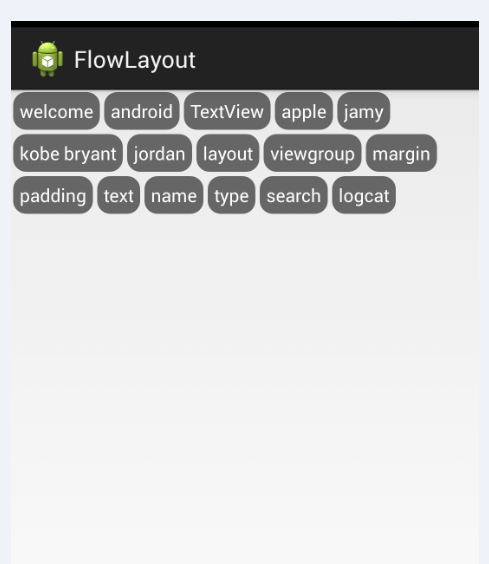
4.最后来看看实现的最终效果图:
二、热门标签的流式布局的实现:
1. 自定义热门标签的ViewGroup实现
根据上面的技术分析,自定义类继承于ViewGroup,并重写 onMeasure和onLayout等方法。具体核心实现代码如下:
package com.czm.flowlayout;

import java.util.ArrayList;

import java.util.List;

import android.content.Context;

import android.util.AttributeSet;

import android.view.View;

import android.view.ViewGroup;

/**

 *

 * @author caizhiming

 *

 */

public class XCFlowLayout extends ViewGroup{

    @Override

    protected void onMeasure(int widthMeasureSpec, int heightMeasureSpec) {

        // TODO Auto-generated method stub

        //父控件传进来的宽度和高度以及对应的测量模式

        int sizeWidth = MeasureSpec.getSize(widthMeasureSpec);

        int modeWidth = MeasureSpec.getMode(widthMeasureSpec);

        int sizeHeight = MeasureSpec.getSize(heightMeasureSpec);

        int modeHeight = MeasureSpec.getMode(heightMeasureSpec);

        //如果当前ViewGroup的宽高为wrap_content的情况

        int width = 0;//自己测量的 宽度

        int height = 0;//自己测量的高度

        //记录每一行的宽度和高度

        int lineWidth = 0;

        int lineHeight = 0;

        //获取子view的个数

        int childCount = getChildCount();

        for(int i = 0;i < childCount; i ++){

            View child = getChildAt(i);

            //测量子View的宽和高

            measureChild(child, widthMeasureSpec, heightMeasureSpec);

            //得到LayoutParams

            MarginLayoutParams lp = (MarginLayoutParams) child.getLayoutParams();

            //子View占据的宽度

            int childWidth = child.getMeasuredWidth() + lp.leftMargin + lp.rightMargin;

            //子View占据的高度

            int childHeight = child.getMeasuredHeight() + lp.topMargin + lp.bottomMargin;

            //换行时候

            if(lineWidth + childWidth > sizeWidth){

                //对比得到最大的宽度

                width = Math.max(width, lineWidth);

                //重置lineWidth

                lineWidth = childWidth;

                //记录行高

                height += lineHeight;

                lineHeight = childHeight;

            }else{//不换行情况

                //叠加行宽

                lineWidth += childWidth;

                //得到最大行高

                lineHeight = Math.max(lineHeight, childHeight);

            }

            //处理最后一个子View的情况

            if(i == childCount -1){

                width = Math.max(width, lineWidth);

                height += lineHeight;

            }

        }

        //wrap_content

        setMeasuredDimension(modeWidth == MeasureSpec.EXACTLY ? sizeWidth : width,

                modeHeight == MeasureSpec.EXACTLY ? sizeHeight : height);

    }

    @Override

    protected void onLayout(boolean changed, int l, int t, int r, int b) {

        // TODO Auto-generated method stub

        mAllChildViews.clear();

        mLineHeight.clear();

        //获取当前ViewGroup的宽度

        int width = getWidth();

        int lineWidth = 0;

        int lineHeight = 0;

        //记录当前行的view

        List<View> lineViews = new ArrayList<View>();

        int childCount = getChildCount();

        for(int i = 0;i < childCount; i ++){

            View child = getChildAt(i);

            MarginLayoutParams lp = (MarginLayoutParams) child.getLayoutParams();

            int childWidth = child.getMeasuredWidth();

            int childHeight = child.getMeasuredHeight();

            //如果需要换行

            if(childWidth + lineWidth + lp.leftMargin + lp.rightMargin > width){

                //记录LineHeight

                mLineHeight.add(lineHeight);

                //记录当前行的Views

                mAllChildViews.add(lineViews);

                //重置行的宽高

                lineWidth = 0;

                lineHeight = childHeight + lp.topMargin + lp.bottomMargin;

                //重置view的集合

                lineViews = new ArrayList();

            }

            lineWidth += childWidth + lp.leftMargin + lp.rightMargin;

            lineHeight = Math.max(lineHeight, childHeight + lp.topMargin + lp.bottomMargin);

            lineViews.add(child);

        }

        //处理最后一行

        mLineHeight.add(lineHeight);

        mAllChildViews.add(lineViews);

        //设置子View的位置

        int left = 0;

        int top = 0;

        //获取行数

        int lineCount = mAllChildViews.size();

        for(int i = 0; i < lineCount; i ++){

            //当前行的views和高度

            lineViews = mAllChildViews.get(i);

            lineHeight = mLineHeight.get(i);

            for(int j = 0; j < lineViews.size(); j ++){

                View child = lineViews.get(j);

                //判断是否显示

                if(child.getVisibility() == View.GONE){

                    continue;

                }

                MarginLayoutParams lp = (MarginLayoutParams) child.getLayoutParams();

                int cLeft = left + lp.leftMargin;

                int cTop = top + lp.topMargin;

                int cRight = cLeft + child.getMeasuredWidth();

                int cBottom = cTop + child.getMeasuredHeight();

                //进行子View进行布局

                child.layout(cLeft, cTop, cRight, cBottom);

                left += child.getMeasuredWidth() + lp.leftMargin + lp.rightMargin;

            }

            left = 0;

            top += lineHeight;

        }

    }

}
2.相关的布局文件:
引用自定义控件:
<RelativeLayout xmlns:android="http://schemas.android.com/apk/res/android"

    xmlns:tools="http://schemas.android.com/tools"

    android:id="@+id/container"

    android:layout_width="match_parent"

    android:layout_height="match_parent" >

    <com.czm.flowlayout.XCFlowLayout

        android:id="@+id/flowlayout"

        android:layout_width="match_parent"

        android:layout_height="match_parent" >

    </com.czm.flowlayout.XCFlowLayout>

</RelativeLayout>
三、使用该自定义布局控件类
最后,如何使用该自定义的热门标签控件类呢?很简单,请看下面实例代码:
package com.czm.flowlayout;

import android.app.Activity;

import android.graphics.Color;

import android.os.Bundle;

import android.view.ViewGroup.LayoutParams;

import android.view.ViewGroup.MarginLayoutParams;

import android.widget.TextView;

/**

 *

 * @author caizhiming

 *

 */

public class MainActivity extends Activity {

    private String mNames[] = {

            "welcome","android","TextView",

            "apple","jamy","kobe bryant",

            "jordan","layout","viewgroup",

            "margin","padding","text",

            "name","type","search","logcat"

    };

    private XCFlowLayout mFlowLayout;

    @Override

    protected void onCreate(Bundle savedInstanceState) {

        super.onCreate(savedInstanceState);

        setContentView(R.layout.activity_main);

        initChildViews();

    }

    private void initChildViews() {

        // TODO Auto-generated method stub

        mFlowLayout = (XCFlowLayout) findViewById(R.id.flowlayout);

        MarginLayoutParams lp = new MarginLayoutParams(

                LayoutParams.WRAP_CONTENT,LayoutParams.WRAP_CONTENT);

        lp.leftMargin = 5;

        lp.rightMargin = 5;

        lp.topMargin = 5;

        lp.bottomMargin = 5;

        for(int i = 0; i < mNames.length; i ++){

            TextView view = new TextView(this);

            view.setText(mNames[i]);

            view.setTextColor(Color.WHITE);

            view.setBackgroundDrawable(getResources().getDrawable(R.drawable.textview_bg));

            mFlowLayout.addView(view,lp);

        }

    }

}
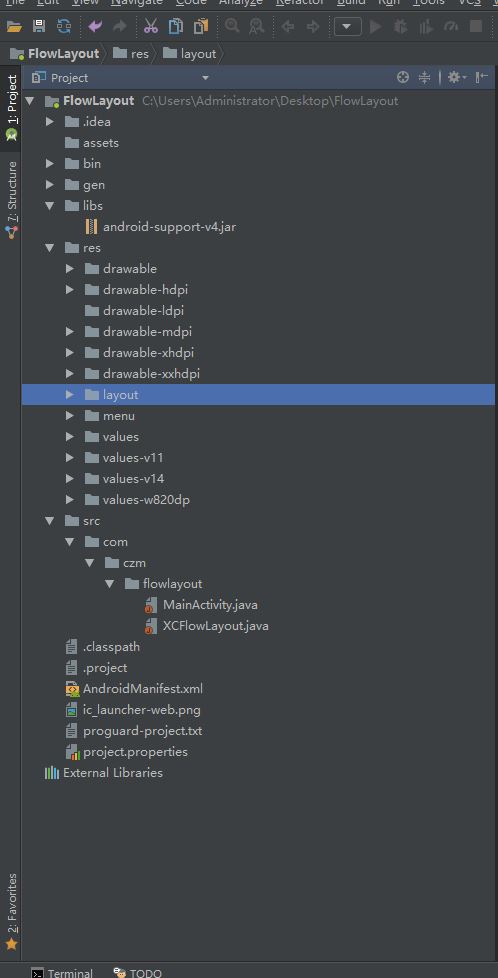
四、项目代码目录结构图
注:本文著作权归作者,由demo大师发表,拒绝转载,转载需要作者授权
Android控件进阶-自定义流式布局和热门标签控件的更多相关文章
- 自定义流式布局:ViewGroup的测量与布局
目录 1.View生命周期以及View层级 1.1.View生命周期 1.2.View层级 2.View测量与MeasureSpec类 2.1.MeasureSpec类 2.2.父View的限制 :测 ...
- Android中流式布局和热门标签
1.流式布局特点.应用场景.2.自定义ViewGroup (1)onMeasure:测量子View的宽和高,设置自己的宽和高. (2)onLayout:设置子View的位置. onMeasure:根据 ...
- android流式布局、待办事项应用、贝塞尔曲线、MVP+Rxjava+Retrofit、艺术图片应用等源码
Android精选源码 android模仿淘宝首页效果源码 一款艺术图片应用,采用T-MVVM打造 Android MVP + RxJava + Retrofit项目 android流式布局实现热门标 ...
- 【Android - 自定义View】之自定义可滚动的流式布局
首先来介绍一下这个自定义View: (1)这个自定义View的名称叫做 FlowLayout ,继承自ViewGroup类: (2)在这个自定义View中,用户可以放入所有继承自View类的视图,这个 ...
- Android 自定义View修炼-Android中常见的热门标签的流式布局的实现
一.概述:在日常的app使用中,我们会在android 的app中看见 热门标签等自动换行的流式布局,今天,我们就来看看如何 自定义一个类似热门标签那样的流式布局吧(源码下载在下面最后给出哈) 类似的 ...
- Android自定义之流式布局
流式布局,好处就是父类布局可以自动的判断子孩子是不是需要换行,什么时候需要换行,可以做到网页版的标签的效果.今天就是简单的做了自定义的流式布局. 具体效果: 原理: 其实很简单,Measure La ...
- 自定义View(三)--实现一个简单地流式布局
Android中的流式布局也就是常说的瀑布流很是常见,不仅在很多项目中都能见到,而且面试中也有很多面试官问道,那么什么是流式布局呢?简单来说就是如果当前行的剩余宽度不足以摆放下一个控件的时候,则自动将 ...
- 自定义ViewGroup 流式布局
使用 public class MainActivity extends Activity { @Override protected void onCreate(Bundle sav ...
- Android流式布局实现
查看我的所有开源项目[开源实验室] 欢迎增加我的QQ群:[201055521],本博客client下载[请点击] 摘要 新项目用到了一种全新布局----Android标签流式布局的功能,正好一直说给大 ...
随机推荐
- Leap Motion 上手体验
很早之前就关注了Leap Motion这个颠覆性的体感操作设备,如今7月22日上市至今已经一个月左右,淘宝的价格也已经降到650元,虽说相对国外还是偏贵,但是已经忍不住尝尝鲜了. Leap Motio ...
- 奇怪吸引子---ChenCelikovsky
奇怪吸引子是混沌学的重要组成理论,用于演化过程的终极状态,具有如下特征:终极性.稳定性.吸引性.吸引子是一个数学概念,描写运动的收敛类型.它是指这样的一个集合,当时间趋于无穷大时,在任何一个有界集上出 ...
- Boost.Asio 网络编程([译]Boost.Asio基本原理)
转自:https://m.w3cschool.cn/nlzbw/nlzbw-3vs825ya.html Boost.Asio基本原理 这一章涵盖了使用Boost.Asio时必须知道的一些事情.我们也将 ...
- Qt解决:Qobject::connect queue arguments of type ‘xxxx’,Make sure ‘xxxx’ is registered using qRegister
解决方法:在调用connect之前,通过 qRegisterMetaType() 注册你connect函数里对象的类型代码如下: typedef QString CustomString;//你自己定 ...
- C++中JSON的使用详解【转】
https://blog.csdn.net/admin_maxin/article/details/53175779 jsoncpp 主要包含三个class:Value.Reader.Writer.注 ...
- 用css3和jQuery制作精美的表单
用css3和jQuery制作一个简单的精美表单 html代码如下: <span class="title">Mask Your Input Forms and Make ...
- java中正则表达式基本用法(转)
https://www.cnblogs.com/xhj123/p/6032683.html 正则表达式是一种可以用于模式匹配和替换的规范,一个正则表达式就是由普通的字符(例如字符a到z)以及特殊字符( ...
- Get file extention in XSLT
When working with data view web parts or data form web parts in SharePoint, you might want to use ...
- OpenGL ES 3.0(五)
使用EGL(在iOS中是EAGL)创建屏幕渲染 加载顶点和片段着色器 创建程序对象,连接顶点和片段着色器,连接程序对象 设置视口 清除颜色缓冲区 绘制一个简单的图元(三角形) 显示缓冲区内容 1.创建 ...
- asp.net集合类
1.返回IEnumerable类型 protected void Page_Load(object sender, EventArgs e) { IEnumerable ie = AllGet(); ...