
Junit+ant+JaCoCo集成使用
接上文,本文主要介绍Junit+ant+JaCoCo集成使用
1、工具的下载上传
需要的工具有:
apache-ant-1.10.5-bin.tar
apache-tomcat-8.0.50.tar
jacoco-0.8.4-20190222.010339-7.zip
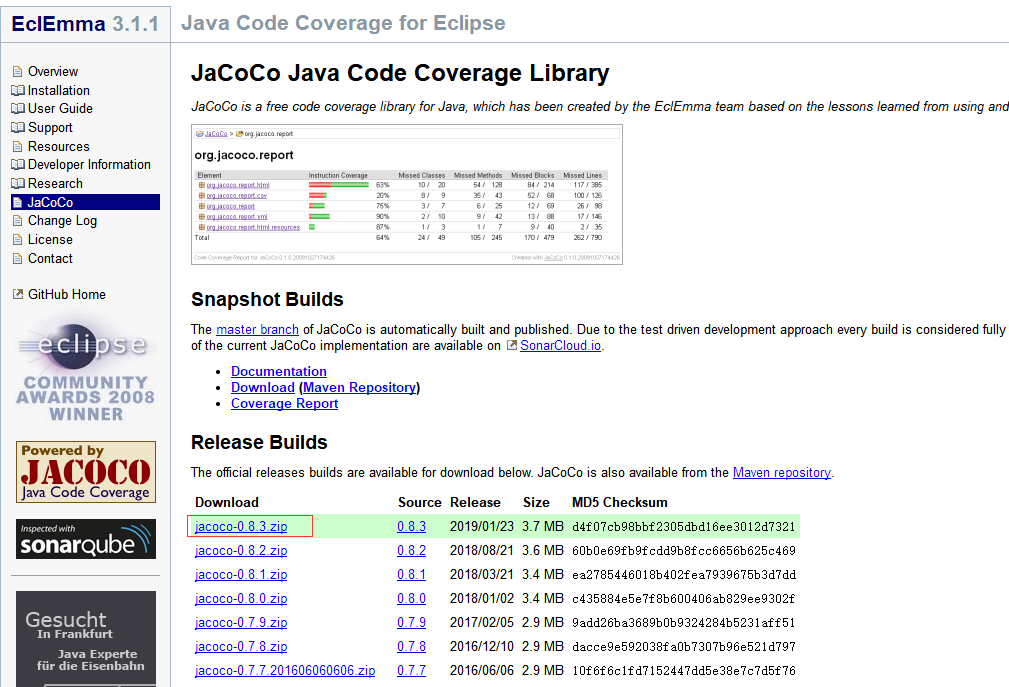
下载jacoco上传到到具体服务器:
也可以到官网下载:https://www.eclemma.org/jacoco/
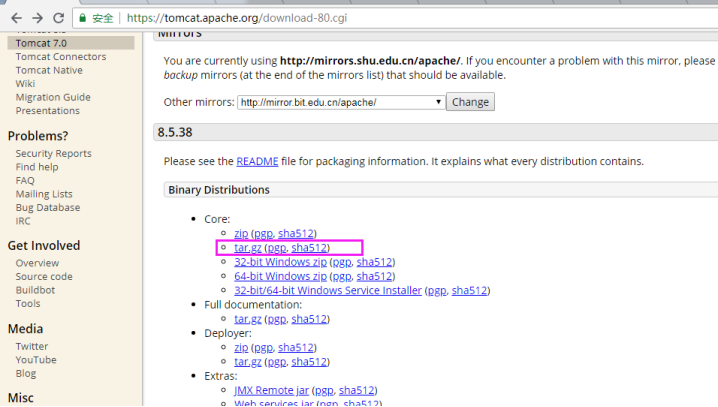
下载tomcat上传到服务器:https://tomcat.apache.org/
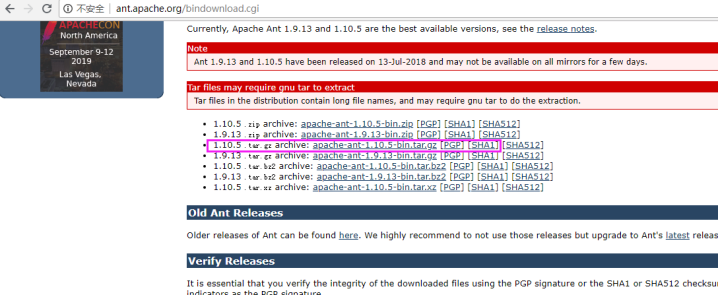
下载ant上传到服务器:http://ant.apache.org/bindownload.cgi
上传到具体的服务器,目录如下:

2、解压配置环境变量
tar -xvf apache-tomcat-8.0..tar.gz

tar -xvf apache-tomcat-8.0..tar

unzip jacoco-0.8.-20190222.010339-.zip
2.1、设置用户环境变量:输入命令:vim ~/.bashrc,有的环境是vim ~/.bash_profile,打开文件,输入ant需要的环境变量;如下内容:
ANT_HOME=/home/antjacocolinux/apache-ant-1.10.

PATH=$ANT_HOME/bin:$PATH

export PATH ANT_HOME
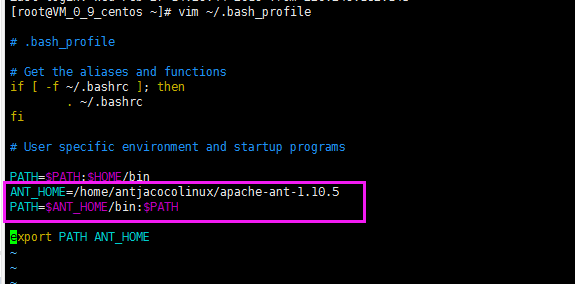
2.2 退出并保存:esc => shift + : => wq => 回车,设置环境变量后必须使命令生效!!再输入命令使之生效:source ~/.bash_profile

修改apache-tomcat-8.0.50目录下bin文件夹下的catalina.sh的JAVA_OPTS配置,如图新增:
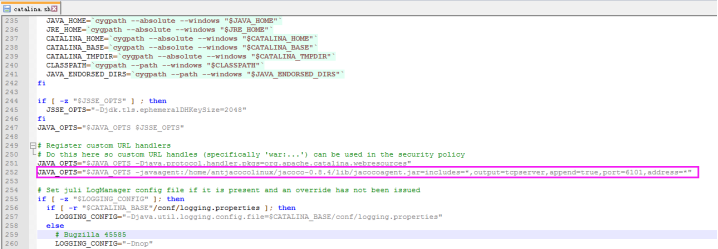
JAVA_OPTS="$JAVA_OPTS -javaagent:/home/antjacocolinux/jacoco-0.8.4/lib/jacocoagent.jar=includes=*,output=tcpserver,append=true,port=6101,address=*"
3、准备好ant项目,修改build.xml配置:
创建一个java工程,编写Calculator类
public class Calculator {

    public int evaluate(String expression) {

        int sum = ;

        for (String summand: expression.split("\\+"))

            sum += Integer.valueOf(summand);

        return sum;

    }

    public int missAdd(int a, int b) {

        return a + b;

    }

    public boolean beyondZero(int v) {

        if (v > ) {

            return true;

        } else {

            return false;

        }

    }

}
创建单元测试CalculatorTest 类
import static org.junit.Assert.assertEquals;

import org.junit.Test;

public class CalculatorTest {

    @Test

    public void evaluatesExpression() {

        Calculator calculator = new Calculator();

        int sum = calculator.evaluate("1+2+3");

        assertEquals(, sum);

    }

    @Test

    public void testChoose() {

        Calculator calculator = new Calculator();

        assertEquals(true, calculator.beyondZero());

    }

}
修改build.xml文件
<?xml version="1.0" encoding="UTF-8"?>

<project name="junit-example" default="rebuild" xmlns:jacoco="antlib:org.jacoco.ant">

    <description>

    这是一个简单的Demo,用来演示junit+ant+Jacoco

    </description>

    <property name="main.build.dir" value="build/main"/>

    <property name="main.src.dir" value="src/main/java"/>

    <property name="test.build.dir" value="build/test"/>

    <property name="test.src.dir" value="src/test/java"/>

    <property name="result.dir" location="./target" />

    <property name="result.report.dir" location="${result.dir}/site/jacoco" />

    <property name="result.exec.file" location="${result.dir}/jacoco.exec" />

    <taskdef uri="antlib:org.jacoco.ant" resource="org/jacoco/ant/antlib.xml">

        <classpath path="lib/jacocoant.jar" />

    </taskdef>

    <target name="clean">

        <delete dir="${result.dir}" />

        <delete dir="build" />

    </target>

    <path id="classpath.test">

        <pathelement location="lib/junit-4.12.jar"/>

        <pathelement location="lib/hamcrest-core-1.3.jar"/>

        <pathelement location="${main.build.dir}"/>

    </path>

    <target name="compile">

        <mkdir dir="${main.build.dir}"/>

        <javac srcdir="${main.src.dir}" destdir="${main.build.dir}"  debug="true" includeantruntime="false"/>

    </target>

    <target name="test-compile" depends="compile">

        <mkdir dir="${test.build.dir}"/>

        <javac srcdir="${test.src.dir}" destdir="${test.build.dir}" includeantruntime="false">

            <classpath refid="classpath.test"/>

        </javac>

    </target>

    <target name="test" depends="test-compile">

        <jacoco:coverage destfile="${result.exec.file}">

            <junit printsummary="yes" haltonfailure="yes" fork="true" forkmode="once">

                <classpath>

                    <path refid="classpath.test"/>

                    <pathelement location="${test.build.dir}"/>

                </classpath>

                <formatter type="brief" usefile="false" />

                <batchtest>

                    <fileset dir="${test.src.dir}" includes="**/*Test.java" />

                </batchtest>

            </junit>

        </jacoco:coverage>

    </target>

    <target name="report" depends="test">

        <jacoco:report>

            <executiondata>

                <file file="${result.exec.file}" />

            </executiondata>

            <structure name="JaCoCo Ant Example">

                <classfiles>

                    <fileset dir="${main.build.dir}" />

                </classfiles>

                <sourcefiles encoding="UTF-8">

                    <fileset dir="${main.src.dir}" />

                </sourcefiles>

            </structure>

            <html destdir="${result.report.dir}" />

            <csv destfile="${result.report.dir}/report.csv" />

            <xml destfile="${result.report.dir}/report.xml" />

        </jacoco:report>

    </target>

    <target name="rebuild" depends="clean,report" />

</project>
将该项目放到apache-tomcat-8.0.50/webapps下,到输入命令:
ant report
在对应的目录下会生成html的报告,目录如下:
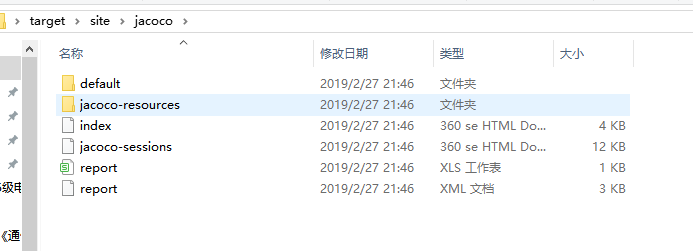
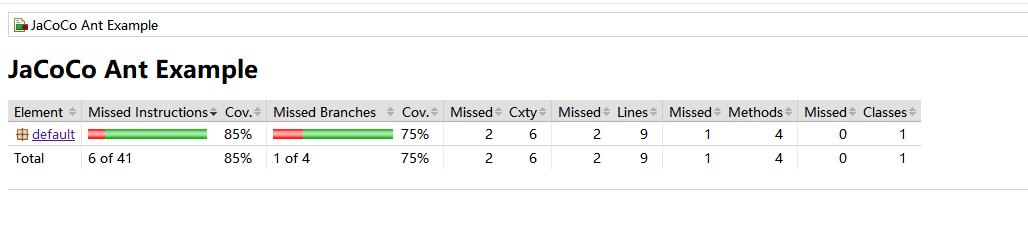
点击可以查看具体的报告:
相关代码下载:代码下载
Junit+ant+JaCoCo集成使用的更多相关文章
- 将jacoco集成到测试工具平台
最近在做接口测试,想通过代码覆盖率来判断一下接口用例是否缺失,但是每次通过命令来生成覆盖率报告,感觉太麻烦,所以就想着把jacoco集成到测试工具平台中,只需要点几个按钮,就能查看到覆盖率报告. 测试 ...
- 单元测试系列之一:如何使用JUnit、JaCoCo和EclEmma提高单元测试覆盖率
更多原创测试技术文章同步更新到微信公众号 :三国测,敬请扫码关注个人的微信号,感谢! 原文链接:http://www.cnblogs.com/zishi/p/6726664.html -----如 ...
- 学习笔记:首次进行JUnit+Ant构建自动的单元测试(二)
关键字:JUnit,Ant,单元测试 终于把JUnit+Ant构建单元测试的大概了解了,其实我实践的过程是对了,只是指导博客(看到这里不懂请看我上一篇博客)本身的错误“成功”把我带入“坑”,有时候网友 ...
- 学习笔记:首次进行JUnit+Ant构建自动的单元测试(一)
指导博客:https://blog.csdn.net/Cceking/article/details/51692010 基于软件测试的需求,使用JUnit+Ant构建自动的单元测试. IDE:ecli ...
- jenkins+jacoco+ant+apache集成统计web端功能测试覆盖率
一.覆盖率定义 作为一个测试人员,保证产品的软件质量是其工作首要目标,为了这个目标,测试人员常常会通过很多手段或工具来加以保证,覆盖率就是其中一环比较重要的环节. 我们通常会将测试覆盖率分为两个部分, ...
- DevOps之Pipeline集成junit、jacoco、SonarQube(二)
一.准备工作 1.准备一个持续集成的代码工程 工程下载地址: Github地址为:https://github.com/zbbkeepgoing/springboot-demo 2.springboo ...
- SpringBoot Junit Maven JaCoCo
写一下最近写单体测试的一些笔记. SrpingBoot的测试用例: @RunWith(SpringJUnit4ClassRunner.class) @SpringBootTest(classes = ...
- ant+Jacoco 统计tomcat远程部署后项目接口自动化测试或者功能测试代码覆盖率
1.安装ant 环境,https://ant.apache.org/bindownload.cgi 2.下载jacoco包 https://www.eclemma.org/jacoco/ ,解压后, ...
- Jenkins + Jmeter +Ant自动化集成环境搭建(一)
所需工具 一.jmeter 工具下载 https://jmeter.apache.org/ 配置环境JDK等及各种插件可以看小七之前的教程 二.Ant安装(http://ant.apache.org ...
随机推荐
- POJ 3167 Cow Pattern ★(KMP好题)
题意 给你一个数字序列S,再给一个数字序列pattern,S和pattern中的数字都是1到s(s<=25).每个序列里的数字都有个排名,也就是第几小,现在我们要用pattern来匹配S.在本题 ...
- express中的错误处理
错误处理 定义错误处理中间件和定义其他中间件一样,除了需要 4 个参数,而不是 3 个,其格式如下 (err, req, res, next).例如: app.use(function(err, re ...
- c# Middleware impl
using NUnit.Framework; using System; using System.Collections.Generic; using System.Linq; using Syst ...
- IOS-下载动画
就2小时教会你抽丝剥茧CAAnimation核心动画之精美的下载动画 header 设计灵感 设计此效果的作者 Nick; images 开始之前你需要了解的 先上一张CAAnimation层次图: ...
- 基于java的https双向认证,android上亦可用
From: http://my.oschina.net/jjface/blog/339144 概述: 客户端,浏览器或者使用http协议和服务器通信的程序. 如: 客户端通过浏览器访问某一网站时,如果 ...
- GlusterFS原创资源
学习博客: GlusterFS原创资源
- Loadrunner 11检查点使用方法总结
在使用Loadrunner 11进行性能测试中,有时需要对性能测试中的功能是否全部正确进行判断.这里就需要用到“检查点”,本文总结了常用三种协议下检查点的使用方法,希望阅读本文后的小伙伴们能够掌握其使 ...
- iOS开发探索-高斯模糊&毛玻璃效果
iOS开发中有的时候需要将图片设置模糊,来实现特定的效果获取更好的用户体验, iOS7之后半透明模糊效果得到大范围使用的比较大,现在也可以看到很多应用局部用到了图片模糊效果,可以通过高斯模糊和毛玻璃效 ...
- this指针逃逸问题
this指针逃逸是指在构造函数返回之前,其他线程已经就持有了该对象的应用,产生的结果自然和预期可能会产生差异.常见的this指针逃逸,在并发编程实战一书中,作者指出:在构造函数中注册事件监听,在构造函 ...
- Java反射-初步入门
Java反射-初步入门 学反射先了解什么是反射. 百度百科:JAVA反射机制是在运行状态中,对于任意一个类,都能够知道这个类的所有属性和方法:对于任意一个对象,都能够调用它的任意一个方法和属性:这种动 ...