
百度编辑器ueditor更改图片默认编辑工具
点击图片编辑器默认出现的工具
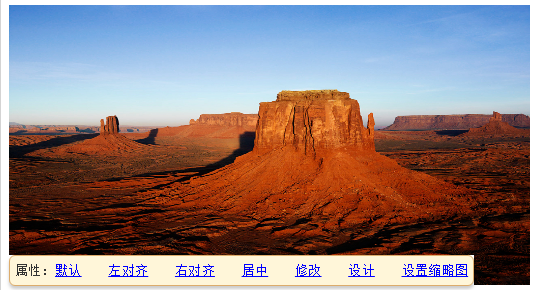
需求是点击图片不出现默认样式,而是在编辑器外出现图片属性编辑框,需求效果如下
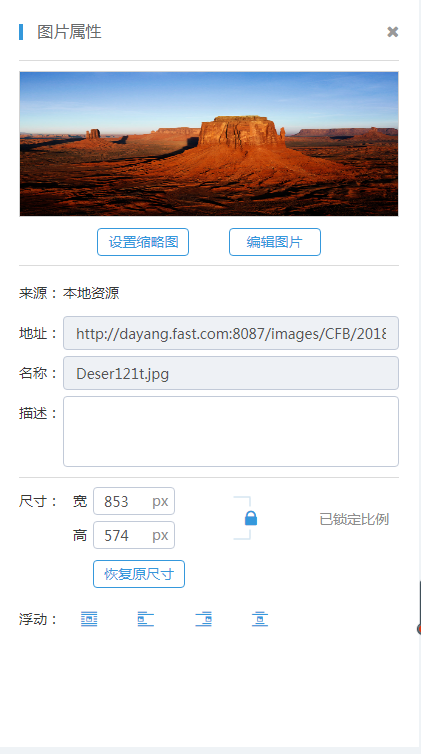
我的做法是在css里面将默认出现的工具隐藏,然后直接在ueditor.all.js里面修改Scale对象的show方法。原代码如下:
 show: function (targetObj) {

                var me = this;

                me.resizer.style.display = 'block';

                if(targetObj) me.attachTo(targetObj);

                domUtils.on(this.resizer, 'mousedown', me.proxy(me._eventHandler, me));

                domUtils.on(me.doc, 'mouseup', me.proxy(me._eventHandler, me));

                me.showCover();

                me.editor.fireEvent('afterscaleshow', me);

                me.editor.fireEvent('saveScene');

            },
更改后代码如下:
 show: function(targetObj) {

                    var me = this;

                    me.resizer.style.display = 'block';

                    if (targetObj) me.attachTo(targetObj);

                    domUtils.on(this.resizer, 'mousedown', me.proxy(me._eventHandler, me));

                    domUtils.on(me.doc, 'mouseup', me.proxy(me._eventHandler, me));

                    me.showCover();

                    me.editor.fireEvent('afterscaleshow', me);

                    me.editor.fireEvent('saveScene');

                    //下面是增加部分

                    if (me.target.localName == "img" || me.target.localName == "IMG") {

                        cmedit.EditSystem.imgClickEvent(targetObj); //图片属性

                    }

                },
另在js里写上图片点击方法:
        imgClickEvent: function(img) {

            $(".cont_right>div").not(".messagetabs").hide();

            var ue = UE.getEditor("editer_");

            var thisImg = $(img),

                description = thisImg.attr("description"),

                address = thisImg.attr("src"),

                name = thisImg.attr("alt"),

                originalWidth = thisImg.width(),

                originalHeight = thisImg.height();

            var imagePreview = '<img src="' + address + '" alt="' + name + '" style="width: 100%; height: 100%;">';

            $('#imgAddress').val(address);

            $('#imgName').val(name);

            $('#imgDescribe').val("");

            if (description) {

                $('#imgDescribe').val(description);

            }

            thisImg.attr("title", name);

            //判断图片来源

            if (typeof(thisImg.attr("cfbresourceid")) != "undefined") {

                $("#image_original").html("本地资源");

            } else if (typeof(thisImg.attr("fileid")) != "undefined") {

                $("#image_original").html("<span style='color:#C93111;' >媒资系统(CRE)</span>");

            }

            $('#image_preview').html(imagePreview);

            $('#back_to_original').off("click").on("click", function() {

                $('#img_width').val(originalWidth);

                $('#img_height').val(originalHeight);

                thisImg.width(originalWidth);

                thisImg.height(originalHeight);

            });

            $('#back_to_original').trigger("click");

            // 设置尺寸

            var ratio = $('#img_width').val() / $('#img_height').val();

            $('#image_size_lock').off("click").on("click", function() {

                $(this).children().toggleClass("icon-suo icon-jiesuo");

                ratio = $('#img_width').val() / $('#img_height').val();

                if ($(this).children().hasClass("icon-suo")) {

                    $('#lock_explain').html("已锁定比例");

                } else {

                    $('#lock_explain').html("已解锁比例");

                }

            });

            $('#img_width').off("input").on("input", function() {

                var imgSize = $(this).val();

                thisImg.width(imgSize);

                if ($('#image_size_lock').children().hasClass("icon-suo")) {

                    var newSize = parseInt(imgSize / ratio);

                    $('#img_height').val(newSize);

                    thisImg.height(newSize);

                }

            });

            $('#img_height').off("input").on("input", function() {

                var imgSize = $(this).val();

                thisImg.height(imgSize);

                if ($('#image_size_lock').children().hasClass("icon-suo")) {

                    var newSize = parseInt(imgSize * ratio)

                    $('#img_width').val(newSize);

                    thisImg.width(newSize);

                }

            });

            // 描述

            $('#imgDescribe').off("change").on("change", function() {

                var context = $(this).val();

                thisImg.attr("description", context);

            });

            //设置浮动

            $('#float_none').on("click", function() {

                ue.execCommand('imagefloat', 'none');

            });

            $('#float_left').on("click", function() {

                ue.execCommand('imagefloat', 'left');

            });

            $('#float_right').on("click", function() {

                ue.execCommand('imagefloat', 'right');

            });

            $('#float_middle').on("click", function() {

                ue.execCommand('imagefloat', 'center');

            });

            //设置缩略图

            $('#set_thumbnail_btn').on("click", function() {

                thisContext.uploadLitimg(address);

            });

            //编辑图片

            $('#edit_image_btn').on("click", function() {

                ue.execCommand("waterimage", address);

            });

            $('#imageProperty').show();

        },
百度编辑器ueditor更改图片默认编辑工具的更多相关文章
- asp.net 百度编辑器 UEditor 上传图片 图片上传配置 编辑器配置 网络连接错误,请检查配置后重试
1.配置ueditor/editor_config.js文件,将 //图片上传配置区 ,imageUrl:URL+"net/imageUp.ashx" //图片上传提交地址 ,im ...
- 百度编辑器ueditor的图片地址修正
我用的百度编辑器为1.4.2的,相对于现在这个时间来说是比较新的.之前去的1.3版的,后来更新到1.4之后出现路径问题.因为今天晚上出现特别奇怪的问题,所以特地又整了一遍,发现这玩意还是得自己弄通了好 ...
- 百度编辑器ueditor 字符限制
百度编辑器ueditor 字符限制 默认只能输入10000个字符 修改 ueditor.config.js // ,wordCount:true //是否开启字数统计 // ,maximumWords ...
- 工具,如何去掉百度编辑器 ueditor 元素路径、字数统计等
去掉如下截图: 在百度编辑器 ueditor 根目录下: ueditor.config.js 文件中 搜索并将参数elementPathEnabled设置成false即可 常用功能开关如下: ,ele ...
- 解决:百度编辑器UEditor,怎么将图片保存到图片服务器,或者上传到ftp服务器的问题(如果你正在用UE,这篇文章值得你看下)
在使用百度编辑器ueditor的时候,怎么将图片保存到另一个服务器,或者上传到ftp服务器?这个问题,估计很多使用UE的人会遇到.而且我百度过,没有找到这个问题的解决方案.那么:本篇文章就很适合你了. ...
- 【百度编辑器ueditor】工具,如何去掉百度编辑器 ueditor 元素路径、字数统计等
去掉如下截图: 在百度编辑器 ueditor 根目录下: ueditor.config.js 文件中 搜索并将参数elementPathEnabled设置成false即可 常用功能开关如下: ,ele ...
- FLASH图片上传功能—从百度编辑器UEditor里面提取出来
为了记录工作中碰到的各种问题,以及学习资料整理,今天开始,将以往的文章进行了一个整理,以后也开始认真的记录学习过程中的各种问题 在HTML里面的文件上传功能一直是个问题,为了实现上传文件大小限制,怎样 ...
- [转载]百度编辑器-Ueditor使用
前段时间发表过一篇关于“KindEditor在JSP中使用”的博文.这几天在沈阳东软进行JavaWeb方面的实习工作,在一个CMS系统的后台和博客板块中又要用到文本编辑器,突然发现了这个——百度编辑器 ...
- 百度编辑器 ueditor .net开发
ueditor1.4.3 下载地址:http://pan.baidu.com/s/1bnCQVtd <!--editor--> <script type="text/j ...
随机推荐
- kibana 安装
一 介绍 kibana 主要实现对日志的可视化显示. 二 安装 下载安装包: wget https://download.elastic.co/kibana/kibana/kibana-4.1.2-l ...
- Java 基于javaMail的邮件发送(支持附件)
基于JavaMail的Java邮件发送Author xiuhong.chen@hand-china.com Desc 简单邮件发送 Date 2017/12/8 项目中需要根据物料资质的状况实时给用户 ...
- django实现图片上传后自动修改尺寸并保存修改后的图到数据库和本地文件系统
图片上传首先要是设置settings.py文件(与静态文件设置类似) MEDIA_ROOT = os.path.join(BASE_DIR,'media')MEDIA_URL = '/media/' ...
- 设计模式--适配器模式C++实现
适配器模式C++实现 1定义Adapter 将一个类的接口变成客户端所需要的另外一种借口,从而使远不因为接口不匹配而无法合作的两个雷能够一起工作 又叫变压器模式,包装模式Wrapper 2类图 角色分 ...
- Linux命令详解-pwd
Linux中用 pwd 命令来查看"当前工作目录"的完整路径. 简单得说,每当你在终端进行操作时,你都会有一个当前工作目录. 在不太确定当前位置时,就会使用pwd来判定当前目录在文 ...
- 基于IDEA和Maven的SSM分层项目搭建
前言 虽然现在SpringBoot开始流行,但是SSM作为一个经典框架,还是有必要去了解一下. 项目建立 1.新建一个空白的Maven项目,如下图.然后把IDEA自动生成的多余src目录删掉. 2.右 ...
- python文件名不要跟模块名相同,报错AttributeError: 'module' object has no attribute 'Differ'
python中的文件都会生成pyc文件,包括模块也是这样,所以调用模块的时候,实际上会调用模块.pyc文件:在这个前提下,如果将文件名命名成跟模块名一样,在同一目录下就会生成一个跟模块名一样的pyc文 ...
- LeetCode OJ:Add and Search Word - Data structure design(增加以及搜索单词)
Design a data structure that supports the following two operations: void addWord(word) bool search(w ...
- ios8 - CoreLocation定位服务的变化
在iOS8开发中,发现一个CoreLocation的使用问题,执行操作之后,不会调用到定位之后的delegate方法中. 根据文档,需要在使用CoreLocation前调用方法: [locationm ...
- APUE学习笔记——10.18 system函数 与waitpid
system函数 system函数用方便在一个进程中执行命令行(一行shell命令). 用法如下: #include <stdio.h> #include <stdlib.h> ...