
VirtualBox network / study environment setup for RHEL
I re-visited the RHEL study material and setup the environment again, noted down the procedure.
1, copied the *.vdi (rhel6std.vdi and RHEL6-Student.vdi) file from Lenovo ThinkPad T400 to my new Lenovo ThinkPad X1, created the new machine by importing the *.vdi, no need to install the system again.
2, setup the network at Linux Instructor and Linux Student
In VirtualBox Manager, File->Preferences...->Network, to create "VirtualBox Host-Only Ethernet Adapter #2" and "VirtualBox Host-Only Ethernet #3".
The Adapter #2 leave it as default,

The Adapter #3 set as below, server address allocated as 192.168.18.100, server mask as 255.255.255.0, address range as 192.168.18.101 ~ 192.168.18.254:
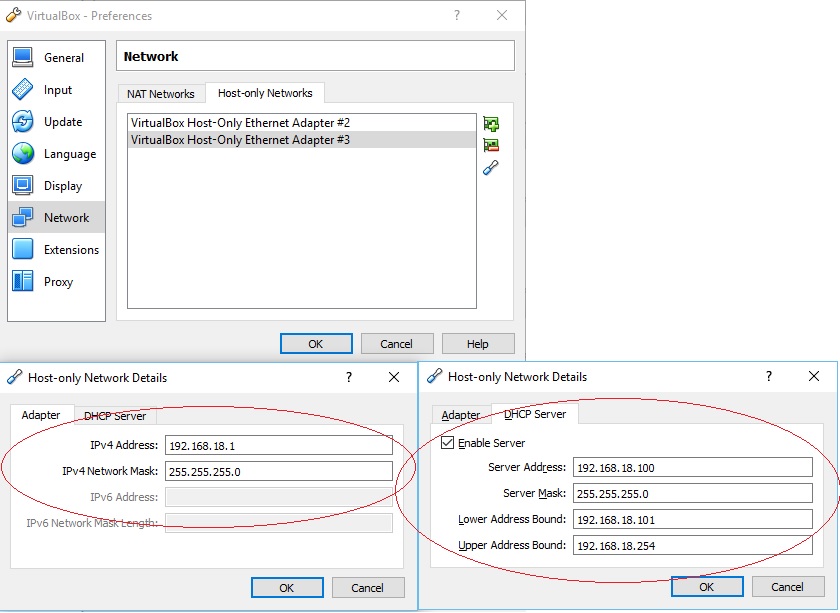
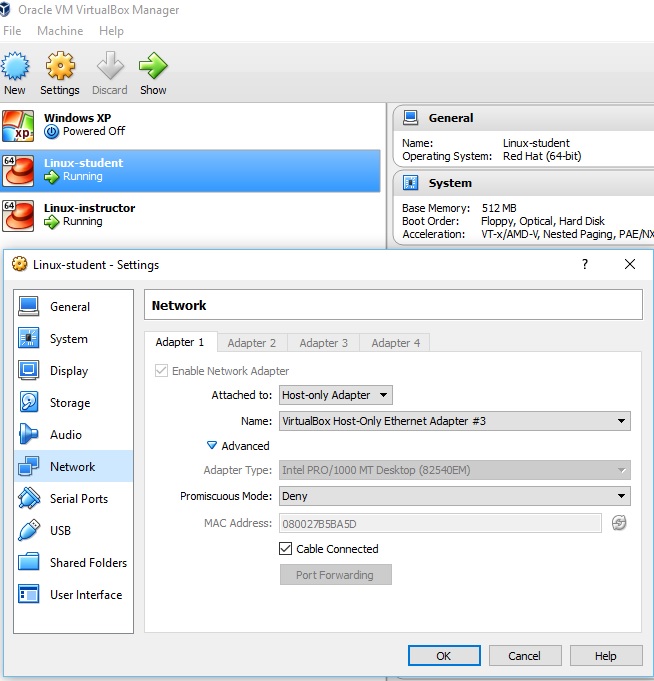
In Linux-student->Machine->Settings, set as below,
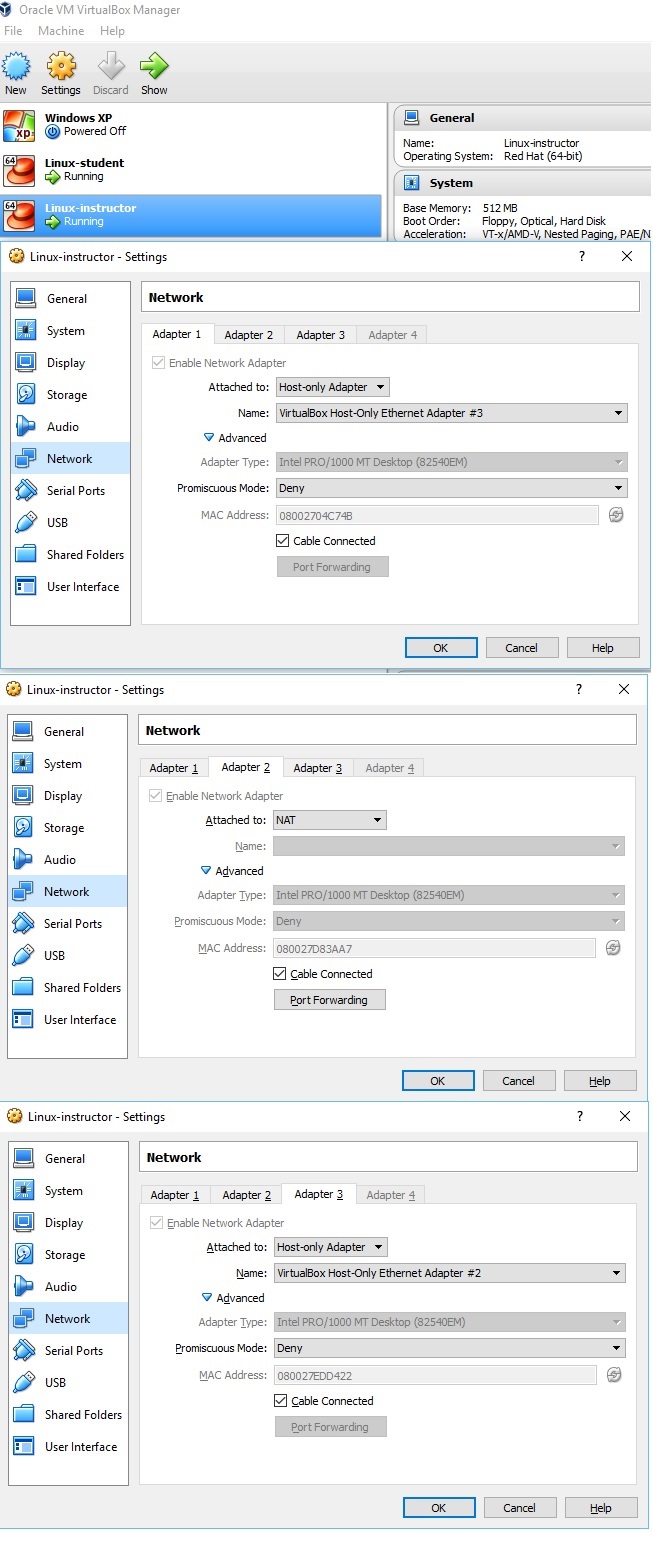
In Linux-Instructor->Machine->Settings, set as below,
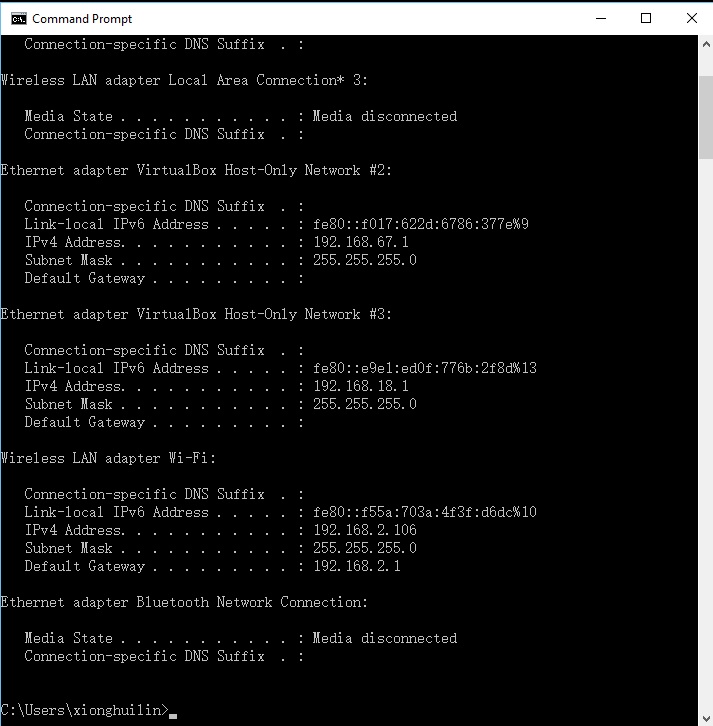
In Windows, the network configuration as below,
Network configuration on Linux-Instructor, as I cloned the machine, I didn't change anything and tried to test the network connection, but failed, the configuration as below,
/etc/sysconfig/network-scripts/glsorig-ifcfg-eth0
DEVICE="eth0"


BOOTPROTO="static"


DNS1="192.168.0.254"


HOSTNAME="instructor.example.com"


HWADDR="00:0C:29:65:C0:CE"


IPADDR="192.168.0.254"


MTU="1500"


NETMASK="255.255.255.0"


NM_CONTROLLED="yes"


ONBOOT="yes"
/etc/sysconfig/network-scripts/ifcfg-br0
DEVICE=br0


BOOTPROTO=none


IPADDR=192.168.0.254


NETMASK=255.255.255.0


DNS1=192.168.0.254


HOSTNAME="instructor.example.com"


IPV6INIT=no


NAME="Bridge eth0"


NM_CONTROLLED=no


ONBOOT=yes


PEERNTP="no"


DELAY=0


TYPE=Bridge


USERCTL=no
/etc/sysconfig/network-scripts/ifcfg-br0:0
# gls remote.test interface


DEVICE=br0:0


IPADDR=192.168.1.254


NETMASK=255.255.255.0


TYPE=Ethernet


BOOTPROTO=none


IPV6INIT=no


USERCTL=no
/etc/sysconfig/network-scripts/ifcfg-eth0
DEVICE=eth0


BOOTPROTO=none


DNS1=192.168.0.254


HOSTNAME="instructor.example.com"


IPADDR=192.168.0.254


MTU=1500


NETMASK=255.255.255.0


NM_CONTROLLED=yes


ONBOOT=yes


BRIDGE=br0


TYPE=Ethernet


HWADDR=08:00:27:04:C7:4B


IPV6INIT=no


USERCTL=no
/etc/sysconfig/network-scripts/ifcfg-eth1
DEVICE=eth1


BOOTPROTO=dhcp


ONBOOT=yes


TYPE=Ethernet


IPV6INIT=no


USERCTL=no
/etc/sysconfig/network-scripts/ifcfg-lo
DEVICE=lo


IPADDR=127.0.0.1


NETMASK=255.0.0.0


NETWORK=127.0.0.0


# If you're having problems with gated making 127.0.0.0/8 a martian,


# you can change this to something else (255.255.255.255, for example)


BROADCAST=127.255.255.255


ONBOOT=yes


NAME=loopback
Bringing up interface eth0: Device eth0 does not seem to be present, delaying initialization.
Bringing up interface eth1: Device eth0 does not seem to be present, delaying initialization.
As below,
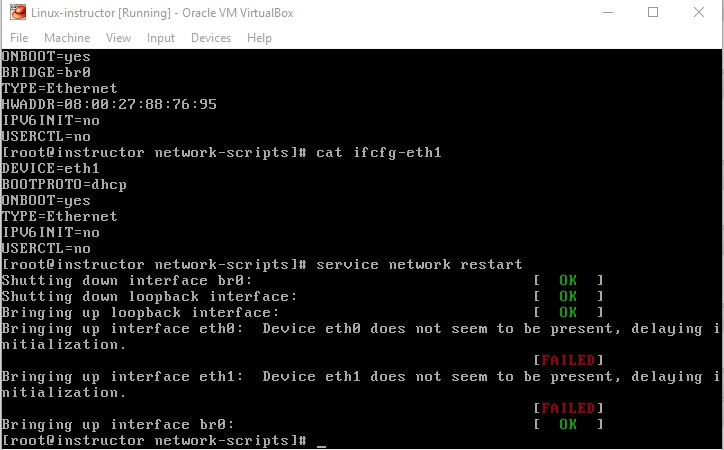
Delete the file /etc/udev/rules.d/70-persistent-net.rules, by commands:
mv 70-persistent-net.rules 70-persistent-net.rules.bak


reboot
encountered below problems,
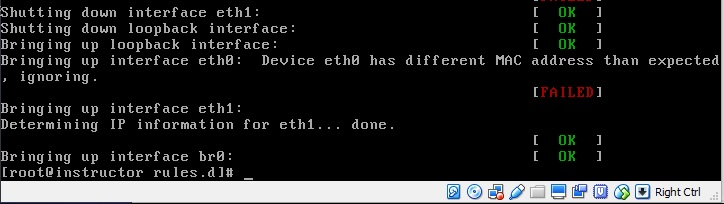
change the MAC_address in the ethernet configuration file as required, by commands,
ifconfig -a                                    #this is to get the MAC address of the etho0


vim /etc/sysconfig/network-scripts/ifcfg-eth0   #modify the MAC address in the configuration file
service network restart
For Linux-Instructors network configuration, I configured all and I am not sure which file makes it work.
Network configuration on Linux-Student, as below,
[student@server1 Desktop]$ cat /etc/sysconfig/network-scripts/ifcfg-eth0


DEVICE=eth0


BOOTPROTO=none


IPADDR=192.168.0.101


NETMASK=255.255.255.0


ONBOOT=yes


GATEWAY=192.168.0.254


TYPE=Ethernet


DNS1=192.168.0.254


IPV6INIT=no


USERCTL=no


PEERDNS=no
and by command
setup
In "Device configuration" -> "eth0 (eth0) - Intel Corporation 82540EM Gigabit Ethernet Controller"
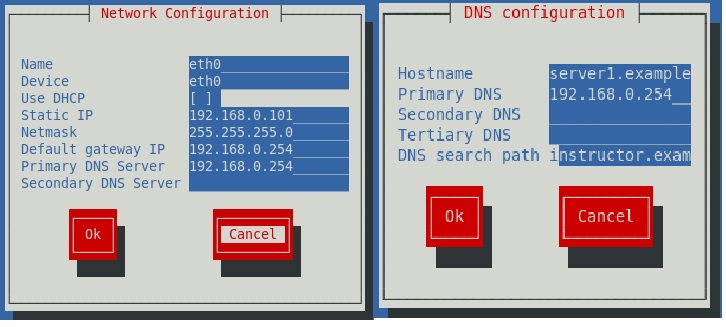
/etc/init.d/NetworkManager stop


chkconfig NetworkManager off


service network restart
3, testing the result from Linux-student and Linux-Instructor
the connection from Linux-student as Linux-student -> Linux-Instructor->Window Host-> Internet, testing ping 8.8.8.8, ping instructor.example.com, ping 192.168.0.254, all successful,
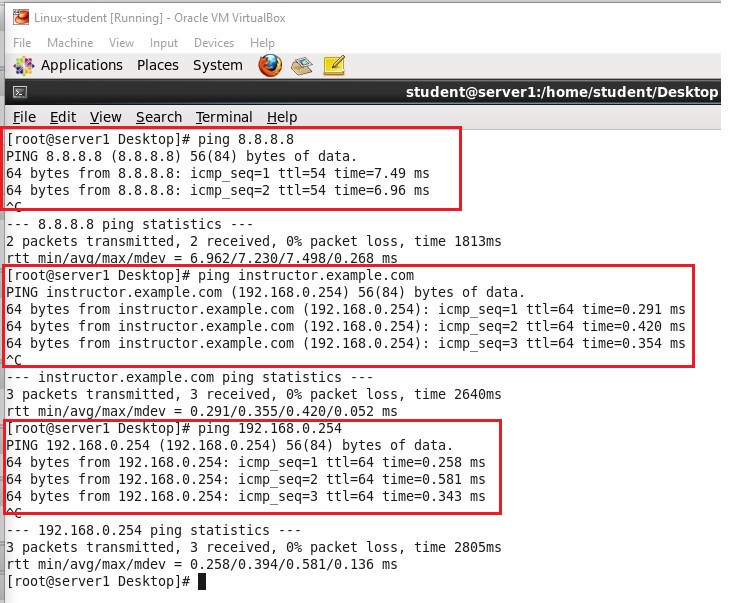
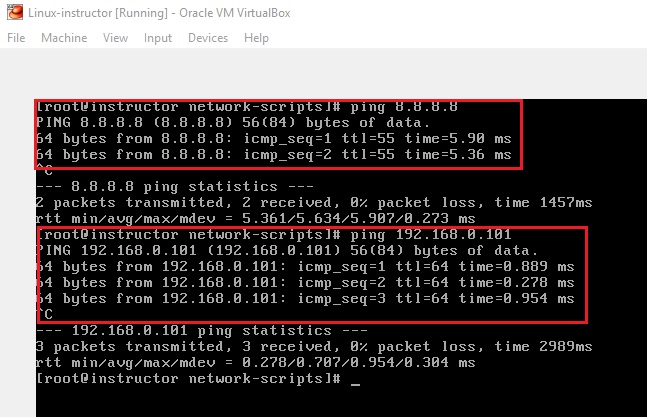
the connection from Linux -Instructor as, Linux-student -> Linux-Instructor->Window host-> Internet, testing ping 8.8.8.8, ping 192.168.0.101, all successful,
4, installation of VirtualBox Additions( VBOXADDITIONS_4.3.12_93733 ), and configure the share the folder between the Windows and Linux
Please refer to this link, http://xionghuilin.com/?p=7
5, reference links,
https://www.centos.org/forums/viewtopic.php?t=26971
https://www.centos.org/forums/viewtopic.php?t=7684
VirtualBox network / study environment setup for RHEL的更多相关文章
- Configure a bridged network interface for KVM using RHEL 5.4 or later?
environment Red Hat Enterprise Linux 5.4 or later Red Hat Enterprise Linux 6.0 or later KVM virtual ...
- Network Experiment Environment Construction
In order to provide an environment for network experiments in the future, I use VirutalBox to create ...
- VirtualBox Network Config
Sharing Host VPN with VirtualBox guest After looking for this solution everywhere, I finally found a ...
- Struts 2 - Environment Setup
Our first task is to get a minimal Struts 2 application running. This chapter will guide you on how ...
- [React Fundamentals] Development Environment Setup
In this lesson we'll setup a simple build process for converting our ES6 React components into ES5 u ...
- VirtualBox Network设置的NAT和Bridged Adapter模式区别
区别: NAT模式下,虚拟机仍然可以访问网络,但是从网络接收者的眼中看来,这些网络请求都来自宿主机,而感知不到虚拟机.外网也无法访问虚拟机网络.虚拟机和宿主机器的IP地址在不同的子网,比如192.16 ...
- [Flux] 1. Development Environment Setup
Install packages: { "name": "reactflux", "version": "1.0.0", ...
- [Environment setup]python+selenium+Eclipse+pydev环境搭建
转载自: http://www.cnblogs.com/Bonker/p/3584707.html http://www.cnblogs.com/fnng/archive/2013/05/29/310 ...
- Azure Sphere Development Environment Setup
1. Visual Studio 目前,Visual Studio 2017/2019支持Azure Sphere开发,后续,微软会加入Visual Studio Code的支持.以Visual St ...
随机推荐
- Hbase脚本小结
脚本使用小结: 1.开启集群,start-hbase.sh 2.关闭集群,stop-hbase.sh 3.开启/关闭所有的regionserver.zookeeper,hbase-daemons.sh ...
- 转:PHP获取浏览器类型及版本号
function getBrowser(){ $agent=$_SERVER["HTTP_USER_AGENT"]; if(strpos($agent,'MSIE')!==fals ...
- netctl
netctl is a CLI-based tool used to configure and manage network connections via profiles. It is a na ...
- 编译Spark2.1.2源码
源码编译的shell脚本为 /dev/make-distribution.sh ,下载源码包解压就能找到.不同版本使用的参数有差异.可以直接查看make-distribution.sh文件. 下载sp ...
- shell命令技巧——文本去重并保持原有顺序
简单来说,这个技巧相应的是例如以下一种场景 假设有文本例如以下 cccc aaaa bbbb dddd bbbb cccc aaaa 如今须要对它进行去重处理.这个非常easy,sort -u就能够搞 ...
- hrbustoj 1306:再遇攻击(计算几何,判断点是否在多边形内,水题)
再遇攻击 Time Limit: 1000 MS Memory Limit: 65536 K Total Submit: 253(37 users) Total Accepted: 56(2 ...
- hdu 1147:Pick-up sticks(基本题,判断两线段相交)
Pick-up sticks Time Limit: 4000/2000 MS (Java/Others) Memory Limit: 65536/32768 K (Java/Others)To ...
- Appium使用Python运行appium测试的实例
Appium使用Python运行appium测试的实例 一. Appium之介绍 https://testerhome.com/topics/8038 详情参考--https://testerhom ...
- 微擎app端上传图片后删除不了图片
相信在微擎开发的哥们都知道, 微擎在手册方面还是有点坑的,根本不让人活啊.没办法, 开发时, 只能自己看着源码来搞>>>> 好, 不多说了. 现在来看一个坑 ..直接上代码\ ...
- 系统管理模块_岗位管理_实现CRUD功能的具体步骤并设计Role实体
系统管理模块_岗位管理_实现CRUD功能的具体步骤并设计Role实体 1,设计实体/表 设计实体 --> JavaBean --> hbm.xml --> 建表 设计Role实体 p ...