
Struts 2 - Environment Setup
Our first task is to get a minimal Struts 2 application running. This chapter will guide you on how to prepare a development environment to start your work with Struts 2. I assume that you already have have JDK (5+), Tomcat and Eclipse installed on your machine. If you do not have these components installed then follow the given steps on fast track:
Step 1 - Setup Java Development Kit (JDK):
You can download the latest version of SDK from Oracle's Java site: Java SE Downloads. You will find instructions for installing JDK in downloaded files, follow the given instructions to install and configure the setup. Finally set PATH and JAVA_HOME environment variables to refer to the directory that contains java and javac, typically java_install_dir/bin and java_install_dir respectively.
If you are running Windows and installed the SDK in C:\jdk1.5.0_20, you would have to put the following line in your C:\autoexec.bat file.
set PATH=C:\jdk1.5.0_20\bin;%PATH%

set JAVA_HOME=C:\jdk1.5.0_20
Alternatively, on Windows NT/2000/XP, you could also right-click on My Computer, select Properties, then Advanced, then Environment Variables. Then, you would update the PATH value and press the OK button.
On Unix (Solaris, Linux, etc.), if the SDK is installed in /usr/local/jdk1.5.0_20 and you use the C shell, you would put the following into your .cshrc file.
setenv PATH /usr/local/jdk1.5.0_20/bin:$PATH

setenv JAVA_HOME /usr/local/jdk1.5.0_20
Alternatively, if you use an Integrated Development Environment (IDE) like Borland JBuilder, Eclipse, IntelliJ IDEA, or Sun ONE Studio, compile and run a simple program to confirm that the IDE knows where you installed Java, otherwise do proper setup as given document of the IDE.
Step 2 - Setup Apache Tomcat:
You can download the latest version of Tomcat from http://tomcat.apache.org/. Once you downloaded the installation, unpack the binary distribution into a convenient location. For example in C:\apache-tomcat-6.0.33 on windows, or /usr/local/apache-tomcat-6.0.33 on Linux/Unix and create CATALINA_HOME environment variable pointing to these locations.
Tomcat can be started by executing the following commands on windows machine, or you can simply double click on startup.bat
%CATALINA_HOME%\bin\startup.bat
or
C:\apache-tomcat-6.0.33\bin\startup.bat
Tomcat can be started by executing the following commands on Unix (Solaris, Linux, etc.) machine:
$CATALINA_HOME/bin/startup.sh
or
/usr/local/apache-tomcat-6.0.33/bin/startup.sh
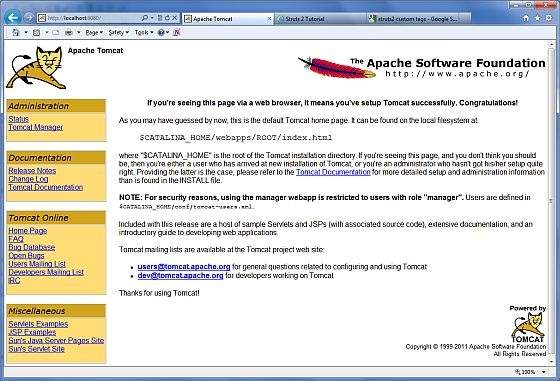
After a successful startup, the default web applications included with Tomcat will be available by visiting http://localhost:8080/. If everything is fine then it should display following result:
Tomcat can be stopped by executing the following commands on windows machine:
%CATALINA_HOME%\bin\shutdown
or
C:\apache-tomcat-5.5.29\bin\shutdown
Tomcat can be stopped by executing the following commands on Unix (Solaris, Linux, etc.) machine:
$CATALINA_HOME/bin/shutdown.sh
or
/usr/local/apache-tomcat-5.5.29/bin/shutdown.sh
Step 3 - Setup Eclipse (IDE)
All the examples in this tutorial has been written using Eclipse IDE. So I would suggest you have latest version of Eclipse installed on your machine.
To install Eclipse dDownload the latest Eclipse binaries from http://www.eclipse.org/downloads/. Once you downloaded the installation, unpack the binary distribution into a convenient location. For example in C:\eclipse on windows, or /usr/local/eclipse on Linux/Unix and finally set PATH variable appropriately.
Eclipse can be started by executing the following commands on windows machine, or you can simply double click on eclipse.exe
%C:\eclipse\eclipse.exe
Eclipse can be started by executing the following commands on Unix (Solaris, Linux, etc.) machine:
$/usr/local/eclipse/eclipse
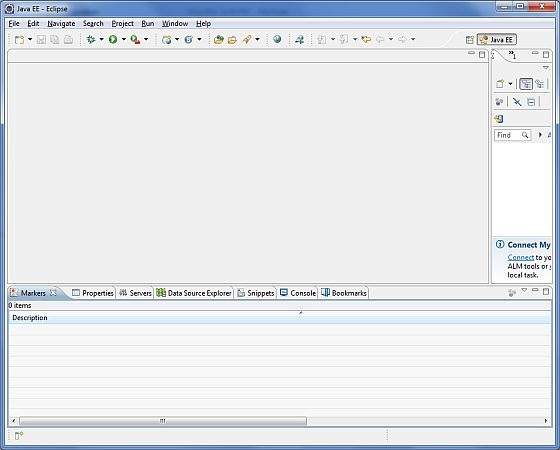
After a successful startup, if everything is fine then it should display following result:
Step 4 - Setup Struts2 Libraries
Now if everything is fine, then you can proceed to setup your Struts 2 faremwork. Following are the simple steps to download and install Struts2 on your machine.
- Make a choice whether you want to install Struts2 on Windows, or Unix and then proceed to the next step to download .zip file for windows and .tz file for Unix.
- Download the latest version of Struts2 binaries from http://struts.apache.org/download.cgi.
- At the time of writing this tutorial, I downloaded struts-2.0.14-all.zip and when you unzip the downloaded file it will give you directory structure inside C:\struts-2.2.3 as follows.
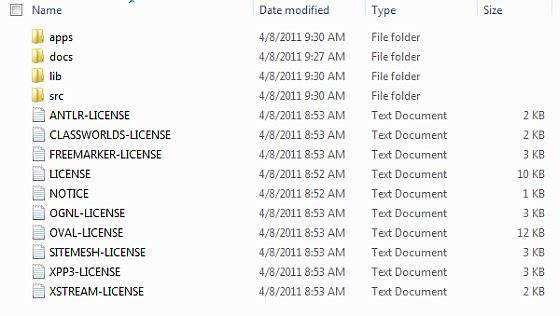
Second step is to extract the zip file in any location, I downloaded & extracted struts-2.2.3-all.zip in c:\ folder on my Windows 7 machine so that I have all the jar files into C:\struts-2.2.3\lib. Make sure you set your CLASSPATH variable properly otherwise you will face problem while running your application.
Struts 2 - Environment Setup的更多相关文章
- VirtualBox network / study environment setup for RHEL
I re-visited the RHEL study material and setup the environment again, noted down the procedure. 1, c ...
- [React Fundamentals] Development Environment Setup
In this lesson we'll setup a simple build process for converting our ES6 React components into ES5 u ...
- [Flux] 1. Development Environment Setup
Install packages: { "name": "reactflux", "version": "1.0.0", ...
- [Environment setup]python+selenium+Eclipse+pydev环境搭建
转载自: http://www.cnblogs.com/Bonker/p/3584707.html http://www.cnblogs.com/fnng/archive/2013/05/29/310 ...
- Azure Sphere Development Environment Setup
1. Visual Studio 目前,Visual Studio 2017/2019支持Azure Sphere开发,后续,微软会加入Visual Studio Code的支持.以Visual St ...
- Building and setting up QT environment for BeagleBone
There are too few information available on how to easily setup QT environment for building Beaglebon ...
- Struts 1 Struts 2
Key Technologies Primer https://struts.apache.org/primer.html Threads With Struts 1 you were require ...
- (转) [it-ebooks]电子书列表
[it-ebooks]电子书列表 [2014]: Learning Objective-C by Developing iPhone Games || Leverage Xcode and Obj ...
- javascript单元测试框架mochajs详解
关于单元测试的想法 对于一些比较重要的项目,每次更新代码之后总是要自己测好久,担心一旦上线出了问题影响的服务太多,此时就希望能有一个比较规范的测试流程.在github上看到牛逼的javascript开 ...
随机推荐
- GetVersionEx 正确获取windows10版本
vs2008直接将下面xml保存成文件添加到资源文件 vc的话insert-->Resource-->Custom-->输入24,ok-->id改为1-->把下面内容保存 ...
- SMO详解
转自:简书https://www.jianshu.com/p/55458caf0814 SVM通常用对偶问题来求解,这样的好处有两个:1.变量只有N个(N为训练集中的样本个数),原始问题中的变量数量与 ...
- Ubuntu硬盘空间不足时,添加硬盘的方法
Ubuntu下重新挂载一个硬盘:方法如下: 1 .在Vmware中关闭Ubuntu虚拟机,在设置中,添加新的硬件设备,选择Hard Disk.(这里如果不关闭Ubuntu系统就不能增加新的硬件设备) ...
- html基础知识汇总(二)之Emmet语法
div.imageBox+div.infoBox+input[type="button" class="starBtn"]*3 <div class=&q ...
- COGS 5. P服务点设置
5. P服务点设置 http://www.cogs.pro/cogs/problem/problem.php?pid=5 ★★ 输入文件:djsc.in 输出文件:djsc.out 简单对 ...
- 软件测试(二)PICT的使用 组合测试方法(两两组合测试,可遍历组合测试)
一.两两组合测试 # # 两两组合测试 # PLATFORH: x86, ia64, amd64 CPUS: Single, Dual, QUad PAHL: 120MB, 1GB, 4GB, 64G ...
- pentaho bi server 配置MySQL数据库
软件版本: jdk 1.7 MySQL 5.5 biserver-ce-6.1.0.1-196 (选择右下方的所有选项See All Activities) 一.前置环境安装 1.安装jdk(略) 2 ...
- 写给“有钱大爷”、”美工殿下”、“前端文艺青年”的微信HTML5页面设计建议
============================== 2018更新 iphone X 的设计内容 ============================== 我保证你一分钟就 ...
- JS设计模式——11.适配器模式
适配器模式概述 适配器模式可用来在现有接口和不兼容的类之间进行适配.使用这种模式的对象又叫包装器(wrapper). 适配器特点 从表面看,适配器模式很像门面模式.她们都要对别的对象进行包装并改变其呈 ...
- 洛谷 P4559: bzoj 5319: [JSOI2018]军训列队
题目传送门:洛谷 P4559. 题意简述: 有 \(n\) 个学生,编号为 \(i\) 的学生有一个位置 \(a_i\). 有 \(m\) 个询问,每次询问编号在 \([l,r]\) 区间内的学生跑到 ...