
ItemTemplateSelector
ItemTemplateSelector的中文翻译是模板选择器
是用来选择模板。
他的用法稍有不同,他必须派生于DataTemplateSelector类。
然后重写SelectTemplate这个方法,方法内由两个参数,一是对象所绑定的数据,二是你绑定的元素。方法有返回类型为DataTemplate的,不过默认值为Null
xaml则是通过绑定的方式。
模板选择的用比较广。
这里就介绍默认的使用方式。
通过数据或者对象元素来选择模板
选择器类
using System.Windows;

using System.Windows.Controls;

namespace WinMenu

{

    public class Select: DataTemplateSelector

    {

        private int i = ;

        public override DataTemplate SelectTemplate(object item, DependencyObject container)

        {

            var u = container as FrameworkElement;

            i++;

            if (i %  == )

                return u.FindResource("d1") as DataTemplate;

            else

                return u.FindResource("d2") as DataTemplate;

        }

    }

}
xaml代码:
 <Window.Resources>

        <local:Select  x:Key="sl2"/>

        <DataTemplate x:Key="d1">

            <Image x:Name="image" Height=""  Width="" Source="{Binding Image}"  />

        </DataTemplate>

        <DataTemplate x:Key="d2">

            <Image x:Name="image" Height="" Width="" Source="{Binding Image}"  />

        </DataTemplate>

        <Storyboard x:Key="S2">

            <DoubleAnimationUsingKeyFrames Storyboard.TargetProperty="(UIElement.RenderTransform).(TransformGroup.Children)[2].(RotateTransform.Angle)" >

                <EasingDoubleKeyFrame KeyTime="" Value=""/>

                <EasingDoubleKeyFrame KeyTime="" Value=""/>

                <EasingDoubleKeyFrame KeyTime="0:0:0.4" Value="-5"/>

                <EasingDoubleKeyFrame KeyTime="0:0:0.5" Value=""/>

            </DoubleAnimationUsingKeyFrames>

            <DoubleAnimationUsingKeyFrames Storyboard.TargetProperty="(UIElement.RenderTransform).(TransformGroup.Children)[0].(ScaleTransform.ScaleX)" >

                <EasingDoubleKeyFrame KeyTime="" Value=""/>

                <EasingDoubleKeyFrame KeyTime="" Value=""/>

                <EasingDoubleKeyFrame KeyTime="0:0:0.5" Value=""/>

            </DoubleAnimationUsingKeyFrames>

            <DoubleAnimationUsingKeyFrames Storyboard.TargetProperty="(UIElement.RenderTransform).(TransformGroup.Children)[0].(ScaleTransform.ScaleY)" >

                <EasingDoubleKeyFrame KeyTime="" Value=""/>

                <EasingDoubleKeyFrame KeyTime="" Value=""/>

                <EasingDoubleKeyFrame KeyTime="0:0:0.5" Value=""/>

            </DoubleAnimationUsingKeyFrames>

        </Storyboard>

    </Window.Resources>

    <Grid>

        <ListBox ItemTemplateSelector="{StaticResource sl2}"  x:Name="ListBoxFile" Margin="0,0,0,119"   >

            <ListBox.ItemsPanel>

                <ItemsPanelTemplate>

                    <StackPanel Orientation="Horizontal"/>

                </ItemsPanelTemplate>

            </ListBox.ItemsPanel>

            <ListBox.ItemContainerStyle>

                <Style  TargetType="ListBoxItem">

                    <Setter Property="RenderTransform" >

                        <Setter.Value>

                            <TransformGroup>

                                <ScaleTransform/>

                                <SkewTransform/>

                                <RotateTransform/>

                                <TranslateTransform/>

                            </TransformGroup>

                        </Setter.Value>

                    </Setter>

                    <Style.Triggers>

                        <EventTrigger  RoutedEvent="FrameworkElement.Loaded">

                            <BeginStoryboard Storyboard="{StaticResource S2}"/>

                        </EventTrigger>

                    </Style.Triggers>

                </Style>

            </ListBox.ItemContainerStyle>

        </ListBox>

        <Button Click="Button_Click" Margin="451,321,0,0"/>

    </Grid>
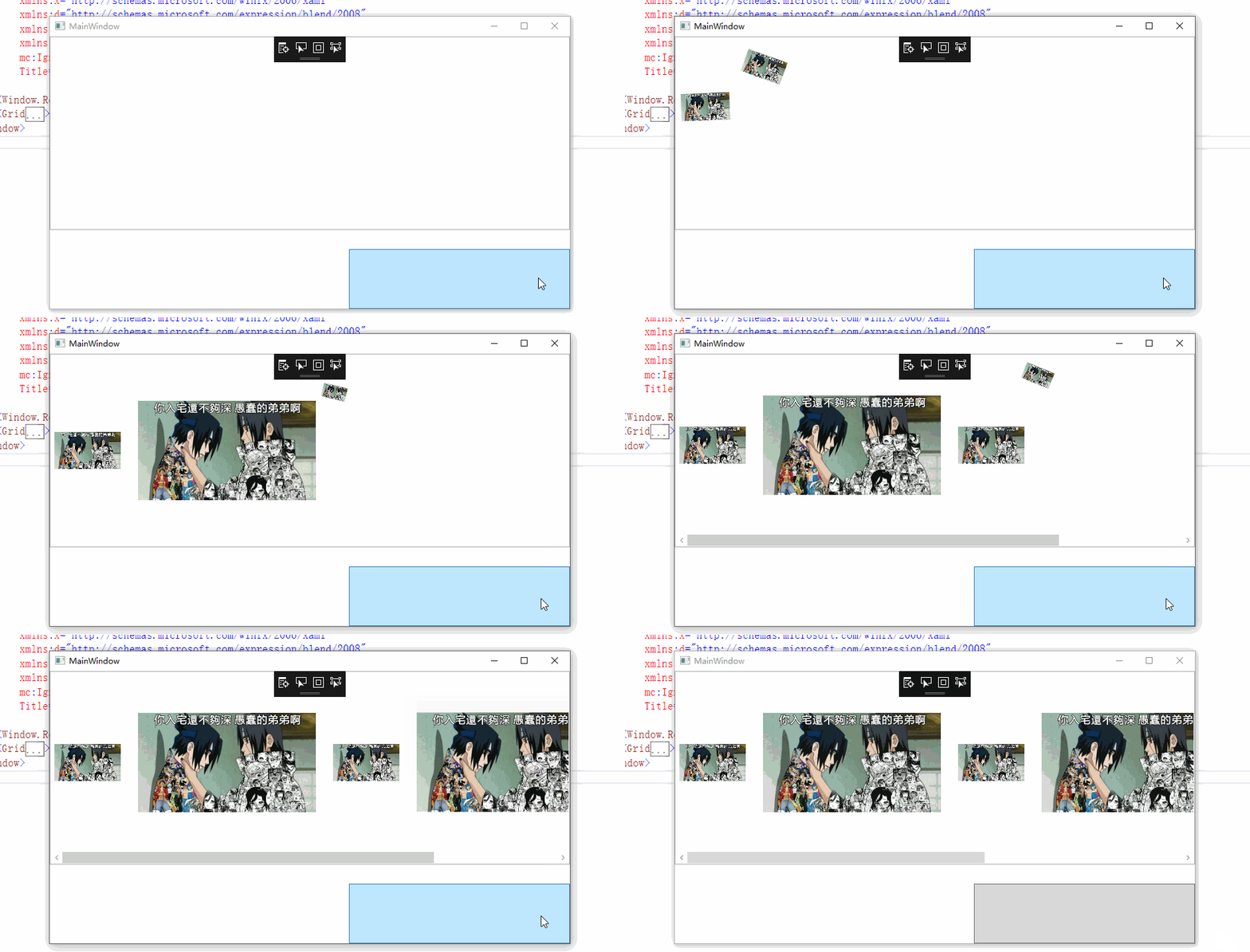
图片
ItemTemplateSelector的更多相关文章
- UWP开发入门(八)——聊天窗口和ItemTemplateSelector
我们平常用的最多的APP可能就是企鹅和微信了.有没有想过聊天窗口如何实现的?本篇我们将简单模拟一个聊天窗口. 聊天窗口大致上就是消息的一个集合列表.集合列表最常见的展现形式无非就是ListView.可 ...
- wpf Listbox 设置ItemContainerStyle后,ItemTemplateSelector不能触发
解决方案: 将Listbox 的ItemTemplateSelector 改为 ItemContainerStyle中ContentPresenter ContentTemplateSelector ...
- 项模板选择器属性(ItemTemplateSelector属性)和样式选择器(ItemContainerStyleSelector)
3.4.5 共享尺寸组 样式选择器: 或者========================================
- wpf ListView DataTemplate方式的鼠标悬停和选中更改背景色
今天使用wpf技术弄一个ListView的时候,由于需求需要,需要ListView显示不同的数据模板,很自然的使用了DataTemplate方式来定义多个数据模板,并在ListView中使用ItemT ...
- WPF Telerik TreeListView样式设计
Telerik控件 TreeListView 修改其中样式 1.添加TreeListView控件 <telerik:RadTreeView x:Name="ObjecTreeView& ...
- [WPF系列]-数据邦定之DataTemplate 对 ItemsControl 进行样式和模板处理
引言 即使 ItemsControl 不是 DataTemplate 所用于的唯一控件类型,将 ItemsControl 绑定到集合仍然很常见. 在 DataTemplate 中有哪些内容一节中, ...
- [WPF系列]-数据邦定之DataTemplate 根据对象属性切换模板
引言 书接上回[WPF系列-数据邦定之DataTemplate],本篇介绍如何根据属性切换模板(DataTemplate) 切换模板的两种方式: 使用DataTemplateSelecto ...
- WPF Combobox样式
<ControlTemplate x:Key="ComboBoxToggleButton" TargetType="{x:Type ToggleButton}&qu ...
- UWP开发随笔——UWP新控件!AutoSuggestBox!
摘要 要开发一款优秀的application,控件肯定是必不可少的,uwp就为开发者提供了各种各样的系统控件,AutoSuggestBox就是uwp极具特色的控件之一,也是相对于之前win8.1的ua ...
随机推荐
- android学习-Eclipse中修改Android项目图标
参考原文:http://blog.csdn.net/wpwbb510582246/article/details/52556753 方法一:替换res文件夹下的ic_launcher-web.png图 ...
- C#窗体中将窗体按钮与键盘关联
当击了某个按钮相当于是按了某个键盘上按键 private void btnPre_Click(object sender, EventArgs e) { this.treeView1.Focu ...
- resultset 记录数
JDBC中的ResultSet API没有直接获取记录条数的方法,现介绍几个: 方法一:利用ResultSet的getRow方法来获得ResultSet的总行数 Java代码 ResultSet rs ...
- spring bean单例注入与用单例模式通过class.getinstance()区别?
1.action的某个方法中,用以下代码获得redis单例实例 RedisDelegate redisDelegate = RedisDelegate.getInstance(); redisDele ...
- 从计算框架MapReduce看Hadoop1.0和2.0的区别
一.1.0版本 主要由两部分组成:编程模型和运行时环境. 编程模型为用户提供易用的编程接口,用户只需编写串行程序实现函数来实现一个分布式程序,其他如节点间的通信.节点失效,数据切分等,则由运行时环境完 ...
- spring中添加google的guava缓存(demo)
1.pom文件中配置 <dependencies> <dependency> <groupId>org.springframework</groupId> ...
- 采用AutoIt实现文件上传
在非常规的上传界面中,AutoIt可以操作Windows资源管理器实现上传路径的输入. AutoIt中编辑以下脚本,需通过“AutoIt Windows Info”定位资源管理器路径输入位置信息及打开 ...
- C++继承后的函数访问权限
今天在写代码时发现对继承后的函数访问权限不太清楚,于是自己做了个测试: 1.头文件(test.h) 1 #include <iostream> 2 using namespace std ...
- scala开发环境
1. Intellij IDEA Scala开发环境搭建 Intellij IDEA 15.0.3 默认配置里面没有Scala插件,需要手动安装,在Intellij IDEA 15.0.3 第一次运行 ...
- Spring.net页面属性注入
.条件spring.web程序集 1.1 system.web配置 <httpHandlers> <add verb="*" path="*.aspx& ...