
ipc 进程间通讯的AIDL
1.什么是aidl:aidl是 Android Interface definition language的缩写,一看就明白,它是一种android内部进程通信接口的描述语言,通过它我们可以定义进程间的通信接口
icp:interprocess communication :内部进程通信
2.既然aidl可以定义并实现进程通信,那么我们怎么使用它呢?文档/android-sdk/docs/guide/developing/tools/aidl.html中对步骤作了详细描述:
--1.Create your .aidl file - This
file defines an interface (YourInterface.aidl) that defines the methods
and fields available to a client.
创建你的aidl文件,我在后面给出了一个例子,它的aidl文件定义如下:写法跟java代码类似,但是这里有一点值得注意的就是它可以引用其它aidl文件中定义的接口,但是不能够引用你的java类文件中定义的接口
- package com.cao.android.demos.binder.aidl;
- import com.cao.android.demos.binder.aidl.AIDLActivity;
- interface AIDLService {
- void registerTestCall(AIDLActivity cb);
- void invokCallBack();
- }
--2.Add the .aidl file to your
makefile - (the ADT Plugin for Eclipse manages this for you). Android
includes the compiler, called AIDL, in the tools/ directory.
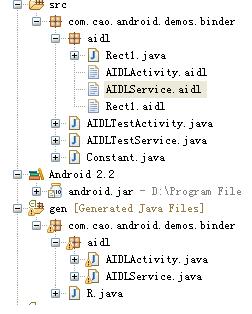
编译你的aidl文件,这个只要是在eclipse中开发,你的adt插件会像资源文件一样把aidl文件编译成java代码生成在gen文件夹下,不用手动去编译:编译生成AIDLService.java如我例子中代码
--3.Implement
your interface methods - The AIDL compiler creates an interface in the
Java programming language from your AIDL interface. This interface has
an inner abstract class named Stub that inherits the interface (and
implements a few additional methods necessary for the IPC call). You
must create a class that extends YourInterface.Stub and implements the
methods you declared in your .aidl file.
实现你定义aidl接口中的内部抽象类Stub,public
static abstract class Stub extends android.os.Binder implements
com.cao.android.demos.binder.aidl.AIDLService
Stub类继承了Binder,并继承我们在aidl文件中定义的接口,我们需要实现接口方法,下面是我在例子中实现的Stub类:
- private final AIDLService.Stub mBinder = new AIDLService.Stub() {
- @Override
- public void invokCallBack() throws RemoteException {
- Log("AIDLService.invokCallBack");
- Rect1 rect = new Rect1();
- rect.bottom=-1;
- rect.left=-1;
- rect.right=1;
- rect.top=1;
- callback.performAction(rect);
- }
- @Override
- public void registerTestCall(AIDLActivity cb) throws RemoteException {
- Log("AIDLService.registerTestCall");
- callback = cb;
- }
- };
Stub翻译成中文是存根的意思,注意Stub对象是在被调用端进程,也就是服务端进程,至此,服务端aidl服务端得编码完成了。
--4.Expose your interface to clients -
If you're writing a service, you should extend Service and override
Service.onBind(Intent) to return an instance of your class that
implements your interface.
第四步告诉你怎么在客户端如何调用服务端得aidl描述的接口对象,doc只告诉我们需要实现Service.onBind(Intent)方法,该方法会返回一个IBinder对象到客户端,绑定服务时不是需要一个ServiceConnection对象么,在没有了解aidl用法前一直不知道它是什么作用,其实他就是用来在客户端绑定service时接收service返回的IBinder对象的:
- AIDLService mService;
- private ServiceConnection mConnection = new ServiceConnection() {
- public void onServiceConnected(ComponentName className, IBinder service) {
- Log("connect service");
- mService = AIDLService.Stub.asInterface(service);
- try {
- mService.registerTestCall(mCallback);
- } catch (RemoteException e) {
- }
- }
- public void onServiceDisconnected(ComponentName className) {
- Log("disconnect service");
- mService = null;
- }
- };
mService就是AIDLService对象,具体可以看我后面提供的示例代码,需要注意在客户端需要存一个服务端实现了的aidl接口描述文件,但是客户端只是使用该aidl接口,不需要实现它的Stub类,获取服务端得aidl对象后mService
=
AIDLService.Stub.asInterface(service);,就可以在客户端使用它了,对mService对象方法的调用不是在客户端执行,而是在服务端执行。
4.aidl中使用java类,需要实现Parcelable接口,并且在定义类相同包下面对类进行声明:
上面我定义了Rect1类
之后你就可以在aidl接口中对该类进行使用了
package com.cao.android.demos.binder.aidl;
import com.cao.android.demos.binder.aidl.Rect1;
interface AIDLActivity {
void performAction(in Rect1 rect);
}
注意in/out的说明,我这里使用了in表示输入参数,out没有试过,为什么使用in/out暂时没有做深入研究。
5.aidl使用完整示例,为了清除说明aidl使用,我这里写了一个例子,例子参考了博客:
http://blog.csdn.net/saintswordsman/archive/2010/01/04/5130947.aspx
作出说明
例子实现了一个AIDLTestActivity,AIDLTestActivity通过bindservice绑定一个服务AIDLTestService,通过并获取AIDLTestActivity的一个aidl对象AIDLService,该对象提供两个方法,一个是registerTestCall注册一个aidl对象,通过该方法,AIDLTestActivity把本身实现的一个aidl对象AIDLActivity传到AIDLTestService,在AIDLTestService通过操作AIDLActivity这个aidl远端对象代理,使AIDLTestActivity弹出一个toast,完整例子见我上传的资源:
ipc 进程间通讯的AIDL的更多相关文章
- Android查缺补漏(IPC篇)-- 进程间通讯之AIDL详解
本文作者:CodingBlock 文章链接:http://www.cnblogs.com/codingblock/p/8436529.html 进程间通讯篇系列文章目录: Android查缺补漏(IP ...
- 守护进程,进程安全,IPC进程间通讯,生产者消费者模型
1.守护进程(了解)2.进程安全(*****) 互斥锁 抢票案例3.IPC进程间通讯 manager queue(*****)4.生产者消费者模型 守护进程 指的也是一个进程,可以守护着另一个进程 一 ...
- android IPC 进程间通讯
参考资料: http://blog.csdn.net/birdsaction/article/details/39451849 在这里我说一下学习技术的方法,别人的博客,别人的东西,再简单,自己没有写 ...
- 【IPC进程间通讯之二】管道Pipe
IPC进程间通信+管道Pipe IPC(Inter-Process Communication.进程间通信). 管道用于进程间共享数据,事实上质是共享内存 ...
- 【IPC进程间通讯之中的一个】邮槽MailSlot
IPC进程间通信+邮槽MailSlot IPC(Inter-Process Communication.进程间通信). 现代计算机採用虚拟内存机制,为进程提 ...
- 【IPC进程间通讯之三】内存映射文件Mapping File
IPC进程间通信+共享内存Mapping IPC(Inter-Process Communication.进程间通信). 文件映射(Mapping)是一种 ...
- Android查缺补漏(IPC篇)-- 进程间通讯基础知识热身
本文作者:CodingBlock 文章链接:http://www.cnblogs.com/codingblock/p/8479282.html 在Android中进程间通信是比较难的一部分,同时又非常 ...
- Android查缺补漏(IPC篇)-- Bundle、文件共享、ContentProvider、Messenger四种进程间通讯介绍
本文作者:CodingBlock 文章链接:http://www.cnblogs.com/codingblock/p/8387752.html 进程间通讯篇系列文章目录: Android查缺补漏(IP ...
- Android查缺补漏(IPC篇)-- 进程间通讯之Socket简介及示例
本文作者:CodingBlock 文章链接:http://www.cnblogs.com/codingblock/p/8425736.html 进程间通讯篇系列文章目录: Android查缺补漏(IP ...
随机推荐
- Yii::记录日志到自定义文件
默认情况下,Yii::log($msg, $level, $category)会把日志记录到runtime/application.log文件中 日志格式如下: [时间] - [级别] - [类别] ...
- 转mosquitto auth plugin 编译配置
配置使用 mysql 作为 be (back end) 使用config.mk 配置编译参数 cp config.mk.in config.mk 修改 安装 mysql sudo apt-get in ...
- TCP的发送缓冲区和接收缓冲区
TCP协议是作用是用来进行端对端数据传送的,那么就会有发送端和接收端,在操作系统有两个空间即user space和kernal space. 每个Tcp socket连接在内核中都有一个发送缓冲区和接 ...
- Tsung运行环境安装(转)
转自:http://www.cnblogs.com/tsbc/p/4272974.html#_Toc372013359 tsung Tsung运行环境安装 检查安装一下依赖包,以免在安装的时候报错.( ...
- 非变动性算法源代码分析与使用示例( for_each、min_element 、find_if、search 等)
非变动性算法代码分析与示例: 一.for_each C++ Code 1 2 3 4 5 6 7 8 9 10 11 12 13 14 // TEMPLATE FUNCTION for_eac ...
- WinForm下的键盘事件(KeyPress、KeyDown)及如何处理不响应键盘事件
KeyDown事件用来处理功能键:F1 F2 F3... keyPress事件用来处理字符比如说:A B C... 1 2 3... 注:处理该事件时,需要先将窗体的 KeyPreview=true; ...
- 温故而知新 js 点击空白处关闭气泡
诀窍1:使用el.contains(e) 来判断点击的区域诀窍2:使用mouseup 诀窍3:完成之后,移除事件 showpopover (e) { this.popover = !this.popo ...
- jdbc链接基础
1 jdbc 链接两种方式,通过jdbc链接mysql数据库,url:jdbc:mysql://ip:端口[/database name] 通过什么驱动器,链接什么数据库,数据库的ip,连接端口,可以 ...
- unity, SkinnedMeshRenderer.bones[i]不能直接赋值
SkinnedMeshRenderer.bones[i]=xxx,这样写不报错,但也不起作用. 正确的方法是: List<Transform> boneList=new List<T ...
- Swift 的 pod 第三方库
#HTTPpod 'Alamofire' #Elegant HTTP Networking in Swiftpod 'SwiftHTTP' #Thin wrapper around NSURLSess ...