
python操作三大主流数据库(5)python操作mysql⑤使用Jinja2模板提取优化页面展示
python操作mysql⑤使用Jinja2模板提取优化页面展示
在templates目录下的index.html、cat.html等页面有一些共同的元素,代码比较冗余
可以使用模板提取公共代码,在各网页中集成模板即可,这样会是代码看起来更加优雅
1.模板页面home_base.html
<!DOCTYPE html>

<html lang="en">

<head>

  <meta charset="UTF-8">

  <link rel="stylesheet" href="{{ url_for('static', filename='bootstrap-3.3.7-dist/css/bootstrap.min.css')}}">

  <link rel="stylesheet" type="text/css" href="{{ url_for('static', filename='main.css')}}">

  <link rel="stylesheet" type="text/css" href="{{ url_for('static', filename='datatables.min.css')}}">

  <script type="text/javascript" src="{{ url_for('static', filename='jquery-3.3.1.min.js')}}"></script>

  <script type="text/javascript">

        $(document).ready(function() {

            $('#example').DataTable();

        } );

  </script>

  {% block head %}

  <title>首页</title>

  {% endblock %}

</head>

<body>

<div class="container">

    <h1>新闻列表</h1>

  <nav class="navbar navbar-inverse">

      <!-- 页面头部 -->

      <div class="navbar-header">

          <button type="button" class="navbar-toggle collapsed" data-toggle="collapse" data-target="#navbar-menu" aria-expanded="false">

              <span class="sr-only">Toggle navigation</span>

              <span class="icon-bar"></span>

              <span class="icon-bar"></span>

              <span class="icon-bar"></span>

          </button>

      </div>

      <div id="navbar-menu" class="collapse navbar-collapse">

          <ul class="nav navbar-nav">

              <li class="active"><a href="/">首页</a></li>

              <li><a href="{{url_for('cat', name='推荐')}}">推荐</a></li>

              <li><a href="{{url_for('cat', name='百家')}}">百家</a></li>

              <li><a href="{{url_for('cat', name='推荐')}}">本地</a></li>

              <li><a href="{{url_for('cat', name='图片')}}">图片</a></li>

          </ul>

      </div>

  </nav>

<!-- 新闻内容部分 -->

{% block content %}

<!-- 内容区域 -->

{% endblock %}

</div>

{% block extrajs %}

<!-- 其他脚本 -->

{% endblock %}

</body>

</html>
2.首页index.html
{% extends 'home_base.html' %}

{% block content%}

<div id="content" class="row-fluid">

        <div class="col-md-12">

        <table id="example" class="table table-striped table-bordered" cellspacing="0" width="100%">

        <thead>

            <tr>

                <th>图片</th>

                <th>简介</th>

            </tr>

        </thead>

        <tfoot>

            <tr>

                <th>Name</th>

                <th>Position</th>

            </tr>

        </tfoot>

        <tbody>

        {% for obj in news_list %}

        <tr>

              <td>

              <img width=120 height=60 src="{{ obj.image }}" alt="图片">

              </td>

              <td>

              <p>

                <a href="{{ url_for('detail', pk=obj.id) }}">{{ obj.title }}</a>

                <small>{{ obj.created_at }}</small>

              </p>

              </td>

        </tr>

        {% endfor %}

        </tbody>

        </table>

        </div>

</div>

</div>

{% endblock %}

{% block extrajs %}

<script type="text/javascript" src="{{ url_for('static', filename = 'datatables.min.js')}}"></script>

{% endblock %}
3.详情页detail.html
{% extends 'home_base.html' %}

  {% block head %}

  <title>新闻详情</title>

  {% endblock %}

{% block content%}

<div id="content" class="row-fluid">

        <div class="col-md-9">

            <h2>新闻详情,来自新闻id> {{obj.id}}</h2>

        </div>

         <div class="col-md-12">

        <table id="example" class="table table-striped table-bordered" cellspacing="0" width="100%">

        <thead>

            <tr>

                <th>具体新闻内容</th>

            </tr>

        </thead>

        <tbody>

        <tr>

              <td>

              <img width=600 height=500 src="{{ obj.image }}" alt="图片">

              </td>

              <td>

        </tr>

        <tr>

              <td>

              <p>

                {{ obj.title }}

                <small>{{ obj.created_at }}</small>

              </p>

              </td>

        </tr>

        </tbody>

        </table>

        </div>

</div>

</div>

{% endblock %}

</body>

</html>
4.专栏页面cat.html
{% extends 'home_base.html' %}

{% block head%}

<title>{{ name }}</title>

{% endblock %}

{% block content%}

<div id="content" class="row-fluid">

        <div class="col-md-12">

        <table id="example" class="table table-striped table-bordered" cellspacing="0" width="100%">

        <thead>

            <tr>

                <th>图片</th>

                <th>简介</th>

            </tr>

        </thead>

        <tfoot>

            <tr>

                <th>Name</th>

                <th>Position</th>

            </tr>

        </tfoot>

        <tbody>

        {% for obj in news_list %}

        <tr>

              <td>

              <img width=120 height=60 src="{{ obj.image }}" alt="图片">

              </td>

              <td>

              <p>

                <a href="{{ url_for('detail', pk=obj.id) }}">{{ obj.title }}</a>

                <small>{{ obj.created_at }}</small>

              </p>

              </td>

        </tr>

        {% endfor %}

        </tbody>

        </table>

        </div>

</div>

</div>

{% endblock %}

{% block extrajs %}

<script type="text/javascript" src="{{ url_for('static', filename = 'datatables.min.js')}}"></script>

{% endblock %}
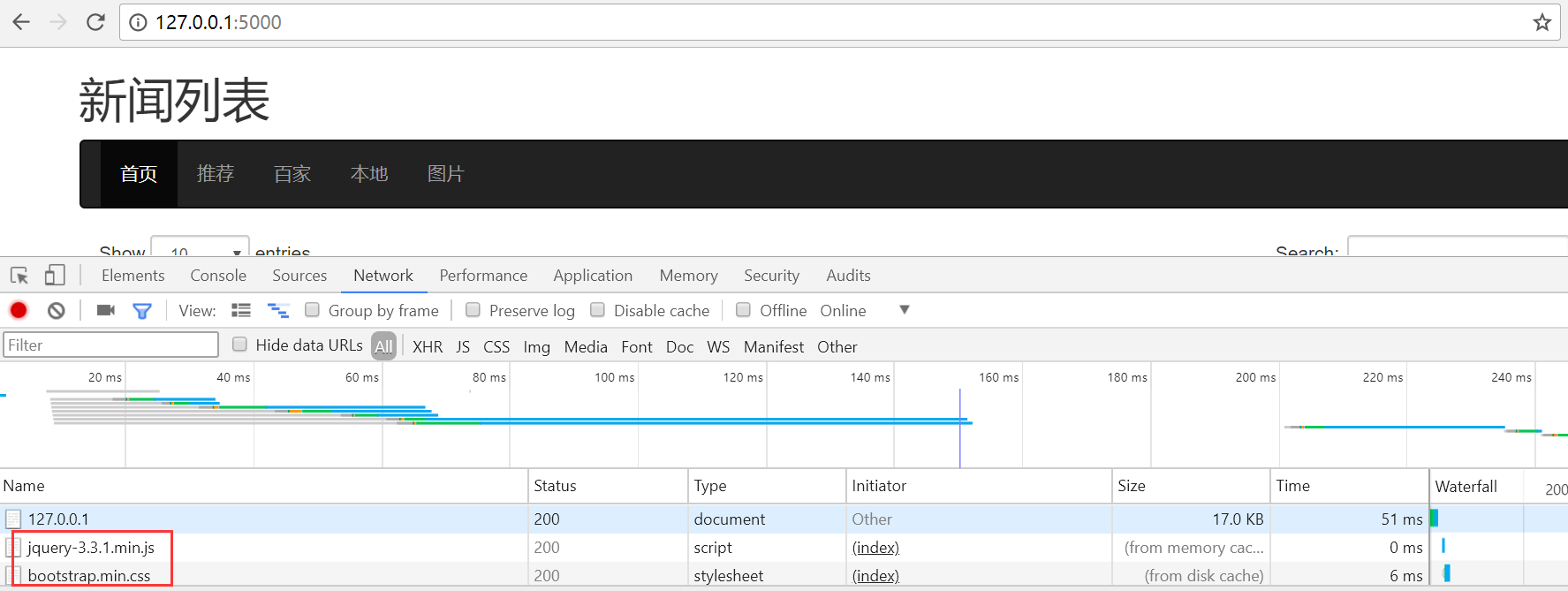
可以看到页面能够正常加载共用的js和css库文件
python操作三大主流数据库(5)python操作mysql⑤使用Jinja2模板提取优化页面展示的更多相关文章
- python操作三大主流数据库(14)python操作redis之新闻项目实战②新闻数据的展示及修改、删除操作
python操作三大主流数据库(14)python操作redis之新闻项目实战②新闻数据的展示及修改.删除操作 项目目录: ├── flask_redis_news.py ├── forms.py ├ ...
- python操作三大主流数据库(12)python操作redis的api框架redis-py简单使用
python操作三大主流数据库(12)python操作redis的api框架redis-py简单使用 redispy安装安装及简单使用:https://github.com/andymccurdy/r ...
- python操作三大主流数据库(10)python操作mongodb数据库④mongodb新闻项目实战
python操作mongodb数据库④mongodb新闻项目实战 参考文档:http://flask-mongoengine.readthedocs.io/en/latest/ 目录: [root@n ...
- python操作三大主流数据库(9)python操作mongodb数据库③mongodb odm模型mongoengine的使用
python操作mongodb数据库③mongodb odm模型mongoengine的使用 文档:http://mongoengine-odm.readthedocs.io/guide/ 安装pip ...
- python操作三大主流数据库(8)python操作mongodb数据库②python使用pymongo操作mongodb的增删改查
python操作mongodb数据库②python使用pymongo操作mongodb的增删改查 文档http://api.mongodb.com/python/current/api/index.h ...
- python操作三大主流数据库(7)python操作mongodb数据库①mongodb的安装和简单使用
python操作mongodb数据库①mongodb的安装和简单使用 参考文档:中文版:http://www.mongoing.com/docs/crud.html英文版:https://docs.m ...
- python操作三大主流数据库(6)python操作mysql⑥新闻管理后台功能的完善(增、ajax异步删除新闻、改、查)
python操作mysql⑥新闻管理后台功能的完善(增.删.改.查)安装表单验证D:\python\python_mysql_redis_mongodb\version02>pip instal ...
- python操作三大主流数据库(4)python操作mysql④python服务端flask和前端bootstrap框架结合实现新闻展示
python操作mysql④python服务端flask和前端bootstrap框架结合实现新闻展示 参考文档http://flask.pocoo.org/docs/0.11/http://flask ...
- python操作三大主流数据库(3)python操作mysql③python操作mysql的orm工具sqlaichemy安装配置和使用
python操作mysql③python操作mysql的orm工具sqlaichemy安装配置和使用 手册地址: http://docs.sqlalchemy.org/en/rel_1_1/orm/i ...
随机推荐
- 加密PDF文件的打印问题
工作中遇到网上下载的PDF文件加密,并且不能打印 解决方法: 1.解密: 去网站下载解密软件,1M左右:http://www.onlinedown.net/soft/19939.htm 直接解压,运行 ...
- jQuery使用(四):DOM操作之查找兄弟元素和父级元素
查找兄弟元素 向下查找兄弟元素 next() nextAll() nextUntil() 向上查找兄弟元素 prev() prevAll() prevUntil() 查找所有兄弟元素 siblings ...
- LR与SVM的异同
原文:http://blog.sina.com.cn/s/blog_818f5fde0102vvpy.html 在大大小小的面试过程中,多次被问及这个问题:“请说一下逻辑回归(LR)和支持向量机(SV ...
- SecureCRT通过拷贝配置文件登陆
不知道是不是SecureCRT有问题,有时候会出现配置丢失的情况,而自己又找不到密码了,于是从同事拷贝配置文件,发现可以成功复制服务器登陆信息 1.option -> global option ...
- java位运算(&、|、 ~、>>、>>> 、 ^)
1.& 与 数字按位进行与运算 101101 110111 100101 2.| 或 数字按位进行或运算 3.~ 非 数字按位取反 4.>> 右移 数字按位进行右移 正数右移高位补 ...
- 5年GTD自我管理经验,一块听听
我在胜利油田做了20多年的油田信息化工作,以前的我经常处于这样一种状态: 当我正在做着手边的一项事情时,头脑里却不断地蹦出来其它的事务,让我烦心不已,焦虑不安:PPT经常要拖到汇报当天的凌晨才做完,有 ...
- mysql驱动参数变化
在java平台使用的mysql jdbc驱动为:mysql-connector-java. 在项目中添加如下依赖: <dependency> <groupId>mysql< ...
- JS获得元素相对位置坐标getBoundingClientRect()
getBoundingClientRect用于获取某个元素相对于视窗的位置集合.集合中有top, right, bottom, left等属性. 1.语法:这个方法没有参数. rectObject = ...
- C# RestoreDirectory
OpenFileDialog与SaveFileDialog都有RestoreDirectory属性,这个属性默认是false,打开一 个文件后,那么系统默认目录就会指向刚才打开的文件.如果设为true ...
- CF920E Connected Components?
CF luogu 先讲两个靠谱的做法 1.首先因为有n个点,m条不存在的边,所以至少存在一个点,和m/n个点之间没边,所以把这个点找出来,连一下其他相连的点,这样还剩m/n个点没确定在哪个联通块,而这 ...