
Matplotlib中柱状图bar使用
一、函数原型
matplotlib.pyplot.bar(left, height, alpha=1, width=0.8, color=, edgecolor=, label=, lw=3)
1. left:x轴的位置序列,一般采用range函数产生一个序列,但是有时候可以是字符串
2. height:y轴的数值序列,也就是柱形图的高度,一般就是我们需要展示的数据;
3. alpha:透明度,值越小越透明
4. width:为柱形图的宽度,一般这是为0.8即可;
5. color或facecolor:柱形图填充的颜色;
6. edgecolor:图形边缘颜色
7. label:解释每个图像代表的含义,这个参数是为legend()函数做铺垫的,表示该次bar的标签,其中legend()函数loc参数如下:
'best'         : 0, (only implemented for axes legends)(自适应方式)

'upper right'  : 1,

'upper left'   : 2,

'lower left'   : 3,

'lower right'  : 4,

'right'        : 5,

'center left'  : 6,

'center right' : 7,

'lower center' : 8,

'upper center' : 9,

'center'       : 10,
8. linewidth or linewidths or lw:边缘or线的宽
import pandas as pd

import numpy as np

import matplotlib as mpl

mpl.rcParams['font.sans-serif']=['SimHei']

import matplotlib.pyplot as plt

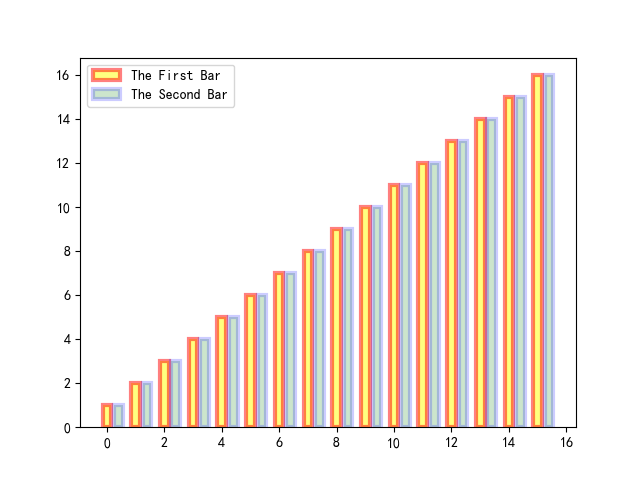
y = range(1,17)

plt.bar(np.arange(16), y, alpha=0.5, width=0.3, color='yellow', edgecolor='red', label='The First Bar', lw=3)

plt.bar(np.arange(16)+0.4, y, alpha=0.2, width=0.3, color='green', edgecolor='blue', label='The Second Bar', lw=3)

plt.legend(loc='upper left')

plt.show()
1)为坐标轴加上标签
plt.xlabel('This Is X Axis', fontsize=15)

plt.ylabel('This Is Y Axis', fontsize=15)

plt.title('This Is My Title', fontsize=15)

#fontsize可以控制字体大小
2)X轴可以是字符串
import matplotlib as mpl

mpl.rcParams['font.sans-serif']=['SimHei']

import matplotlib.pyplot as plt

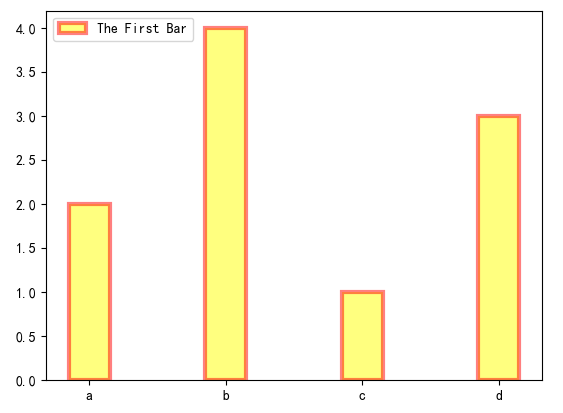
x = ['c', 'a', 'd', 'b']

y = [1, 2, 3, 4]

plt.bar(x, y, alpha=0.5, width=0.3, color='yellow', edgecolor='red', label='The First Bar', lw=3)

plt.legend(loc='upper left')

plt.show()
python3已经自动将x轴的字符串进行了排序,x轴变成了[ 'a', 'b', 'c', 'd' ](放心:同时x轴对应的y轴值也跟随x的顺序变化),python2并未自动对x轴字符串进行排序:
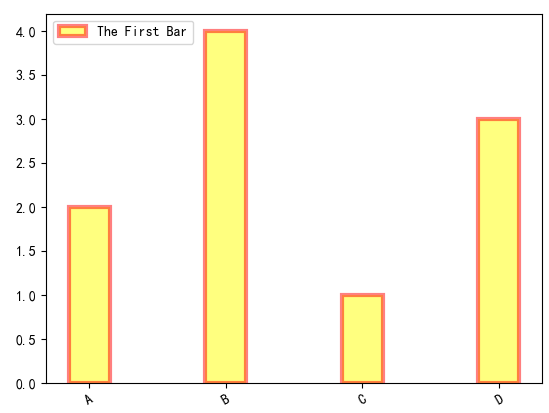
3) 如果想自己给x轴的bar加上标签,或者想让标签倾斜:plt.xticks()
import numpy as np

import matplotlib as mpl

mpl.rcParams['font.sans-serif']=['SimHei']

import matplotlib.pyplot as plt

x = []

y = []

x = ['c', 'a', 'd', 'b']

y = [1, 2, 3, 4]

#plt.figure(figsize=(40,40))

plt.bar(x, y, alpha=0.5, width=0.3, color='yellow', edgecolor='red', label='The First Bar', lw=3)

plt.legend(loc='upper left')

plt.xticks(np.arange(4), ('A','B', 'C', 'D'), rotation=30)#rotation控制倾斜角度

plt.show()
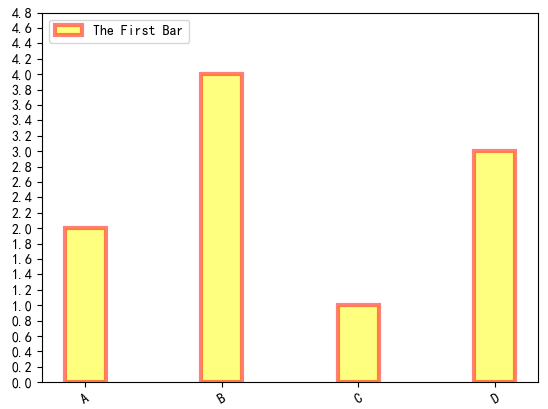
4) 如果想控制y轴数值间隔:plt.yticks(np.arange(0,5,0.2))
import numpy as np

import matplotlib as mpl

mpl.rcParams['font.sans-serif']=['SimHei']

import matplotlib.pyplot as plt

x = []

y = []

x = ['c', 'a', 'd', 'b']

y = [1, 2, 3, 4]

#plt.figure(figsize=(40,40))

plt.bar(x, y, alpha=0.5, width=0.3, color='yellow', edgecolor='red', label='The First Bar', lw=3)

plt.legend(loc='upper left')

plt.xticks(np.arange(4), ('A','B', 'C', 'D'), rotation=30)#rotation控制倾斜角度

plt.yticks(np.arange(0, 5, 0.2))

plt.show()
5)加上label和title
import numpy as np

import matplotlib as mpl

mpl.rcParams['font.sans-serif']=['SimHei']

import matplotlib.pyplot as plt

x = ['c', 'a', 'd', 'b']

y = [1, 2, 3, 4]

#plt.figure(figsize=(40,40))

plt.bar(x, y, alpha=0.5, width=0.3, color='yellow', edgecolor='red', label='The First Bar', lw=3)

plt.legend(loc='upper left')

plt.xticks(np.arange(4), ('A','B', 'C', 'D'), rotation=30)#rotation控制倾斜角度

plt.yticks(np.arange(0, 5, 0.4))

#fontsize控制了label和title字体大小

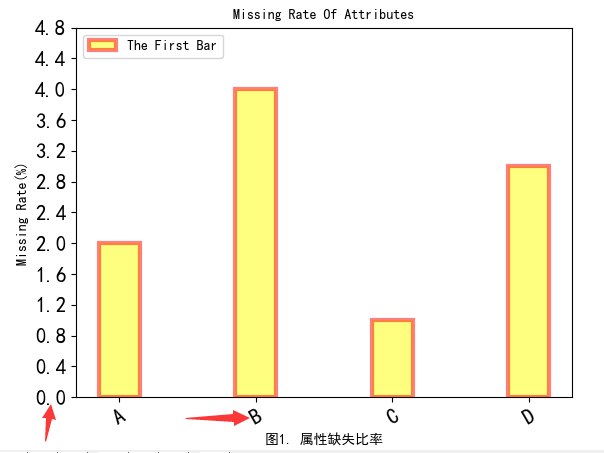
plt.ylabel('Missing Rate(%)', fontsize=10)

plt.title('Missing Rate Of Attributes', fontsize=10)

plt.xlabel('图1. 属性缺失比率', fontsize=10)

#但是如果想调整轴上数值字体大小呢?

plt.tick_params(axis='both', labelsize=15)

plt.show()
6)如果遇到title越出画布的,可以使用plt.figure(figsize=(50,80))适当调整figsize的大小,plt.savefig('NA.png')可以保存图片。
7)可以将图形框的四条边去掉,或者坐标轴线宽进行加粗
import numpy as np

import matplotlib as mpl

mpl.rcParams['font.sans-serif']=['SimHei']

import matplotlib.pyplot as plt

x = ['c', 'a', 'd', 'b']

y = [1, 2, 3, 4]

plt.figure(figsize=(40,40), dpi=80)

#底部和左边加粗,顶部和右边消失

ax = plt.subplot(1,1,1)

ax.spines['bottom'].set_linewidth(10)

ax.spines['left'].set_linewidth(10)

ax.spines['top'].set_visible(False)

ax.spines['right'].set_visible(False)

plt.bar(x, y, alpha=0.8, width=0.3, color='yellow', edgecolor='red', label='The First Bar', lw=6)

plt.legend(loc='upper left', fontsize=35)

plt.xticks(np.arange(4), ('A','B', 'C', 'D'), rotation=30)#rotation控制倾斜角度

plt.yticks(np.arange(0, 5, 0.4))

#fontsize控制了label和title字体大小

plt.ylabel('Missing Rate(%)', fontsize=40)

plt.title('Missing Rate Of Attributes', fontsize=40)

plt.xlabel('图1. 属性缺失比率', fontsize=40)

#但是如果想调整轴上数值字体大小呢?

plt.tick_params(axis='both', labelsize=35)

plt.savefig('NA.png', dpi=80)
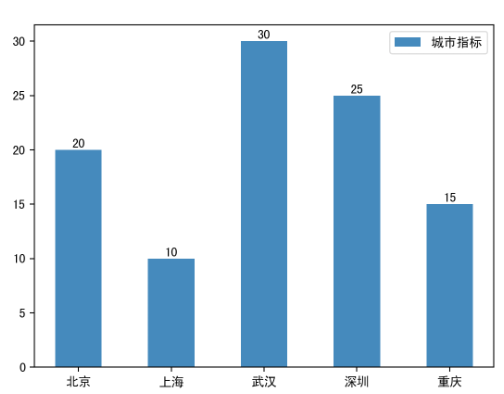
8)给柱状图顶部添加文字(plt.text)
"""

    默认的是竖值条形图

"""

import numpy as np

import matplotlib.pyplot as plt

# 将全局的字体设置为黑体

plt.rcParams['font.family'] = 'SimHei'

# 数据

N = 5

y = [20, 10, 30, 25, 15]

x = np.arange(N)

# 添加地名坐标

str1 = ("北京", "上海", "武汉", "深圳", "重庆")

# 绘图 x x轴, height 高度, 默认:color="blue", width=0.8

p1 = plt.bar(x, height=y, width=0.5, label="城市指标", tick_label=str1)

# 添加数据标签,也就是给柱子顶部添加标签

for a, b in zip(x, y):

    plt.text(a, b + 0.05, '%.0f' % b, ha='center', va='bottom', fontsize=10)

# 添加图例

plt.legend()

# 展示图形

plt.show()
Matplotlib中柱状图bar使用的更多相关文章
- 使用matplotlib中的bar函数绘制柱状图
使用柱状图显示三日电影的票房信息 要显示的数据为2018年12月7日-9日四场电影的票房信息 四场电影分别为:无名之辈,狗十三,毒液:知名守卫者,憨豆特工3 2018年12月7日四场电影票房分别为:[ ...
- Python Matplotlib 中对于 bar 显示时间的问题
参考: 官方教程: http://matplotlib.org/1.3.1/users/recipes.html http://stackoverflow.com/questions/13515471 ...
- 基于matplotlib的数据可视化 - 柱状图bar
柱状图bar 柱状图常用表现形式为: plt.bar(水平坐标数组,高度数组,宽度比例,ec=勾边色,c=填充色,label=图例标签) 注:当高度值为负数时,柱形向下 1 语法 bar(*args, ...
- Python——使用matplotlib绘制柱状图
Python——使用matplotlib绘制柱状图 1.基本柱状图 首先要安装matplotlib(http://matplotlib.org/api/pyplot_api.htm ...
- Matplotlib 在绘画bar时, 鼠标响应点击 bar 的消息
官方教程: http://urania.udea.edu.co/sitios/astronomia-2.0/pages/descargas.rs/files/descargasdt5vi/Cursos ...
- matplotlib 中的一些参数设置
首先:在pycharm 中要使图显示出来,最后一定要加上 plt.show(),如: plt.bar(x, y) plt.show() 下面就是我使用 matplotlib 遇到的一些常用参数设置: ...
- 基于Python实现matplotlib中动态更新图片(交互式绘图)
最近在研究动态障碍物避障算法,在Python语言进行算法仿真时需要实时显示障碍物和运动物的当前位置和轨迹,利用Anaconda的Python打包集合,在Spyder中使用Python3.5语言和mat ...
- 有趣的冷知识:编程中Foo, Bar 到底什么意思?
转自:编程中Foo, Bar 到底什么意思? 1 前言 在很多国外计算机书本和一些第三份开源软件的Demo中经常用到两个英文单词Foo,Bar.这到底是什么意思呢?从步入屌丝界的IT生活见到这两个单词 ...
- matplotlib中color可用的颜色
http://stackoverflow.com/questions/22408237/named-colors-in-matplotlib 参考网址给出了matplotlib中color可用的颜色: ...
随机推荐
- 最简单的socket服务器与客户端
服务器: //服务器 #include <stdio.h> #include <netinet/in.h> #include <unistd.h> #include ...
- M3U8文件
M3U本质上说不是音频文件,它是音频文件的列表文件,是纯文本文件.你下载下来打开它,播放软件并不是播放它,而是根据它的记录找到网络地址进行在线播放. M3U文件的大小很小,也就是因为它里面没有任何音频 ...
- kubernetes 构架
- POJ 3621-Sightseeing Cows-最优比率环|SPFA+二分
最优比率环问题.二分答案,对于每一个mid,把节点的happy值归类到边上. 对于每条边,用mid×weight减去happy值,如果不存在负环,说明还可以更大. /*---------------- ...
- 读取CSV到DataTable
using System; using System.Collections.Generic; using System.Data; using System.Data.OleDb; using Sy ...
- JS的初步了解
JavaScript 是互联网上最流行的脚本语言,这门语言可用于 HTML 和 web,更可广泛用于服务器.PC.笔记本电脑.平板电脑和智能手机等设备.JavaScript 是脚本语言 HTML 中的 ...
- Codeforces962F Simple Cycles Edges 【双连通分量】【dfs树】
题目大意: 给出一个无向图,问有哪些边只属于一个简单环. 题目分析: 如果这道题我们掌握了点双连通分量,那么结论会很显然,找到每个点双,如果一个n个点的点双正好由n条边构成,那么这些边都是可以的. 这 ...
- 洛谷P1330封锁阳光大学题解
题意 此题可以说是一个很裸的一个二分图染色,但是比较不同的是,这个图中可能是不联通的,因此我们需要找到所有的联通块,然后一一选出每个联通块中黑块与白块中最小的个数,然后加入到最后的答案中去,也是很坑的 ...
- 【BZOJ5119】【CTT2017】生成树计数 DP 分治FFT 斯特林数
CTT=清华集训 题目大意 有\(n\)个点,点权为\(a_i\),你要连接一条边,使该图变成一颗树. 对于一种连边方案\(T\),设第\(i\)个点的度数为\(d_i\),那么这棵树的价值为: \[ ...
- day5 模拟用户登录
_user= "yangtuo" _passwd = " # passd_authentication = False #flag 标志位 for i in range( ...