
LaTeX IEEE模板
因为课程作业的要求需要完成一篇IEEE格式的论文,所以选择入门LaTeX。但是期间遇到了各种各样莫名其妙的坑。前前后后挣扎了两个多星期终于完成了IEEE模板的设置。下面详细记录一下让我深恶痛绝的心路历程。
一、软件的选择
网上有很多LaTeX软件,在线编辑器推荐Overleaf。但是我个人还是更喜欢离线写东西,所以尝试过各种编辑器,例如VSCode等等,这些编辑器都需要自己搭环境才能用,反正对于我们这种初学者而言门槛较高,而且浪费时间,所以下面介绍一个LaTeX组合可以让你直接上手体验LaTeX,而不需要挣扎在LaTeX的门口。
要想离线使用LaTeX,首先需要一个编辑器,也就是敲LaTeX的软件,这里强烈推荐 TextStudio。这个软件是开源免费的,而且界面是我找过的软件中还过得去的。。因为感觉其他的也都不怎么好看。
但是光有编辑器还不行啊,你还得有编译器,这里推荐使用 MiKTeX。怎么理解这个软件的作用呢,就好像你要运行python代码,你得安装官网提供的Python3.6或者Anaconda之后才能编译python代码啊,之前没搞懂这个关系,一直以为跟markdown一样,结果并不是。
所以综上,要想使用LaTeX,你得有编辑器和编译器才行啊。
二、模板
废话不多说直接上模板。模板最初只需要如下三个文件:
- temp.tex: 保存LaTeX的文件
- temp.bib: 保存参考文献的文件,其实也可以将参考文献写在*.tex中,但是我个人更喜欢把他们分开,因为这样逻辑更清晰。
- ieeeconf.cls: IEEE样式模板。
以上文件可在如下网址下载:
最终效果:
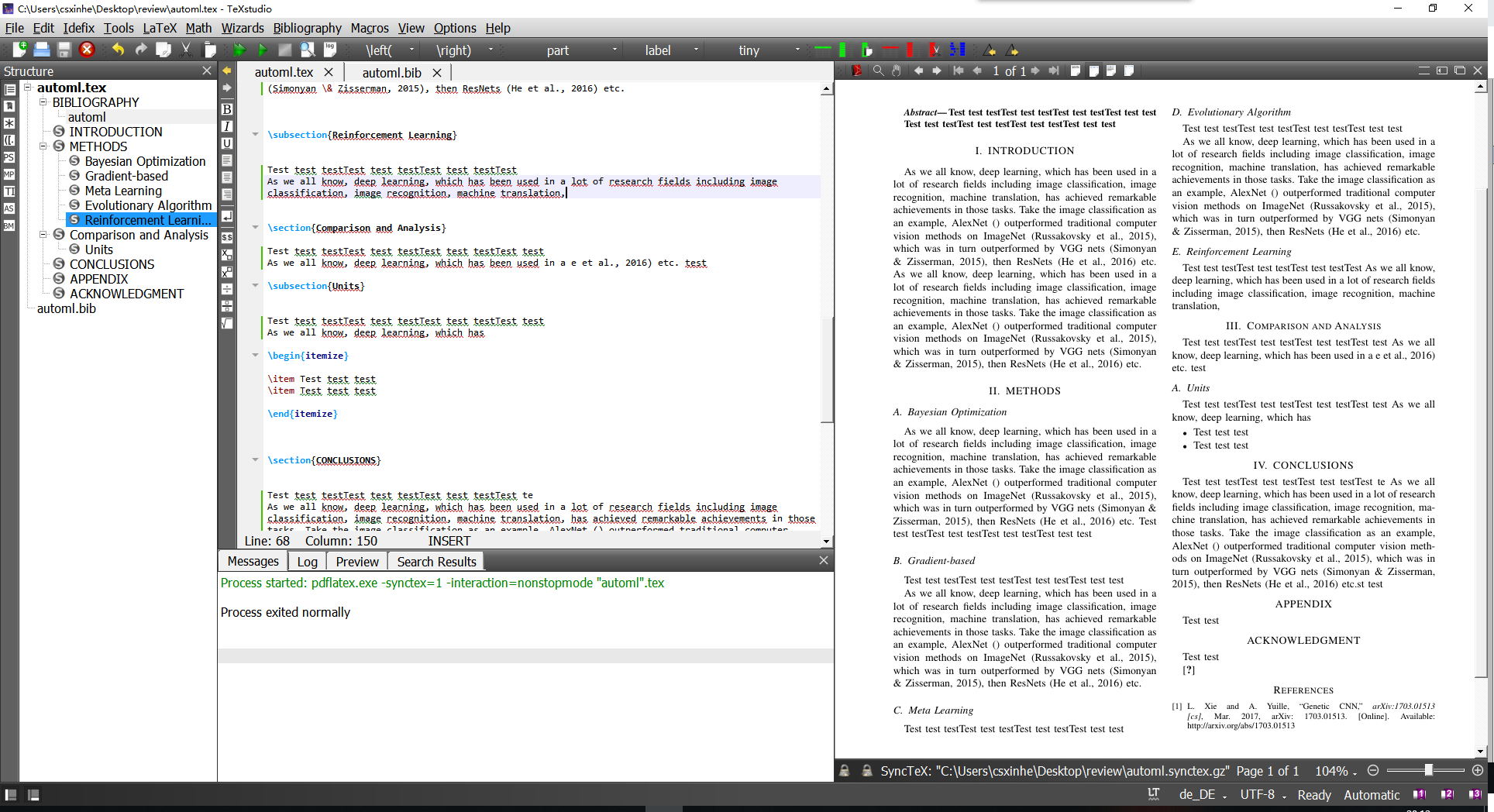
下面是示例。
1. temp.tex
\documentclass[a4paper, 10pt, conference]{ieeeconf}

\usepackage[utf8]{inputenc}

\usepackage{dtk-logos} % for BibTeX stylized logo

\overrideIEEEmargins

\title{\LARGE \bf

The review of Automated Machine learning

}

\author{He Xin$^{1}$ and Wang Zhichun$^{2}$

}

\begin{document}

\maketitle

%\thispagestyle{empty}

%\pagestyle{empty}

%%%%%%%%%%%%%%%%%%%%%%%%%%%%%%%%%%%%%%%%%%%%%%%%%%%%%%%%%%%%%%%%%%%%%%%%%%%%%%%%

\begin{abstract}

Test test testTest test testTest test testTest test test

Test test testTest test testTest test testTest test test

\end{abstract}

\section{INTRODUCTION}

As we all know(\cite{xie_genetic_2017}), deep learning, which has been used in a lot of research fields including image classification, image recognition, machine translation, has achieved remarkable achievements in those tasks. Take the image classification as an example, AlexNet () outperformed traditional computer vision methods on ImageNet (Russakovsky et al., 2015), which was in turn outperformed by VGG nets (Simonyan \& Zisserman, 2015), then ResNets (He et al., 2016) etc.

\section{METHODS}

As we all know(\cite{xie_genetic_2017}), deep learning, which has been used in a lot of research fields including image classification, image recognition, machine translation, has achieved remarkable achievements in those tasks. Take the image classification as an example, AlexNet () outperformed traditional computer vision methods on ImageNet (Russakovsky et al., 2015), which was in turn outperformed by VGG nets (Simonyan \& Zisserman, 2015), then ResNets (He et al., 2016) etc.

\subsection{Bayesian Optimization}

Test test testTest test testTest test testTest test test

As we all know(\cite{xie_genetic_2017}), deep learning, which has been used in a lot of research fields including image classification, image recognition, machine translation, has achieved remarkable achievements in those tasks. Take the image classification as an example, AlexNet () outperformed traditional computer vision methods on ImageNet (Russakovsky et al., 2015), which was in turn outperformed by VGG nets (Simonyan \& Zisserman, 2015), then ResNets (He et al., 2016) etc.

\subsection{Gradient-based}

Test test testTest test testTest test testTest test test

As we all know(\cite{xie_genetic_2017}), deep learning, which has been used in a lot of research fields including image classification, image recognition, machine translation, has achieved remarkable achievements in those tasks. Take the image classification as an example, AlexNet () outperformed traditional computer vision methods on ImageNet (Russakovsky et al., 2015), which was in turn outperformed by VGG nets (Simonyan \& Zisserman, 2015), then ResNets (He et al., 2016) etc.

\subsection{Meta Learning}

Test test testTest test testTest test testTest test test

As we all know(\cite{xie_genetic_2017}), deep learning, which has been used in a lot of research fields including image classification, image recognition, machine translation, has achieved remarkable achievements in those tasks. Take the image classification as an example, AlexNet () outperformed traditional computer vision methods on ImageNet (Russakovsky et al., 2015), which was in turn outperformed by VGG nets (Simonyan \& Zisserman, 2015), then ResNets (He et al., 2016) etc.

\subsection{Evolutionary Algorithm}

Test test testTest test testTest test testTest test test

As we all know(\cite{xie_genetic_2017}), deep learning, which has been used in a lot of research fields including image classification, image recognition, machine translation, has achieved remarkable achievements in those tasks. Take the image classification as an example, AlexNet () outperformed traditional computer vision methods on ImageNet (Russakovsky et al., 2015), which was in turn outperformed by VGG nets (Simonyan \& Zisserman, 2015), then ResNets (He et al., 2016) etc.

\subsection{Reinforcement Learning}

Test test testTest test testTest test testTest test test

Test test testTest test testTest test testTest test test

Test test testTest test testTest test testTest test test

\section{Comparison and Analysis}

Test test testTest test testTest test testTest test test

Test test testTest test testTest test testTest test test

Test test testTest test testTest test testTest test test

\subsection{Units}

Test test testTest test testTest test testTest test test

Test test testTest test testTest test testTest test test

Test test testTest test testTest test testTest test test

\begin{itemize}

\item Test test test

\item Test test test

\end{itemize}

\section{CONCLUSIONS}

Test test testTest test testTest test testTest test test

Test test testTest test testTest test testTest test test

Test test testTest test testTest test testTest test test

\addtolength{\textheight}{-12cm}   % This command serves to balance the column lengths

                                  % on the last page of the document manually. It shortens

                                  % the textheight of the last page by a suitable amount.

                                  % This command does not take effect until the next page

                                  % so it should come on the page before the last. Make

                                  % sure that you do not shorten the textheight too much.

%%%%%%%%%%%%%%%%%%%%%%%%%%%%%%%%%%%%%%%%%%%%%%%%%%%%%%%%%%%%%%%%%%%%%%%%%%%%%%%%

%%%%%%%%%%%%%%%%%%%%%%%%%%%%%%%%%%%%%%%%%%%%%%%%%%%%%%%%%%%%%%%%%%%%%%%%%%%%%%%%

%%%%%%%%%%%%%%%%%%%%%%%%%%%%%%%%%%%%%%%%%%%%%%%%%%%%%%%%%%%%%%%%%%%%%%%%%%%%%%%%

\section*{APPENDIX}

Test test

Test test testTest test testTest test testTest test test

Test test testTest test testTest test testTest test test

\section*{ACKNOWLEDGMENT}

Test test testTest test testTest test testTest test test

Test test testTest test testTest test testTest test test

Test test

%%%%%%%%%%%%%%%%%%%%%%%%%%%%%%%%%%%%%%%%%%%%%%%%%%%%%%%%%%%%%%%%%%%%%%%%%%%%%%%%

\nocite{*}

\bibliographystyle{ieeetran}

\bibliography{temp}

\end{document}
2. temp.bib
@article{xie_genetic_2017,

	title = {Genetic {CNN}},

	url = {http://arxiv.org/abs/1703.01513},

	abstract = {The deep Convolutional Neural Network (CNN) is the state-of-the-art solution for large-scale visual recognition. Following basic principles such as increasing the depth and constructing highway connections, researchers have manually designed a lot of fixed network structures and verified their effectiveness.},

	language = {en},

	urldate = {2018-10-22},

	journal = {arXiv:1703.01513 [cs]},

	author = {Xie, Lingxi and Yuille, Alan},

	month = mar,

	year = {2017},

	note = {arXiv: 1703.01513},

	keywords = {Computer Science - Computer Vision and Pattern Recognition},

	file = {Xie 和 Yuille - 2017 - Genetic CNN.pdf:E\:\\Zotero_storage\\storage\\A73TXSBC\\Xie 和 Yuille - 2017 - Genetic CNN.pdf:application/pdf}

}
3. ieeeconf.cls
这个文件太大,建议去上面的链接中下载。
LaTeX IEEE模板的更多相关文章
- Latex: IEEEtrans模板下 扩大标题宽度
参考: Extending side margins for Title section in IEEEtrans document class Latex: IEEEtrans模板下 扩大标题宽度 ...
- 使用LaTeX按IEEE模板写论文时的参考文献管理方法(BibTeX使用小结)
之前用LaTeX写论文时,参考文献都是手动添加管理的,真是让人很抓狂.所以这次趁着假期,简单看了一下怎么使用BibTeX对参考文献进行管理,这里以IEEE的最新模板为例. 首先说明,我之前用的是MiK ...
- Latex—IEEE Latex模板 期刊名带下划线的问题解决
其实期刊名应该是斜体字的,但是有可能默认模板会导致斜体变下划线的问题,解决方法如下 引用包: \usepackage{ulem} %to strike the words 然后再在: \bibliog ...
- Latex中为作者添加多个单位属性(IEEE模板)
\author{ \IEEEauthorblockN{name1 name1\IEEEauthorrefmark{1}\IEEEauthorrefmark{2}, name2 name2\IEEEa ...
- 【LATEX】个人版latex论文模板
以下是我的个人论文模板,运行环境为Xelatex(在线ide:Sharelatex.com) 鉴于本人常有插入程序的需求,故引用了lstlisting \RequirePackage{ifxetex} ...
- LaTeX简历模板
%# -*- coding:utf-8 -*- %% start of file `template_en.tex'. %% Copyright 2006-1008 Xavier Danaux (xd ...
- 推荐一个latex简历模板的网站给大家
http://www.rpi.edu/dept/arc/training/latex/resumes/ Using the LaTeX Resume Templates A group of resu ...
- latex中文模板
\documentclass[UTF8,a4paper,10pt, twocolumn]{ctexart} \usepackage[left=2.50cm, right=2.50cm, top=2.5 ...
- latex 小模板
\documentclass[11pt,a4paper,english]{article}\usepackage[T1]{fontenc}\usepackage[utf8]{inputenc}\use ...
随机推荐
- JS学习笔记Day7
一.ES5扩展方法 1.严格模式"use strict" 1)必须加在作用域的开头 2.数组扩展方法 1)indexOf(元素,从哪个下标开始查找) 作用:在数组中查找指定的元素第 ...
- HTML学习笔记Day13
一.HTML+CSS代码实现三角形 (一)transparent透明属性实现代码编写三角 <!DOCTYPE html> <html> <head> <met ...
- Failed to start Vsftpd ftp daemon错误
配置 vsftpd.conf文件后 重启ftp服务出现 Failed to start Vsftpd ftp daemon错误 总是 启动失败 解决方法 将配置文件中的 listen=YES 改为 l ...
- (sort)P1068 分数线划定 洛谷
题目描述 世博会志愿者的选拔工作正在 A 市如火如荼的进行.为了选拔最合适的人才,AA市对 所有报名的选手进行了笔试,笔试分数达到面试分数线的选手方可进入面试.面试分数线根 据计划录取人数的150\% ...
- linux c 编程 ------ 头文件及其作用
#include <stdio.h> printf #include <sys/types.h> 基本系统数据类型.系统的基本数据类型在32编译环境中保持为32位值,在64编译 ...
- collections 模块之Counter
Counter字典的子类,用于统计哈希对象 from collections import Counter users = ["body1","body11", ...
- Hbase_02、Hbase的常用的shell命令&Hbase的DDL操作&Hbase的DML操作(转)
阅读目录 前言 一.hbase的shell操作 1.1启动hbase shell 1.2执行hbase shell的帮助文档 1.3退出hbase shell 1.4使用status命令查看hbase ...
- C#数据结构学习
Collection类学习 using System; using System.Collections.Generic; using System.Linq; using System.Text; ...
- 理解maven命令package、install、deploy的联系与区别
我们在用maven构建java项目时,最常用的打包命令有mvn package.mvn install.deploy,这三个命令都可完成打jar包或war(当然也可以是其它形式的包)的功能,但这三个命 ...
- 阿里Fastjson的使用
Fastjson是一个Java语言编写的高性能功能完善的JSON库.由阿里巴巴公司团队开发的. 主要特性主要体现在以下几个方面: 1.高性能 fastjson采用独创的算法,将parse的速度提升到极 ...