
MyBatis - 7.MyBatis逆向 Generator
MyBatis Generator:
- 简称MBG,是一个专门为MyBatis框架使用者定制的代码生成器,可以快速的根据表生成对应的映射文件,接口,以及bean类。支持基本的增删改查,以及QBC风格的条件查询。但是表连接、存储过程等这些复杂sql的定义需要我们手工编写
- 官方文档地址
http://www.mybatis.org/generator/ - 官方工程地址
https://github.com/mybatis/generator/releases
1.mbg配置文件编写
<?xml version="1.0" encoding="UTF-8"?>

<!DOCTYPE generatorConfiguration

  PUBLIC "-//mybatis.org//DTD MyBatis Generator Configuration 1.0//EN"

  "http://mybatis.org/dtd/mybatis-generator-config_1_0.dtd">

<generatorConfiguration>

  <context id="DB2Tables" targetRuntime="MyBatis3">

    <!--如和连接数据库-->

    <jdbcConnection driverClass="com.mysql.cj.jdbc.Driver"

      connectionURL="jdbc:mysql://localhost:4040/db_mybatis?serverTimezone = GMT"

      userId="root"

      password="123">

    </jdbcConnection>

    <javaTypeResolver>

      <property name="forceBigDecimals" value="false"/>

    </javaTypeResolver>

    <!--

      javaModelGenerator:指定javaBean生成策略

          - targetPackage="test.model":  目标包名

          - targetProject="\MBGTestProject\src"  目标工程

    -->

    <javaModelGenerator targetPackage="com.tangge.bean" targetProject=".\src">

      <property name="enableSubPackages" value="true"/>

      <property name="trimStrings" value="true"/>

    </javaModelGenerator>

    <!--

      sqlMapGenerator: sql映射XML生成策略

          - targetPackage="test.xml":

          - targetProject="\MBGTestProject\src":

    -->

    <sqlMapGenerator targetPackage="tangge.mapper" targetProject=".\src">

      <property name="enableSubPackages" value="true"/>

    </sqlMapGenerator>

    <!--

      javaClientGenerator:指定的mapper接口生成策略(Java客户端生成器的属性,Java客户端生成器构建Java接口和类。)

          - type="XMLMAPPER":

              - XMLMAPPER	生成的对象将是MyBatis 3.x映射器基础结构的Java接口。接口将依赖于生成的XML映射器文件。

              - MIXEDMAPPER	接口将基于注释和XML的混合。将使用注释将在简单注释工作的地方使用。

                此客户端不会生成和Sql Provider,因此所有复杂的动态SQL都将以XML格式生成。

              - ANNOTATEDMAPPER	接口将基于注释和MyBatis 3.x SqlProviders。不会生成XML映射器文件。

          - targetPackage="test.dao": 目标包名

          - targetProject=".\src":  目标工程

    -->

    <javaClientGenerator type="XMLMAPPER" targetPackage="com.tangge.dao"

      targetProject=".\src">

      <property name="enableSubPackages" value="true"/>

    </javaClientGenerator>

    <!--<table schema="db_mybatis" tableName="tbl_employee" domainObjectName="Customer">-->

      <!--<property name="useActualColumnNames" value="true"/>-->

      <!--<generatedKey column="ID" sqlStatement="DB2" identity="true"/>-->

      <!--<columnOverride column="DATE_FIELD" property="startDate"/>-->

      <!--<ignoreColumn column="FRED"/>-->

      <!--<columnOverride column="LONG_VARCHAR_FIELD" jdbcType="VARCHAR"/>-->

    <!--</table>-->

    <!--

      table:表生成策略

          - tableName(必须):表名

          - domainObjectName(选填):生成类的名字

    -->

    <table schema="db_mybatis" tableName="tbl_employee" domainObjectName="Employee">

    </table>

    <table schema="db_mybatis" tableName="tbl_dept" domainObjectName="Department">

    </table>

  </context>

</generatorConfiguration>
1.1 如果不想生成Example类文件
table里面就关闭掉 enable** = "false"。
 <table tableName="tbl_employee" domainObjectName="Employee" enableCountByExample="false"

      enableDeleteByExample="false"  enableSelectByExample="false" enableSelectByPrimaryKey="true"

    enableUpdateByPrimaryKey="true" enableDeleteByPrimaryKey="true" selectByExampleQueryId="false"

      enableUpdateByExample="false">

    </table>

    <table  tableName="tbl_dept" domainObjectName="Department" enableCountByExample="false"

      enableDeleteByExample="false" enableUpdateByExample="false" enableSelectByExample="false"

      selectByExampleQueryId="false" enableSelectByPrimaryKey="true" enableUpdateByPrimaryKey="true"

      enableDeleteByPrimaryKey="true">

    </table>
2.mbg逆向生成
 @Test

    public void test()

            throws IOException, XMLParserException, InvalidConfigurationException, SQLException, InterruptedException {

        List<String> warnings = new ArrayList<String>();

        boolean overwrite = true;

        File configFile = new File("mbg.xml");

        ConfigurationParser cp = new ConfigurationParser(warnings);

        Configuration config = cp.parseConfiguration(configFile);

        DefaultShellCallback callback = new DefaultShellCallback(overwrite);

        MyBatisGenerator myBatisGenerator = new MyBatisGenerator(config, callback, warnings);

        myBatisGenerator.generate(null);

    }
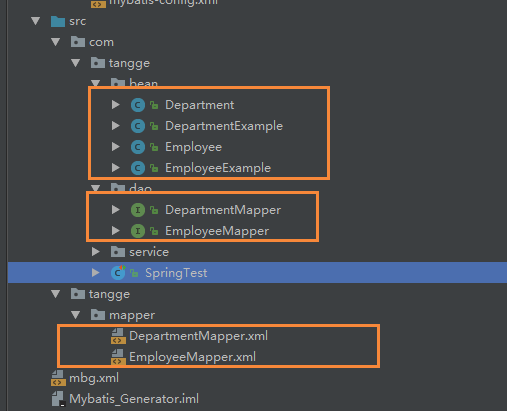
下面看看 生成的mapper.xml
<?xml version="1.0" encoding="UTF-8"?>

<!DOCTYPE mapper PUBLIC "-//mybatis.org//DTD Mapper 3.0//EN" "http://mybatis.org/dtd/mybatis-3-mapper.dtd">

<mapper namespace="com.tangge.dao.EmployeeMapper">

  <resultMap id="BaseResultMap" type="com.tangge.bean.Employee">

    <!--

      WARNING - @mbg.generated

      This element is automatically generated by MyBatis Generator, do not modify.

      This element was generated on Mon Sep 03 10:51:01 CST 2018.

    -->

    <id column="id" jdbcType="INTEGER" property="id" />

    <result column="last_name" jdbcType="VARCHAR" property="lastName" />

    <result column="gender" jdbcType="CHAR" property="gender" />

    <result column="email" jdbcType="VARCHAR" property="email" />

    <result column="dept_id" jdbcType="INTEGER" property="deptId" />

  </resultMap>

  <sql id="Base_Column_List">

    <!--

      WARNING - @mbg.generated

      This element is automatically generated by MyBatis Generator, do not modify.

      This element was generated on Mon Sep 03 10:51:01 CST 2018.

    -->

    id, last_name, gender, email, dept_id

  </sql>

  <select id="selectByPrimaryKey" parameterType="java.lang.Integer" resultMap="BaseResultMap">

    <!--

      WARNING - @mbg.generated

      This element is automatically generated by MyBatis Generator, do not modify.

      This element was generated on Mon Sep 03 10:51:01 CST 2018.

    -->

    select

    <include refid="Base_Column_List" />

    from tbl_employee

    where id = #{id,jdbcType=INTEGER}

  </select>

  <delete id="deleteByPrimaryKey" parameterType="java.lang.Integer">

    <!--

      WARNING - @mbg.generated

      This element is automatically generated by MyBatis Generator, do not modify.

      This element was generated on Mon Sep 03 10:51:01 CST 2018.

    -->

    delete from tbl_employee

    where id = #{id,jdbcType=INTEGER}

  </delete>

  <insert id="insert" parameterType="com.tangge.bean.Employee">

    <!--

      WARNING - @mbg.generated

      This element is automatically generated by MyBatis Generator, do not modify.

      This element was generated on Mon Sep 03 10:51:01 CST 2018.

    -->

    insert into tbl_employee (id, last_name, gender,

      email, dept_id)

    values (#{id,jdbcType=INTEGER}, #{lastName,jdbcType=VARCHAR}, #{gender,jdbcType=CHAR},

      #{email,jdbcType=VARCHAR}, #{deptId,jdbcType=INTEGER})

  </insert>

  <insert id="insertSelective" parameterType="com.tangge.bean.Employee">

    <!--

      WARNING - @mbg.generated

      This element is automatically generated by MyBatis Generator, do not modify.

      This element was generated on Mon Sep 03 10:51:01 CST 2018.

    -->

    insert into tbl_employee

    <trim prefix="(" suffix=")" suffixOverrides=",">

      <if test="id != null">

        id,

      </if>

      <if test="lastName != null">

        last_name,

      </if>

      <if test="gender != null">

        gender,

      </if>

      <if test="email != null">

        email,

      </if>

      <if test="deptId != null">

        dept_id,

      </if>

    </trim>

    <trim prefix="values (" suffix=")" suffixOverrides=",">

      <if test="id != null">

        #{id,jdbcType=INTEGER},

      </if>

      <if test="lastName != null">

        #{lastName,jdbcType=VARCHAR},

      </if>

      <if test="gender != null">

        #{gender,jdbcType=CHAR},

      </if>

      <if test="email != null">

        #{email,jdbcType=VARCHAR},

      </if>

      <if test="deptId != null">

        #{deptId,jdbcType=INTEGER},

      </if>

    </trim>

  </insert>

  <update id="updateByPrimaryKeySelective" parameterType="com.tangge.bean.Employee">

    <!--

      WARNING - @mbg.generated

      This element is automatically generated by MyBatis Generator, do not modify.

      This element was generated on Mon Sep 03 10:51:01 CST 2018.

    -->

    update tbl_employee

    <set>

      <if test="lastName != null">

        last_name = #{lastName,jdbcType=VARCHAR},

      </if>

      <if test="gender != null">

        gender = #{gender,jdbcType=CHAR},

      </if>

      <if test="email != null">

        email = #{email,jdbcType=VARCHAR},

      </if>

      <if test="deptId != null">

        dept_id = #{deptId,jdbcType=INTEGER},

      </if>

    </set>

    where id = #{id,jdbcType=INTEGER}

  </update>

  <update id="updateByPrimaryKey" parameterType="com.tangge.bean.Employee">

    <!--

      WARNING - @mbg.generated

      This element is automatically generated by MyBatis Generator, do not modify.

      This element was generated on Mon Sep 03 10:51:01 CST 2018.

    -->

    update tbl_employee

    set last_name = #{lastName,jdbcType=VARCHAR},

      gender = #{gender,jdbcType=CHAR},

      email = #{email,jdbcType=VARCHAR},

      dept_id = #{deptId,jdbcType=INTEGER}

    where id = #{id,jdbcType=INTEGER}

  </update>

</mapper>
3.Example的使用
QBC风格的带条件查询
@Test

public void test01(){

SqlSession openSession = build.openSession();

DeptMapper mapper = openSession.getMapper(DeptMapper.class);

DeptExample example = new DeptExample();

//所有的条件都在example中封装

Criteria criteria = example.createCriteria();

//select id, deptName, locAdd from tbl_dept WHERE

//( deptName like ? and id > ? )

criteria.andDeptnameLike("%部%");

criteria.andIdGreaterThan(2);

List<Dept> list = mapper.selectByExample(example);

for (Dept dept : list) {

	System.out.println(dept);

	}

}
MyBatis - 7.MyBatis逆向 Generator的更多相关文章
- MyBatis 注解开发+逆向(Generator)
注解开发 最初设计时,MyBatis 是一个 XML 驱动的框架.配置信息是基于 XML 的,而且映射语句也是定义在 XML 中的.随着技术的更新发展,对于开发效率要求也原来越高,特别是一些小型项目; ...
- Hello Mybatis 02 mybatis generator
接着上一篇文章通过Mybatis完成了一个User的CRUD的功能之后,这篇开始还需要建立一个Blog类,这样就可以模拟一个简单的微博平台的数据库了. 数据库准备 首先我们,还是需要在数据库中新建一个 ...
- springboot集成mybatis及mybatis generator工具使用
原文链接 前言mybatis是一个半自动化的orm框架,所谓半自动化就是mybaitis只支持数据库查出的数据映射到pojo类上,而实体到数据库的映射需要自己编写sql语句实现,相较于hibernat ...
- springboot入门(三)-- springboot集成mybatis及mybatis generator工具使用
前言 mybatis是一个半自动化的orm框架,所谓半自动化就是mybaitis只支持数据库查出的数据映射到pojo类上,而实体到数据库的映射需要自己编写sql语句实现,相较于hibernate这种完 ...
- spring boot集成mybatis(3) - mybatis generator 配置
Spring Boot 集成教程 Spring Boot 介绍 Spring Boot 开发环境搭建(Eclipse) Spring Boot Hello World (restful接口)例子 sp ...
- 【Mybatis】MyBatis之动态SQL(六)
MyBatis 的强大特性之一便是它的动态 SQL,本章介绍动态 SQL 查看本章,请先阅读[Mybatis]MyBatis对表执行CRUD操作(三). 本例表结构 CREATE TABLE `emp ...
- 【Mybatis】MyBatis之Sql配置文件的使用(四)
上一章[Mybatis]MyBatis对表执行CRUD操作(三),已经讲了基本操作,本章介绍Sql配置文件中常用功能 1.插入返回主键 2.参数值的获取方式 3.resultMap使用 插入返回主键 ...
- MyBatis笔记----MyBatis 入门经典的两个例子: XML 定义与注解定义
----致敬MyBatis官方开放文档让大家翻译,不用看书直接看文档就行了,mybatis的中文文档还需要完备的地方 简介 什么是 MyBatis ? MyBatis 是支持定制化 SQL.存储过程以 ...
- 【Mybatis】MyBatis对表执行CRUD操作(三)
本例在[Mybatis]MyBatis配置文件的使用(二)基础上继续学习对表执行CRUD操作 使用MyBatis对表执行CRUD操作 1.定义sql映射xml文件(EmployeeMapper.xml ...
- 【Mybatis】MyBatis配置文件的使用(二)
本例在[Mybatis]MyBatis快速入门(一)基础上继续学习XML映射配置文件 MyBatis 的配置文件包含了会深深影响 MyBatis 行为的设置(settings)和属性(properti ...
随机推荐
- (转载)经典计算机视觉论文笔记——DeepFace\DeepID\DeepID2\DeepID3\FaceNet\VGGFace汇总
1. DeepFace:Closing the Gap to Human-Level Performance in Face Verification 最早将深度学习用于人脸验证的开创性工作.Face ...
- CentOS 6与7对比【转】
片段1:时间同步 CentOS 6 逐步: ntpd或ntpdate 直接: ntpdate -b(通常加到crontab) CentOS 7 方法1: systemctl start chronyd ...
- 利用binlogserver恢复单表实验【转】
使用场景 每次开启binlogserver 指定了mysql-bin.0000XX 后都会从该点从头进行传输一次 创建binlogserver [root@mysql-zst3 binlogserve ...
- H5混合开发app常用代码
1.Android与H5互调可以让我们的实现混合开发,至于混合开发就是在一个App中内嵌一个轻量级的浏览器(高性能webkit内核浏览器),一部分原生的功能改为Html 5来开发.然后这个浏览器又封装 ...
- 题解-PKUWC2018 Slay the Spire
Problem loj2538 Solution 在考场上当然要学会写暴力,考虑如果手上已经有了\(a\)张攻击牌和\(b\)张强化牌: 首先强化牌会在攻击牌之前用(废话),其次要将两种牌分别从大往小 ...
- js判断空字符串、null、undefined、空格、中文空格
代码 function isEmpty(obj) { if (obj === null) return true; if (typeof obj === 'undefined') { return t ...
- 神经网络中的偏置项b到底是什么?
原文地址:https://blog.csdn.net/Uwr44UOuQcNsUQb60zk2/article/details/81074408 前言 很多人不明白为什么要在神经网络.逻 ...
- List<T>常用操作
1.List<T>类型强制转换: List<UIData> datalist=null;datalist.ConvertAll<object>(input => ...
- 【MySql】Order By 排序
你可以使用任何字段来作为排序的条件,从而返回排序后的查询结果. 你可以设定多个字段来排序. 你可以使用 ASC 或 DESC 关键字来设置查询结果是按升序或降序排列. 默认情况下,它是按升序排列. 你 ...
- Windows Service 2012 R2 下如何建立ftp服务器
1.首先在本地机器上创建一个用户!这些用户是用来登录到FTP的!我的电脑右键->管理->本地用户和组->用户->“右键”新建用户->输入用户名和密码再点创建就行了! 2. ...