
IdentityServer4之Clients、Scopes、Claims与Token关联
IdentityServer4之Clients、Scopes、Claims与Token关联
参考
官方文档:client、identity_resource、api_resource:三类配置项介绍描述。
打一个不恰当的比喻来描述一下
User:表示自己 。
Client:表示客户经理,能指引或者代办一些业务。
Resource:表示银行,包括identity_resource(银行基本业务)、api_resource(银行特色业务)。多个resource比作多个分行。
user中的
Claims:自身在银行已经有的业务(包括自己YY的业务)。
client中的
Claims、Scopes是客户经理会推荐给你(User)的业务需不需要看自己。
Claims:好比优惠client可以选择给你或者不给。
Scopes:但是推荐给你的某个Scope业务可能与银行已经下线了但是client不知道。
Resource中的
Claims、Scopes、Scopes->Claims:表示银行的业务。
Token:银行认可自己拥有的业务信息。
User、Client、Resource配置
User配置
new TestUser

{

    SubjectId = "",

    Username = "ddr",

    Password = "",

    Claims = new []

    {

        new Claim("name", "ddr"),

        new Claim("get", "get_order"),  //User Claim Type 与 Api Resource中的Claims、Scopes->Claims的Type匹配就会输出到Token

        new Claim("add", "add_order"),

        new Claim("add", "add_account"),

        new Claim("del", "del_all"),

        new Claim("website", "https://ddr.com")

    }

},
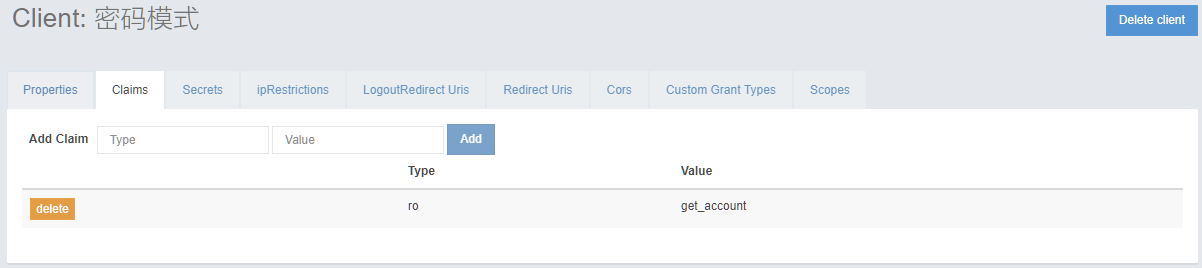
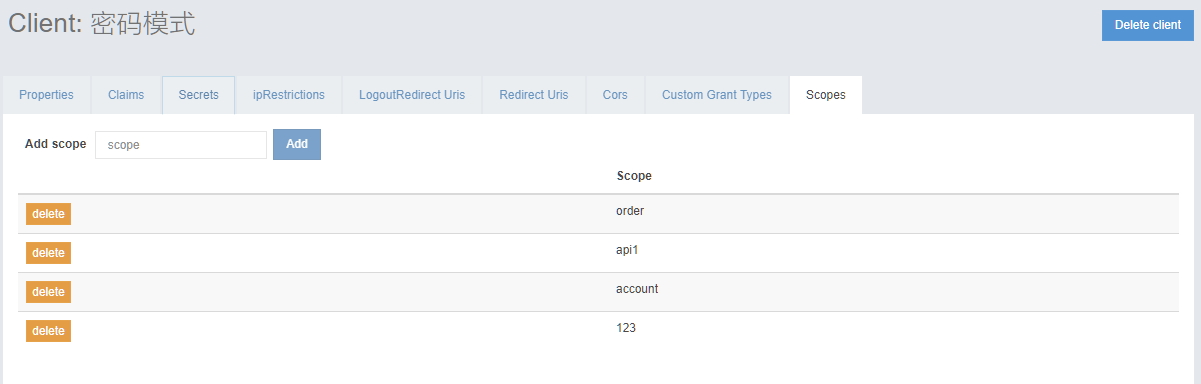
Client配置
Identity Resources配置
一般不需要改变就是默认的OpenId、Profile、Email、Phone、Address。
{ IdentityServerConstants.StandardScopes.Profile, new[]

                {

                    JwtClaimTypes.Name,

                    JwtClaimTypes.FamilyName,

                    JwtClaimTypes.GivenName,

                    JwtClaimTypes.MiddleName,

                    JwtClaimTypes.NickName,

                    JwtClaimTypes.PreferredUserName,

                    JwtClaimTypes.Profile,

                    JwtClaimTypes.Picture,

                    JwtClaimTypes.WebSite,

                    JwtClaimTypes.Gender,

                    JwtClaimTypes.BirthDate,

                    JwtClaimTypes.ZoneInfo,

                    JwtClaimTypes.Locale,

                    JwtClaimTypes.UpdatedAt

                }},

{ IdentityServerConstants.StandardScopes.Email, new[]

                {

                    JwtClaimTypes.Email,

                    JwtClaimTypes.EmailVerified

                }},

{ IdentityServerConstants.StandardScopes.Address, new[]

                {

                    JwtClaimTypes.Address

                }},

{ IdentityServerConstants.StandardScopes.Phone, new[]

                {

                    JwtClaimTypes.PhoneNumber,

                    JwtClaimTypes.PhoneNumberVerified

                }},

{ IdentityServerConstants.StandardScopes.OpenId, new[]

                {

                    JwtClaimTypes.Subject

                }}
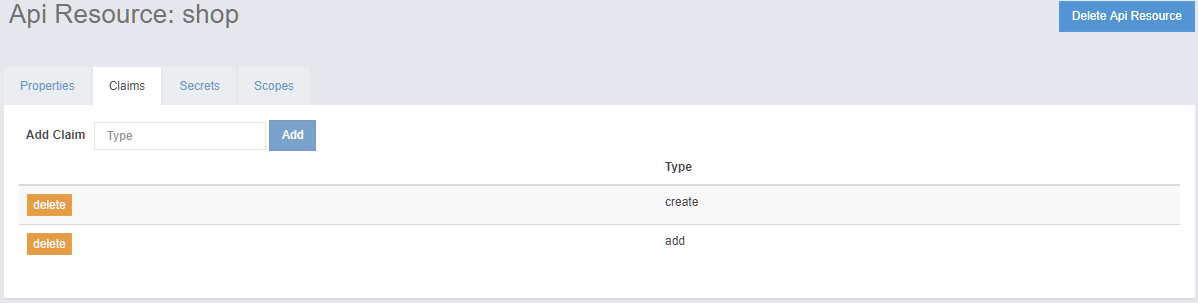
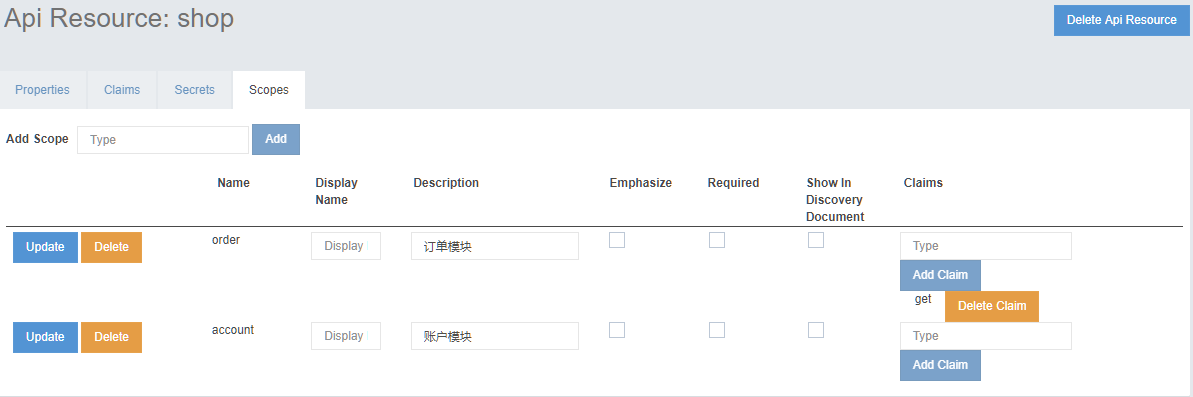
Api Resource配置
过程详解
使用正常方式获取的Token
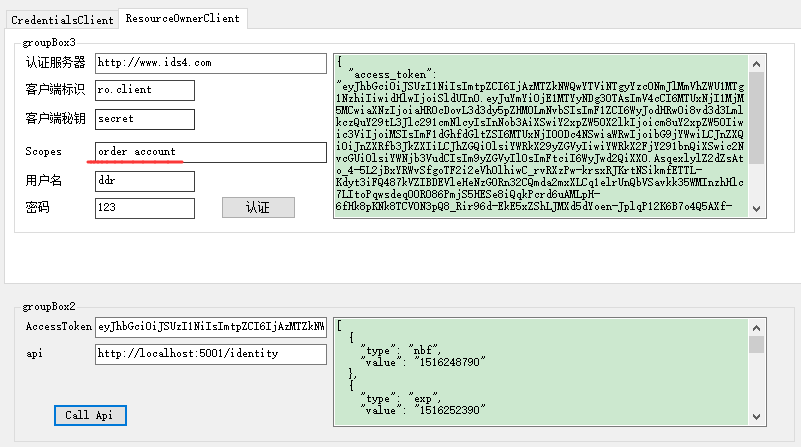
获取的Token详细信息
[

  {

    "type": "nbf",

    "value": ""

  },

  {

    "type": "exp",

    "value": ""

  },

  {

    "type": "iss",

    "value": "http://www.ids4.com"

  },

  {

    "type": "aud",

    "value": "http://www.ids4.com/resources"

  },

  {

    "type": "aud",

    "value": "shop"

  },

  {

    "type": "client_id",

    "value": "ro.client"

  },

  {

    "type": "sub",

    "value": ""

  },

  {

    "type": "auth_time",

    "value": ""

  },

  {

    "type": "idp",

    "value": "local"

  },

  {

    "type": "get",

    "value": "get_order"

  },

  {

    "type": "add",

    "value": "add_order"

  },

  {

    "type": "add",

    "value": "add_account"

  },

  {

    "type": "scope",

    "value": "account"

  },

  {

    "type": "scope",

    "value": "order"

  },

  {

    "type": "amr",

    "value": "pwd"

  },

  {

    "type": "api1返回",

    "value": "2018-01-18 12:13:15"

  }

]
client没有把优惠给你,client客户经理的Claims中是有ro - get_account但是这项优惠没有取出来,Properties默认设置 不会返回到Token。
// check for client claims

if (request.ClientClaims != null && request.ClientClaims.Any())

{

    if (subject == null || request.Client.AlwaysSendClientClaims)

    {

        foreach (var claim in request.ClientClaims)

        {

            var claimType = claim.Type;

            if (request.Client.ClientClaimsPrefix.IsPresent())

            {

                claimType = request.Client.ClientClaimsPrefix + claimType;

            }

            outputClaims.Add(new Claim(claimType, claim.Value, claim.ValueType));

        }

    }

}
new Claim("del", "del_all") 是自己YY出来的Token里也不会有。
/// <summary>

/// Filters the claims based on requested claim types.

/// </summary>

/// <param name="context">The context.</param>

/// <param name="claims">The claims.</param>

/// <returns></returns>

public static List<Claim> FilterClaims(this ProfileDataRequestContext context, IEnumerable<Claim> claims)

{

    return claims.Where(x => context.RequestedClaimTypes.Contains(x.Type)).ToList();

}
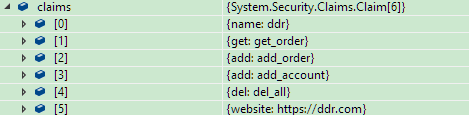
claims自己的claims信息。
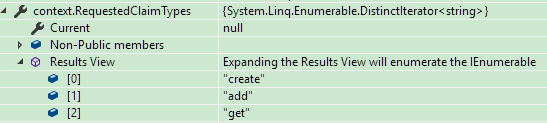
context.RequestedClaimTypes是Api Resource中Claims、Scopes->Claims的信息。
client客户经理推荐的123实际在银行已经下线了。
如果获取Token请求包含了 "123" 的scope,但是实际上Resource又不存在就会提示invalid_scope。
foreach (var scope in requestedScopes)

{

    var identity = resources.IdentityResources.FirstOrDefault(x => x.Name == scope);

    if (identity != null)

    {

        if (!client.AllowedScopes.Contains(scope))

        {

            _logger.LogError("Requested scope not allowed: {scope}", scope);

            return false;

        }

    }

    else

    {

        var api = resources.FindApiScope(scope);

        if (api == null || !client.AllowedScopes.Contains(scope))

        {

            _logger.LogError("Requested scope not allowed: {scope}", scope);

            return false;

        }

    }

}
Scope对模块鉴权
参考:https://docs.microsoft.com/en-us/aspnet/core/security/authorization/claims
Token中带有 scope:order或者scope:account的请求都能访问IdentityController。
Api项目配置
services.AddMvcCore()

    .AddAuthorization(options =>

    {

        options.AddPolicy("Order", policy => policy.RequireClaim("scope","order","account"));

    })

    .AddJsonFormatters();
[Authorize(Policy = "Order")]

public class IdentityController : ControllerBase
IdentityServer4配置后台管理,在github找到一个随机生成数据的后台改成使用读数据库,数据库使用ids4示例生成。时间紧做出来并不好凑合用。
https://github.com/ddrsql/IdentityServer4.Admin
IdentityServer4之Clients、Scopes、Claims与Token关联的更多相关文章
- postman设置token关联参数,其他接口直接读取token变量
问题描述:有一个登录接口获取token,其他接口再次访问时都要带上token 解决方案: 步骤一:在登录接口访问后设置postman的环境变量,例如设置环境变量名:token,值为登录接口访问成功后, ...
- python+pytest接口自动化(13)-token关联登录
在PC端登录公司的后台管理系统或在手机上登录某个APP时,经常会发现登录成功后,返回参数中会包含token,它的值为一段较长的字符串,而后续去请求的请求头中都需要带上这个token作为参数,否则就提示 ...
- 登录获取token,token参数关联至所有请求的请求体内
问题描述: 有些系统接口判断用户是否登录,是校验登录接口成功后传的token值,也就是请求系统所有接口时,前端传参必带登录成功后接口返回的token,后台以此检验是否过期或是否有登录.所有接口都依赖登 ...
- python接口自动化-token参数关联登录(二)
原文地址https://www.cnblogs.com/yoyoketang/p/9098096.html 原文地址https://www.cnblogs.com/yoyoketang/p/68866 ...
- python接口自动化-token参数关联登录(登录拉勾网)
前言 登录网站的时候,经常会遇到传token参数,token关联并不难,难的是找出服务器第一次返回token的值所在的位置,取出来后就可以动态关联了 登录拉勾网 1.先找到登录首页https://pa ...
- Unable to find a constructor to use for type System.Security.Claims.Claim. A class should either have a default constructor
Newtonsoft.Json DeserializeObject 反序列化 IdentityServer4.Models Cliecnt 错误: Newtonsoft.Json.JsonSeria ...
- Spring Boot web API接口设计之token、timestamp、sign
版权声明:本文为博主原创文章,未经博主允许不得转载. https://blog.csdn.net/vbirdbest/article/details/80789817一:token 简介Token:访 ...
- Spring Security构建Rest服务-1204-Spring Security OAuth开发APP认证框架之Token处理
token处理之一基本参数配置 处理token时间.存储策略,客户端配置等 以前的都是spring security oauth默认的token生成策略,token默认在org.springframe ...
- IdentityServer4笔记整理(更新中)
1 OAuth 2.0 1.1 OAuth 2.0协议流程图 1.2 授权码模式 1.3 简化模式 1.4 资源所有者密码模式 1.5 客户端凭证模式 2 OpenID Connect(OIDC) 2 ...
随机推荐
- 用IrisSkin2.dll美化你的WinForm
From:http://hi.baidu.com/tr0j4n 在WinForm中,可以方便地给自己的程序添加皮肤,做出各种绚丽的效果,而只需要很简单的几句代码即可搞定,下面来领略下. 前期准备:1. ...
- 冬瓜头答疑:磁盘阵列内部FC-AL的性能问题
冬瓜头答疑:磁盘阵列内部FC-AL的性能问题 作者:冬瓜头出处:IT专家网2009-08-03 09:59 问: 大多数磁盘阵列都是通过两个控制器后端的端口,组成1/2/4条FC-AL环,来连接所 ...
- 2017-11-29 由runnable说起Android中的子线程和主线程
1.首先纠正一个观点,就是runnable运行在子线程中是错误的观念.runnable只是创建了一个执行任务的对象,但是它本身并不会创建一个新的子线程,Runable只是给你接口让你实现工作线程的工作 ...
- Is Docker Good for Your Database?
https://dzone.com/articles/is-docker-good-for-your-database
- (转)MYSQL远程登录权限设置
转自:http://blog.csdn.net/zhengnz/article/details/6308773 Mysql默认关闭远程登录权限,如下操作允许用户在任意地点登录: 1. 进入mysql, ...
- 一个发送邮件的java类,包含多种发送方法
import java.util.Calendar;import java.util.Date; import java.util.Properties; import javax.mail.Addr ...
- Linqpad工具
下载地址: http://www.linqpad.net/ 可以通过连接数据库,直接测试LINQ语句,并可以转化为Lamda .SQL语句. 非常好用的小工具,记录一下.
- Dinic算法——重述
赛前赛后算是第三次接触Dinic算法了,每一次接触都能有种很好的感觉,直男的我没法描述~~ 已经比较懂得DInic的基本算法思想了 首先是bfs进行进行分层处理,然后dfs寻找分层后的最大流, ...
- 《principal component analysis based cataract grading and classification》学习笔记
Abstract A cataract is lens opacification caused by protein denaturation which leads to a decrease i ...
- 修改apche的端口号为80后,重启不成功,怎么办
修改为80后提示如下 Job for httpd.service failed. See 'systemctl status httpd.service' and 'journalctl -xn' f ...