
swift - scrollview 判断左右移动, 以及上下两个view联动
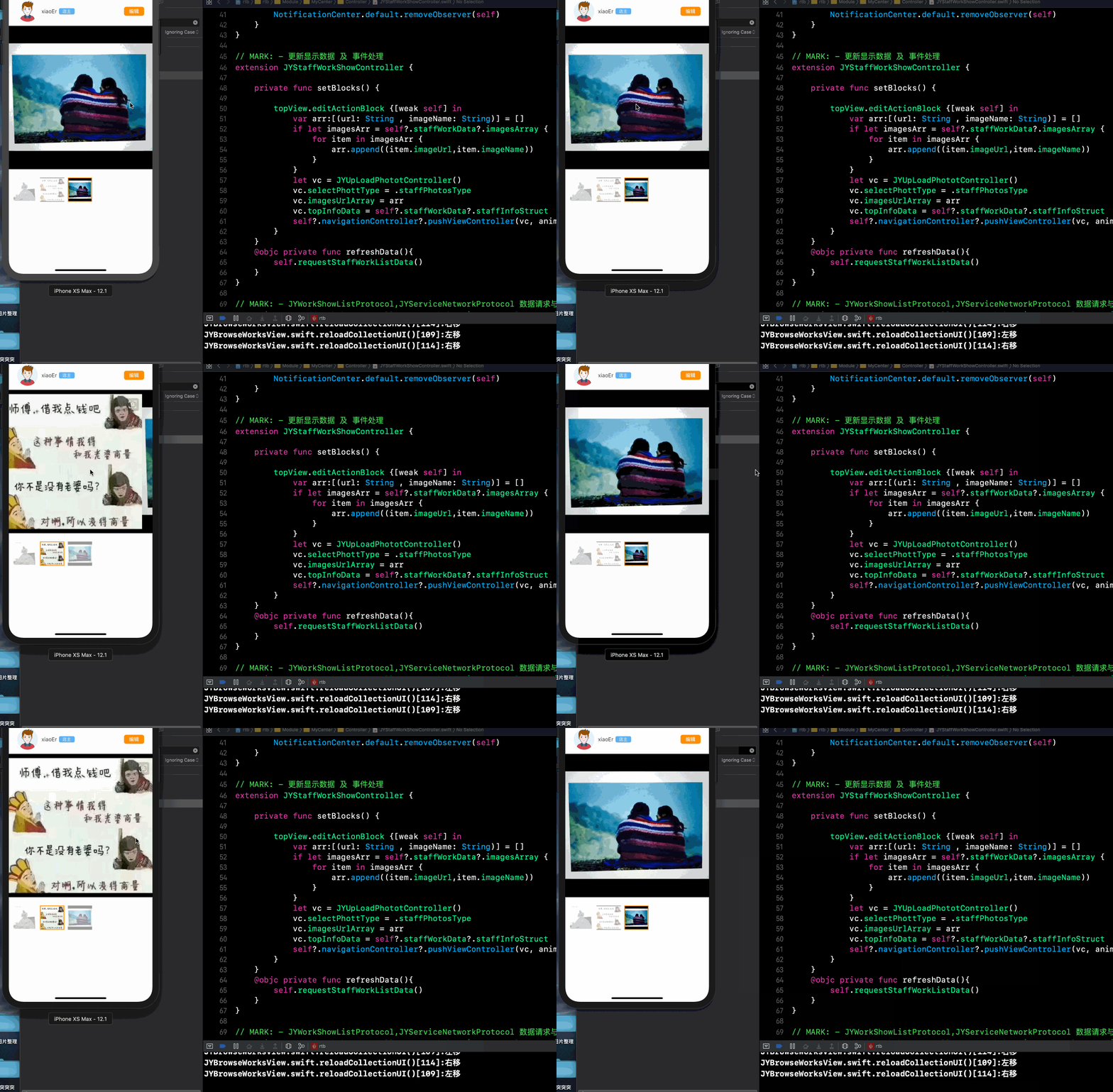
核心代码
1.

2.

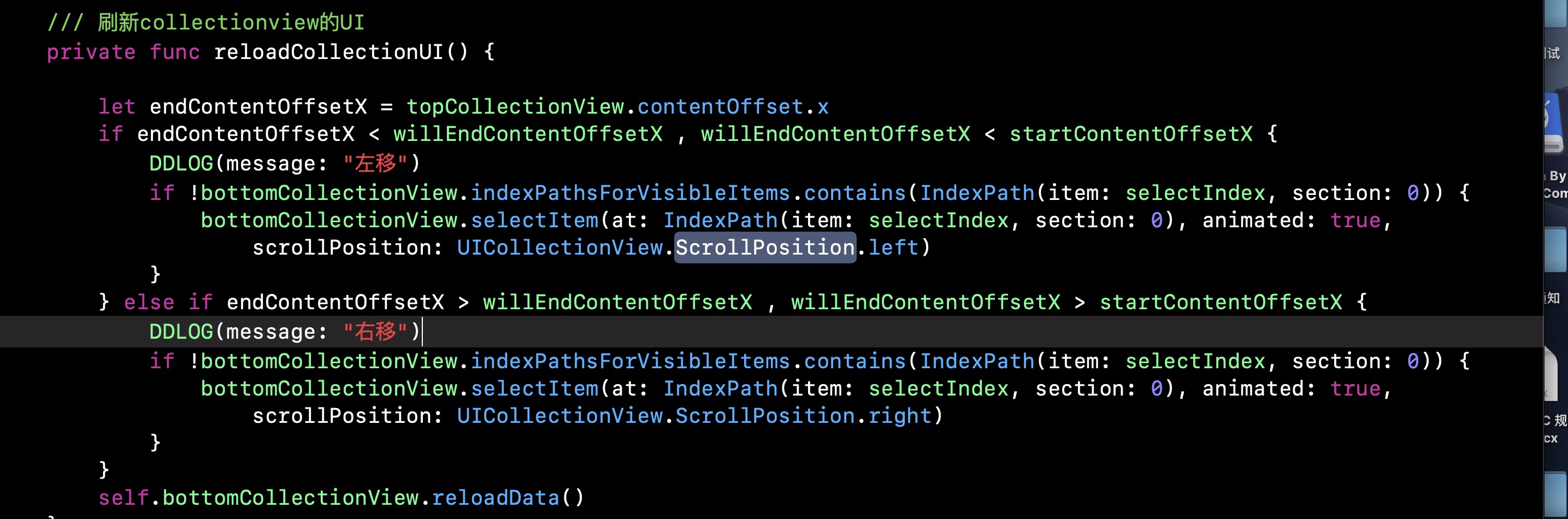
3.
界面代码VFL
/* 浏览作品view*/

import UIKit

/**

 *  图片浏览器(大图和缩略图)

 */

class JYBrowseWorksView: UIView {

    /// 数据源参数(外界传入)

    var dataArray:[WorkImagesProtocol] = [] {

        didSet{

            self.topCollectionView.reloadData()

            self.bottomCollectionView.reloadData()

            if dataArray.isEmpty {

                self.topCollectionView.backgroundView = self.emptyView

                bottomCollectHeight?.constant = 0

                self.topCollectionView.backgroundColor = UIColor(hexColor: "F9F9F9")

            }else{

                self.topCollectionView.backgroundView = nil

                 bottomCollectHeight?.constant = 70

                self.topCollectionView.backgroundColor = UIColor.white

            }

        }

    }

    /// 照片比例类型(默认1:1)

    var photoSizeType: JYMyCenterPhotoHeightType = .squareType {

        didSet{

            self.collectionHeightConstraint?.constant = photoSizeType.photoHeight

            if photoSizeType == .rectangleType {

                self.collectionMegrainConstraint?.constant = 72

            }else {

                self.collectionMegrainConstraint?.constant = 24

            }

        }

    }

    /// 当前显示的图片索引

    private var selectIndex:Int = 0 {

        didSet{

            self.reloadCollectionUI()

        }

    }

    /// 空页面

    private let emptyView = JYZDEmptyView(emptyAreement: JYEmptyViewStruct(emptyType: .noImageEmptyType, offsetY: -70, titleTipStr: "暂无作品", buttonTitleStr: nil))

    /// 底部相册的高度约束

    private var bottomCollectHeight: NSLayoutConstraint?

    /// 可分页滑动collectionView

    private lazy var topCollectionView : UICollectionView = {

        let layout = UICollectionViewFlowLayout()

        layout.scrollDirection = .horizontal

        layout.itemSize = CGSize(width: JY_DEVICE_WIDTH, height: self.photoSizeType.photoHeight)

        let collectionView = UICollectionView(frame: .zero, collectionViewLayout: layout)

        collectionView.translatesAutoresizingMaskIntoConstraints = false

        collectionView.backgroundColor = UIColor.white

        collectionView.isPagingEnabled = true

        collectionView.showsVerticalScrollIndicator = false

        collectionView.showsHorizontalScrollIndicator = false

        return collectionView

    }()

    /// 可选择点中的collectionview

    private var bottomCollectionView : UICollectionView = {

        let layout = UICollectionViewFlowLayout()

        layout.scrollDirection = .horizontal

        layout.itemSize = CGSize(width: 70, height: 70)

        let collectionView = UICollectionView(frame: .zero, collectionViewLayout: layout)

        collectionView.translatesAutoresizingMaskIntoConstraints = false

        collectionView.backgroundColor = UIColor.white

        collectionView.showsVerticalScrollIndicator = false

        collectionView.showsHorizontalScrollIndicator = false

        return collectionView

    }()

    /// topcollectionView 开始滑动时的位移

    private var startContentOffsetX : CGFloat = 0

    /// topcollectionView 将要停止滑动时的位移

    private var willEndContentOffsetX : CGFloat = 0

    /// 控制高度的约束

    private var collectionHeightConstraint: NSLayoutConstraint?

    /// 控制距离的约束

    private var collectionMegrainConstraint: NSLayoutConstraint?

    override init(frame: CGRect) {

        super.init(frame: frame)

        self.translatesAutoresizingMaskIntoConstraints = false

        self.configerUI()

    }

    required init?(coder aDecoder: NSCoder) {

        fatalError("init(coder:) has not been implemented")

    }

    /// 刷新collectionview的UI

    private func reloadCollectionUI() {

        let endContentOffsetX = topCollectionView.contentOffset.x

        if endContentOffsetX < willEndContentOffsetX , willEndContentOffsetX < startContentOffsetX {

            DDLOG(message: "左移")

            if !bottomCollectionView.indexPathsForVisibleItems.contains(IndexPath(item: selectIndex, section: 0)) {

                bottomCollectionView.selectItem(at: IndexPath(item: selectIndex, section: 0), animated: true, scrollPosition: UICollectionView.ScrollPosition.left)

            }

        } else if endContentOffsetX > willEndContentOffsetX , willEndContentOffsetX > startContentOffsetX {

            DDLOG(message: "右移")

            if !bottomCollectionView.indexPathsForVisibleItems.contains(IndexPath(item: selectIndex, section: 0)) {

                bottomCollectionView.selectItem(at: IndexPath(item: selectIndex, section: 0), animated: true, scrollPosition: UICollectionView.ScrollPosition.right)

            }

        }

        self.bottomCollectionView.reloadData()

    }

}

// MARK: - UICollectionViewDelegate,UICollectionViewDataSource,UICollectionViewDelegateFlowLayout

extension JYBrowseWorksView : UICollectionViewDelegate,UICollectionViewDataSource,UICollectionViewDelegateFlowLayout {

    func collectionView(_ collectionView: UICollectionView, numberOfItemsInSection section: Int) -> Int {

        return self.dataArray.count

    }

    func collectionView(_ collectionView: UICollectionView, cellForItemAt indexPath: IndexPath) -> UICollectionViewCell {

        let cell = collectionView.dequeueReusableCell(withReuseIdentifier: "JYBrowseWorksCollectionCell", for: indexPath) as! JYBrowseWorksCollectionCell

        cell.configerCellData(imageData: dataArray[indexPath.row])

        if collectionView == bottomCollectionView {

            let select = selectIndex == indexPath.row ? true : false

            cell.configerSelectCell(isSelect: select)

        }else {

//            cell.imageView.contentMode = .scaleAspectFit

//            cell.clipsToBounds = false

        }

        return cell

    }

    func collectionView(_ collectionView: UICollectionView, layout collectionViewLayout: UICollectionViewLayout, minimumInteritemSpacingForSectionAt section: Int) -> CGFloat {

        if collectionView == topCollectionView {

            return 0.0001

        }

        return 10

    }

    func collectionView(_ collectionView: UICollectionView, layout collectionViewLayout: UICollectionViewLayout, minimumLineSpacingForSectionAt section: Int) -> CGFloat {

        if collectionView == topCollectionView {

            return 0

        }

        return 10

    }

    func collectionView(_ collectionView: UICollectionView, layout collectionViewLayout: UICollectionViewLayout, insetForSectionAt section: Int) -> UIEdgeInsets {

        if collectionView == topCollectionView {

            return UIEdgeInsets.zero

        }

        return UIEdgeInsets(top: 0, left: 10, bottom: 0, right: 10)

    }

    func collectionView(_ collectionView: UICollectionView, didSelectItemAt indexPath: IndexPath) {

        if collectionView == bottomCollectionView {

            selectIndex = indexPath.row

            topCollectionView.scrollToItem(at: IndexPath(item: indexPath.row, section: 0), at: UICollectionView.ScrollPosition.left, animated: true)

        }

    }

    /// 滑动顶部collectionview,底部collectionview显示顶部当前显示的图片

    ///

    /// - Parameter scrollView: scrollView description

    func scrollViewDidEndDecelerating(_ scrollView: UIScrollView) {

        if scrollView == topCollectionView {

            let x = scrollView.contentOffset.x

            let i:Int = Int(x/UIScreen.main.bounds.size.width)

            self.selectIndex = i

        }

    }

    /// 获取将要滑动时位移

    /// 用于判断滑动方向

    /// - Parameter scrollView: scrollView description

    func scrollViewWillBeginDragging(_ scrollView: UIScrollView) {

        if scrollView == topCollectionView {

            startContentOffsetX = scrollView.contentOffset.x

        }

    }

    /// 获取将要结束时 topCollectionView 的位移

    ///  用于判断 滑动方向

    /// - Parameters:

    ///   - scrollView: scrollView description

    ///   - velocity: velocity description

    ///   - targetContentOffset: targetContentOffset description

    func scrollViewWillEndDragging(_ scrollView: UIScrollView, withVelocity velocity: CGPoint, targetContentOffset: UnsafeMutablePointer<CGPoint>) {

        if scrollView == topCollectionView {

            willEndContentOffsetX = scrollView.contentOffset.x

        }

    }

}

// MARK: - UI布局

extension JYBrowseWorksView {

    private func configerUI() {

        topCollectionView.delegate = self

        topCollectionView.dataSource  = self

        bottomCollectionView.delegate = self

        bottomCollectionView.dataSource = self

        topCollectionView.register(JYBrowseWorksCollectionCell.classForCoder(), forCellWithReuseIdentifier: "JYBrowseWorksCollectionCell")

        bottomCollectionView.register(JYBrowseWorksCollectionCell.classForCoder(), forCellWithReuseIdentifier: "JYBrowseWorksCollectionCell")

        self.addSubview(topCollectionView)

        self.addSubview(bottomCollectionView)

        let vd:[String:UIView] = ["topCollectionView":topCollectionView,"bottomCollectionView":bottomCollectionView]

        self.addConstraints(NSLayoutConstraint.constraints(withVisualFormat: "|[topCollectionView]|", options: [], metrics: nil, views: vd))

        self.addConstraints(NSLayoutConstraint.constraints(withVisualFormat: "|[bottomCollectionView]|", options: [], metrics: nil, views: vd))

        self.addConstraints(NSLayoutConstraint.constraints(withVisualFormat: "V:|[topCollectionView]", options: [], metrics: nil, views: vd))

        self.addConstraints(NSLayoutConstraint.constraints(withVisualFormat: "V:[bottomCollectionView]|", options: [], metrics: nil, views: vd))

        self.collectionHeightConstraint = topCollectionView.heightAnchor.constraint(equalToConstant: JY_DEVICE_WIDTH)

        self.collectionHeightConstraint?.isActive = true

        self.collectionMegrainConstraint = bottomCollectionView.topAnchor.constraint(equalTo: topCollectionView.bottomAnchor, constant: 24)

        self.collectionMegrainConstraint?.isActive = true

        bottomCollectHeight = bottomCollectionView.heightAnchor.constraint(equalToConstant: 70)

        bottomCollectHeight?.isActive = true

    }

}
swift - scrollview 判断左右移动, 以及上下两个view联动的更多相关文章
- iOS开发——设备篇Swift篇&判断设备类型
判断设备类型 1,分割视图控制器(UISplitViewController) 在iPhone应用中,使用导航控制器由上一层界面进入下一层界面. 但iPad屏幕较大,通常使用SplitViewCo ...
- 给定数组A,大小为n,现给定数X,判断A中是否存在两数之和等于X
题目:给定数组A,大小为n,现给定数X,判断A中是否存在两数之和等于X 思路一: 1,先采用归并排序对这个数组排序, 2,然后寻找相邻<k,i>的两数之和sum,找到恰好sum>x的 ...
- jQuery实现两个DropDownList联动(MVC)
近段时间原本是学习MVC的,谁知道把jQuery也学上了.而且觉得对jQuery更感兴趣,比如今早上有写了一个练习<jQuery实现DropDownList(MVC)>http://www ...
- 实现外卖选餐时两级 tableView 联动效果
最近实现了下饿了么中选餐时两级tableView联动效果,先上效果图,大家感受一下: 下面说下具体实现步骤: 首先分解一下,实现这个需求主要是两点,一是点击左边tableView,同时滚动右边tabl ...
- MVC编辑状态两个DropDownList联动
前几天使用jQuery在MVC应用程序中,实现了<jQuery实现两个DropDownList联动(MVC)>http://www.cnblogs.com/insus/p/3414480. ...
- GridView中两个DropDownList联动
GridView中两个DropDownList联动 http://www.cnblogs.com/qfb620/archive/2011/05/25/2057163.html Html: <as ...
- ios中两个view动画切换
@interface ViewController () @property(nonatomic,retain)UIView *redview; @property(nonatomic,retain) ...
- iOS 类似外卖 两个tableView联动
在伯乐在线上看到一个挺好玩的文章,自己也参考文章实现了一下. 效果实现如图所示: 具体实现的内容可以参考原文,参考文章:<iOS 类似美团外卖 app 两个 tableView 联动效果实现&g ...
- js判断字符长度 汉字算两个字符
方法一:使用正则表达式,代码如下: function getByteLen(val) { var len = 0; for (var i = 0; i < val.length; i++) { ...
随机推荐
- CSS内容简单总结
day50 1. 内容回顾 1. 伪类和伪元素 1. 伪类 1. :link 2. :visited 3. :hover ...
- 对于两个初始时设置为Sensor的刚体,不会触发preSolve和postSolve
Main.as package{ import Box2D.Common.Math.b2Vec2; import Box2D.Dynamics.b2Body; import Box2D.Dynamic ...
- php运行代码流程和性能优化方法
---恢复内容开始--- php文件->扫描->zd引擎去理解->opcodes->执行->输出 例子,用white随机循环20000数据进行性能测试,分别对比isset ...
- Android通过adb命令Debug调试
Android Debug后IDE执行的命令: / ::: Launching module_app $ adb push C:\fastwork\Projects\project\CJPT\modu ...
- jsp 静态引入<%@ include %> 动态引入<jsp:include> 区别
1. 首先先介绍下,jsp机制: servlet容器,先将jsp转化成servlet,然后编译成.class文件,放置容器缓冲区[tomcat的work目录下]. 每次调用jsp时,服务器会读取编译 ...
- IP/IGMP/UDP校验和算法
校验和算法:IP.IGMP.UDP和TCP报文头部都有检验和字段,其算法都是一样的. IP.IGMP.UDP和TCP校验和的范围:仅报文头部长度. 在发送数据时,为了计算数据包的检验和.应该按如下步骤 ...
- C# 集合转换为DataTable
该类就用了几个类型,如int,int?,string,所以其它类型就先没管. 用到的类: public class tb_Projects { public int ProID { get; set; ...
- 实例的render方法渲染组件
1.普通渲染组件 在app容器中插入login组件 <login></login> 一个app可以多个这种组件 <script> var login = { te ...
- lunux开放80端口(本地访问不了linux文件可能是这个原因)
/sbin/iptables -I INPUT -p tcp --dport 80 -j ACCEPT #开启80端口 /etc/rc.d/init.d/iptables save #保存配置 / ...
- MATLAB GUI图片添加背景
global im [filename,pathname]=uigetfile('*.jpg','输入图片'); file=strcat(pathname,filename); im=imread(f ...