
1.print()与input()
 hello world必备-》print函数
print():
作用:
打印函数,打印数据到屏幕中
参数列表:
print(value, ..., sep=' ', end='\n', file=sys.stdout, flush=False)
参数解释:
value,...,代表可以有多个要打印的数据,如print("a","b","c")
sep代表打印出的各个数据之间的参数
end代表打印结束字符,如\n代表打印完换行,\t代表打印完缩进到下一位置
file代表输出流,sys.stdout代表标准输出流,sys.stderr代表标准错误流
flush代表是否立即刷新缓冲区
用法:
print("hello world!")

print(1,2,3,sep='\t')

print('a','b','c',sep='#')

print(1,end='\t')

print(2)
输出结果:
hello world!

1    2    3

a#b#c

1    2
input():
作用:
输入函数,获取用户输入
参数列表:
input("输入提示信息")
用法:
name=input("你的名字:")

age=input("你的年龄:")
输出结果:

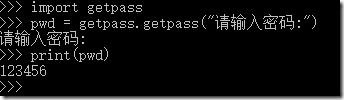
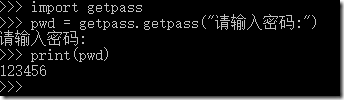
如果要使用非明文可见模式,使用getpass模块下的getpass:
(此模块在pycharm中无法正常使用))
用法:
import getpass

pwd=getpass.getpass("请输入密码:")
1.print()与input()的更多相关文章
- Learning Python 002 print() 和 input()
Python print() 和 input() print()函数 print()函数可以向终端中输入指定的内容. 输出当个字符串 .py文件中,输入下面的代码,并保存: print('hello ...
- python3.5在print和input上的几个变化
1. 在python3.5中使用print,打印内容必须用括号()括起来.python2.7中可以不用括号,如果你加了括号,代码在python2.7中也是可以正常运行的. python3.5 exam ...
- python中print和input的底层实现
print print的底层通过sys.stdout.write() 实现 import sys print('hello') print('world') print(520) sys.stdout ...
- Python中的print、input函数以及Python中交换两个变量解析
一.Python中的值交换操作 首先明确一点点,Python中的一切都是面向对象的,可以理解为Python的中一切都是对象. 我们知道Java也是面向对象的语言,但是在Java中定义一个值变量如下: ...
- 浅析 python中的 print 和 input 的底层区别!!!
近期的项目中 涉及到相关知识 就来总结一下 ! 先看源码: def print(self, *args, sep=' ', end='\n', file=None): # known special ...
- [Python] Print input and output in table
Print the input and output in a table using prettyTable. from prettytable import PrettyTable import ...
- 2.1 Python3基础-内置函数(print&input)
>>返回主目录 源代码 # 内置函数:输入/输出 name = 'Portos' age = 18 sex = 'man' score = 99.5 print('Hello World! ...
- Python input 使用
Python 3.0 中使用"input" , Python 2.0 中使用"raw_input"Python 3.5: #!C:\Program Files\ ...
- python学习03——设计,与input有关
笨办法学python第36节,我写的代码如下: from sys import exit def rule(): print "Congratulations! You made the r ...
随机推荐
- (转) JVM Crash with SIGSEGV - problematic frame - libzip.so
原文:https://stackoverflow.com/questions/38057362/jvm-crash-with-sigsegv-problematic-frame-libzip-so h ...
- Spring Boot 基础概述与相关约定配置
今天打算整理一下 Spring Boot 的基础篇,这系列的文章是我业余时间来写的,起源于之前对微服务比较感兴趣,微服务的范畴比较广包括服务治理.负载均衡.断路器.配置中心.API网关等,还需要结合 ...
- 和我一起打造个简单搜索之ElasticSearch入门
本文简单介绍了使用 Rest 接口,对 es 进行操作,更深入的学习,可以参考文末部分. 环境 本文以及后续 es 系列文章都基于 5.5.3 这个版本的 elasticsearch ,这个版本比较稳 ...
- 一次Linux服务器被入侵和删除木马程序的经历
转载时请务必以超链接形式标明文章 原始出处 .作者信息和本声明.否则将追究法律责任.http://wzlinux.blog.51cto.com/8021085/1740113 一.背景 晚上看到有台服 ...
- Android性能测试--垃圾回收频次统计的作用
频繁的垃圾回收有可能暗示着内存泄露,在我手机统计数据,每次垃圾回收会占据100ms左右,这对内存和事件响应要求严格的程序(游戏等)来讲是可观的性能损耗.
- let‘s encrypt之nginx-https没有小锁
1.使用let's encrypt 加密后的nginx,访问的时候,发现没有小锁,chrome中: 火狐浏览器上: 会看到如上信息,这是因为css.图片或javascript任然通过http提供,可以 ...
- webpack4 自学笔记一(babel的配置)
所有代码都可以再我的github上查看,每个文件夹下都会有README.md,欢迎star: https://github.com/Jasonwang911/webpackStudyInit/tree ...
- 开启Centos网卡失败的解决办法
虚拟机安装了Centos,使用ip addr命令查看网卡,但是ens33没有ip地址,按照网上说的,修改ens33网卡的配置文件: vi /etc/sysconfig/network-scripts/ ...
- Spring Boot项目属性配置
接着上面的入门教程,我们来学习下Spring Boot的项目属性配置. 1.配置项目内置属性 属性配置主要是在application.properties文件里配置的(编写时有自动提示)这里我们将se ...
- JavaScript学习总结(四)——this、原型链、javascript面向对象
一.this 在JavaScript中this表示:谁调用当前函数this就指向谁,不知道调用者时this指向window. JavaScript是由对象组成的,一切皆为对象,万物皆为对象.this是 ...