
Flume简介与使用(二)——Thrift Source采集数据
Flume简介与使用(二)——Thrift Source采集数据
继上一篇安装Flume后,本篇将介绍如何使用Thrift Source采集数据。
Thrift是Google开发的用于跨语言RPC通信,它拥有功能强大的软件堆栈和代码生成引擎,允许定义一个简单的IDL文件来生成不同语言的代码,服务器端和客户端通过共享这个IDL文件来构建来完成通信。
Flume的Thrift Source是其实现的众多Source中的一个,Flume已经实现了服务器端,因此我们可以用任意自己熟悉的语言编写自己的Thrift Source客户端来采集数据,然后发送给Thrift Source服务器端。
[一]、生成C++代码
下载源码版的Flume,在apache-flume-1.6.0-src\flume-ng-sdk\src\main\thrift目录下有Flume定义好的flume.thrift文件,现在只要用这个文件来生成我们需要的代码就行了。
flume.thrift文件内容如下:
 namespace java org.apache.flume.thrift

 struct ThriftFlumeEvent {

   1: required map <string, string> headers,

   2: required binary body,

 }

 enum Status {

   OK,

   FAILED,

   ERROR,

   UNKNOWN

 }

 service ThriftSourceProtocol {

   Status append(1: ThriftFlumeEvent event),

   Status appendBatch(1: list<ThriftFlumeEvent> events),

 }
1、定义了一个ThriftFlumeEvent结构体,用来封装发送的数据;
2、定义了一个service类ThriftSourceProtocol,服务器端具体实现ThriftSourceProtocol里面的两个方法,再由客户端调用这些方法把数据传给Thrift Source服务器端。
3、运行下面的命令:thrift --gen cpp flume.thrift,会在当前目录生成gen-cpp目录,里面是Thrift自动生成c++头文件和代码。(在这之前要先安装Thrift)
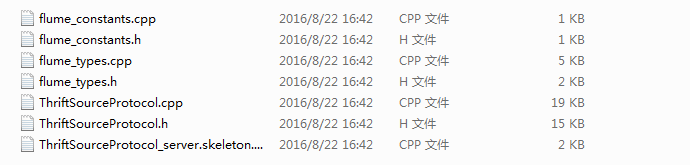
[二]、下面是编写自己的客户端代码,我这里是接收远程传过来的数据,然后发送给Flume的Thrift Source服务器。
 #include <arpa/inet.h>

 #include <sys/types.h>

 #include <sys/socket.h>

 #include <pthread.h>

 #include <unistd.h>

 #include <stdlib.h>

 #include "include/MESA_prof_load.h"

 #include "include/MESA_handle_logger.h"

 #include <string>

 #include <iostream>

 #include "gen-cpp/flume_constants.h"

 #include "gen-cpp/flume_types.h"

 #include "gen-cpp/ThriftSourceProtocol.h"

 #include <thrift/protocol/TBinaryProtocol.h>

 #include <thrift/protocol/TCompactProtocol.h>

 #include <thrift/transport/TSocket.h>

 #include <thrift/transport/TTransportUtils.h>

 using namespace std;

 using namespace apache::thrift;

 using namespace apache::thrift::protocol;

 using namespace apache::thrift::transport;

 #define LOG_PATH "/home/zjf/DFcode/trafficlog/traffic_source.log"

 #define DATA_BUFFER 2048    //send buffer data length

 #define BUFLEN   2048       //received buffer data length

 #define BATCH_SIZE 1000     //send event num to flume once

 //defined my C++ object

 class ThriftClient{

     public:

         // Thrift protocol needings...

         boost::shared_ptr<TTransport> socket;

         boost::shared_ptr<TTransport> transport;

         boost::shared_ptr<TProtocol> protocol;

         ThriftSourceProtocolClient* pClient;

     public:

         ThriftClient();

 };

 //cconstruction function, init the thrift source server ip and port

 ThriftClient::ThriftClient():

     socket(new TSocket("10.208.129.12",)),

     transport(new TFramedTransport(socket)),

     protocol(new TCompactProtocol(transport))

 {

     pClient = new ThriftSourceProtocolClient(protocol);

 }

 //log

 struct log_info_t{

     char *path;

     int log_level;

     void * handle;

 };

 struct log_info_t log_info;

 const char *module = "zjf_traffic_data_collector";

 //类的对象

 ThriftClient *client = new ThriftClient();

 std::map<std::string, std::string>  headers;

 std::vector<ThriftFlumeEvent> eventbatch;

 unsigned long long pkt_num_tgl = ;

 int RecvAndSendUDP(){

     MESA_handle_runtime_log(log_info.handle, RLOG_LV_INFO, module, "RecvUDP be called");

     int listen_socket;          //socket id

     struct sockaddr_in    local;    //client IP, where to recevied data

     struct sockaddr_in    from;      //server IP(local host)

     char server_addr[] = "10.208.129.12";    //received traffic IP

     int server_port = ;                    //received traffic port

     char send_buf[DATA_BUFFER] = {};          //data send to flume

     char Buf[BUFLEN] = {};

     int fromlen;

     int len;

     //init socket

 reconnect:

     memset(&local, , sizeof(local));

     local.sin_family = AF_INET;

     local.sin_addr.s_addr = inet_addr(server_addr);

     local.sin_port = htons(server_port);

     listen_socket = socket(AF_INET, SOCK_DGRAM, ); // UDP socket

     if(listen_socket < ) {

         printf("error udp socket\n");

     }else{

         printf("listen_socket create OK\n");

     }

     if(bind(listen_socket, (struct sockaddr *)&local, sizeof(local)) < ) {

         printf("error udp bind\n");

         return -;

     }else{

         printf("socket bind OK\n");

     }

     while(){

         char sip[] = {};

         char dip[] = {};

         char srcport[] = {};

         char destport[] = {};

         char url[BUFLEN] = {};

         memset(Buf,,BUFLEN);

         fromlen = sizeof(from);

         len = recvfrom(listen_socket, (void *)Buf, (size_t)BUFLEN, , (struct sockaddr *)&from,(socklen_t *)&fromlen);

         if(len == -) {

             printf("error udp recvfrom\n");

             close(listen_socket);

             goto reconnect;

         }

         //parse received buf, transform to key-value

         int i;

         int sip_loc = ;

         int sport_loc = ;

         int dip_loc = ;

         int dport_loc = ;

         int dotcount = ;

         for(i=;Buf[i] != '\0';i++){

             if(Buf[i] == '.'){

                 dotcount++;

                 if(dotcount == ){

                     sip_loc = i;

                     memcpy(sip,Buf,i);

                 }

                 else if(dotcount == ){

                     dip_loc = i;

                     memcpy(dip,Buf+sport_loc+,dip_loc-sport_loc-);

                 }

                 else if(dotcount == ){

                     dport_loc = i;

                     memcpy(destport,Buf+dip_loc+,dport_loc-dip_loc-);

                     break;

                 }

                 else{}

             }

             if(Buf[i] == '>'){

                 sport_loc = i;

                 memcpy(srcport,Buf+sip_loc+,sport_loc-sip_loc-);

             }

         }

         memcpy(url,Buf+dport_loc+,strlen(Buf)-dport_loc);

         unsigned long src_ip = inet_addr(sip);

         unsigned long dst_ip = inet_addr(dip);

         sprintf(send_buf,"SrcIP=%u SrcPort=%s DestIP=%u DestPort=%s",ntohl(src_ip),srcport,ntohl(dst_ip),destport);

         //construct an event and append to send

         if( != strlen(send_buf) ){

             pkt_num_tgl++;

             string sBody(send_buf);

             ThriftFlumeEvent tfEvent;

             tfEvent.__set_headers(headers);

             tfEvent.__set_body(sBody);

             eventbatch.push_back(tfEvent);

             if(eventbatch.size() >= BATCH_SIZE){

                 if(!client->transport->isOpen())

                     client->transport->open();

                 Status::type res = client->pClient->appendBatch(eventbatch);

                 if(res != Status::OK){

                     MESA_handle_runtime_log(log_info.handle, RLOG_LV_FATAL, module, "WARNING: send event via thrift failed, return code:%d",res);

                 }else{

                     //printf("sended %lld event data to flume successful\n", pkt_num_tgl);

                 }

                 eventbatch.clear();

             }

         }

         bzero(send_buf,DATA_BUFFER);

     }

 }

 int main()

 {

     //create――logger

     log_info.path = (char *)LOG_PATH;

     log_info.log_level = ;

     log_info.handle = MESA_create_runtime_log_handle(log_info.path, log_info.log_level);

     //open thrift connection

     if(!client->transport->isOpen()){

         client->transport->open();

     }

     eventbatch.clear();

     RecvAndSendUDP();

     return ;

 }
[三]、编译并运行
g++ -g -DHAVE_NETINET_IN_H -I. -I/usr/local/include/thrift -L/usr/local/lib rec_send_traffic_thrift.cpp gen-cpp/flume_constants.cpp gen-cpp/flume_types.cpp gen-cpp/ThriftSourceProtocol.cpp -o rec_send_traffic_thrift -lthrift -lpcap -L/usr/lib64 -lMESA_htable -lpthread -lMESA_handle_logger
用守护进程启动程序:
 #!/bin/sh

 while [  ]; do

     ulimit -c unlimited

     #./jz

     #cgexec -g cpu,memory:/MESA/jz ./jz >> jz.log

     ./rec_send_traffic_thrift

     #./jz

     echo program crashed, restart at `date +"%w %Y/%m/%d, %H:%M:%S"` >> RESTART.log

     sleep

 done
推荐博文:【1】http://www.micmiu.com/soa/rpc/thrift-sample/
【2】http://www.mamicode.com/info-detail-869223.html
【3】http://blog.csdn.net/yuzx2008/article/details/50179033
【4】http://shiyanjun.cn/archives/456.html
【5】http://flume.apache.org/FlumeDeveloperGuide.html#rpc-clients-avro-and-thrift
转载请注明原文出处,谢谢
Flume简介与使用(二)——Thrift Source采集数据的更多相关文章
- 一次flume exec source采集日志到kafka因为单条日志数据非常大同步失败的踩坑带来的思考
本次遇到的问题描述,日志采集同步时,当单条日志(日志文件中一行日志)超过2M大小,数据无法采集同步到kafka,分析后,共踩到如下几个坑.1.flume采集时,通过shell+EXEC(tail -F ...
- Flume简介与使用(一)——Flume安装与配置
Flume简介与使用(一)——Flume安装与配置 Flume简介 Flume是一个分布式的.可靠的.实用的服务——从不同的数据源高效的采集.整合.移动海量数据. 分布式:可以多台机器同时运行采集数据 ...
- 01_日志采集框架Flume简介及其运行机制
离线辅助系统概览: 1.概述: 在一个完整的大数据处理系统中,除了hdfs+mapreduce+hive组成分析系统的核心之外,还需要数据采集.结果数据导出. 任务调度等不可或缺的辅助系统,而这些辅助 ...
- [ETL] Flume 理论与demo(Taildir Source & Hdfs Sink)
一.Flume简介 1. Flume概述 Flume是Cloudera提供的一个高可用的,高可靠的,分布式的海量日志采集.聚合和传输的系统,Flume支持在日志系统中定制各类数据发送方,用于收集数据: ...
- Flume 简介及基本使用
一.Flume简介 Apache Flume是一个分布式,高可用的数据收集系统.它可以从不同的数据源收集数据,经过聚合后发送到存储系统中,通常用于日志数据的收集.Flume 分为 NG 和 OG (1 ...
- 入门大数据---Flume 简介及基本使用
一.Flume简介 Apache Flume 是一个分布式,高可用的数据收集系统.它可以从不同的数据源收集数据,经过聚合后发送到存储系统中,通常用于日志数据的收集.Flume 分为 NG 和 OG ( ...
- Flume简介及安装
Hadoop业务的大致开发流程以及Flume在业务中的地位: 从Hadoop的业务开发流程图中可以看出,在大数据的业务处理过程中,对于数据的采集是十分重要的一步,也是不可避免的一步,从而引出我们本文的 ...
- Flume简介与使用(三)——Kafka Sink消费数据之Kafka安装
前面已经介绍了如何利用Thrift Source生产数据,今天介绍如何用Kafka Sink消费数据. 其实之前已经在Flume配置文件里设置了用Kafka Sink消费数据 agent1.sinks ...
- Flume 1.7 源代码分析(四)从Source写数据到Channel
Flume 1.7 源代码分析(一)源代码编译 Flume 1.7 源代码分析(二)总体架构 Flume 1.7 源代码分析(三)程序入口 Flume 1.7 源代码分析(四)从Source写数据到C ...
随机推荐
- java Object类学习
/* * Copyright (c) 1994, 2010, Oracle and/or its affiliates. All rights reserved. * ORACLE PROPRIETA ...
- 在LinearLayout中实现列表,列表采用LinearLayout横向布局-android学习
不多讲直接上代码 1.Activity 对应的布局文件如下: <?xml version="1.0" encoding="utf-8"?> < ...
- 为Virtualbox中的Solaris10安装VBoxAdditions
安装增强插件,以便能够和虚拟机拖放文件 1.启动虚拟系统,选择安装VirtualBox增强功 能(Guest Additions).在VirtualBox中选择“设备”->“安装增强功能”.Vi ...
- C程序内存分配
在多任务操作系统中的每一个进程都运行在一个属于它自己的内存沙盘中.这个沙盘就是虚拟地址空间(virtual address space),在32位模式下它总是一个4GB的内存地址块.这些虚拟地址通过页 ...
- 一键生成HTML4和WAP站
前两天在QQ空间上提到微信上线风铃时,把其中的HTML5错打成HTML4,结果发现很多媒体微博照着转载,依旧说成 "一键生成HTML4和WAP站",这就是转载不注明出处.不署名.不 ...
- bzoj 2820 YY的GCD(莫比乌斯反演)
Description 神犇YY虐完数论后给傻×kAc出了一题 给定N, M,求1<=x<=N, 1<=y<=M且gcd(x, y)为质数的(x, y)有多少对 kAc这种傻× ...
- 【poj2891】Strange Way to Express Integers
题意: 给出n个模方程x=a(mod r) 求x的最小解 题解: 这就是个线性模方程组的模版题- - 但是有一些要注意的地方 extgcd算出来的解x可能负数 要让x=(x%mo+mo)%mo 而且 ...
- POJ1038 - Bugs Integrated, Inc.(状态压缩DP)
题目大意 要求你在N*M大小的主板上嵌入2*3大小的芯片,不能够在损坏的格子放置,问最多能够嵌入多少块芯片? 题解 妈蛋,这道题折腾了好久,黑书上的讲解看了好几遍才稍微有点眉目(智商捉急),接着看了网 ...
- HDU4276 - The Ghost Blows Light(树形DP)
题目大意 给定一棵n个结点的树,每个结点上有一定数量的treasure,经过每条边需要花一定的时间,要求你从结点1出发,在不超过时间T的情况下,最多能够获得的treasure是多少,并且要求结束于结点 ...
- Android应用正确使用扩展SD卡,特别是安卓4.4以后的版本
Android 开发时如何正确获取使用扩展存储路径 在 2.x 版本中,Android设备都是单存储,第三方App写文件,必须申请 WRITE_EXTERNAL_STORAGE 权限: 在4.0之后, ...