
Cross-Browser HTML5 Placeholder Text
One of the nice enhancement in HTML5 web form is being able to add placeholder text to input fields. Placeholder attribute allows you to display text in a form input when it is empty and when it is not focused (it clears the field on focus). This is a nifty feature, but it is not supported by all browsers yet. This tutorial will show you how to use Modernizr to detect if placeholder is supported, or else use jQuery to display the fallback placeholder text dynamically.
Old School Javascript Way
Before we had the placeholder attribute, we relied on Javascript to fake the placeholder text. Below is an example. The text is inserted in the value attribute. On focus, it checks if the value is "search" and returns empty to clear the field. If the value is empty, it returns "search." As you can see, this way is not an efficient way because each field has to be checked.
<input type="text" value="Search" onfocus="if (this.value == 'Search') {this.value = '';}" onblur="if (this.value == '') {this.value = 'Search';}">
jQuery Placeholder Text (Demo)
Now with HTML5 placeholder, it is more semantic to use placeholder than value attribute. However, placeholder text is not supported by all browsers. To make it cross-browser, Modernizr and jQuery come in handy here.
Modernizr is used here to check if placeholder is supported. If placeholder is not supported, the jQuery code will run. It finds all elements with placeholder attribute and stores in a variable. It then compares the input value with the placeholder attribute. If the input value is empty, it will display the placeholder text and add a "placeholder" class to the input field. View Demo.
To use this on your site, download a copy of Modernizr and jQuery and paste the following code any where in your html page (be sure the jquery.js and modernizr.js file is in correct path).
<script src="jquery.js"></script>

<script src="modernizr.js"></script>
$(document).ready(function(){

if(!Modernizr.input.placeholder){

    $('[placeholder]').focus(function() {

      var input = $(this);

      if (input.val() == input.attr('placeholder')) {

        input.val('');

        input.removeClass('placeholder');

      }

    }).blur(function() {

      var input = $(this);

      if (input.val() == '' || input.val() == input.attr('placeholder')) {

        input.addClass('placeholder');

        input.val(input.attr('placeholder'));

      }

    }).blur();

    $('[placeholder]').parents('form').submit(function() {

      $(this).find('[placeholder]').each(function() {

        var input = $(this);

        if (input.val() == input.attr('placeholder')) {

          input.val('');

        }

      })

    });

}
Remove Webkit Search Input Styles
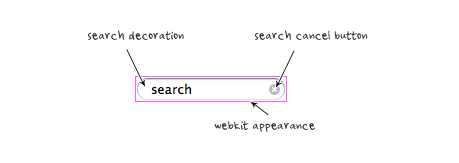
Webkit browsers add extra styling to the search input field. To remove them, add the following CSS code:
input[type=search] {    -webkit-appearance: none;}

input[type="search"]::-webkit-search-decoration,

input[type="search"]::-webkit-search-cancel-button {

    display: none;

}
Credit
The jQuery code is found at Nico Hagenburger.
http://webdesignerwall.com/tutorials/cross-browser-html5-placeholder-text
Cross-Browser HTML5 Placeholder Text的更多相关文章
- html5 placeholder ie 不兼容问题 解决方案
解决HTML5 placeholder的方案 来源: 时间:2013-09-05 20:06:49 阅读数:11375 分享到: 0 [导读] 使低版本浏览器支持Placeholder有很多方 ...
- (转)html5 Placeholder属性兼容IE6、7方法
使低版本浏览器支持Placeholder有很多方法,都不是很完美,或多或少有点问题,且有些原生支持的浏览器在获得焦点时会清空Placeholder提示.发现zhihu的解决方法不错,特记录下 wind ...
- 玩转 HTML5 Placeholder
Placeholder(占位符) 是 HTML5 新增的一个 HTML 属性,用来对可输入字段的期望值提供提示信息,目前已经得到主流浏览器的广泛支持,使用方式非常简单: <input id=&q ...
- IE8 不支持html5 placeholder的解决方案
IE8不支持html5 placeholder的解决方法. /** * jQuery EnPlaceholder plug * version 1.0 2014.07.01戈志刚 * by Frans ...
- HTML5 placeholder(空白提示) 属性
原文地址:HTML5′s placeholder Attribute 演示地址: placeholder演示 原文日期: 2010年08月09日 翻译日期: 2013年8月6日 浏览器引入了许多的HT ...
- 占位符(placeholder text)
占位符(placeholder text)是用户在input(输入)框输入任何东西之前放置在input(输入)框中的预定义文本. 你可以用如下方式创建占位符: <input type=" ...
- UITextField placeholder text color
iOS6 and Later 改变UITextField 中占位符 提示文本的文字颜色 在新版本中(iOS6以后)iOS提供一种 Key = value 属性的方式,来改变UI的属性内容.以UITex ...
- html5 placeholder
placeholder是html5<input>标签的一个属性,placeholder 属性提供可描述输入字段预期值的提示信息(hint).该提示会在输入字段为空时显示,并会在字段获得焦点 ...
- Html5 Canvas Text
html5 canvas中支持对text文本进行渲染;直接的理解就是把text绘制在画布上,并像图形一样处理它(可以加shadow.gradient.pattern.color fill等等):既然它 ...
随机推荐
- 查一下 excel中某一列是否有重复
另一列中写入 =IF(COUNTIF(C:C,C1)>1,"有重复","") 其余往下拖拉公式 我在想如果可以有不往下拖的呢? 不过好像筛选中也有类似的选 ...
- 可接受多个值的文件上传字段HTML5新特性
<input type="file" id="input" multiple="multiple"> 主要是多了个multip ...
- git/github初级运用自如(zz)
----//git/github环境配置 一 . github上创建立一个项目 用户登录后系统,在github首页,点击页面右下角“New Repository” 填写项目信息: project n ...
- 康乐不风流之爱解题的pde灌水王张祖锦
康乐不风流之爱解题的pde灌水王张祖锦 师弟: 邓洪存 (现在烟台大学任教) 好吧, 我一直想写写康乐园里与我相熟的这几个人, 不如趁此机会开始. 第一批人物为张祖锦.苏延辉.张会春.黄显涛.刘兴兴. ...
- hibernate建表 一对多 多的一方控制一的一方
一对多 单向<one-to-many>通过calss操作student 外键在student表中,所以外键由student维护<many-to-one>通过student操作c ...
- inno setup详细使用教程
前段时间我完成了几个软件的汉化,想把它们打包起来,可是苦于我是一个很菜的鸟,很笨的瓜,只好上网找关于安装程序制作的文章.不幸我没能找到:-( 没法只好自己去华军软件园里找找制作安装程序的软件,并一把下 ...
- Invalid encoding name "UTF8". 报错 XML
报错:2013-07-05 10:59:49,111 ERROR [STDERR] [Fatal Error] :1:38: Invalid encoding name "UTF8" ...
- Android百度地图开发(二)地图覆盖物
上一篇文章写道如何在一个mapview中简单的显示地图:本次学习一下如何在地图上添加一些覆盖物. 1.设置显示交通地图: // 显示交通地图 mapView.setTraffic(true); 2.设 ...
- ajax 访问--提高安全性
首先受到struts token的启发,产生了客户端发起的ajax请求进行验证的想法,大致思路是客户端每次请求产生一个key ,然后服务端接收到key,然后解析,判断是否为合法key, 对于不带key ...
- leetcode—jump game
1.题目描述 Given an array of non-negative integers, you are initially positioned at the first index of t ...