
css概括
CSS:美化页面 层叠样式表 修改标签样式
1、分类:内联 内嵌 外部引用
(1)内联: 写在标签里面,以属性的形式表现 属性名为style
(2)内嵌:写在head标签里面,以标签的形式表现 标签名style
(3)外部引用:写在head标签里面 以标签的形式表现 标签名 link

2.选择器格式:
选择器{
样式属性值 : 样式值;
样式属性值 : 样式值;
}
选择器:找元素 通过各种方式 例如:标签名 id属性值
标签选择器: 通过标签名找标签
id选择器 : 通过id属性值找元素 关键符号 #id值
实例:
css中
#style2{
font-size: 30px;
skyblue;
}
html中
<span id="style2">内容</span>
1.class选择器: 通过class属性值找元素 关键符号 .class值
一个标签可以有多个class值 加空格就是两个
2.后代选择器:选择器1 选择器2{}
3.子类选择器:选择器1>选择器2{}
4.并列选择器:选择器1,选择器2……{}
5.伪类选择器:选择器:伪类 hover
6.通用选择器:*{ padding:0px 内边距
Margin:0px 外边距}
/*使用通用选择器对外边距和内边距清零*/
在元素中类选择器是可以多个一起使用的,如果在多个类选择器中,同意属性样式重复定义,那么,以后面那个选择器为准。
:<span class="style1 style2 style3">内容</span>
优先级概念 权值 权值越高优先级越高
行内优先级最高 1000
Id 100
Class 10
标签 1
* 0
综合实例:

@CHARSET "UTF-8";

/*类选择器*/

.style1 {

    font-weight: bold;

    font-size: 20px;

    background-color: pink;

    color: blue;

}


.style3 {

    font-style: italic;

    text-decoration: underline;

    color: green;

}


/*ID选择器*/

#style2 {

    font-weight: 30px;

    background-color: silver;

    color: black;

}


/* 父子选择器 */

#style2 span {

    font-style: italic;

    color: red;

}


#style2 span span {

    font-weight: bold;

    color: green;

}


/*标签选择器*/

body {

    color: yellow;

}


/* 通配符选择器 */

* {

    margin: 5px 0px 0px 0px;

    padding: 0px;

}


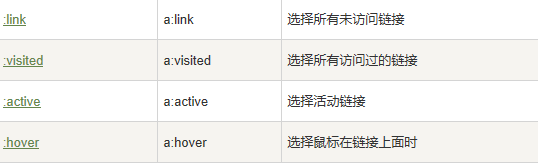
/*超链接的4种状态*/

/*

    a:link - 普通的、未被访问的链接

    a:visited - 用户已访问的链接

    a:hover - 鼠标指针位于链接的上方

    a:active - 链接被点击的时刻

 */

a:LINK {

    color: black;

    text-decoration: none;

}


a:VISITED {

    color: silver;

    text-decoration: overline;

}

<pre name="code" class="css">a:HOVER {

    text-decoration: underline;

}
CSS 属性定义背景效果:
- background-color
- background-image
- background-repeat
- background-attachment
- background-position
<a>标签属性
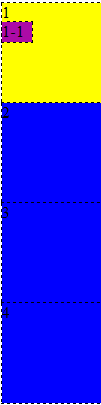
运行代码:
<!doctype html>

<html>

<head>

<meta charset="utf-8">

<title>无标题文档</title>

<link rel="stylesheet" href="">

<style>

    div{

            width: 100px;

            height: 100px;

            background: blue;

    }

    #mar{

        background: yellow;

    }

    div div{

        width: 30px;

        height: 20px;

        background: #AC0BA6;

    }

    body{

        background: #F0FB34;

    }

</style>

</head>

<body>

      <div id="mar">1

      <div>1-1</div>

      </div>

      <div>2</div>

      <div>3</div>

      <div>4</div>

</body>

</html>
运行结果:
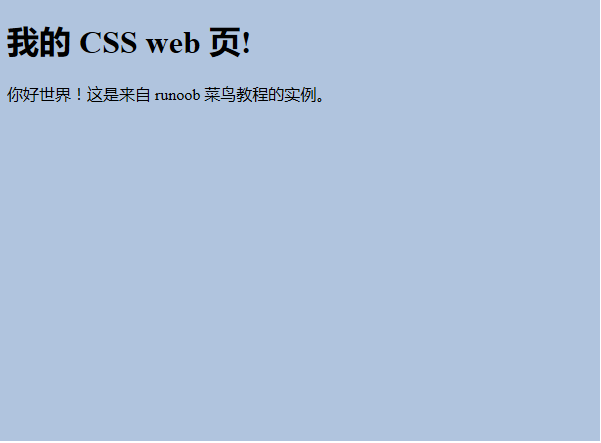
背景色的实现:
<!DOCTYPE html>

<html>

    <head>

              <meta charset="utf-8">

              <title>菜鸟教程(runoob.com)</title>

   <style>

        body

               {

              background-color:#b0c4de;

      }

   </style>

</head>

<body>

<h1>我的 CSS web 页!</h1>

<p>你好世界!这是来自 runoob 菜鸟教程的实例。</p>

</body>

</html>
运行结果:
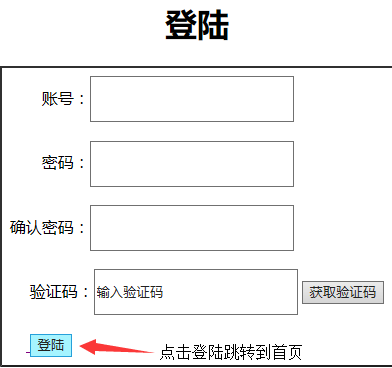
登陆页面实现:
<!doctype html>
<html>
<head>
<meta charset="utf-8">
<title>超人登陆</title>
</head> <body> <table border="1" align="center" cellpadding="8" cellspacing="0">
<h1 align="center">登陆</h1>
<tr>
<td>
账号:<input type="text" style="width: 200px;height: 40px" ><br><br>
密码:<input type="text" style="width: 200px;height: 40px"><br><br>
确认密码:<input type="text" style="width: 200px;height: 40px"><br><br>
验证码:<input type="text" style="width: 200px;height: 40px" value="输入验证码">
<input type="button" value="获取验证码"><br><br>
<a href="首页.html" target="_blank"> <input type="button" name="登陆" value="登陆">
</a>
</td>
</tr>
</table>
</body>
</html>
运行结果:
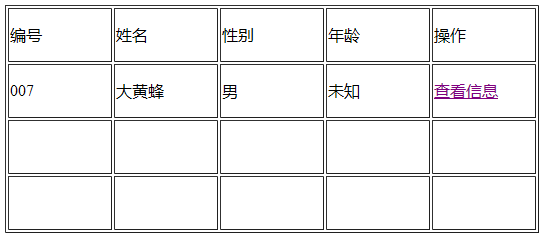
首页实现:
<!doctype html>

<html>

<head>

<meta charset="utf-8">

<title>超人</title>

    <style type="text/css">

        td{ width: 100px;height: 50px}

    </style>

</head>

<body>

<table border="1" align="center">

    <tr>

        <td>编号</td>

        <td>姓名</td>

        <td>性别</td>

        <td>年龄</td>

        <td>操作</td>

    </tr>

    <tr>

        <td>007</td>

        <td>大黄蜂</td>

        <td>男</td>

        <td>未知</td>

        <td><a href="简历.html#个人简历3">查看信息</a></td>

    </tr>

    <tr>

        <td></td>

        <td></td>

        <td></td>

        <td></td>

        <td></td>

    </tr>

    <tr>

        <td></td>

        <td></td>

        <td></td>

        <td></td>

        <td></td>

    </tr>

</table>

</body>

</html>
运行结果:
css概括的更多相关文章
- css概括2
Css内容: 常用样式:字体.颜色.背景... 字体:大小.颜色.粗细.字体 Text-decoration:文本修饰{overline 上 Underline 下 Line-throung 中} T ...
- Matplotlib数据可视化(3):文本与轴
在一幅图表中,文本.坐标轴和图像的是信息传递的核心,对着三者的设置是作图这最为关心的内容,在上一篇博客中虽然列举了一些设置方法,但没有进行深入介绍,本文以围绕如何对文本和坐标轴进行设置展开(对图像 ...
- css学习--inline-block详解及dispaly:inline inline-block block 三者区别精要概括
*知识储备: 内联元素:是不可以控制宽和高.margin等:并且在同一行显示,不换行. 块级元素:是可以控制宽和高.margin等,并且会换行. 1.inline-block 详解 (1)一句话就是在 ...
- MUI学习01-MUI概括、使用前引入CSS及JS
1.MUI含义 目标:追求性能体验,追求原生UI感觉 重要特征:轻量 优势:MUI不依赖任何第三方JS库,压缩后的JS和CSS文件仅有100+K和60+K 基础:MUI以iOS平台UI为基础,补充部分 ...
- 更愉快的书写CSS
我在写CSS的时候经常会碰到些麻烦事儿: 1)看上去蛮简单的排版却写了很久 2)代码写的越来越散,总是这里补一句,那里补一句,没有条理性 3)margin.padding.font-size等属性在不 ...
- html学习第三天—— 第12章——css布局模型
清楚了CSS 盒模型的基本概念. 盒模型类型, 我们就可以深入探讨网页布局的基本模型了.布局模型与盒模型一样都是 CSS 最基本. 最核心的概念. 但布局模型是建立在盒模型基础之上,又不同于我们常说的 ...
- HTML+CSS知识点总结
转自:http://blog.csdn.net/qiushi_1990/article/details/40260447?utm_source=tuicool&utm_medium=refer ...
- css书写规范及特殊样式
1.CSS书写顺序: (1)位置:position.top.right.z-index.display.float (2)大小:width.height.padding.margin (3)文字系列: ...
- css布局模型
---恢复内容开始--- 在清楚了CSS盒模型的基本概念,盒模型类型,我们就可以深入探讨网页布局的基本模型了.布局模型与盒模型一样都是CSS最基本,最核心的概念.但布局模型是建立在盒型基础之上,又不同 ...
随机推荐
- Vue中table合并单元格用法
<table> <tr> <th>地名</th> <th>结果</th> <th>人名</th> < ...
- python之json&pickle
用于序列化的两个模块: json:用于字符串和python数类型间进行转换 oickle:用于python特有的类型和python的数据类型间进行转换 json.pickle模块提供四个功能:dump ...
- hadoop的hdfs中的javaAPI操作
package cn.itcast.bigdata.hdfs; import java.net.URI; import java.util.Iterator; import java.util.Map ...
- getColor问题
getResource.getColor(R.color.color_name) 过时了,可以使用新加入的方法 ContextCompat.getColor(context, R.color.colo ...
- pyqt---------事件与信号处理
pyqt:信号与槽的关系 GUI应用程序是事件驱动的. 事件主要由应用程序的用户生成. 但它们也可以通过其他手段产生,例如:网络连接,窗口管理器或定时器. 当我们调用应用程序的exec_()方法时,应 ...
- 部署一个基于python语言的web发布环境
---恢复内容开始--- 1) 一门面向对象的语言 2)拥有丰富的库 3)可移植性 4)免费.开源 5)简单易易学 可做软件开发.人工智能.web开发等等 部署流程: Cnetos7.5+Nginx+ ...
- python杂记一
1. 输出CSV文件 用python输出csv文件不难,可是MS office excel和WPS 对输出的CSV文件打开规则不一样. WPS可以支持CSV以'\t'为分隔符,打开文件直接写内容 MS ...
- Fiddler 抓包工具怎么使用?怎么在Android手机端的APP抓包
https://blog.csdn.net/loner_fang/article/details/83309266 参考这个人的微博上有fiddler主要功能使用的步骤. 序章 Fiddler是一个蛮 ...
- Android中五大字符串总结(String、StringBuffer、StringBuilder、Spanna
https://www.aliyun.com/jiaocheng/2861.html?spm=5176.100033.1.35.2ed56b03CbsYFK 摘要:String.StringBuffe ...
- springboot+mybatis+freemark+oauth开发环境搭建
一.创建springboot工程 1.环境介绍: a:jdk版本:1.7 b:Springboot版本:1.5.6(使用1.5.9的版本整合mybatis会报错:java.lang.NoClassDe ...