
asp.net mvc + dapper(ORM框架) + easyui框架简洁的信息管理项目
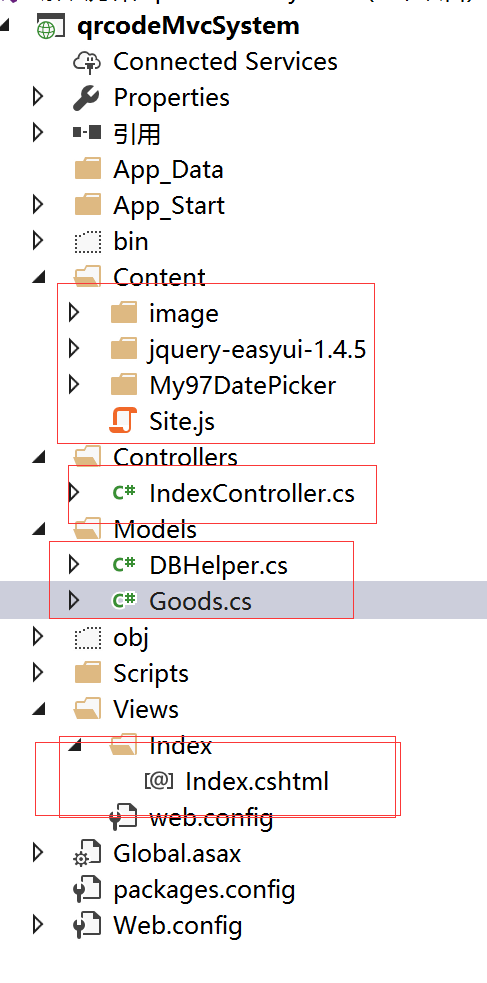
1.目录结构:
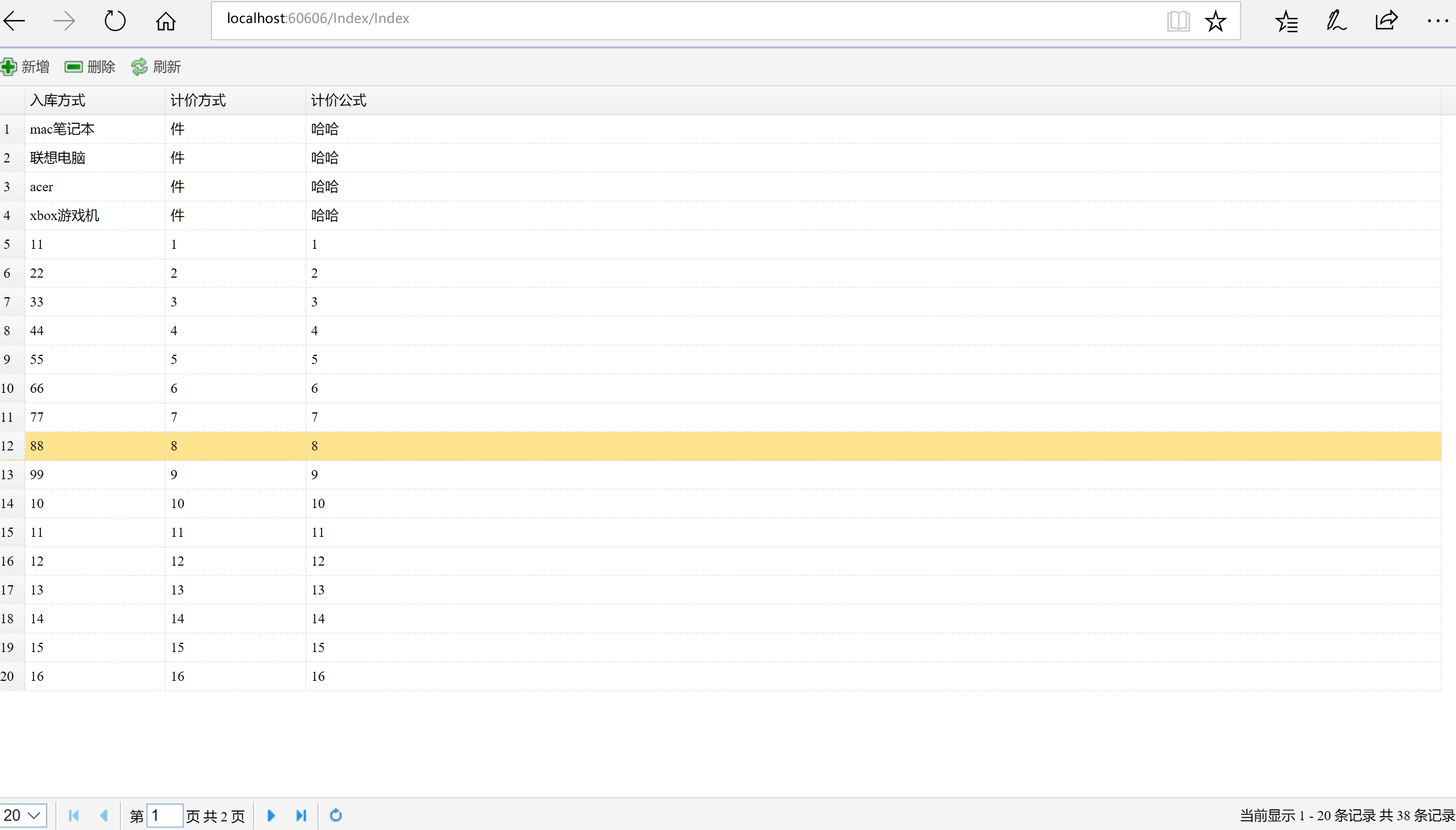
2.效果图:
3.IndexController控制器:
using System;

using System.Collections;

using System.Collections.Generic;

using System.Linq;

using System.Web;

using System.Web.Mvc;

using Newtonsoft.Json;

namespace qrcodeMvcSystem.Controllers

{

    public class IndexController : Controller

    {

        // GET: Index

        public ActionResult Index()

        {

            return View();

        }

        /// <summary>

        /// datagrid数据绑定

        /// </summary>

        /// <param name="rows">每行显示的条数</param>

        /// <param name="page">当前页</param>

        /// <param name="sort">排序字段</param>

        /// <param name="order">排序方式</param>

        /// <param name="query">条件</param>

        /// <returns></returns>

        [HttpPost]

        public ActionResult LoadList(string rows, string page, string sort, string query)

        {

            int count = ;

            IList list = DBHelper.GetList1(Convert.ToInt32(rows), Convert.ToInt32(page), sort, ref count);

            return Content(JsonConvert.SerializeObject(new

            {

                total = count,

                rows = list

            }));

        }

        /// <summary>

        /// 修改添加数据

        /// </summary>

        /// <param name="goods"></param>

        /// <returns></returns>

        [HttpPost]

        public ActionResult AcceptClick(Goods goods)

        {

            int isOk = default(int);

            if(goods.ID!=)

            {

                isOk = DBHelper.Update(goods);

            }

            else

            {

                isOk = DBHelper.Insert(goods);

            }

            return Content(isOk.ToString());

        }

        /// <summary>

        /// 查看详细信息

        /// </summary>

        /// <param name="id"></param>

        /// <returns></returns>

        [HttpPost]

        public ActionResult LoadForm(string id)

        {

            if (!string.IsNullOrEmpty(id))

                return Json(DBHelper.GetEntity(id));

            else

                return null;

        }

        /// <summary>

        /// 删除一条数据

        /// </summary>

        /// <param name="id"></param>

        /// <returns></returns>

        public ActionResult Del(string id)

        {

            if (!string.IsNullOrEmpty(id))

                return Content(DBHelper.Delete(id).ToString());

            else

                return null;

        }

    }

}
4.index.cshtml
@{

    Layout = null;

}

<!DOCTYPE html>

<html>

<head>

    <meta name="viewport" content="width=device-width" />

    <title>Index</title>

    @*Easyui需要引入的文件*@

    <script type="text/javascript" src="~/Content/jquery-easyui-1.4.5/jquery.min.js"></script>

    <script type="text/javascript" src="~/Content/jquery-easyui-1.4.5/jquery.easyui.min.js"></script>

    <link href="~/Content/jquery-easyui-1.4.5/themes/default/easyui.css" rel="stylesheet" />

    <link href="~/Content/jquery-easyui-1.4.5/themes/icon.css" rel="stylesheet" />

    <script src="~/Scripts/jquery.validate.min.js"></script>

    <script src="~/Scripts/messages_zh.js"></script>

    <script type="text/javascript" src="~/Content/Site.js"></script>

    <script type="text/javascript">

        $(function () {

            //初始化datagrid数据

            InitGrid();

            InitDialog();

            $('#btnReload').click(function () {

                $("#grid").datagrid("reload");

            });

            //ajax提交修改表单数据

            $('#ok').click(function () {

                $('#form').submit();

            });

            $('#cancel').click(function () {

                $('#dd').dialog('close');

            });

            $('#add').click(function () {

                $('#form')[].reset();

                $('#ID').val("此字段自动生成.");

                $('#dd').dialog('open');

            });

            $('#del').click(function () {

                getAjax("../Index/Del", { id: $('#del_id').val() }, function (data) {

                    if ($('#del_id').val() == null || $('#del_id').val() == "")

                        return false;

                    if (data) {

                        $.messager.alert('提示', '操作成功!');

                        $('#dd').dialog('close');

                        $("#grid").datagrid("reload");

                        return true;

                    }

                    else {

                        $.messager.alert('提示', '操作失败!');

                        return false;

                    }

                });

                });

            });

        function InitGrid() {

            $('#grid').datagrid({

                url: '../Index/LoadList',

                nowrap: true,//单行显示

                autoRowHeight: false,

                striped: false,     //斑马纹

                collapsible: true,      //可折叠

                pagination: true,

                singleSelect: true,

                border: true,

                pageSize: ,

                fit: true,

                fitColumns: true,       //自适应列宽

                rownumbers: true,

                columns: [[

                    { title: '编号', field: 'ID', hidden: true },

                    { title: '入库方式', field: 'Name', width:  },

                    { title: '计价方式', field: 'PriceWay', width:  },

                    { title: '计价公式', field: 'PriceFormula', width:  },

                ]],

                toolbar: '#tb',

                onDblClickRow: function (rowIndex, rowData) {

                    getAjax("../Index/LoadForm",

                        { id: rowData['ID'] }, function (data) {

                            var data = eval("(" + data + ")");

                            SetWebControls(data);

                        });

                    $('#dd').dialog('open');

                },

                onClickRow: function (index, row) {

                    $('#del_id').val(row['ID']);

                }

            })

            var p = $('#grid').datagrid('getPager');

            $(p).pagination({

                beforePageText: '第',

                afterPageText: '页   共 {pages} 页',

                displayMsg: '当前显示 {from} - {to} 条记录   共 {total} 条记录',

            });

        }

        function InitDialog() {

            $('#dd').dialog({

                title: '修改信息',

                width: ,

                height: ,

                top: ($(window).height() - ) * 0.5,      //居中

                left: ($(window).width() - ) * 0.5,

                closed: true,

                cache: false,

                modal: true,

                buttons: '#dlg-buttons'

            });

        }

    </script>

    <script>

            //表单验证和提交

            $(function () {

                $('#form').validate({

                    rules: {

                        Name: {

                            required: true

                        }

                    },

                    submitHandler: function (form) {

                        var postData = GetWebControls("#form");

                        console.log(postData);

                        getAjax("/Index/AcceptClick",

                            postData, function (data) {

                                if (data) {

                                    alert(data);

                                    $.messager.alert('提示', '操作成功!');

                                    $('#dd').dialog('close');

                                    $("#grid").datagrid("reload");

                                    return true;

                                }

                                else {

                                    $.messager.alert('提示', '操作失败!');

                                    return false;

                                }

                            });

                    },

                    invalidHandler: function (form, validator) {  //不通过回调

                        return false;

                    },

                    showErrors: function (errorMap, errorList) {

                        this.defaultShowErrors();

                        for (var i = ; i < errorList.length; i++) {

                            $(errorList[i].element).one("blur", function () {

                                $("label.error[for='" + (this.id ? this.id : this.name) + "']").remove();

                            });

                        }

                    }

                });

            });

    </script>

</head>

<body style="margin:0;padding:0;">

    <div>

        <input id="del_id" type="hidden" name="del_id" value=" " />

        <div style="position:fixed;width:100%;height:100%">

            <table id="grid"></table>

        </div>

        <div id="tb" style="padding:3px">

            <a id="add" href="#" class="easyui-linkbutton" data-options="plain:true,iconCls:'icon-add'">新增</a>

            <a id="del" href="#" class="easyui-linkbutton" data-options="plain:true,iconCls:'icon-remove'">删除</a>

            <a id="btnReload" href="#" class="easyui-linkbutton" data-options="plain:true,iconCls:'icon-reload'">刷新</a>

        </div>

    </div>

    <div id="dd" class="easyui-dialog">

        <form id="form" name="form" method="post">

            <table style="margin:8px">

                <tr>

                    <td>编号:</td>

                    <td><input type="text" id="ID" name="ID" value=" " disabled="disabled" /></td>

                </tr>

                <tr>

                    <td>入库方式:</td>

                    <td><input type="text" id="Name" name="Name" value="" class="required" /></td>

                </tr>

                <tr>

                    <td>计价方式:</td>

                    <td><input type="text" id="PriceWay" name="PriceWay" value=" " /></td>

                </tr>

                <tr>

                    <td>计价公式:</td>

                    <td><input type="text" id="PriceFormula" name="PriceFormula" value=" " /></td>

                </tr>

            </table>

            <div id="dlg-buttons">

                <a id="ok" href="#" class="easyui-linkbutton" iconcls="icon-ok">确定</a>

                <a id="cancel" href="#" class="easyui-linkbutton" iconcls="icon-cancel">取消</a>

            </div>

        </form>

    </div>

</body>

</html>
5.Goods模型类
using System;

using System.Collections.Generic;

using System.Linq;

using System.Web;

   public class Goods

    {

        public int ID { get; set; }

        public string Name { get; set; }

        public string PriceWay { get; set; }

        public string PriceFormula { get; set; }

    }
6.数据库操作dapper框架
using System;

using System.Collections;

using System.Collections.Generic;

using System.Data;

using System.Data.SqlClient;

using System.Linq;

using System.Text;

using System.Web;

using Dapper;

    public static class DBHelper

    {

    private static readonly string connString = "Data Source=.;Initial Catalog=qrab;Integrated Security=False;User ID=sa;Password=111111;Connect Timeout=30;Encrypt=False;TrustServerCertificate=True;ApplicationIntent=ReadWrite;MultiSubnetFailover=False;";

    //ConfigurationManager.ConnectionStrings["PharmacySystem"].ConnectionString;

    private static IDbConnection _conn;

    public static IDbConnection Conn

    {

        get

        {

            _conn = new SqlConnection(connString);

            _conn.Open();

            return _conn;

        }

    }

    public static int Insert(Goods goods)

    {

        using (Conn)

        {

            string query = "insert into Goods(Name,PriceWay,PriceFormula)values(@Name,@PriceWay,@PriceFormula)";

            return Conn.Execute(query,goods);

        }

    }

    public static int Update(Goods goods)

    {

        using (Conn)

        {

            string query = "update Goods set Name=@Name,PriceWay=@PriceWay,PriceFormula=@PriceFormula where id=@ID";

            return Conn.Execute(query,goods);

        }

    }

    public static int Delete(string id)

    {

        using (Conn)

        {

            string query = "delete from Goods where id=@id";

            return Conn.Execute(query, new { id = id });

        }

    }

    public static IList<Goods> GetList()

    {

        using (Conn)

        {

            string query = "select * from Goods";

            return Conn.Query<Goods>(query).ToList();

        }

    }

    public static Goods GetEntity(string id)

    {

        Goods goods;

        string query = "select * from Goods where id=@id";

        using (Conn)

        {

            goods = Conn.Query<Goods>(query, new { id = id }).SingleOrDefault();

            return goods;

        }

    }

    public static IList GetList1(int rows, int page, string sort, ref int count)

    {

        int num1 = (page - ) * rows;

        //int num1 = rows * page;

        using (Conn)

        {

            string query = "select top "+rows+" * from Goods as b where b.id not in(select  top "+num1+" id from Goods)";

            count = Conn.Query<int>("select COUNT(1) from Goods As t").Single();

            return Conn.Query<Goods>(query).ToList();

        }

    }

}
asp.net mvc + dapper(ORM框架) + easyui框架简洁的信息管理项目的更多相关文章
- 在ASP.NET MVC应用中开发插件框架(中英对照)
[原文] Developing a plugin framework in ASP.NET MVC with medium trust [译文] 在ASP.NET MVC应用中开发一个插件框架 I’v ...
- 使用asp.net mvc + entityframework + sqlServer 搭建一个简单的code first项目
步骤: 1. 创建一个asp.net mvc 项目 1.1 项目创建好结构如下 2 通过vs安装EntityFramework框架 install-package entityframework 3. ...
- Asp.net MVC 搭建属于自己的框架(一)
为什么要自己搭框架? 大家伙别急,让我慢慢地告诉你!大家有没有这种感觉,从一家跳槽到另一家公司,公司的框架往往是不相同的,这样你必须就得摒弃原来的,学习新的框架. 问题是你用习惯了一种框架,比如封装的 ...
- ASP.NET MVC EXTJS 通用主菜单框架
一.说明 首先我不知道定义的文章标题是不是准确,我这篇博文介绍的是一个通用的软件主菜单框架,界面布局用的是extjs,还是先上一个图吧. 软件主界面左侧菜单采用的风格是extjs的手风琴模式,需要注意 ...
- asp.net mvc 通过T4模板生成框架
http://www.cnblogs.com/rdst/archive/2012/08/13/2637210.html http://www.kuqin.com/shuoit/20140716/341 ...
- asp.net MVC的EF与easyui DataGrid数据绑定
页面代码 @{ Layout = null; } <!DOCTYPE html> <html> <head> <meta name="viewpor ...
- ASP.NET MVC 使用 Petapoco 微型ORM框架+NpgSql驱动连接 PostgreSQL数据库
前段时间在园子里看到了小蝶惊鸿 发布的有关绿色版的Linux.NET——“Jws.Mono”.由于我对.Net程序跑在Linux上非常感兴趣,自己也看了一些有关mono的资料,但是一直没有时间抽出时间 ...
- ASP.NET MVC+EF框架+EasyUI实现权限管理(附源码)
前言:时间很快,已经快到春节的时间了,这段时间由于生病,博客基本没更新,所以今天写一下我们做的一个项目吧,是对权限的基本操作的操作,代码也就不怎么说了,直接上传源码和图片展示,下面我们直接进入主题介绍 ...
- 写自己的ASP.NET MVC框架(上)
http://www.cnblogs.com/fish-li/archive/2012/02/12/2348395.html 阅读目录 开始 ASP.NET程序的几种开发方式 介绍我的MVC框架 我的 ...
随机推荐
- 0.2:Game and Art
文章著作权归作者所有.转载请联系作者,并在文中注明出处,给出原文链接. 本系列原更新于作者的github博客,这里给出链接. 通过上一节的学习,我们对游戏美术和游戏开发已经有了比较基本的了解.那么,该 ...
- QQ"坦白说"抓包破解与PacketCapture使用介绍
据腾讯发布内容来看,“坦白说”是刚刚在QQ中上线的新功能,还在测试阶段就已经非常火爆. 但作为一种web端的小游戏,无疑可以使用爬虫的来自我模拟. (话说写完这篇的时候我总感觉自己几年前好像写过这个. ...
- MYSQL 修改表结构基本操作一览
查看表的字段信息:desc 表名; 查看表的所有信息:show create table 表名; 添加主键约束:alter table 表名 add constraint 主键 (形如:PK_表名) ...
- 加密方法与HTTPS 原理详解
一:加密方法: 1,对称加密 AES,3DES,DES等,适合做大量数据或数据文件的加解密. 2,非对称加密 如RSA,Rabin.公钥加密,私钥解密.对大数据量进行加解密时性能较低. 二:https ...
- JavaScript 声明全局变量和局部变量
JS中声明全局变量主要分为显式声明或者隐式声明下面分别介绍. 声明方式一: 使用var(关键字)+变量名(标识符)的方式在function外部声明,即为全局变量,否则在function声明的是局部变量 ...
- freeswitch编译安装,初探, 以及联合sipgateway, webrtc server的使用场景。
本文主要记录freeswitch学习过程. 一 安装freeswitch NOTE 以下两种安装方式,再安装的过程中遇到了不少问题,印象比较深刻的就是lua库找到不到这个问题.这个问题发生在make ...
- 实体关系图应用——google ads
实体关系 本页展示了 AdWords 实体的关系图,其中的可点击图片可帮助您找到最合适的文档. 表示法图例 实体:链接到相关性最高的指南. 基数:允许的实例数量.例如,1..\* 表示允许一个或多个. ...
- 线性回归(linear regression)
基本形式 最小二乘法估计拟合参数 最小二乘法:基于均方误差最小化来进行模型求解的方法称为“最小二乘法”(least square method) 即(左边代表 $\mathbf{\omega }$ 和 ...
- Centos7 安装并配置redis
一. 安装 操作系统:Centos 7. 最小化安装 redis版本: 4.0.2 服务器地址:*** 安装过程: 安装wget, yum -y install wget 2. 下载redis wg ...
- 力扣(LeetCode)463. 岛屿的周长
给定一个包含 0 和 1 的二维网格地图,其中 1 表示陆地 0 表示水域. 网格中的格子水平和垂直方向相连(对角线方向不相连).整个网格被水完全包围,但其中恰好有一个岛屿(或者说,一个或多个表示陆地 ...