
线程封装组件(BackgroundWorker)和线程(Thread)
BackgroundWorker是微软的在.net Framwork中添加的一个组件,主要对线程的访问提供了一种安全的方式。简单的说就是对Thread的一次封装。
BackgroundWorker位于System.ComponentModel下,是一个继承了Component的组件,微软官方的解释为:Executes an operation on a separate thread.就是说,开始一个新的线程执行操作。
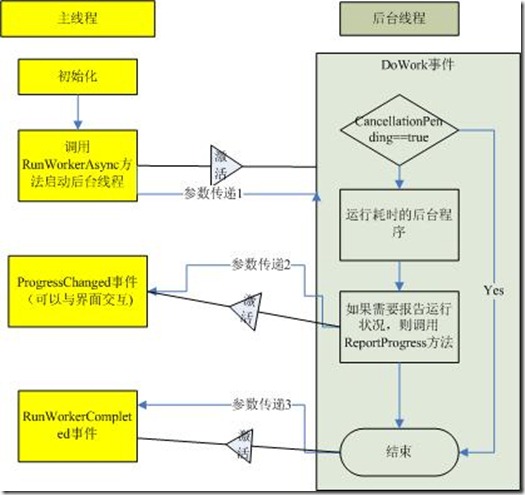
首先介绍一下BackgroundWorker的相关属性和方法:
属性:
WorkerReportsProgress:是否可以报告进度。
WorkerSupportsCancellation:是否允许异步中止。
IsBusy:是否在运行。
CancellationPending:判断BackgroundWorker是否已经异步取消。
方法:
RunWorkerAsync:开始执行任务。触发DoWork事件
ReportProgress:异步提醒,触发ProgressChanged事件,但是这个如果可以使用,必须设置WorkerReportsProgress为True
CancelAsync:取消BackgroundWorker操作。
事件:
DoWork:执行RunWorkerAsync后触发,异步执行的认为。
ProgressChanged:执行ReportProgress时触发,异步获得进度。
RunWorkerCompleted:线程结束时触发,主要有成功结束,发生异常或者取消时发生。
Thread相对来说就简单了,但是使用起来就比较麻烦了。Thread位于System.Threading的名空间下,是一个可以独立创建和操作一个线程,并且对线程进行设置优先级和获得状态的一个不可继承的类。
下面是我做的一个例子,来比较他们两个的使用。
建立一个窗体,放置了两个TextBox,分别为设置开始和结束的Progree的值,放置两个ProgressBar,分别设置为线程的Progressbar和BackGroundWorker的ProgressBar。另外放置按钮为StartBackGroundWorker,StartThread,CancelBackGroundWorker,CancelThread和PauseThread。
BackGroundWorker的使用就非常简单:
/// <summary>

        /// Handles the Click event of the btnBackGroundWorker control.

        /// </summary>

        /// <param name="sender">The source of the event.</param>

        /// <param name="e">The <see cref="System.EventArgs"/> instance containing the event data.</param>

        private void btnBackGroundWorker_Click(object sender, EventArgs e)

        {

            StartFrom = Convert.ToInt32(txtStart.Text);

            EndTo = Convert.ToInt32(txtEnd.Text);

            progressBarThread.Minimum = StartFrom;

            progressBarThread.Maximum = EndTo;

            this.btnBackGroundWorker.Enabled = false;

            this.backgroundWorker.RunWorkerAsync();

        }

        /// <summary>

        /// Handles the DoWork event of the backgroundWorker control.

        /// </summary>

        /// <param name="sender">The source of the event.</param>

        /// <param name="e">The <see cref="System.ComponentModel.DoWorkEventArgs"/> instance containing the event data.</param>

        private void backgroundWorker_DoWork(object sender, DoWorkEventArgs e)

        {

            for (int nValue = StartFrom; nValue <= EndTo; nValue++)

            {

                if (this.backgroundWorker.CancellationPending)

                {

                    e.Cancel = true;

                    return;

                }

                this.backgroundWorker.ReportProgress(nValue);

                Thread.Sleep();

            }

        }

        /// <summary>

        /// Handles the ProgressChanged event of the backgroundWorker control.

        /// </summary>

        /// <param name="sender">The source of the event.</param>

        /// <param name="e">The <see cref="System.ComponentModel.ProgressChangedEventArgs"/> instance containing the event data.</param>

        private void backgroundWorker_ProgressChanged(object sender, ProgressChangedEventArgs e)

        {

            this.prgProcessBackGroundWorker.Value = e.ProgressPercentage;

        }

        /// <summary>

        /// Handles the RunWorkerCompleted event of the backgroundWorker control.

        /// </summary>

        /// <param name="sender">The source of the event.</param>

        /// <param name="e">The <see cref="System.ComponentModel.RunWorkerCompletedEventArgs"/> instance containing the event data.</param>

        private void backgroundWorker_RunWorkerCompleted(object sender, RunWorkerCompletedEventArgs e)

        {

            // 取消

            if (e.Cancelled)

            {

                MessageBox.Show("Cancelled");

            }

            // 出现错误

            else if (e.Error != null)

            {

                MessageBox.Show(e.Error.Message + Environment.NewLine + e.Error.StackTrace);

            }

            // 完成

            else

            {

                MessageBox.Show("Completed");

                this.btnBackGroundWorker.Enabled = true;

            }

        }

        /// <summary>

        /// Handles the Click event of the btnCancelBackgroundWoker control.

        /// </summary>

        /// <param name="sender">The source of the event.</param>

        /// <param name="e">The <see cref="System.EventArgs"/> instance containing the event data.</param>

        private void btnCancelBackgroundWoker_Click(object sender, EventArgs e)

        {

            this.backgroundWorker.CancelAsync();

        }
Thread的使用就比较麻烦了,对于尤其是对异步提醒来说,需要写委托,代码量是很多,但是对于BackgroundWorker来说,却没有线程暂停和继续的方法。但是对于一般的来说,这些功能也是不用的,而且在微软的文档中还提到了,Thread的Resume和Suspend已经不推荐使用。
// 声明委托

        delegate void DelegateType(int x);

       DelegateType TheDelegate;

        // ProgressBar的开始和结束值

        int StartFrom, EndTo;

        // 是否线程暂停

        bool IsThreadPaused;

        ManualResetEvent CancelEvent = new ManualResetEvent(false);

        Thread MyThread;

        /// <summary>

        /// 委托的消息事件

        /// </summary>

        /// <param name="nProgress">进度值</param>

        private void MessageHandler(int nProgress)

        {

            lblThreadStatus.Text = "处理: " + Convert.ToString(nProgress);

            progressBarThread.Value = nProgress;

            if (nProgress == progressBarThread.Maximum)

            {

                MessageBox.Show("Completed");

                this.btnTread.Enabled = true;

            }

        }

        /// <summary>

        /// Handles the Click event of the btnTread control.

        /// </summary>

        /// <param name="sender">The source of the event.</param>

        /// <param name="e">The <see cref="System.EventArgs"/> instance containing the event data.</param>

        private void btnTread_Click(object sender, EventArgs e)

        {

            TheDelegate = MessageHandler;

            StartFrom = Convert.ToInt32(txtStart.Text);

            EndTo = Convert.ToInt32(txtEnd.Text);

            progressBarThread.Minimum = StartFrom;

            progressBarThread.Maximum = EndTo;

            btnTread.Enabled = false;

            IsThreadPaused = false;

            MyThread = new Thread(ProcessRoutine);

            MyThread.Start();

        }

        /// <summary>

        /// Processes the routine.

        /// </summary>

        private void ProcessRoutine()

        {

            for (int nValue = StartFrom; nValue <= EndTo; nValue++)

            {

                // 判断是否取消

                if (CancelEvent.WaitOne(, false) == true)

                {

                    return;

                }

                this.BeginInvoke(this.TheDelegate, nValue);

                Thread.Sleep();

            }

        }

        /// <summary>

        /// Handles the Click event of the btnCancelThread control.

        /// </summary>

        /// <param name="sender">The source of the event.</param>

        /// <param name="e">The <see cref="System.EventArgs"/> instance containing the event data.</param>

        private void btnCancelThread_Click(object sender, EventArgs e)

        {

            btnCancelThread.Enabled = false;

            btnPauseThread.Enabled = false;

            CancelEvent.Set();

            MyThread.Join();

        }

        /// <summary>

        /// Handles the Click event of the btnPauseThread control.

        /// </summary>

        /// <param name="sender">The source of the event.</param>

        /// <param name="e">The <see cref="System.EventArgs"/> instance containing the event data.</param>

        private void btnPauseThread_Click(object sender, EventArgs e)

        {

            // Bad approach!

            if (!IsThreadPaused)

            {

                IsThreadPaused = true;

                MyThread.Suspend();

                btnPauseThread.Text = "Resume Thread";

                // Disallow Cancel

                btnCancelThread.Enabled = false;

            }

            else

            {

                IsThreadPaused = false;

                MyThread.Resume();

                btnPauseThread.Text = "Pause Thread";

                btnCancelThread.Enabled = true;

            }

        }
比较起来,两个是完全相同的,对于Thread来说,灵活性就比较好了,BackgroundWorker的使用就相对来说简单了。
线程封装组件(BackgroundWorker)和线程(Thread)的更多相关文章
- Java 线程同步组件 CountDownLatch 与 CyclicBarrier 原理分析
1.简介 在分析完AbstractQueuedSynchronizer(以下简称 AQS)和ReentrantLock的原理后,本文将分析 java.util.concurrent 包下的两个线程同步 ...
- .NET组件程序设计之线程、并发管理(二)
.Net组件程序设计之线程.并发管理(二) 2.同步线程 手动同步 监视器 互斥 可等待事件 同步线程 所有的.NET组件都支持在多线程的环境中运行,可以被多个线程并发访问,如果没有线程同步,这样的后 ...
- .Net组件程序设计之线程、并发管理(一)
.Net组件程序设计之线程.并发管理(一) 1.线程 线程 线程的创建 线程的阻塞 线程挂起 线程睡眠 加入线程 线程中止 现在几乎所有的应用程序都是多线程的,给用户看来就是一个应用程序界面(应用程序 ...
- ThreadExecutorPool 线程池组件
ThreadExecutorPool是使用最多的线程池组件: Executor是用来执行提交的Runnable任务的对象,并以接口的形式定义,提供一种提交任务(submission task)与执行任 ...
- Java带参数的线程类ParameterizedThread——即如何给Thread传递参数
在Java中似乎没有提供带运行参数的线程实现类,在第三方类库中也没有找到.网上有大量的文章在讨论这个问题,但都没有提供很好的代码封装解决方案,这令我很吃惊.如果读者知道有官方或者第三方的实现方式,欢迎 ...
- 创建线程的三种方式(Thread、Runnable、Callable)
方式一:继承Thread类实现多线程: 1. 在Java中负责实现线程功能的类是java.lang.Thread 类. 2. 可以通过创建 Thread的实例来创建新的线程. 3. 每个线程都是通过某 ...
- 创建线程的两种方式比较Thread VS Runnable
1.首先来说说创建线程的两种方式 一种方式是继承Thread类,并重写run()方法 public class MyThread extends Thread{ @Override public vo ...
- Java 线程第三版 第一章Thread导论、 第二章Thread的创建与管理读书笔记
第一章 Thread导论 为何要用Thread ? 非堵塞I/O I/O多路技术 轮询(polling) 信号 警告(Alarm)和定时器(Timer) 独立的任务(Ta ...
- java中的线程问题(三)——继承Thread VS 实现Runnable的区别
从java的设计来看,通过继承Thread或者实现Runnable接口来创建线程本质上没有区别,从jdk帮助文档我们可以看到Thread类本身就实现了Runnable接口,如果一定要说它们有什么区别, ...
随机推荐
- python数据结构之选择排序
选择排序(select_sort)是一个基础排序,它主要通过查找已给序列中的元素的最大或者最小元素,然后将其放在序列的起始位置或者结束位置,并通过多次这样的循环完成对已知序列的排序,在我们对n个元素进 ...
- linux基础 用户(组)管理
修改/etc/shadow文件 1.chage -m MINDAYS USERNAME#设置密码修改最小天数2.chage -M MAXDAYS USERNAME#设置密码修改最大天数3.chage ...
- C# winform 弹出确认消息框
if (MessageBox.Show("确认删除?", "此删除不可恢复", MessageBoxButtons.YesNo) == DialogResult ...
- 一次ARP病毒排查
XX公司网络卡断问题 1. 问题现象 2017年XX公司机关网络出现几次异常情况,并寻求内外部专家对异常情况进行诊断分析,均未找到原因,具体情况如下: 1.XX分公司机关网络IP地址为10.0.0. ...
- BZOJ.4825.[AHOI/HNOI2017]单旋(线段树)
BZOJ LOJ 洛谷 这题不难啊,我怎么就那么傻,拿随便一个节点去模拟.. 我们只需要能够维护,将最小值或最大值转到根.模拟一下发现,对于最小值,它的右子树深度不变(如果存在),其余节点深度全部\( ...
- 洛谷 P1078 文化之旅(CODEVS 1316)
题目描述 有一位使者要游历各国,他每到一个国家,都能学到一种文化,但他不愿意学习任何一 种文化超过一次(即如果他学习了某种文化,则他就不能到达其他有这种文化的国家).不 同的国家可能有相同的文化.不同 ...
- Java笔记(八)TreeMap & TreeSet & LinkedHashMap
TreeMap & TreeSet & LinkedHashMap 一.TreeMap HashMap缺陷:键值对之间没有特定的顺序.在TreeMap中, 键值对之间按键有序,Tree ...
- 2111 ACM 贪心 水题
题目:http://acm.hdu.edu.cn/showproblem.php?pid=2111 题意:知道背包容量和物品单价.体积.问能买到的最大价值? 注意:单价指的是单位体积的价格 思路:先把 ...
- SSH(Spring SpringMVC Hibernate)框架整合
项目说明: 使用SSH(Spring SpringMVC Hibernate)框架整合添加部门功能 项目结构 1.导入依赖jar包 <!--单测--> <dependency&g ...
- 理解Session缓存
session的缓存有两大作用 (1)减少访问数据库的频率.应用程序从内存中读取持久化对象的速度显然比到数据库中查询数据的速度快多了,音系Session的缓存 可以提高数据库访问性能 (2)保证缓存中 ...