
使用CoreData [3]
使用CoreData [3]

此篇幅介绍CoreData如何升级版本防止崩溃
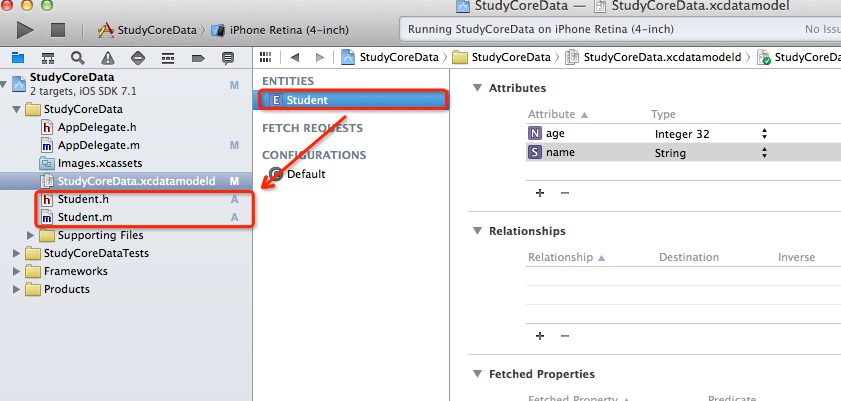
把你之前创建的实体文件全部删除掉,把沙盒中的数据库文件删除掉,实体只保持一个,然后重新创建出实体文件.
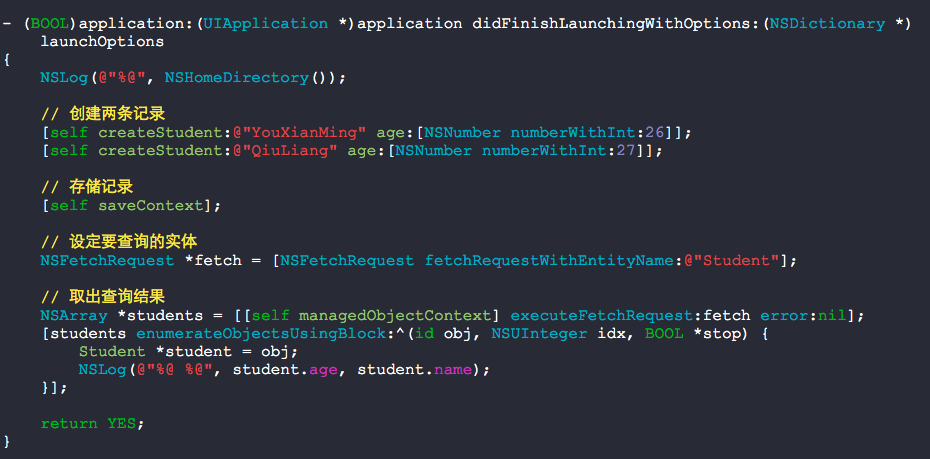
- (BOOL)application:(UIApplication *)application didFinishLaunchingWithOptions:(NSDictionary *)launchOptions

{

    NSLog(@"%@", NSHomeDirectory());

    // 创建两条记录

    [self createStudent:@"YouXianMing" age:[NSNumber numberWithInt:]];

    [self createStudent:@"QiuLiang" age:[NSNumber numberWithInt:]];

    // 存储记录

    [self saveContext];

    // 设定要查询的实体

    NSFetchRequest *fetch = [NSFetchRequest fetchRequestWithEntityName:@"Student"];

    // 取出查询结果

    NSArray *students = [[self managedObjectContext] executeFetchRequest:fetch error:nil];

    [students enumerateObjectsUsingBlock:^(id obj, NSUInteger idx, BOOL *stop) {

        Student *student = obj;

        NSLog(@"%@ %@", student.age, student.name);

    }];

    return YES;

}

- (Student *)createStudent:(NSString *)name age:(NSNumber *)age

{

    // 实体描述信息

    NSEntityDescription *description = \

    [NSEntityDescription entityForName:@"Student"

                inManagedObjectContext:[self managedObjectContext]];

    // 初始化对象

    Student *student = [[Student alloc] initWithEntity:description

                        insertIntoManagedObjectContext:[self managedObjectContext]];

    student.name     = name;

    student.age      = age;

    return student;

}
执行上述代码后运行结果为:
2014-07-31 09:13:40.424 StudyCoreData[16612:60b] 26 YouXianMing
2014-07-31 09:13:40.425 StudyCoreData[16612:60b] 27 QiuLiang
检查下数据库,此时只有两个属性哦:

然后我们给这个Student表新增加一个属性然后进行数据库的版本升级.
首先,我们先创建新的数据库表版本.
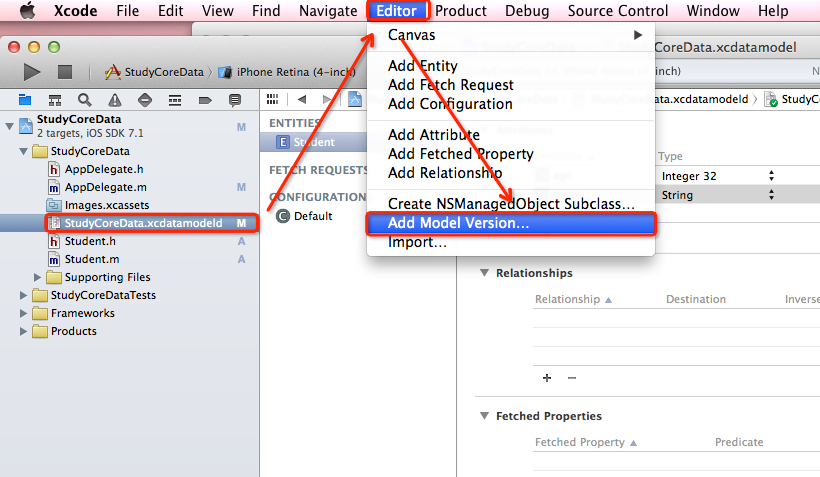
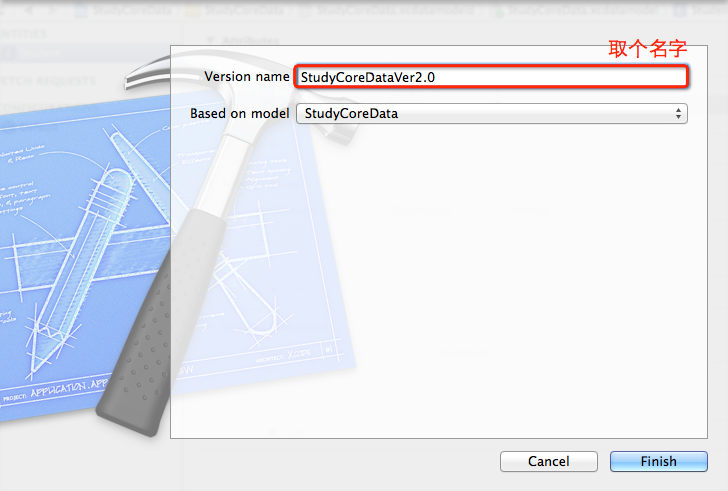

然后切换版本:

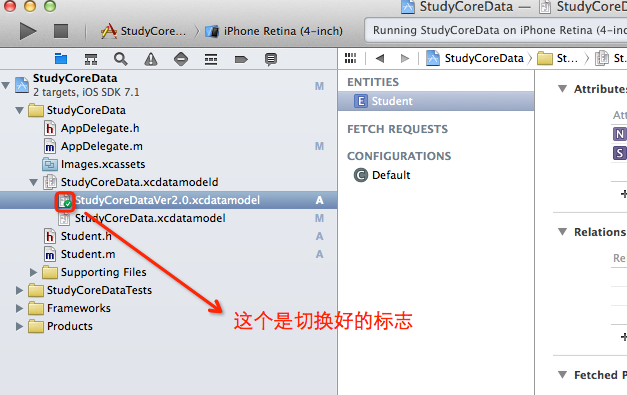
然后给Student新增加一个属性值
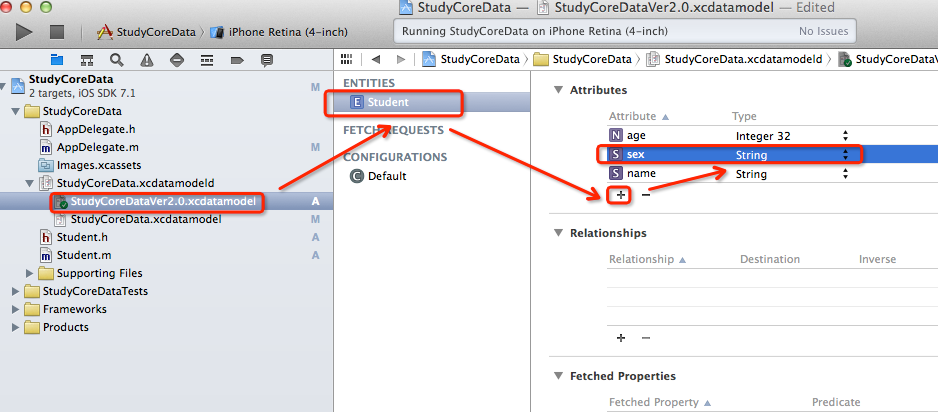

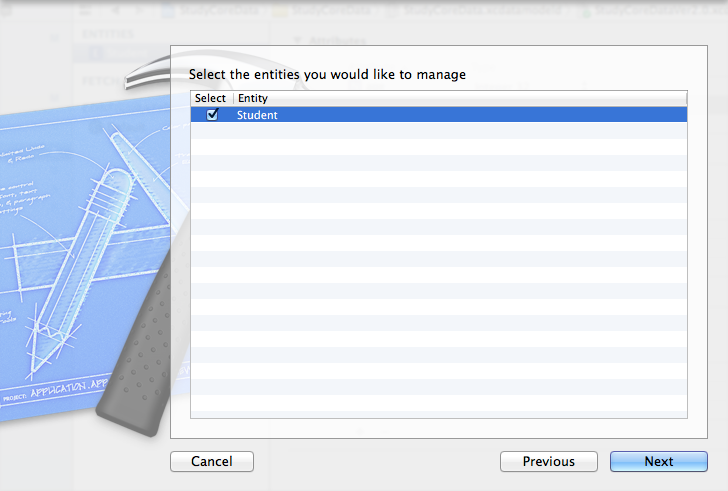
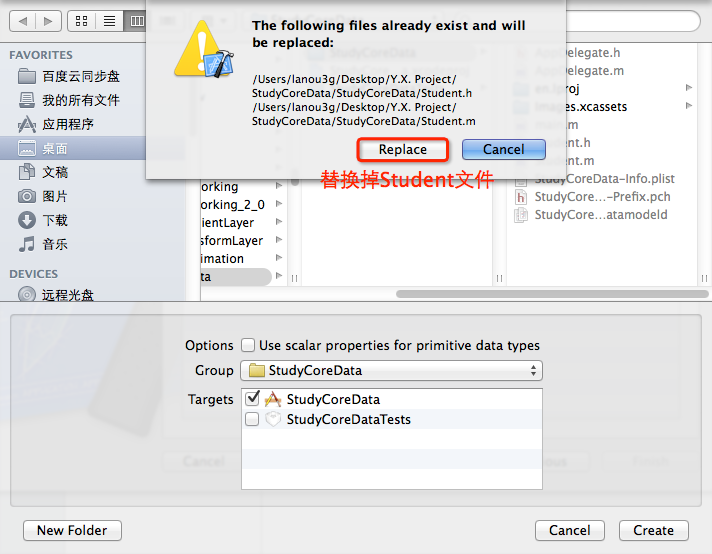
然后,我们来修改下源码试验测试结果:
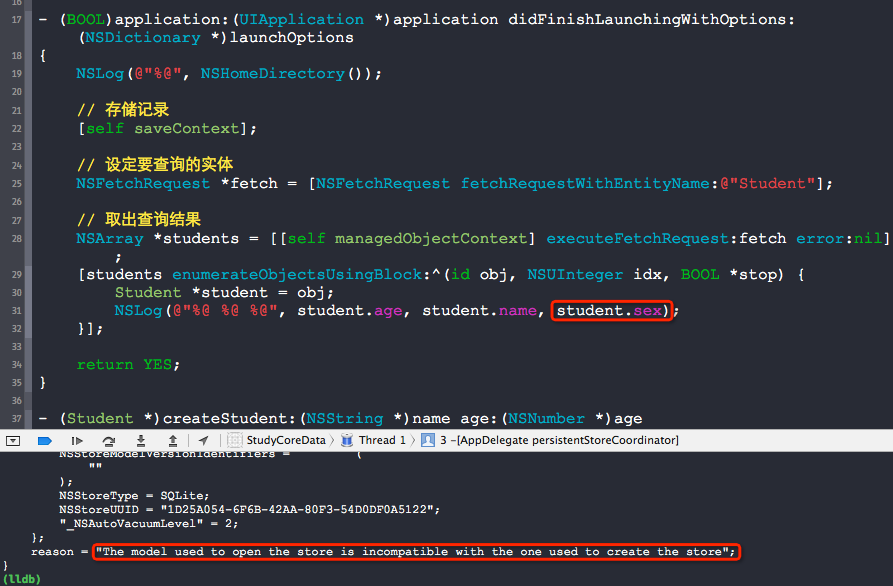
- (BOOL)application:(UIApplication *)application didFinishLaunchingWithOptions:(NSDictionary *)launchOptions

{

    NSLog(@"%@", NSHomeDirectory());

    // 存储记录

    [self saveContext];

    // 设定要查询的实体

    NSFetchRequest *fetch = [NSFetchRequest fetchRequestWithEntityName:@"Student"];

    // 取出查询结果

    NSArray *students = [[self managedObjectContext] executeFetchRequest:fetch error:nil];

    [students enumerateObjectsUsingBlock:^(id obj, NSUInteger idx, BOOL *stop) {

        Student *student = obj;

        NSLog(@"%@ %@ %@", student.age, student.name, student.sex);

    }];

    return YES;

}
运行后会崩溃,提示不兼容.
这个时候我们需要修改点东西:
找到以下地方.
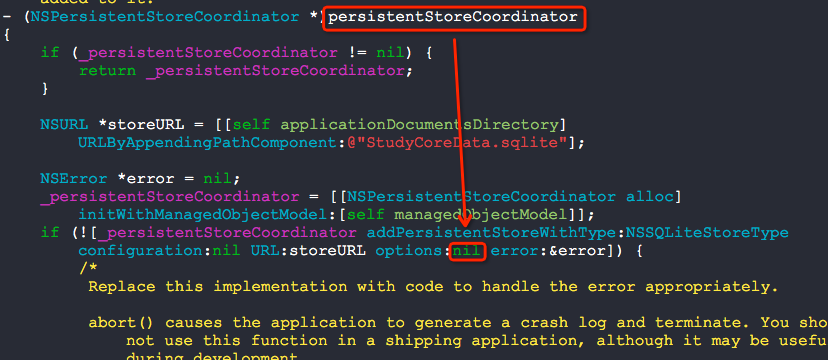
将nil替换成如下的形式.
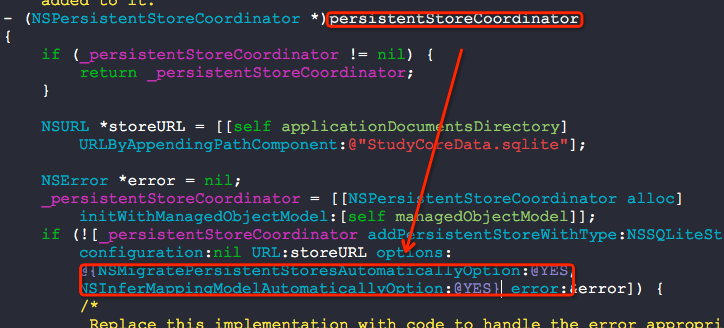
然后运行.

崩溃问题解决了,版本升级成功哦:)
解决问题出处:
http://stackoverflow.com/questions/8881453/the-model-used-to-open-the-store-is-incompatible-with-the-one-used-to-create-the
Deleting the app is sometimes not the case! Suggest, your app has already been published! You can't just add new entity to the data base and go ahead - you need to perform migration!
For those who doesn't want to dig into documentation and is searching for a quick fix:
- Open your .xcdatamodeld file
- click on Editor
- select Add model version...
- Add a new version of your model (the new group of datamodels added)
- select the main file, open file inspector (right-hand panel)
- and under
Versioned core data modelselect your new version of data model for current data model - THAT'S NOT ALL ) You should perform so called "light migration".
- Go to your
AppDelegateand find where thepersistentStoreCoordinatoris being created - Find this line
if (![_persistentStoreCoordinator addPersistentStoreWithType:NSSQLiteStoreType configuration:nil URL:storeURL options:nil error:&error]) - Replace
niloptions with@{NSMigratePersistentStoresAutomaticallyOption:@YES, NSInferMappingModelAutomaticallyOption:@YES}(actually provided in the commented code in that method) - Here you go, have fun!
P.S. This only applies for lightweight migration. For your migration to qualify as a lightweight migration, your changes must be confined to this narrow band:
- Add or remove a property (attribute or relationship).
- Make a nonoptional property optional.
- Make an optional attribute nonoptional, as long as you provide a default value.
- Add or remove an entity.
- Rename a property.
- Rename an entity.
使用CoreData [3]的更多相关文章
- iOS基本数据库存储方式 - CoreData
CoreData 创建模型文件的过程 1.选择模板 2.添加实体 3.添加实体的属性[注意]属性的首字母必须小写 一.CoreData管理类(必备以下三个类对象) 1.CoreData数据操作的上下文 ...
- iOS CoreData 中 objectID 的不变性
关于 CoreData的 objectID 官方文档有这样的表述:新建的Object还没保存到持久化存储上,那么它的objectID是临时id,而保存之后,就是持久化的id,不会再变化了. 那么,我想 ...
- CoreData __ 基本原理
操作过程 Context想要获取值,先要告诉连接器,我要什么东西 链接器再告诉store, 你给我什么东西, store去找 找到之后返回给链接器,链接器再返回给Context Co ...
- iOS CoreData primitive accessor
Given an entity with an attribute firstName, Core Data automatically generates firstName, setFirstNa ...
- 初识CoreData与详解
Core Data数据持久化是对SQLite的一个升级,它是iOS集成的,在说Core Data之前,我们先说说在CoreData中使用的几个类. (1)NSManagedObjectModel(被管 ...
- CoreData教程
网上关于CoreData的教程能搜到不少,但很多都是点到即止,真正实用的部分都没有讲到,而基本不需要的地方又讲了太多,所以我打算根据我的使用情况写这么一篇实用教程.内容将包括:创建entity.创建r ...
- CoreData和SQLite多线程访问时的线程安全
关于CoreData和SQLite多线程访问时的线程安全问题 数据库读取操作一般都是多线程访问的.在对数据进行读取时,我们要保证其当前状态不能被修改,即读取时加锁,否则就会出现数据错误混乱.IOS中常 ...
- IOS数据存储之CoreData使用优缺点
前言: 学习了Sqlite数据之后认真思考了一下,对于已经习惯使用orm数据库的开发者或者对sql语句小白的开发者来说该如何做好数据库开发呢?这个上网搜了一下?看来总李多虑了!apple 提供了一种数 ...
- iOS开发之表视图爱上CoreData
在接触到CoreData时,感觉就是苹果封装的一个ORM.CoreData负责在Model的实体和sqllite建立关联,数据模型的实体类就相当于Java中的JavaBean, 而CoreData的功 ...
- CoreData
之前在学习使用SQLite时, 需要编写大量的sql语句,完成数据的增删改查,但对于不熟悉sql语句的开发人员来说,难度较大,调试程序比较困难. 由此出现CoreData框架,将sql的操作转换成为对 ...
随机推荐
- jieba分词过程
jieba分词最重要的就是字典,我们一般用jieba的话是用的它通用的字典,这样在特定的环境中无法分成我们想要的效果,我们需要根据我们自己的生产环境自己添加我们的字典,然后下载jieba源码进行更改, ...
- redis 迁移工具 redis-port 从阿里云迁移到aws
对于 redis 的 迁移我在网上看到了很多方法,有使用redis-dump 的,有使用 aof导入方式,有rdb文件迁移方式,和redis-port. 由于我是将 redis 从阿里云迁移到AW ...
- Python——可变类型与不可变类型(即为什么函数默认参数要用元组而非列表)
Python 的内建标准类型有一种分类标准是分为可变类型与不可变类型: 可变类型:列表.字典 不可变类型:数字.字符串.元组 因为变量保存的实际都是对象的引用,所以在给一个不可变类型(比如 int)的 ...
- HihoCoder - 1478 水陆距离
水陆距离 描述 给定一个N x M的01矩阵,其中1表示陆地,0表示水域.对于每一个位置,求出它距离最近的水域的距离是多少. 矩阵中每个位置与它上下左右相邻的格子距离为1. 输入 第一行包含两个整数, ...
- Mongodb同步数据到hive(二)
Mongodb同步数据到hive(二) 1. 概述 上一篇文章主要介绍了mongodb-based,通过直连mongodb的方式进行数据映射来进行数据查询,但是那种方式会对线上的 ...
- Django控制器
配置路由 通过对urls.py的配置将用户请求映射到处理函数. Django的URL字符串匹配实际上基于正则表达式,这允许单条URL可以匹配一类请求.参见Django Book中的示例: from d ...
- js jq封装ajax方法
json文本格式 { "userInfo":[ {name:"admin",password:"123"}, {name:"adm ...
- c#基础学习(0701)之一些简单的方法练习
一个简单的求数组最大值的方法 //可变参数 int max=GetMaxNumbers(101,30) static int GetMaxNumbers(params int[] pms) { ]; ...
- C# 中的委托和事件 --转载
作者:张子阳 转载源: http://www.tracefact.net/CSharp-Programming/Delegates-and-Events-in-CSharp.aspx C# 中的委托 ...
- ipV4&V6的区别
1. 更大的地址空间.IPv4中规定IP地址长度为32,即有2^32-1个地址:而IPv6中IP地址的长度为128,即有2^128-1个地址. 2. 更小的路由表.IPv6的地址分配一开始就遵循聚类( ...