
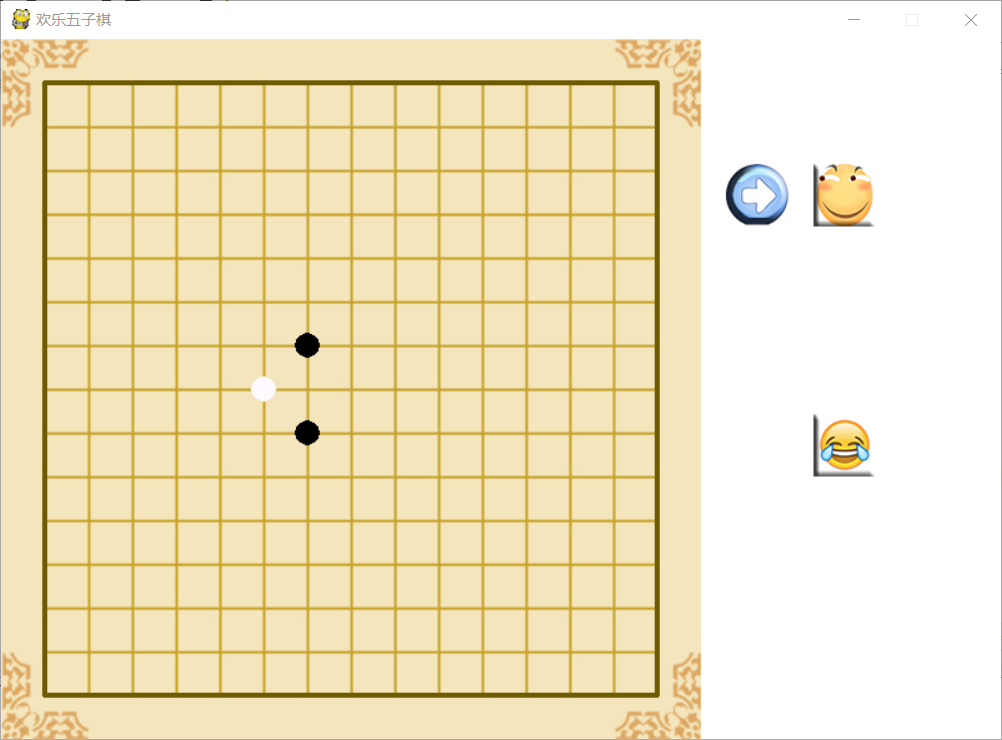
【Pygame】 简易五子棋
import pygame

import sys

import time

import random

pygame.init()

screen_size = (800,560)

WIDTH = 720

HEIGHT = 720

GRID_WIDTH = WIDTH // 20

WHITE = (255, 250, 255)

BLACK = (0, 0, 0)

GREEN = (0, 0xff, 0)

RED = (0xff, 0, 0)

color = [BLACK,WHITE]

class checker:

    def __init__(self,x,y):

        self.ox = x

        self.oy = y

        self.color = (0,0,0)

        self.state = 0   # 0 1 2

checks = []

colorful = []

aiful = []

for i in range(1,16):

    for j in range(1,16):

        achecker = checker(i,j)

        checks.append(achecker)

        colorful.append(0)

        aiful.append(0)

for i in range(1,16):

    colorful.append(0)

    aiful.append(0)

movements=[]

movements1 = []

movements2 = []

screen = pygame.display.set_mode(screen_size,0, 32)

pygame.display.set_caption('欢乐五子棋')

clock = pygame.time.Clock()

bg = pygame.image.load("image\\checker.jpg").convert()

weixiao = pygame.image.load("image\\weixiao.jpg").convert()

huaji =  pygame.image.load("image\\huaji.jpg").convert()

arrow = pygame.image.load("image\\arrow.jpg").convert()

bgcolor = (255,255,255)

turn = 0

def draw_check(surf):

    screen.fill(bgcolor)

    surf.blit(bg, (0, 0))

def draw_column(surf,where):

    surf.blit(huaji, (650, 100))

    surf.blit(weixiao, (650, 300))

    if where == 1:

        surf.blit(arrow, (580, 100))

    else:

        surf.blit(arrow, (580, 300))

def draw_checker(surf):

    for c in checks:

        if c.state == 1:

            pygame.draw.circle(surf, c.color, (c.ox * 35, c.oy * 35), 10, 0)

        if c.state == 2:

            pygame.draw.circle(surf, c.color, (c.ox * 35, c.oy * 35), 10, 0)

def tmax(a):

    max = a[0]

    for i in a:

        if max < i:

            max = i

    return max

def Ai_choose():

    for i in aiful:

        i = 0

    if len(movements) == 0:

        return (7,7)

    for i in movements1:

        aiful[i[0]+i[1]*15] = 0

        if i[0] > 0:

            aiful[i[0]-1+i[1]*15] +=1

        if i[0] < 15:

            aiful[i[0]+1 + i[1] * 15] += 1

        if i[1] > 0:

            aiful[i[0]+ (i[1]-1) * 15] += 1

        if i[1] < 15:

            aiful[i[0] + (i[1] + 1) * 15] += 1

    c = tmax(aiful)

    print(c)

def check_win(x,y):

    i = x

    j = y

    count = 0

    ck = colorful[x+y*15]

    if ck == 0:

        return False

    #横着

    while i>=0 and colorful[i+y*15] == ck:

        i -= 1

        count += 1

    i = x+1

    while i< 15 and colorful[i+y*15] == ck:

        i += 1

        count += 1

    if count >= 5:

        print("win")

        return True

    #竖着

    i = x

    count = 0

    while j>=0 and colorful[i+15*j] == ck:

        j-=1

        count +=1

    j = y+1

    while j < 15 and colorful[i+15*j] == ck:

        j  += 1

        count +=1

    if count >= 5:

        print("win")

        return True

    #斜着左上

    j = y

    count = 0

    while i >= 0 and j >=0 and colorful[i +15* j] == ck:

        j -= 1

        i -= 1

        count += 1

    i = x+1

    j = y+1

    while i< 15 and j <15 and colorful[i+15*j] == ck:

        i += 1

        j +=1

        count += 1

    if count >= 5:

        print("win")

        return True

    #斜着右上

    j = y

    i = x

    count = 0

    while i >= 0 and j <15 and colorful[i + 15 * j] == ck:

        i -= 1

        j += 1

        count += 1

    i = x + 1

    j = y - 1

    while i< 15 and j >0 and colorful[i+15*j] == ck:

        i += 1

        j -=1

        count += 1

    if count >= 5:

        print("win")

        return True

    return False

runing = 1

Ai_wait = 0

while runing:

    for event in pygame.event.get():

        if event.type == pygame.QUIT:

            sys.exit()

        if event.type == pygame.MOUSEBUTTONDOWN:

            if turn == 1:

                pos = event.pos

                grid = (int(round(pos[0] / 35)), int(round(pos[1] / 35)))

                for c in checks:

                    if c.state == 0:

                        if c.ox == grid[0] and c.oy == grid[1]:

                            movements.append(grid)

                            movements2.append(grid)

                            colorful[(c.ox) + (c.oy) * 15] = 2

                            c.color = WHITE

                            c.state = 2

                            turn = 0

                            if True == check_win(c.ox,c.oy):

                                runing = 0

                                print("bingo")

    if turn == 0:

        if Ai_wait == 30:

            Ai_wait= 0

            #pos = Ai_choose()

            grid = pos

            for i in movements:

                while i == pos:

                    pos = (random.randint(1, 19), random.randint(1, 19))

                    grid = pos

            for c in checks:

                if c.state == 0:

                    if c.ox == grid[0] and c.oy == grid[1]:

                        movements.append(grid)

                        movements1.append(grid)

                        colorful[(c.ox) + (c.oy) * 15] = 1

                        c.color = BLACK

                        c.state = 1

                        turn = 1

                        if True == check_win(c.ox, c.oy):

                            runing = 0

                            print("bingo")

        else:

            Ai_wait+=1

    draw_check(screen)

    draw_column(screen,turn)

    draw_checker(screen)

    pygame.display.update()

    clock.tick(50)

while True:

    for event in pygame.event.get():

        if event.type == pygame.QUIT:

            sys.exit()
【Pygame】 简易五子棋的更多相关文章
- 简易五子棋 V1.1.0
main.cpp #include "fivechess.cpp" int main() { fivechess a; a.RunGame(); getchar(); return ...
- Web版简易五子棋
前些时候把大三写的C++版五子棋改成Web板挂到了网上,具有一定傻瓜式智能,欢迎体验使用拍砖:http://www.zhentiyuan.com/Games/QuickFiveChess.aspx 现 ...
- c语言进阶4-有返回值函数
一. 从函数返回 从函数返回就是返回语句的第一个主要用途.在程序中,有两种方法可以终止函数的执行,并返回到调用函数的位置.第一种方法是在函数体中,从第一句一直执行到最后一句,当所有语句 ...
- c语言进阶3-有参函数
一. 有参函数的定义 有参函数的定义格式如下: 类型标识符 函数名(形式参数表列) { 语句: } 如 void fun(int a,int b) { printf(“a+b=%d”,a ...
- html+js+node实现五子棋线上对战,五子棋最简易算法
首先附上我的github地址,https://github.com/jiangzhenfei/five,线上实例:http://47.93.103.19:5900/client/ 线上实例,你可以随意 ...
- [收藏]C++简单五子棋
#include<iostream> #include<iomanip> using namespace std; ; //棋盘行数 ; //棋盘列数 char p[X][Y] ...
- [深度学习]实现一个博弈型的AI,从五子棋开始(2)
嗯,今天接着来搞五子棋,从五子棋开始给小伙伴们聊AI. 昨天晚上我们已经实现了一个五子棋的逻辑部分,其实讲道理,有个规则在,可以开始搞AI了,但是考虑到不够直观,我们还是顺带先把五子棋的UI也先搞出来 ...
- Python:游戏:五子棋之人机对战
本文代码基于 python3.6 和 pygame1.9.4. 五子棋比起我之前写的几款游戏来说,难度提高了不少.如果是人与人对战,那么,电脑只需要判断是否赢了就可以.如果是人机对战,那你还得让电脑知 ...
- 贪吃蛇(简易版)Leslie5205912著
# include <stdio.h># include <string.h># include <windows.h># include <stdlib.h ...
随机推荐
- 面试题21:如何判断二叉树是搜索二叉树BST?
Given a binary tree, determine if it is a valid binary search tree (BST). Assume a BST is defined as ...
- HihoCoder - 1478 水陆距离
水陆距离 描述 给定一个N x M的01矩阵,其中1表示陆地,0表示水域.对于每一个位置,求出它距离最近的水域的距离是多少. 矩阵中每个位置与它上下左右相邻的格子距离为1. 输入 第一行包含两个整数, ...
- vue-router参数传递
1.在vue-router中,有两大对象被挂载到了实例this2.$route(只读.具备信息的对象).$router(具备函数功能)3.查询字符串方式传递参数 1).去哪里 <router-l ...
- Firebird reset SYSDBA password
Firebird 重置超级管理员SYSDBA密码 首先登陆到服务器上(以下以Windows系统演示),命令行进入安装目录,我这里是 D:\-Installer\-Firebird\Firebird-3 ...
- Spring-----AOP深度理解
AOP定义了一些新的概念,要想深入的理解AOP的原理,就必须掌握这些概念的具体含义,本人菜鸡一枚,一下是自己对一些概念的理解,如果哪里不对,欢迎评论区指正 AOP核心概念AOP即Aspect-Orie ...
- sendsms短信验证功能实现代码
<!DOCTYPE HTML> <html> <head> <meta charset="utf-8"> <meta name ...
- ORDER BY 高级用法之CASE WHEN
今天在公司查看一段sql SP代码,发现了一段比较奇怪的代码. 大概长这样子: Select * from tableA ORDER BY ColA , CASE END 小弟才疏学浅,咋一看到代码以 ...
- 【原】Maven解决Jar包冲突
一.起源 引入二方jar maven 包后出现 NoSuchMethodError org.apache.commons.lang3.StringUtils.isNoneEmpty . 第一感觉就是j ...
- 532 -数组中的K-diff对
例1: 输入: [3,1,4,1,5],k = 2 输出: 2 说明:阵列中有两个2-diff对,(1,3)和(3,5). 虽然我们在输入中有两个1,但我们应该只返回唯一对的数量. 例2: 输入: ...
- 【基于初学者的SSH】struts2 值栈的详解与struts2标签库+ognl表达式
一:什么是值栈:struts2里面本身提供的一种存储机制,类似于域对象,值栈,可以存值和取值 特点:先进后出,最上面的元素叫做栈顶,也叫压栈. <s:debug></s:debug& ...