
设计带有placeHolder的TextView
设计带有placeHolder的TextView
效果:
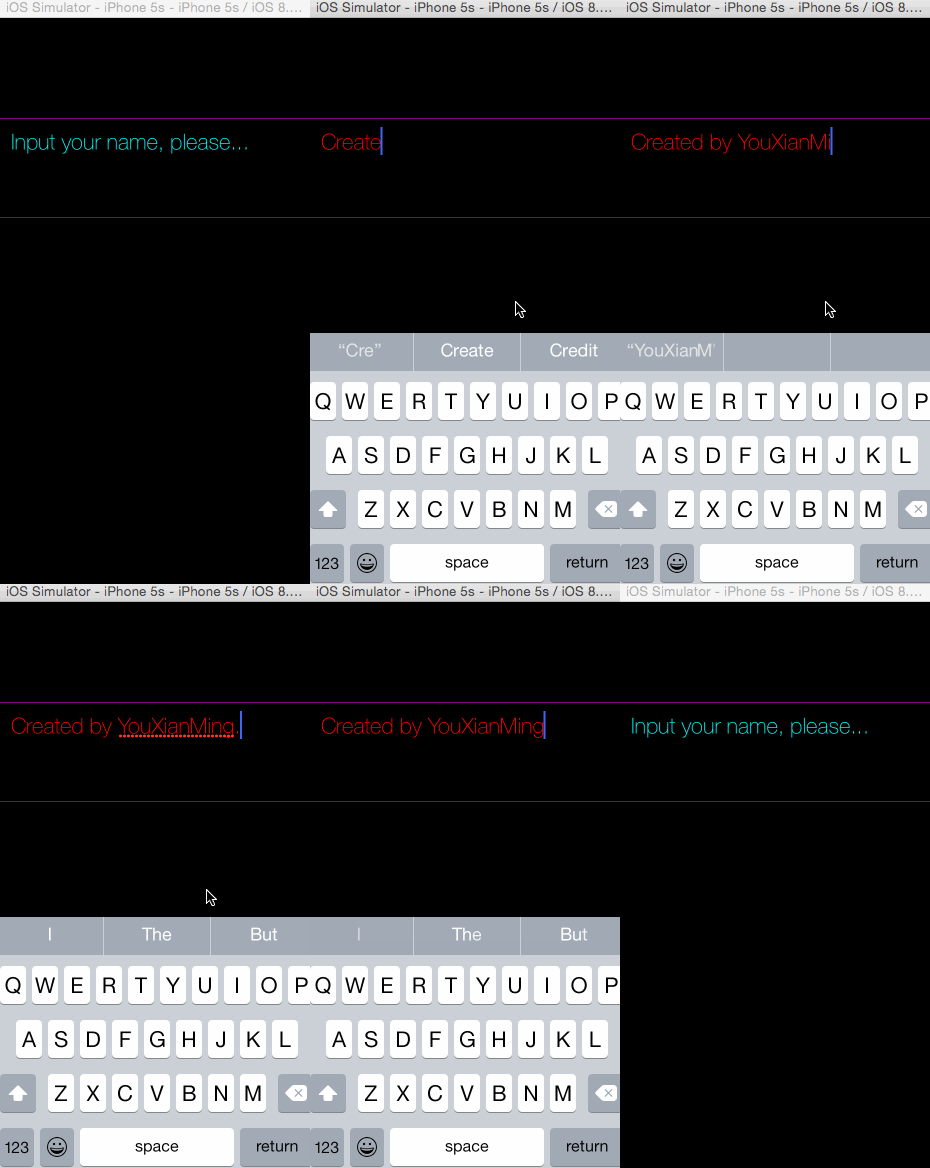
源码:
PlaceholderTextView.h 与 PlaceholderTextView.m
//

//  PlaceholderTextView.h

//  YXTextView

//

//  Created by YouXianMing on 14/12/23.

//  Copyright (c) 2014年 YouXianMing. All rights reserved.

//

#import <UIKit/UIKit.h>

@interface PlaceholderTextView : UIView

// 获取的字符串

@property (nonatomic, strong, readonly) NSString *string;

// textView

@property (nonatomic, strong) UITextView  *textView;

// 占位字符

@property (nonatomic, strong) NSString    *placeHolderString;

// 文本边缘留白

@property(nonatomic, assign) UIEdgeInsets  textContainerInset;

// 颜色设置

@property (nonatomic, strong) UIColor     *editTextColor;

@property (nonatomic, strong) UIColor     *placeHolderColor;

// 返回键是否用来做取消第一响应者

@property (nonatomic, assign) BOOL         returnButtonToResignFirstResponder;

// 取消第一响应者

- (void)resignTextViewFirstResponder;

@end
//

//  PlaceholderTextView.m

//  YXTextView

//

//  Created by YouXianMing on 14/12/23.

//  Copyright (c) 2014年 YouXianMing. All rights reserved.

//

#import "PlaceholderTextView.h"

@interface PlaceholderTextView ()<UITextViewDelegate>

@property (nonatomic, strong) NSString *string;

@end

@implementation PlaceholderTextView

- (instancetype)initWithFrame:(CGRect)frame

{

    self = [super initWithFrame:frame];

    if (self) {

        [self createTextView];

    }

    return self;

}

- (void)createTextView {

    self.textView                 = [[UITextView alloc] initWithFrame:self.bounds];

    self.textView.delegate        = self;

    self.textView.backgroundColor = [UIColor clearColor];

    self.textView.textColor       = [UIColor grayColor];

    [self addSubview:self.textView];

}

#pragma mark - 代理方法

- (BOOL)textViewShouldBeginEditing:(UITextView *)textView {

    // 设置编辑状态文字颜色

    textView.textColor = (self.editTextColor == nil ? [UIColor blackColor] : self.editTextColor);

    // 如果文字为placeHolder文字

    if ([textView.text isEqualToString:self.placeHolderString]) {

        textView.text = @"";

    }

    return YES;

}

- (BOOL)textViewShouldEndEditing:(UITextView *)textView {

    // 如果长度为0,则显示placeHolder文字

    if (textView.text.length == ) {

        textView.text      = self.placeHolderString;

        textView.textColor = (self.placeHolderColor == nil ? [UIColor grayColor] : self.placeHolderColor);

    }

    return YES;

}

- (BOOL)textView:(UITextView *)textView shouldChangeTextInRange:(NSRange)range replacementText:(NSString *)text {

    if (_returnButtonToResignFirstResponder == YES) {

        if ([text isEqualToString:@"\n"]) {

            [textView resignFirstResponder];

            return NO;

        }

    }

    return YES;

}

- (void)resignTextViewFirstResponder {

    [self.textView resignFirstResponder];

}

#pragma mark - 重写setter,getter方法

@synthesize string = _string;

- (NSString *)string {

    if ([self.textView.text isEqualToString:self.placeHolderString]) {

        return @"";

    } else {

        return self.textView.text;

    }

}

@synthesize placeHolderColor = _placeHolderColor;

- (void)setPlaceHolderColor:(UIColor *)placeHolderColor {

    _placeHolderColor       = placeHolderColor;

    self.textView.textColor = _placeHolderColor;

}

- (UIColor *)placeHolderColor {

    return _placeHolderColor;

}

@synthesize placeHolderString = _placeHolderString;

- (void)setPlaceHolderString:(NSString *)placeHolderString {

    _placeHolderString = placeHolderString;

    _textView.text     = placeHolderString;

}

- (NSString *)placeHolderString {

    return _placeHolderString;

}

@synthesize textContainerInset = _textContainerInset;

- (void)setTextContainerInset:(UIEdgeInsets)textContainerInset {

    _textContainerInset          = textContainerInset;

    _textView.textContainerInset = textContainerInset;

}

- (UIEdgeInsets)textContainerInset {

    return _textContainerInset;

}

@end
控制器源码:
//

//  ViewController.m

//  YXTextView

//

//  Created by YouXianMing on 14/12/23.

//  Copyright (c) 2014年 YouXianMing. All rights reserved.

//

#import "ViewController.h"

#import "PlaceholderTextView.h"

@interface ViewController ()

@end

@implementation ViewController

- (void)viewDidLoad {

    [super viewDidLoad];

    self.view.backgroundColor = [UIColor blackColor];

    PlaceholderTextView *textView = [[PlaceholderTextView alloc] initWithFrame:CGRectMake(-, , , )];

    [self.view addSubview:textView];

    textView.layer.borderWidth  = .f;

    textView.layer.borderColor  = [UIColor purpleColor].CGColor;

    textView.returnButtonToResignFirstResponder = YES;

    textView.textView.font      = [UIFont fontWithName:@"HelveticaNeue-Thin" size:.f];

    textView.placeHolderColor   = [UIColor cyanColor];

    textView.editTextColor      = [UIColor redColor];

    textView.textContainerInset = UIEdgeInsetsMake(, , , );

    textView.placeHolderString  = @"Input your name, please...";

}

@end
需要注意的一些细节:

设计带有placeHolder的TextView的更多相关文章
- 李洪强iOS开发之带placeHolder的Textview
李洪强iOS开发之带placeHolder的Textview 01 - 创建工过程,定义全局属性,遵守textview的代理协议 02 - 添加一个textview和一个label 03 - 实现 ...
- 新浪微博客户端(36)-自定义带placeholder的TextView
iOS 上自带的UITextView竟然不能设置placeholder,但是UITextView却可以,我也真是醉了.没办法了,自己写一个 DJTextView.h #import <UIKit ...
- [web设计]带有方向感应的hover effect
See the Pen bdxLQa by jeremylee (@lijie33402) on CodePen. codepen不知道怎么嵌入到cnblogs..待编辑 参考资料 参考博客
- iOS 第三方库、插件、知名博客总结
iOS 第三方库.插件.知名博客总结 用到的组件 1.通过CocoaPods安装 项目名称 项目信息 AFNetworking 网络请求组件 FMDB 本地数据库组件 SDWebImage 多个缩略图 ...
- iOS -- 开源项目和库
TimLiu-iOS 目录 UI 下拉刷新 模糊效果 AutoLayout 富文本 图表 表相关与Tabbar 隐藏与显示 HUD与Toast 对话框 其他UI 动画 侧滑与右滑返回手势 gif动画 ...
- ios很好的开源库
Tim9Liu9/TimLiu-iOS 自己总结的iOS.mac开源项目及库,持续更新.. 目录 UI 下拉刷新 模糊效果 AutoLayout 富文本 图表 表相关与Tabbar 隐藏与显示 HUD ...
- [iOS UI进阶 - 1] 自定义控件
A.关于Quiartz2D的一些细节 1.UIKit的工具已经封装了上下文引用,所以不用手动获取和渲染 - (void)drawRect:(CGRect)rect { [[UIColor redCol ...
- iOS TextView输入长度限制 设置placeholder
textView在使用中通常会有2个功能是最常用的 设置placeholder 限制输入长度 TYLimitedTextView刚好是为了解决这个2个问题而诞生的,下面讲解TYLimitedTextV ...
- iOS开发-带Placeholder的UITextView实现
iOS中UITextField带有PlaceHolder属性,可以方便用于提示输入.但是同样可以进行文本输入的UITextView控件则没有PlaceHolder属性,还是有些不方便的,尤其是对于略带 ...
随机推荐
- 数据库-SQLite简介
SQLite是D.Richard Hipp用C语言编写的开源嵌入式数据库(轻型数据库). 由于资源占用少.性能良好和零管理成本,嵌入式数据库有了它的用武之地,像Android.iPhone都有内置的S ...
- LDA理解
LDA只是一个求解思路. 1.理解LDA首先要理解EM算法,EM不能叫做一个算法,只是一个思想:它要求解的其实是一个极大似然估计,就是我用已知量去求解导致这个已知量出现的最大概率,而在这里又恰恰有点偏 ...
- PTA (Advanced Level) 1024 Palindromic Number
Palindromic Number A number that will be the same when it is written forwards or backwards is known ...
- CSS Sprites(CSS精灵) 的优缺点
CSS Sprites 的优点: 1.减少图片的字节 2.减少了网页的http请求,从而大大的提高了页面的性能 3.解决了网页设计师在图片命名上的困扰,只需对一张集合的图片上命 ...
- JavaScript 函数使用return返回值
我们可以把数据通过函数的 参数 来传入函数,也可以使用 return 语句把数据从一个函数中传出来. 举个栗子 function plusThree(num) {return num + 3;}var ...
- C# Mysql Dapper和原生sql 插入和查询速度比较
1.表中有三个字段,已经有100多万条数据,每次插入10万条数据 时间单位:秒 秒 Dapper批量Model插入时间:40.6165513,Dapper单条Model插入时间:95.9492972, ...
- 【转】JS前台加密,java后台解密实现
因项目需求,需要一些敏感信息进行加密,不能以明文暴露到浏览器. 然后后台进行解密操作 先看一下效果图 未对其加密传输 1.前台JS <script type="text/javascr ...
- Myeclipse安装与破解
安装包+破解包 链接:https://pan.baidu.com/s/1G4mYsTOMDixyr2UmdqqY5A 提取码:a2n8 红色框框内的是安装包,蓝色框框内的是破解包 安装过程中比较简单, ...
- 解决:在php配置文件路径下,添加php.ini之后,测试页面无法显示
安装完php之后,通常情况下,会在网站目录下创建一个.php的文件,来查看php安装过程中的参数配置,脚本的内容很简单: <? phpinfo(); ?> 通常情况下,如果能顺利安装下来不 ...
- ArcGis实现画矩形(RectangleFeedBack)
private void axMapControl1_OnMouseDown(object sender, IMapControlEvents2_OnMouseDownEvent e) ...