
Linux which/whereis/locate命令详解
which 查看可执行文件的位置,从全局环境变量PATH里面查找对应的路径,默认是找 bash内所规范的目录
whereis 查看文件的位置,配合参数-b,用于程序名的搜索,从linux数据库查找。
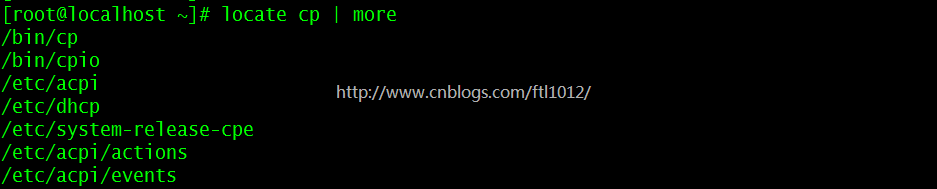
locate 配合数据库查看文件位置。
find 实际搜寻硬盘查询文件名称,效率低。
which常用命令参数
--version, -[vV] Print version and exit successfully.

--help,          Print this help and exit successfully.

--skip-dot       Skip directories in PATH that start with a dot.

--skip-tilde     Skip directories in PATH that start with a tilde.

--show-dot       Don't expand a dot to current directory in output.

--show-tilde     Output a tilde for HOME directory for non-root.

--tty-only       Stop processing options on the right if not on tty.

--all, -a        Print all matches in PATH, not just the first

--read-alias, -i Read list of aliases from stdin.

--skip-alias     Ignore option --read-alias; don't read stdin.

--read-functions Read shell functions from stdin.

--skip-functions Ignore option --read-functions; don't read stdin.
which常用的命令展示
which cp ==> /bin/cp

whereis常用命令参数
# Usage: whereis [ -sbmu ] [ -SBM dir ... -f ] name...
whereis -b cp ==>which cp ==> /bin/cp

locate常用命令参数
Usage: locate [OPTION]... [PATTERN]...

Search for entries in a mlocate database.

  -b, --basename         match only the base name of path names

  -c, --count            only print number of found entries

  -d, --database DBPATH  use DBPATH instead of default database (which is

                         /var/lib/mlocate/mlocate.db)

  -e, --existing         only print entries for currently existing files

  -L, --follow           follow trailing symbolic links when checking file

                         existence (default)

  -h, --help             print this help

  -i, --ignore-case      ignore case distinctions when matching patterns

  -l, --limit, -n LIMIT  limit output (or counting) to LIMIT entries

  -m, --mmap             ignored, for backward compatibility

  -P, --nofollow, -H     don't follow trailing symbolic links when checking file

                         existence

  -0, --null             separate entries with NUL on output

  -S, --statistics       don't search for entries, print statistics about each

                         used database

  -q, --quiet            report no error messages about reading databases

  -r, --regexp REGEXP    search for basic regexp REGEXP instead of patterns

      --regex            patterns are extended regexps

  -s, --stdio            ignored, for backward compatibility

  -V, --version          print version information

  -w, --wholename        match whole path name (default)
locate常用的命令展示
locate cp ==> which cp ==> /bin/cp
Linux which/whereis/locate命令详解的更多相关文章
- Linux上的free命令详解、swap机制
Linux上的free命令详解 解释一下Linux上free命令的输出. 下面是free的运行结果,一共有4行.为了方便说明,我加上了列号.这样可以把free的输出看成一个二维数组FO(Free ...
- Linux CAT与ECHO命令详解 <<EOF EOF
Linux CAT与ECHO命令详解 cat命令是Linux下的一个文本输出命令,通常是用于观看某个文件的内容的: cat主要有三大功能: .一次显示整个文件. $ cat filename .从键盘 ...
- [r]Ubuntu Linux系统下apt-get命令详解
Ubuntu Linux系统下apt-get命令详解(via|via) 常用的APT命令参数: apt-cache search package 搜索包 apt-cache show package ...
- Linux CAT与ECHO命令详解
Linux CAT与ECHO命令详解 cat命令是Linux下的一个文本输出命令,通常是用于观看某个文件的内容的: cat主要有三大功能: 1.一次显示整个文件. $ cat filename 2.从 ...
- (转)Linux: dirname、basename命令详解
Linux: dirname.basename命令详解 原文:http://blog.sina.com.cn/s/blog_3f63916f010143vo.html 一.dirname指令 1.功能 ...
- Linux下面的yum命令详解
yum(全称为 Yellow dog Updater, Modified)是一个在Fedora和RedHat以及SUSE中的Shell前端软件包管理器.基於RPM包管理,能够从指定的服务器自动下载RP ...
- linux应用之yum命令详解
linux yum命令详解 yum(全称为 Yellow dog Updater, Modified)是一个在Fedora和RedHat以及SUSE中的Shell前端软件包管理器.基於RPM包管理,能 ...
- Linux服务管理 systemctl命令详解
Linux服务器,服务管理--systemctl命令详解,设置开机自启动 syetemclt就是service和chkconfig这两个命令的整合 任务 旧指令 新指令 使某服务自动启动 ch ...
- centos、linux关机与重启命令详解
Linux centos关机与重启命令详解与实战 Linux centos重启命令: 1.reboot 2.shutdown -r now 立刻重启(root用户使用) 3.shutdown -r 1 ...
随机推荐
- kafka报错处理
Kafka报错处理 1. 记一次kafka报错处理 Kafka停止后,再启动的时候发生了报错: [2017-10-27 09:43:18,313] INFO Recovering unflus ...
- Apache Thrift - 可伸缩的跨语言服务开发框架 ---转载
src:http://www.ibm.com/developerworks/cn/java/j-lo-apachethrift/ http://thrift.apache.org/
- 如何在生产环境禁用swagger
pringMVC集成springfox-swagger2和springfox-swagger-ui很简单,只需要两步: (1)pom中添加依赖 <dependency> <group ...
- api.setFrameGroupIndex
设置 frame 组当前可见 frame setFrameGroupIndex({params}) params name: 类型:字符串 默认值:无 描述:frame 组名字 index: 类型:数 ...
- WPF进度条
ProgressBar控件与传统WinForm使用方法完全一样,我们只需关注: Minimum——最小值,默认为0: Maximum——最大值,默认为100. Value——当前值. 关键是它的控 ...
- BOM-使用定时器
window对象包含4个定时器专用方法,说明如下表所示,使用它们可以实现代码定时运行,避免连续执行,这样可以设计动画 方法 说明 setInterval() 按照指定的周期,(以毫秒为单位)来调用函数 ...
- Unix Programming :文件IO
文件描述符常量(unistd.h): STDIN_FILENO STDOUT_FILENO STDERR_FILENO 通常这些常量分别对应于数字0,1,2 文件操作需要头文件 fcntl.h ,一些 ...
- sql SUM求和
- github上的项目发布成静态网页
代码上传成功之后就可以发布静态网页了,细心的童鞋应该已经看到我上传的代码在根目录就有一个html文件(发布其他情况没试过,感兴趣自己去尝试),发布的时候选择仓库即自动识别了. 第一步:点击settin ...
- 2017年CCF大数据与计算智能大赛,梳理总结新鲜出炉啦~~~
0 序言 比赛已经过去一段时间,现在才来写总结似乎有点儿晚,但是挡不住内心发出的强烈呼唤的声音,所以决定静下心来梳理一遍,查缺补漏. 参赛契机: 2017年9月偶然在学校的官方微信推送中看到2017年 ...