
elasticsearch安装指导(new)
1 直接去官网下载rpm包安装或者下载tar包
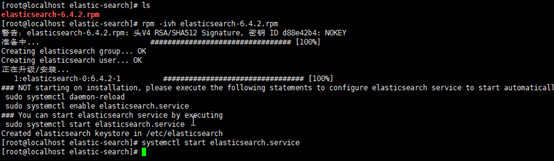
2 服务启动后,发现打不开页面,修改yml文件即可

用rpm包安装的软件有一个特点就是不同的目录在不同文件夹,比如config文件夹根据下面进程信息查到

找到yml文件后,去掉注释并将ip修改为虚机ip

访问chrome即可

3 安装elasticsearch-head插件
按照慕课网上的教程下载master包和安装nodejs后,
[root@localhost elasticsearch-head-master]# yum install nodejs
已加载插件:fastestmirror
Loading mirror speeds from cached hostfile
* base: mirrors.cn99.com
* extras: mirrors.njupt.edu.cn
* updates: mirrors.cn99.com
没有可用软件包 nodejs。
错误:无须任何处理
[root@localhost elasticsearch-head-master]# curl --silent --location https://rpm.nodesource.com/setup_8.x | bash -
## Installing the NodeSource Node.js 8.x LTS Carbon repo...
## Inspecting system...
+ rpm -q --whatprovides redhat-release || rpm -q --whatprovides centos-release || rpm -q --whatprovides cloudlinux-release || rpm -q --whatprovides sl-release
+ uname -m
## Confirming "el7-x86_64" is supported...
+ curl -sLf -o /dev/null 'https://rpm.nodesource.com/pub_8.x/el/7/x86_64/nodesource-release-el7-1.noarch.rpm'
## Downloading release setup RPM...
+ mktemp
+ curl -sL -o '/tmp/tmp.pdvh1ov1pt' 'https://rpm.nodesource.com/pub_8.x/el/7/x86_64/nodesource-release-el7-1.noarch.rpm'
## Installing release setup RPM...
+ rpm -i --nosignature --force '/tmp/tmp.pdvh1ov1pt'
## Cleaning up...
+ rm -f '/tmp/tmp.pdvh1ov1pt'
## Checking for existing installations...
+ rpm -qa 'node|npm' | grep -v nodesource
## Run `sudo yum install -y nodejs` to install Node.js 8.x LTS Carbon and npm.
## You may also need development tools to build native addons:
sudo yum install gcc-c++ make
## To install the Yarn package manager, run:
curl -sL https://dl.yarnpkg.com/rpm/yarn.repo | sudo tee /etc/yum.repos.d/yarn.repo
sudo yum install yarn
[root@localhost elasticsearch-head-master]# sudo yum install -y nodejs
已加载插件:fastestmirror
nodesource | 2.5 kB 00:00:00
nodesource/x86_64/primary_db | 39 kB 00:00:00
Loading mirror speeds from cached hostfile
* base: mirrors.cn99.com
* extras: mirrors.njupt.edu.cn
* updates: mirrors.cn99.com
正在解决依赖关系
--> 正在检查事务
---> 软件包 nodejs.x86_64.2.8.12.0-1nodesource 将被 安装
--> 解决依赖关系完成
依赖关系解决
======================================================================================================================================================================================
Package 架构 版本 源 大小
======================================================================================================================================================================================
正在安装:
nodejs x86_64 2:8.12.0-1nodesource nodesource 16 M
事务概要
======================================================================================================================================================================================
安装 1 软件包
总下载量:16 M
安装大小:49 M
Downloading packages:
警告:/var/cache/yum/x86_64/7/nodesource/packages/nodejs-8.12.0-1nodesource.x86_64.rpm: 头V4 RSA/SHA256 Signature, 密钥 ID 34fa74dd: NOKEY= ] 3.4 MB/s | 14 MB 00:00:00 ETA
nodejs-8.12.0-1nodesource.x86_64.rpm 的公钥尚未安装
nodejs-8.12.0-1nodesource.x86_64.rpm | 16 MB 00:00:04
从 file:///etc/pki/rpm-gpg/NODESOURCE-GPG-SIGNING-KEY-EL 检索密钥
导入 GPG key 0x34FA74DD:
用户ID : "NodeSource <gpg-rpm@nodesource.com>"
指纹 : 2e55 207a 95d9 944b 0cc9 3261 5ddb e8d4 34fa 74dd
软件包 : nodesource-release-el7-1.noarch (installed)
来自 : /etc/pki/rpm-gpg/NODESOURCE-GPG-SIGNING-KEY-EL
Running transaction check
Running transaction test
Transaction test succeeded
Running transaction
警告:RPM 数据库已被非 yum 程序修改。
正在安装 : 2:nodejs-8.12.0-1nodesource.x86_64 1/1
验证中 : 2:nodejs-8.12.0-1nodesource.x86_64 1/1
已安装:
nodejs.x86_64 2:8.12.0-1nodesource
完毕!
[root@localhost elasticsearch-head-master]# node -v
v8.12.0
[root@localhost elasticsearch-head-master]# npm install
npm WARN deprecated coffee-script@1.10.0: CoffeeScript on NPM has moved to "coffeescript" (no hyphen)
npm WARN deprecated http2@3.3.7: Use the built-in module in node 9.0.0 or newer, instead
> phantomjs-prebuilt@2.1.16 install /root/elasticsearch-head/elasticsearch-head-master/node_modules/phantomjs-prebuilt
> node install.js
PhantomJS not found on PATH
Downloading https://github.com/Medium/phantomjs/releases/download/v2.1.1/phantomjs-2.1.1-linux-x86_64.tar.bz2
Saving to /tmp/phantomjs/phantomjs-2.1.1-linux-x86_64.tar.bz2
Receiving...
[==--------------------------------------] 4%
^C
[root@localhost elasticsearch-head-master]# npm install
npm notice created a lockfile as package-lock.json. You should commit this file.
npm WARN elasticsearch-head@0.0.0 license should be a valid SPDX license expression
audited 1750 packages in 7.391s
found 23 vulnerabilities (17 low, 6 high)
run `npm audit fix` to fix them, or `npm audit` for details
[root@localhost elasticsearch-head-master]#
[root@localhost elasticsearch-head-master]# npm run start
> elasticsearch-head@0.0.0 start /root/elasticsearch-head/elasticsearch-head-master
> grunt server
(node:25855) ExperimentalWarning: The http2 module is an experimental API.
Running "connect:server" (connect) task
Waiting forever...
Started connect web server on http://localhost:9100
^C
[root@localhost elasticsearch-head-master]# ps -ef|grep java
elastic+ 26668 1 9 16:11 ? 00:00:53 /bin/java -Xms1g -Xmx1g -XX:+UseConcMarkSweepGC -XX:CMSInitiatingOccupancyFraction=75 -XX:+UseCMSInitiatingOccupancyOnly -XX:+AlwaysPreTouch -Xss1m -Djava.awt.headless=true -Dfile.encoding=UTF-8 -Djna.nosys=true -XX:-OmitStackTraceInFastThrow -Dio.netty.noUnsafe=true -Dio.netty.noKeySetOptimization=true -Dio.netty.recycler.maxCapacityPerThread=0 -Dlog4j.shutdownHookEnabled=false -Dlog4j2.disable.jmx=true -Djava.io.tmpdir=/tmp/elasticsearch.acV6mTPj -XX:+HeapDumpOnOutOfMemoryError -XX:HeapDumpPath=/var/lib/elasticsearch -XX:ErrorFile=/var/log/elasticsearch/hs_err_pid%p.log -XX:+PrintGCDetails -XX:+PrintGCDateStamps -XX:+PrintTenuringDistribution -XX:+PrintGCApplicationStoppedTime -Xloggc:/var/log/elasticsearch/gc.log -XX:+UseGCLogFileRotation -XX:NumberOfGCLogFiles=32 -XX:GCLogFileSize=64m -Des.path.home=/usr/share/elasticsearch -Des.path.conf=/etc/elasticsearch -Des.distribution.flavor=default -Des.distribution.type=rpm -cp /usr/share/elasticsearch/lib/* org.elasticsearch.bootstrap.Elasticsearch -p /var/run/elasticsearch/elasticsearch.pid --quiet
root 27538 3767 0 16:20 pts/1 00:00:00 grep --color=auto java
[root@localhost elasticsearch-head-master]#
[root@localhost elasticsearch-head-master]#
[root@localhost elasticsearch-head-master]#
[root@localhost elasticsearch-head-master]# npm run start
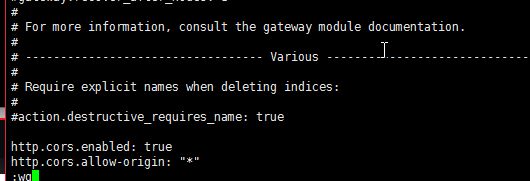
发现存在跨域问题,在elasticsearch.yaml中增加一下两行,注意冒号后要有空格。
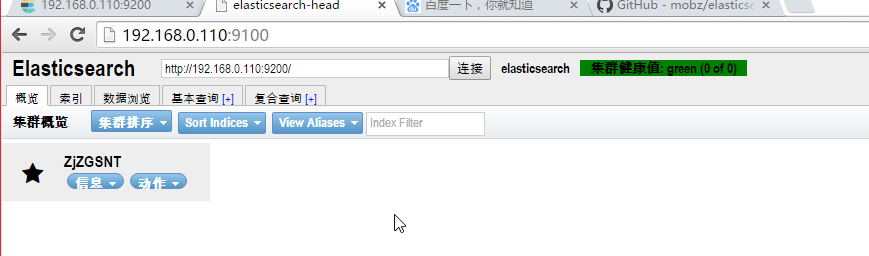
修改完后,关闭到head进程和elasticsearch进程,分别启动head进程和elasticsearch进程。访问head进程,如下, 集群健康值green
elasticsearch安装指导(new)的更多相关文章
- ElasticSearch实践系列(一):安装
Elasticsearch简介 Elasticsearch是一个高度可扩展的开源全文搜索和分析引擎.它允许您快速,近实时地存储,搜索和分析大量数据.它通常用作底层引擎/技术,为具有复杂搜索功能和要求的 ...
- 在centos7上安装elasticSearch
因为elasticsearch是用java编写的,所以需要先安装JDK: jdk1.8的安装:安装指导 elasticsearch的下载和安装 一.下载elasticSearch 1.下载地址: ht ...
- Elasticsearch 及 Kibana 安装篇
简介 官网-安装介绍 这里记载了各个软件包的安装方法,Linux Mac Windows-- 本文记载的是在 CentOS 系统安装 Elasticsearch 7.0.0 版本的步骤. 安装 Jav ...
- Elasticsearch之java的基本操作一
摘要 接触ElasticSearch已经有一段了.在这期间,遇到很多问题,但在最后自己的不断探索下解决了这些问题.看到网上或多或少的都有一些介绍ElasticSearch相关知识的文档,但个人觉得 ...
- Elasticsearch 5.0 中term 查询和match 查询的认识
Elasticsearch 5.0 关于term query和match query的认识 一.基本情况 前言:term query和match query牵扯的东西比较多,例如分词器.mapping ...
- 以bank account 数据为例,认识elasticsearch query 和 filter
Elasticsearch 查询语言(Query DSL)认识(一) 一.基本认识 查询子句的行为取决于 query context filter context 也就是执行的是查询(query)还是 ...
- Ubuntu 14.04中Elasticsearch集群配置
Ubuntu 14.04中Elasticsearch集群配置 前言:本文可用于elasticsearch集群搭建参考.细分为elasticsearch.yml配置和系统配置 达到的目的:各台机器配置成 ...
- ElasticSearch 5学习(10)——结构化查询(包括新特性)
之前我们所有的查询都属于命令行查询,但是不利于复杂的查询,而且一般在项目开发中不使用命令行查询方式,只有在调试测试时使用简单命令行查询,但是,如果想要善用搜索,我们必须使用请求体查询(request ...
- ElasticSearch 5学习(9)——映射和分析(string类型废弃)
在ElasticSearch中,存入文档的内容类似于传统数据每个字段一样,都会有一个指定的属性,为了能够把日期字段处理成日期,把数字字段处理成数字,把字符串字段处理成字符串值,Elasticsearc ...
随机推荐
- java删除字符串最后一个字符的几种方法
偶然看到的,记录一下,以免忘记 字符串:string s = "1,2,3,4,5," 目标:删除最后一个 "," 方法: 1.用的最多的是Substri ...
- MySQL(增删改查补充)
SQL语句数据行操作补充 create table tb12( id int auto_increment primary key, ...
- Flask从入门到精通之flask扩展
Flask被设计成可扩展形式,因此并没有提供一些重要的功能,比如数据库和用户认证,所以开发者可以自由选择最适合程序的包,或者按需求自行开发.社区成员开发了大量不同用途的扩展,如果这还不能满足需求,你还 ...
- maven 服务器搭建 -- nexus
参考文档 http://blog.sina.com.cn/s/blog_5745d6cb0100hasa.html 首先下载nexus webapp,可以使用wget来下载: Java代码 wget ...
- 【bzoj3489】 A simple rmq problem k-d树
由于某些原因,我先打了一个错误的树套树,后来打起了$k-d$.接着因不明原因在思路上被卡了很久,在今天中午蹲坑时恍然大悟...... 对于一个数字$a_i$,我们可以用一组三维坐标$(i,pre,nx ...
- appt查看应用包报名和入口页面
appt在哪里? aapt不需要另外安装喔,有安装了adt的,可以直接在adt../sdk/build-tools/android-xx/下,找到aapt,详细路径如图 怎么使用aapt.bat? 直 ...
- YYYY-mm-dd HH:MM:SS 时间格式
YYYY-mm-dd HH:MM:SS部分解释 d 月中的某一天.一位数的日期没有前导零. dd 月中的某一天.一位数的日期有一个前导零. ...
- Ubuntu安装PhpStorm并设置快速启动phpstorm
使用sudo apt-get install phpstorm 安装php后,没有在桌面生成phpstorm的快捷方式,如果将phpstorm.sh的链接放到/usr/local/bin ,虽然可以从 ...
- vba调用c#dll
本文阐述如何用C#创建COM组件,并能用VB6.0等调用.附有完整测试通过的代码.该功能总体看来很简单,实际值得注意的地方还是挺多.因为很少有人写这类文章,有些代码也是转来转去的不全,有些甚至让人误入 ...
- Mac 10.12连接iSCSI硬盘软件iSCSI Initiator X
Mac下的iSCSI协议苹果一直以来没有集成,而网络上流传的最好用支持iSCSI硬盘的软件是globalSAN,但是这个软件是收费的,当然有破解版,只不多不太好找,因为现在用iSCSI的用户已经很少了 ...