
在centos7上安装elasticSearch
因为elasticsearch是用java编写的,所以需要先安装JDK;
jdk1.8的安装:安装指导
elasticsearch的下载和安装
一、下载elasticSearch
1、下载地址: http://www.elastic.co/cn/downloads (本篇下载 elasticsearch 5.6.6)

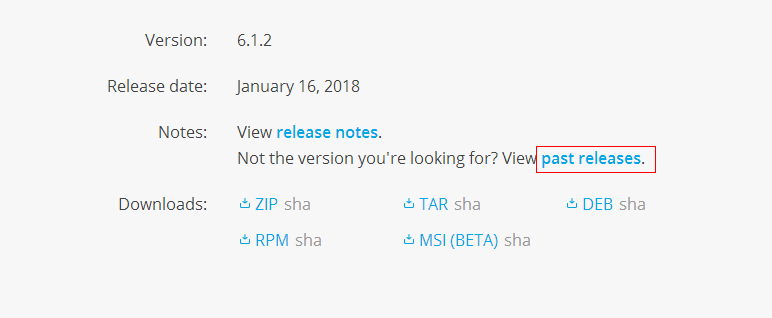
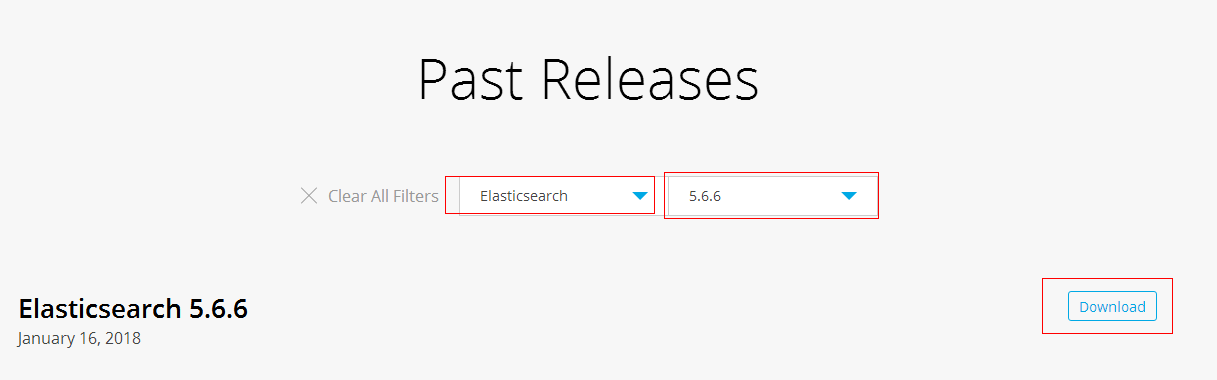
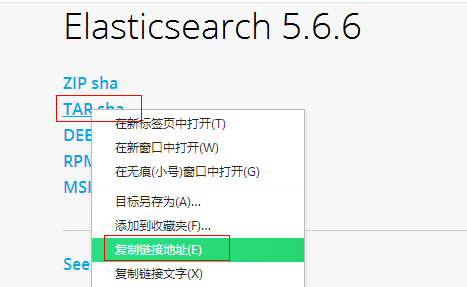
2、使用 wget 命令下载
wget https://artifacts.elastic.co/downloads/elasticsearch/elasticsearch-5.6.6.tar.gz
二、安装elasticsearch
1、解压elasticsearch到 /usr/local 目录下
tar -zxvf elasticsearch-5.6..tar.gz -C /usr/local/
2、进入到解压的elasticsearch包目录下:cd /usr/local/elasticsearch-5.6.6/
3、启动 ./bin/elasticsearch -d #参数 -d 指的是后台运行

4、使用 curl http://localhost:9200/ 查看是否运行,如果返回如下信息则标示运行正常:
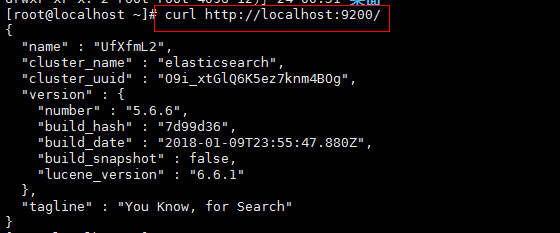
5、elasticsearch默认restful-api的端口是9200 不支持Ip地址,只能在本机用http://localhost:9200来访问。如果需要改变,需要修改配置文件。
默认情况下 Elasticsearch 的 RESTful 服务只有本机才能访问,也就是说无法从主机访问虚拟机中的服务。
可以修改 /etc/elasticsearch/config/elasticsearch.yml 文件,将注释的 network.host 和 http.port 放开,并配置正确的IP;
cd /usr/local/elasticsearch-5.6.

vim config/elasticsearch.yml
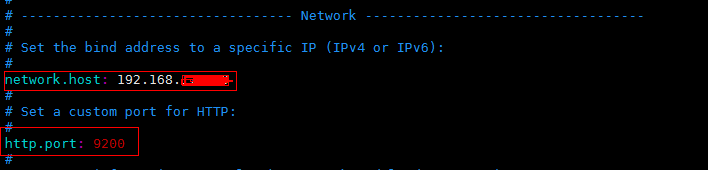
6、先将Elasticsearch 关闭,然后启动;
关闭方法:输入命令: ps -ef | grep elasticsearch ,找到进程,然后kill掉就行了;
启动方法:输入命令:su elastic , 然后输入 ./bin/elasticserach -d
7、在谷歌浏览器中打开:http://{server_IP}:9200/
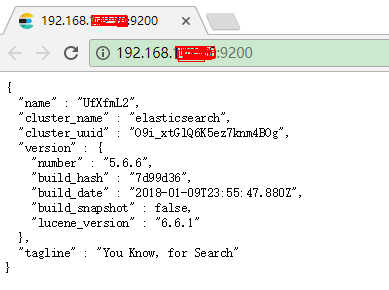
三、问题
1、问题一:启动elasticsearch报错如下:Java HotSpot(TM) 64-Bit Server VM warning: INFO: os::commit_memory(0x0000000085330000, 2060255232, 0) failed; error='Cannot allocate memory' (errno=12)

解决方法:
由于elasticsearch5.0默认分配jvm空间大小为2g,修改jvm空间分配: vim config/jvm.options
-Xms2g

-Xmx2g
修改为
-Xms512m

-Xmx512m
2、问题二:启动elasticsearch报错如下:org.elasticsearch.bootstrap.StartupException: java.lang.RuntimeException: can not run elasticsearch as root
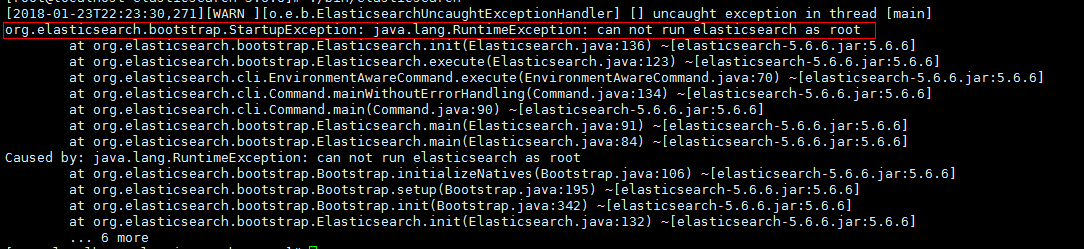
解决方法:
原因是elasticsearch默认是不支持用root用户来启动的,需要添加专门的用户。
cd /usr/local

useradd elastic

chown -R elastic:elastic elasticsearch-5.6./

su elastic

./elasticsearch-5.6./bin/elasticsearch -d
3、问题三:启动报错如下
ERROR: [3] bootstrap checks failed
[1]: max file descriptors [4096] for elasticsearch process is too low, increase to at least [65536]
[2]: max number of threads [1775] for user [elastic] is too low, increase to at least [2048]
[3]: max virtual memory areas vm.max_map_count [65530] is too low, increase to at least [262144]
解决方法:
(1)[1]: max file descriptors [4096] for elasticsearch process is too low, increase to at least [65536]
[2]: max number of threads [1775] for user [elastic] is too low, increase to at least [2048]
先切换到root账户下面,使用 vi /etc/security/limits.conf ,增加如下内容
elastic soft nofile

elastic hard nofile

elastic soft nproc

elastic hard nproc
(2)[3]: max virtual memory areas vm.max_map_count [65530] is too low, increase to at least [262144]
使用 vim /etc/sysctl.conf ,增加如下的内容
vm.max_map_count=
输入:sysctl -p ,如下所示

(3)重新启动elasticsearch,
su elastic

cd /usr/local/elasticsearch-5.6.

./bin/elasticsearch -d
在centos7上安装elasticSearch的更多相关文章
- 在centos7上安装Jenkins
在centos7上安装Jenkins 安装 添加yum repos,然后安装 sudo wget -O /etc/yum.repos.d/jenkins.repo http://pkg.jenkins ...
- 在Windows上安装Elasticsearch 5.0
在windows上安装Elasticsearch Elasticsearch可以使用.zip软件包安装在Windows上. elasticsearch-service.bat命令,它将设置Elasti ...
- 在 CentOS7 上安装 zookeeper-3.4.9 服务
在 CentOS7 上安装 zookeeper-3.4.9 服务 1.创建 /usr/local/services/zookeeper 文件夹: mkdir -p /usr/local/service ...
- 在 CentOS7 上安装 MongoDB
在 CentOS7 上安装 MongoDB 1 通过 SecureCRT 连接至 CentOS7 服务器: 2 进入到 /usr/local/ 目录: cd /usr/local 3 在当前目录下创建 ...
- 在 CentOS7 上安装 MySQL5.7
在 CentOS7 上安装 MySQL5.7 1 通过 SecureCRT 连接到阿里云 CentOS7 服务器: 2 进入到目录 /usr/local/ 中: cd /usr/local/ 3 创建 ...
- 在 CentOS7 上安装 Tomcat9
在 CentOS7 上安装 Tomcat9 1 通过 SecureCRT 连接到阿里云 CentOS7 服务器: 2 进入到目录 /usr/local/ 中: cd /usr/local/ 3 创建目 ...
- 在CentOS7上安装JDK1.8
在CentOS7上安装JDK1.8 1 通过 SecureCRT 连接到阿里云 CentOS7 服务器: 2 进入到目录 /usr/local/ 中: cd /usr/local/ 3 创建目录 to ...
- 在Centos7上安装漏洞扫描软件Nessus
本文摘要:简单叙述了在Centos7上安装Nessus扫描器的过程 Nessus 是目前全世界最多人使用的系统漏洞扫描与分析软件,Nessus的用户界面是基于Web界面来访问Nessus漏洞扫描器 ...
- 如何在centos7上安装源码包
在我们使用linux的过程中,有很多程序是通过红帽官网给的系统中安装的,但是一般来说,系统更新的速度比较慢,如果这个时候我们又想用最新版的该怎么办呢?总不能一直等系统升级吧╮(╯﹏╰)╭所以,我们可以 ...
随机推荐
- 学JS的心路历程-函式(六)其余参数及预设参数
今天我们要来介绍ES6新增的其余参数及预设参数! 其余参数rest parameter …numbers可以让我们表示不确定数量的参数,并将其视为一个数组: function getVal(…numb ...
- js基础-基本包装类型
var t = 13; t.toString(); //t是一个简单数值类型 现在有了方法 toString 对象类型的方法 //数值类型有对应的包装类型 var t1 =new Number(333 ...
- numpy中的数学
1.dot,exp v = np.dot(arg1,arg2) #矩阵乘法 v2 = np.exp() # e的-x 次方
- BlockingQueue 解析
阻塞队列与普通队列的区别在于,当队列是空的时,从队列中获取元素的操作将会被阻塞,或者当队列是满时,往队列里添加元素的操作会被阻塞.试图从空的阻塞队列中获取元素的线程将会被阻塞,直到其他的线程往空的队列 ...
- SimpleAdapter用法
[SimpleAdapter用法] public class TestSimpleAdapter extends Activity { @Override protected void onCreat ...
- linus上运行jar包文件增删查
package com.osplat.util; import com.alibaba.fastjson.JSON; import com.osplat.bean.Resultmodel; impor ...
- Spring的一些资源
1.http://spring.io/ 2.http://projects.spring.io/spring-framework/
- oracle授予调用存储过程权限
参考 https://blog.csdn.net/h254532693/article/details/45364317 grant execute on PROCEDURENAME to USERN ...
- sys系统用户长时间未登录导致密码过期
ORA-28001: the password has expired (DBD ERROR: OCISessionBegin) 问题描述:当登陆em时使用sys帐号登陆进去后,数据库实例提示ORA- ...
- php判断文件夹是不是存在
function MkFolder($path){ if(!is_readable($path)){ MkFolder( dirname($path) ); if(!is_file ...