
elasticsearch安装指导(new)
1 直接去官网下载rpm包安装或者下载tar包
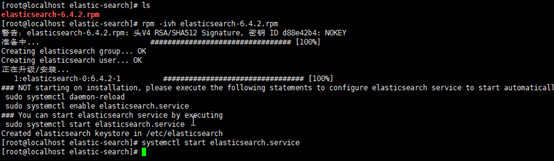
2 服务启动后,发现打不开页面,修改yml文件即可

用rpm包安装的软件有一个特点就是不同的目录在不同文件夹,比如config文件夹根据下面进程信息查到

找到yml文件后,去掉注释并将ip修改为虚机ip

访问chrome即可

3 安装elasticsearch-head插件
按照慕课网上的教程下载master包和安装nodejs后,
[root@localhost elasticsearch-head-master]# yum install nodejs
已加载插件:fastestmirror
Loading mirror speeds from cached hostfile
* base: mirrors.cn99.com
* extras: mirrors.njupt.edu.cn
* updates: mirrors.cn99.com
没有可用软件包 nodejs。
错误:无须任何处理
[root@localhost elasticsearch-head-master]# curl --silent --location https://rpm.nodesource.com/setup_8.x | bash -
## Installing the NodeSource Node.js 8.x LTS Carbon repo...
## Inspecting system...
+ rpm -q --whatprovides redhat-release || rpm -q --whatprovides centos-release || rpm -q --whatprovides cloudlinux-release || rpm -q --whatprovides sl-release
+ uname -m
## Confirming "el7-x86_64" is supported...
+ curl -sLf -o /dev/null 'https://rpm.nodesource.com/pub_8.x/el/7/x86_64/nodesource-release-el7-1.noarch.rpm'
## Downloading release setup RPM...
+ mktemp
+ curl -sL -o '/tmp/tmp.pdvh1ov1pt' 'https://rpm.nodesource.com/pub_8.x/el/7/x86_64/nodesource-release-el7-1.noarch.rpm'
## Installing release setup RPM...
+ rpm -i --nosignature --force '/tmp/tmp.pdvh1ov1pt'
## Cleaning up...
+ rm -f '/tmp/tmp.pdvh1ov1pt'
## Checking for existing installations...
+ rpm -qa 'node|npm' | grep -v nodesource
## Run `sudo yum install -y nodejs` to install Node.js 8.x LTS Carbon and npm.
## You may also need development tools to build native addons:
sudo yum install gcc-c++ make
## To install the Yarn package manager, run:
curl -sL https://dl.yarnpkg.com/rpm/yarn.repo | sudo tee /etc/yum.repos.d/yarn.repo
sudo yum install yarn
[root@localhost elasticsearch-head-master]# sudo yum install -y nodejs
已加载插件:fastestmirror
nodesource | 2.5 kB 00:00:00
nodesource/x86_64/primary_db | 39 kB 00:00:00
Loading mirror speeds from cached hostfile
* base: mirrors.cn99.com
* extras: mirrors.njupt.edu.cn
* updates: mirrors.cn99.com
正在解决依赖关系
--> 正在检查事务
---> 软件包 nodejs.x86_64.2.8.12.0-1nodesource 将被 安装
--> 解决依赖关系完成
依赖关系解决
======================================================================================================================================================================================
Package 架构 版本 源 大小
======================================================================================================================================================================================
正在安装:
nodejs x86_64 2:8.12.0-1nodesource nodesource 16 M
事务概要
======================================================================================================================================================================================
安装 1 软件包
总下载量:16 M
安装大小:49 M
Downloading packages:
警告:/var/cache/yum/x86_64/7/nodesource/packages/nodejs-8.12.0-1nodesource.x86_64.rpm: 头V4 RSA/SHA256 Signature, 密钥 ID 34fa74dd: NOKEY= ] 3.4 MB/s | 14 MB 00:00:00 ETA
nodejs-8.12.0-1nodesource.x86_64.rpm 的公钥尚未安装
nodejs-8.12.0-1nodesource.x86_64.rpm | 16 MB 00:00:04
从 file:///etc/pki/rpm-gpg/NODESOURCE-GPG-SIGNING-KEY-EL 检索密钥
导入 GPG key 0x34FA74DD:
用户ID : "NodeSource <gpg-rpm@nodesource.com>"
指纹 : 2e55 207a 95d9 944b 0cc9 3261 5ddb e8d4 34fa 74dd
软件包 : nodesource-release-el7-1.noarch (installed)
来自 : /etc/pki/rpm-gpg/NODESOURCE-GPG-SIGNING-KEY-EL
Running transaction check
Running transaction test
Transaction test succeeded
Running transaction
警告:RPM 数据库已被非 yum 程序修改。
正在安装 : 2:nodejs-8.12.0-1nodesource.x86_64 1/1
验证中 : 2:nodejs-8.12.0-1nodesource.x86_64 1/1
已安装:
nodejs.x86_64 2:8.12.0-1nodesource
完毕!
[root@localhost elasticsearch-head-master]# node -v
v8.12.0
[root@localhost elasticsearch-head-master]# npm install
npm WARN deprecated coffee-script@1.10.0: CoffeeScript on NPM has moved to "coffeescript" (no hyphen)
npm WARN deprecated http2@3.3.7: Use the built-in module in node 9.0.0 or newer, instead
> phantomjs-prebuilt@2.1.16 install /root/elasticsearch-head/elasticsearch-head-master/node_modules/phantomjs-prebuilt
> node install.js
PhantomJS not found on PATH
Downloading https://github.com/Medium/phantomjs/releases/download/v2.1.1/phantomjs-2.1.1-linux-x86_64.tar.bz2
Saving to /tmp/phantomjs/phantomjs-2.1.1-linux-x86_64.tar.bz2
Receiving...
[==--------------------------------------] 4%
^C
[root@localhost elasticsearch-head-master]# npm install
npm notice created a lockfile as package-lock.json. You should commit this file.
npm WARN elasticsearch-head@0.0.0 license should be a valid SPDX license expression
audited 1750 packages in 7.391s
found 23 vulnerabilities (17 low, 6 high)
run `npm audit fix` to fix them, or `npm audit` for details
[root@localhost elasticsearch-head-master]#
[root@localhost elasticsearch-head-master]# npm run start
> elasticsearch-head@0.0.0 start /root/elasticsearch-head/elasticsearch-head-master
> grunt server
(node:25855) ExperimentalWarning: The http2 module is an experimental API.
Running "connect:server" (connect) task
Waiting forever...
Started connect web server on http://localhost:9100
^C
[root@localhost elasticsearch-head-master]# ps -ef|grep java
elastic+ 26668 1 9 16:11 ? 00:00:53 /bin/java -Xms1g -Xmx1g -XX:+UseConcMarkSweepGC -XX:CMSInitiatingOccupancyFraction=75 -XX:+UseCMSInitiatingOccupancyOnly -XX:+AlwaysPreTouch -Xss1m -Djava.awt.headless=true -Dfile.encoding=UTF-8 -Djna.nosys=true -XX:-OmitStackTraceInFastThrow -Dio.netty.noUnsafe=true -Dio.netty.noKeySetOptimization=true -Dio.netty.recycler.maxCapacityPerThread=0 -Dlog4j.shutdownHookEnabled=false -Dlog4j2.disable.jmx=true -Djava.io.tmpdir=/tmp/elasticsearch.acV6mTPj -XX:+HeapDumpOnOutOfMemoryError -XX:HeapDumpPath=/var/lib/elasticsearch -XX:ErrorFile=/var/log/elasticsearch/hs_err_pid%p.log -XX:+PrintGCDetails -XX:+PrintGCDateStamps -XX:+PrintTenuringDistribution -XX:+PrintGCApplicationStoppedTime -Xloggc:/var/log/elasticsearch/gc.log -XX:+UseGCLogFileRotation -XX:NumberOfGCLogFiles=32 -XX:GCLogFileSize=64m -Des.path.home=/usr/share/elasticsearch -Des.path.conf=/etc/elasticsearch -Des.distribution.flavor=default -Des.distribution.type=rpm -cp /usr/share/elasticsearch/lib/* org.elasticsearch.bootstrap.Elasticsearch -p /var/run/elasticsearch/elasticsearch.pid --quiet
root 27538 3767 0 16:20 pts/1 00:00:00 grep --color=auto java
[root@localhost elasticsearch-head-master]#
[root@localhost elasticsearch-head-master]#
[root@localhost elasticsearch-head-master]#
[root@localhost elasticsearch-head-master]# npm run start
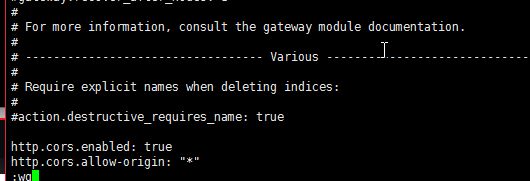
发现存在跨域问题,在elasticsearch.yaml中增加一下两行,注意冒号后要有空格。
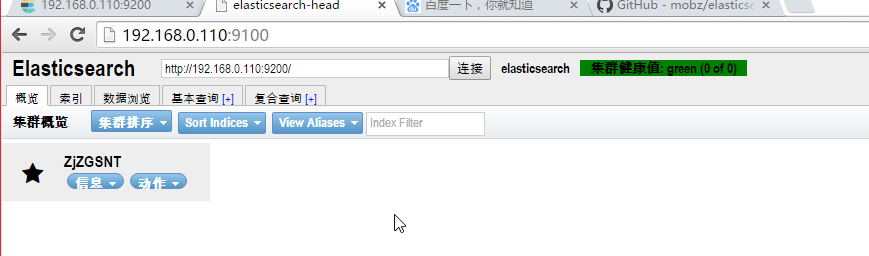
修改完后,关闭到head进程和elasticsearch进程,分别启动head进程和elasticsearch进程。访问head进程,如下, 集群健康值green
elasticsearch安装指导(new)的更多相关文章
- ElasticSearch实践系列(一):安装
Elasticsearch简介 Elasticsearch是一个高度可扩展的开源全文搜索和分析引擎.它允许您快速,近实时地存储,搜索和分析大量数据.它通常用作底层引擎/技术,为具有复杂搜索功能和要求的 ...
- 在centos7上安装elasticSearch
因为elasticsearch是用java编写的,所以需要先安装JDK: jdk1.8的安装:安装指导 elasticsearch的下载和安装 一.下载elasticSearch 1.下载地址: ht ...
- Elasticsearch 及 Kibana 安装篇
简介 官网-安装介绍 这里记载了各个软件包的安装方法,Linux Mac Windows-- 本文记载的是在 CentOS 系统安装 Elasticsearch 7.0.0 版本的步骤. 安装 Jav ...
- Elasticsearch之java的基本操作一
摘要 接触ElasticSearch已经有一段了.在这期间,遇到很多问题,但在最后自己的不断探索下解决了这些问题.看到网上或多或少的都有一些介绍ElasticSearch相关知识的文档,但个人觉得 ...
- Elasticsearch 5.0 中term 查询和match 查询的认识
Elasticsearch 5.0 关于term query和match query的认识 一.基本情况 前言:term query和match query牵扯的东西比较多,例如分词器.mapping ...
- 以bank account 数据为例,认识elasticsearch query 和 filter
Elasticsearch 查询语言(Query DSL)认识(一) 一.基本认识 查询子句的行为取决于 query context filter context 也就是执行的是查询(query)还是 ...
- Ubuntu 14.04中Elasticsearch集群配置
Ubuntu 14.04中Elasticsearch集群配置 前言:本文可用于elasticsearch集群搭建参考.细分为elasticsearch.yml配置和系统配置 达到的目的:各台机器配置成 ...
- ElasticSearch 5学习(10)——结构化查询(包括新特性)
之前我们所有的查询都属于命令行查询,但是不利于复杂的查询,而且一般在项目开发中不使用命令行查询方式,只有在调试测试时使用简单命令行查询,但是,如果想要善用搜索,我们必须使用请求体查询(request ...
- ElasticSearch 5学习(9)——映射和分析(string类型废弃)
在ElasticSearch中,存入文档的内容类似于传统数据每个字段一样,都会有一个指定的属性,为了能够把日期字段处理成日期,把数字字段处理成数字,把字符串字段处理成字符串值,Elasticsearc ...
随机推荐
- Linux core 文件 gdb
http://blog.csdn.net/mr_chenping/article/details/13767609 在程序不寻常退出时,内核会在当前工作目录下生成一个core文件(是一个内存映像,同时 ...
- 浅谈对MVC的认识
MVC是model(模型),view(视图),Controller(控制)的缩写. 模型层负责提供数据,和数据库相关的操作都交给模型层处理: 视图层提供交互的界面,其输出数据: 控制层负责接收各种请求 ...
- POST 400 (BAD REQUEST)
遇到这种错,1,F12打开控制台,2,点击network,找到发送的请求. 3,点击请求,4,看右侧的 Header Preview Response 应该能找到原因. 就拿刚才来说,找了好几个小时原 ...
- [JavaScript] 判断设备类型,加载相应css
$(document).ready(function () { var browser = { versions: function () { var u = navigator.userAgent, ...
- [JavaScript] 获取昨日前天的日期
var day = new Date(); day.setDate(day.getDate()-1); console(day.pattern('yyyy-MM-dd'));//昨天的日期 day.s ...
- 《JAVA与模式》之原型模式
在阎宏博士的<JAVA与模式>一书中开头是这样描述原型(Prototype)模式的: 原型模式属于对象的创建模式.通过给出一个原型对象来指明所有创建的对象的类型,然后用复制这个原型对象的办 ...
- ubuntu 16.04 docker下安装klee环境
手动构建docker映象: 从github上获取klee源码 git clone https://github.com/klee/klee.git cd klee 使用存储库根目录中dockerfil ...
- Swift循环遍历集合方法
第一种方式:for-in循环 OC延续了C语言的for循环,在Swift中被彻底改造,我们无法再使用传统形式的for循环了 遍历数组和字典: //遍历数组 let iosArray = [&quo ...
- Window History对象
History 对象属性 length 返回浏览器历史列表中的 URL 数量. History 对象方法 back() 加载 history 列表中的前一个 URL. window.history.b ...
- (转)Windows下MySQL :GUI安装和使用(MySQL GUI tools)
原文:http://blog.csdn.net/dahunbi/article/details/52970815 MySQL GUI Tools是MySQL官方提供的图形化管理工具,功能很强大,值得推 ...