
python开发_tkinter_获取文本框内容_给文本框添加键盘输入事件
在之前的blog中有提到python的tkinter中的菜单操作
python开发_tkinter_窗口控件_自己制作的Python IDEL_博主推荐
python开发_tkinter_窗口控件_自己制作的Python IDEL_博主推荐(二)
python开发_tkinter_菜单选项中英文切换_菜单选项不可用操作_博主推荐
下面是tkinter的获取文本框内容_给文本框添加键盘输入事件的操作
运行效果:
在输入的时候,单击回车键,触发:print_contents()
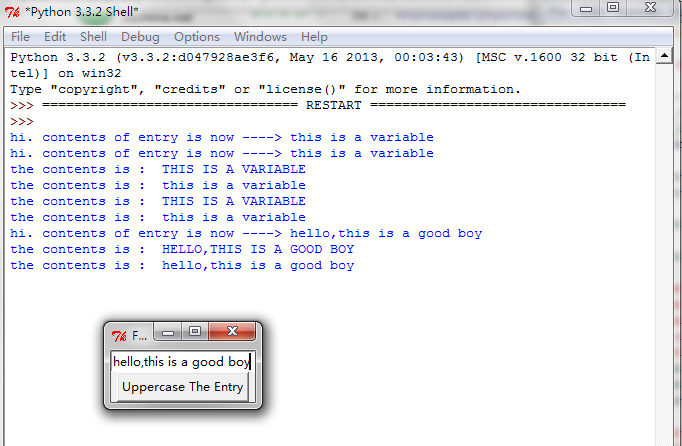
==========================================================
代码部分:
==========================================================
 from tkinter import *

 __author__ = {'name' : 'Hongten',

               'mail' : 'hongtenzone@foxmail.com',

               'blog' : 'http://www.cnblogs.com/',

               'QQ': '',

               'created' : '2013-09-11'}

 # This program  shows how to make a typein box shadow a program variable.

 flag = True

 class App(Frame):

     def __init__(self, master=None):

         Frame.__init__(self, master)

         self.pack()

         self.entrythingy = Entry(self)

         self.entrythingy.pack()

         self.button = Button(self, text="Uppercase The Entry",

                              command=self.upper)

         self.button.pack()

         # here we have the text in the entry widget tied to a variable.

         # changes in the variable are echoed in the widget and vice versa.

         # Very handy.

         # there are other Variable types. See Tkinter.py for all

         # the other variable types that can be shadowed

         self.contents = StringVar()

         self.contents.set("this is a variable")

         self.entrythingy.config(textvariable=self.contents)

         # and here we get a callback when the user hits return. we could

         # make the key that triggers the callback anything we wanted to.

         # other typical options might be <Key-Tab> or <Key> (for anything)

         self.entrythingy.bind('<Key-Return>', self.print_contents)

     def upper(self):

         # notice here, we don't actually refer to the entry box.

         # we just operate on the string variable and we

         # because it's being looked at by the entry widget, changing

         # the variable changes the entry widget display automatically.

         # the strange get/set operators are clunky, true...

         global flag

         flag = not flag

         if not flag:

             str = self.contents.get().upper()

             self.contents.set(str)

         else:

             str = self.contents.get().lower()

             self.contents.set(str)

         print('the contents is : ', self.contents.get())

     def print_contents(self, event):

         print("hi. contents of entry is now ---->", self.contents.get())

 root = App()

 root.master.title("Foo")

 root.mainloop()
参考资料:
http://www.oschina.net/code/explore/Python-3.1.3/Demo/tkinter/matt/entry-with-shared-variable.py
python开发_tkinter_获取文本框内容_给文本框添加键盘输入事件的更多相关文章
- python开发_tkinter_获取单选菜单值
在之前的blog中有提到python的tkinter中的菜单操作 python开发_tkinter_窗口控件_自己制作的Python IDEL_博主推荐 python开发_tkinter_窗口控件_自 ...
- python开发_tkinter_菜单选项中英文切换_菜单选项不可用操作_博主推荐
我使用的python版本为:3.3.2 如果你对python中tkinter模块的菜单操作不是很了解,你可以看看: python开发_tkinter_窗口控件_自己制作的Python IDEL_博主推 ...
- python开发_tkinter_小球完全弹性碰撞游戏_源码下载
完成这个小球的完全弹性碰撞游戏灵感来自于: 下面是我花了一周下班时间所编写的一个小球完全弹性碰撞游戏: 游戏初始化状态: 最下面的游标和修改小球的移动速度 ====================== ...
- python开发_tkinter_单选菜单_不可用菜单操作
在之前的blog中有提到python的tkinter中的菜单操作 python开发_tkinter_窗口控件_自己制作的Python IDEL_博主推荐 python开发_tkinter_窗口控件_自 ...
- python开发_tkinter_多级子菜单
在之前的blog中有提到python的tkinter中的菜单操作 python开发_tkinter_窗口控件_自己制作的Python IDEL_博主推荐 python开发_tkinter_窗口控件_自 ...
- python开发_tkinter_复选菜单
在之前的blog中有提到python的tkinter中的菜单操作 python开发_tkinter_窗口控件_自己制作的Python IDEL_博主推荐 python开发_tkinter_窗口控件_自 ...
- python开发_tkinter_窗口控件_自己制作的Python IDEL_博主推荐(二)
在上一篇blog:python开发_tkinter_窗口控件_自己制作的Python IDEL_博主推荐 中介绍了python中的tkinter的一些东西,你可能对tkinter有一定的了解了.这篇b ...
- python开发_tkinter_小球完全弹性碰撞游戏
python开发_tkinter_小球完全弹性碰撞游戏 完成这个小球的完全弹性碰撞游戏灵感来自于: 下面是我花了一周下班时间所编写的一个小球完全弹性碰撞游戏: 游戏初始化状态: 最下面的游标和修改 ...
- 【转】python win32api win32gui win32con 简单操作教程(窗口句柄 发送消息 常用方法 键盘输入)
作者:https://blog.csdn.net/qq_16234613/article/details/79155632 附:https://www.programcreek.com/python/ ...
随机推荐
- Shell-脚本只能运行1次
用空文件进行判断 path=`pwd` if [ -f ${path}/.runned ]; then { echo "This script can only execute once! ...
- html5学习之canvas
Canvas画布 1.绘图方法 ctx.moveTo(x,y) 落笔ctx.lineTo(x,y) 连线ctx.stroke() 描边 ctx.beginPath(): 开启新的图层 演示: stro ...
- 在jsp页面中设置了远程验证,在初始化时必须预先调用一次。
参考链接:http://code.taobao.org/p/sztaotao/diff/5/trunk/code/src/main/webapp/webpage/modules/sys/roleFor ...
- 转:vue-cli的webpack模板项目配置文件分析
转载地址:http://blog.csdn.net/hongchh/article/details/55113751 一.文件结构 本文主要分析开发(dev)和构建(build)两个过程涉及到的文件, ...
- C++ 必须使用初始化列表
继承关系中,父类无默认构造函数 类类型类成员变量无默认构造函数 const类型成员变量 引用类型成员变量 不使用初始化列表,在创建对象调用构造函数之前会对所有的成员变量进行默认初始化,然后再执行构造函 ...
- python2.7
python2.7支持win32.win64 下载地址:http://pan.baidu.com/s/1dE39eQ9 初学,附一个牛人的python教程地址:http://www.liaoxuefe ...
- Windbg在应用层调试漏洞时的应用
主要记录一些在应用层调试漏洞的技巧,不会写一些基本的命令,只记录比较有用的平时难以想到的调试方法. 1.!address eax 查看对应内存页的属性,如果poc触发异常之后就可以用这个指令看一下触发 ...
- C#socket编程序(一)
在讲socket编程之前,我们先看一下最常用的一些类和方法,相信这些能让你事半功倍. 一.IP地址操作类 1.IPaddress类 a.在该类中有一个 parse()方法,能够把点分十进制IP地址 转 ...
- 第五届CCF软件能力认证
1.数列分段 问题描述 给定一个整数数列,数列中连续相同的最长整数序列算成一段,问数列中共有多少段? 输入格式 输入的第一行包含一个整数n,表示数列中整数的个数. 第二行包含n个整数a1, a2, … ...
- uc 下载页面 记录备份
记录一下 <!doctype html> <html> <head> <meta charset="utf-8"> <titl ...