
Window系统 安装TFLearn
1. 确保成功安装了tensorflow

2. 查看当前tensorflow下的库文件,判断是否已经安装了h5py,scipy:conda list
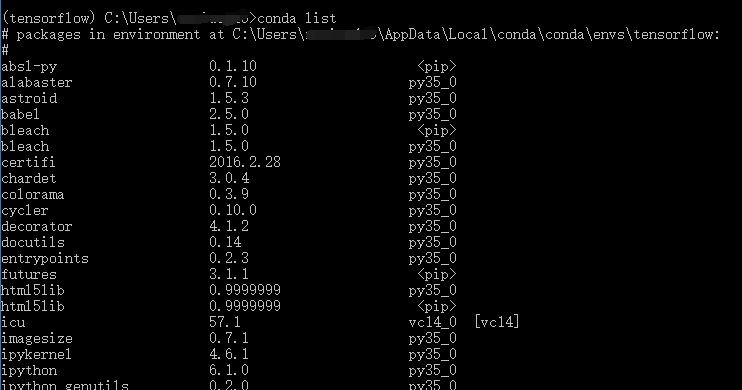
3. 若没有安装,安装h5py,scipy。我的电脑中没有安装h5py,安装:pip install h5py
安装scipy同理

4. 安装tflearn
有两种安装方式
1)pip install tflearn
2) pip install git+https://github.com/tflearn/tflearn.git (要确保先安装了Git)
我使用的第一种安装方法
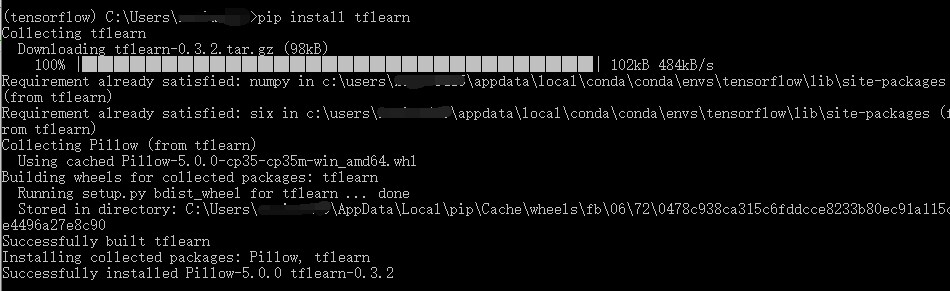
5. 至此tflearn安装成功。

6. 从tflearn官网找的一个例子:http://tflearn.org/examples/
from __future__ import absolute_import, division, print_function

import tflearn

# Regression data

X = [3.3,4.4,5.5,6.71,6.93,4.168,9.779,6.182,7.59,2.167,7.042,10.791,5.313,7.997,5.654,9.27,3.1]

Y = [1.7,2.76,2.09,3.19,1.694,1.573,3.366,2.596,2.53,1.221,2.827,3.465,1.65,2.904,2.42,2.94,1.3]

# Linear Regression graph

input_ = tflearn.input_data(shape=[None])

linear = tflearn.single_unit(input_)

regression = tflearn.regression(linear, optimizer='sgd', loss='mean_square',

                                metric='R2', learning_rate=0.01)

m = tflearn.DNN(regression)

m.fit(X, Y, n_epoch=1000, show_metric=True, snapshot_epoch=False)

print("\nRegression result:")

print("Y = " + str(m.get_weights(linear.W)) +

      "*X + " + str(m.get_weights(linear.b)))

print("\nTest prediction for x = 3.2, 3.3, 3.4:")

print(m.predict([3.2, 3.3, 3.4]))
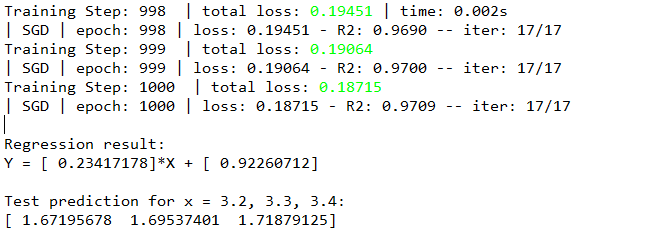
运行结果部分截图如下:
--------------------------------分割线--------------------------------------------
安装过程中遇到的错误

1. hdf5 is not supported on this machine (please install/reinstall h5py for optimal experience)
原因:没有安装h5py,安装h5py后,问题得以解决
2. curses is not supported on this machine (please install/reinstall curses for an optimal experience)
解决方法:安装curses
安装过程:
1)如果没有安装wheel,首先通过pip命令安装wheel:pip install wheel

2)从https://www.lfd.uci.edu/~gohlke/pythonlibs/下载curses‑2.2‑cp35‑none‑win_amd64.whl包
3)cd到下载的.whl的目录(如我的 ~/PythonTool)。直接输入命令 : pip install curses-2.2-cp36-cp36m-win32.whl

Window系统 安装TFLearn的更多相关文章
- 在window系统下安装Sass
1.Ruby下载 因为Sass依赖于Ruby环境,所以应先在window系统下安装Ruby,Ruby安装包下载链接:http://rubyinstaller.org/downloads/ 2.Ruby ...
- U盘安装window系统
U盘安装window系统: 1. 制作系统启动U盘,推荐使用老毛桃. 2. 电脑上插入U盘,启动系统,选择U盘启动. 3. 进入老毛桃选择界面,选择生成PE系统.推荐win8,之前在一个戴尔电脑上使用 ...
- kvm安装window系统及使用NFS动态迁移
验证是否开启虚拟化 # grep -E 'svm|vmx' /proc/cpuinfo - vmx is for Intel processors - svm is for AMD processor ...
- mysql 学习之1 mysql在window系统下的安装
转载: https://blog.csdn.net/weixin_43295278/article/details/8287440 此方法只 适用 于window系统 坑 此篇文章在使用 alter ...
- MariaDB ZIP方式安装(Window系统)
Maria DB ZIP方式安装 Windows上ZIP包的入门非常简单-此发行版包括预构建的数据库文件,这些文件可以在解压缩ZIP后立即使用. 您可以从命令提示符运行mysqld.exe,如下所示: ...
- window下安装pip工具,再利用pip安装工具来安装其他的python包
1.在安装pip前,请确认你window系统中已经安装好了python,和easy_install工具,如果系统安装成功,easy_install在目录C:\Python27\Scripts 下面,如 ...
- [实战经验]Macbook pro 苹果系统换window系统
1. Macbook的window软件驱动备份 通过Boot Camp助手进行window支持苹果驱动下载 2. 拆机把SSD固态硬盘放在主盘位置,把苹果的机械盘放在光驱位置 ...
- 【原】window上安装elasticserach
[window上安装elasticserach] 系统环境:2008R2 x64测试安装用的服务器IP:192.168.12.52elasticsearch版本:2.3.4JDK版本:jdk 1.8. ...
- 学习window系统下的注册表
一直不明白注册表是一个什么鬼,查了资料后大概明白了注册表到底有什么用,其实简单来说注册表就是一个存放系统.硬件.应用配置信息的数据ku.##### 一.注册表的来历在最早的视窗操作系统win3.x中, ...
随机推荐
- 【ORACLE】ORACLE RAC设置控制文件多路
[oracle@rac01 ~]$ srvctl stop database -d proc -o immediate [oracle@rac01 ~]$ sqlplus / as sysdba SQ ...
- 资产管理系统 CMDB 讲解
两年前笔者在一个中小型互联网公司做运维,当时我们经理在机房,花了半天找一台服务器,但是服务器搞错了,悲剧了^.^! 当时我们的做法是用了一个 Excel,很多时候更新不及时,重启一台机器.拔一根网线都 ...
- 微信小程序—day01
前言 听说谷歌准备回中国了,玩了一下谷歌刚入驻微信的小程序:“猜画小歌”,又一次见识到了ai的强大魅力.看来python之路,前途还是一片光明的. 因为18年初时的“跳一跳”,带火了微信小程序,一直想 ...
- tomcat 在liunx中shutdown后进程仍然存在的两种实用解决办法
方法一: 查找tomcat进程并kill ps -elf | grep ${ctompath} | grep -v grep | awk '{print $4}' | xargs kill -9 此处 ...
- SQL Server Management Studio 键盘快捷键
光标移动键盘快捷键 操作 SQL Server 2012 SQL Server 2008 R2 左移光标 向左键 向左键 右移光标 向右键 向右键 上移光标 向上键 向上键 下移光标 向下键 向下键 ...
- 五、Django之视图和模板-Part 3
一.概述 一个视图就是一个页面,通常提供特定的功能,使用特定的模版.列如:在一个博客应用中,你可能会看到下列视图: 博客主页:显示最新发布的一些内容 每篇博客的详细页面:博客的永久链接 基于年的博客页 ...
- 编码 解码 python
之前一直对python文件中编码解码糊里糊涂,今天看到一篇文章,觉得把我讲的有点明白了.写个心得吧. 1.编码解码是怎么一回事? Python 里面的编码和解码也就是 unicode 和 str 这两 ...
- vue入门之单文件组件
介绍 在很多 Vue 项目中,我们使用 Vue.component 来定义全局组件,紧接着用 new Vue({ el: '#container '}) 在每个页面内指定一个容器元素. 这种方式在很多 ...
- “Hello World!“”团队第七周召开的第二次会议
今天是我们团队“Hello World!”团队第七周召开的第二次会议.博客内容: 一.会议时间 二.会议地点 三.会议成员 四.会议内容 五.todo list 六.会议照片 七.燃尽图 八.代码 一 ...
- 2-Fourth Scrum Meeting20151204
任务安排 闫昊: 今日完成:设计本地数据库. 明日任务:请假.(最近代码写得多……很累……) 唐彬: 今日完成:ios客户端代码的了解. 明日任务:ios客户端代码的深度学习. 史烨轩: 今日完成: ...