
c#:实现动态编译,并实现动态MultiProcess功能(来自python multiprocess的想法)
由于之前一直遇到一些关于并行进行数据处理的时效果往往不好,不管是c#还是java程序都是一样,但是在Python中通过multiprocess实现同样的功能时,却发现确实可以提高程序运行的性能,及服务器资源使用提高。python具体性能及multiprocess用法,请参考:《Python:使用pymssql批量插入csv文件到数据库测试》
如有转载请标明原文地址:http://www.cnblogs.com/yy3b2007com/p/7228337.html
很久之前就设想如何在c#中实现多进程的方案,如今终于设计出了C#中动态实现多进程的方案:
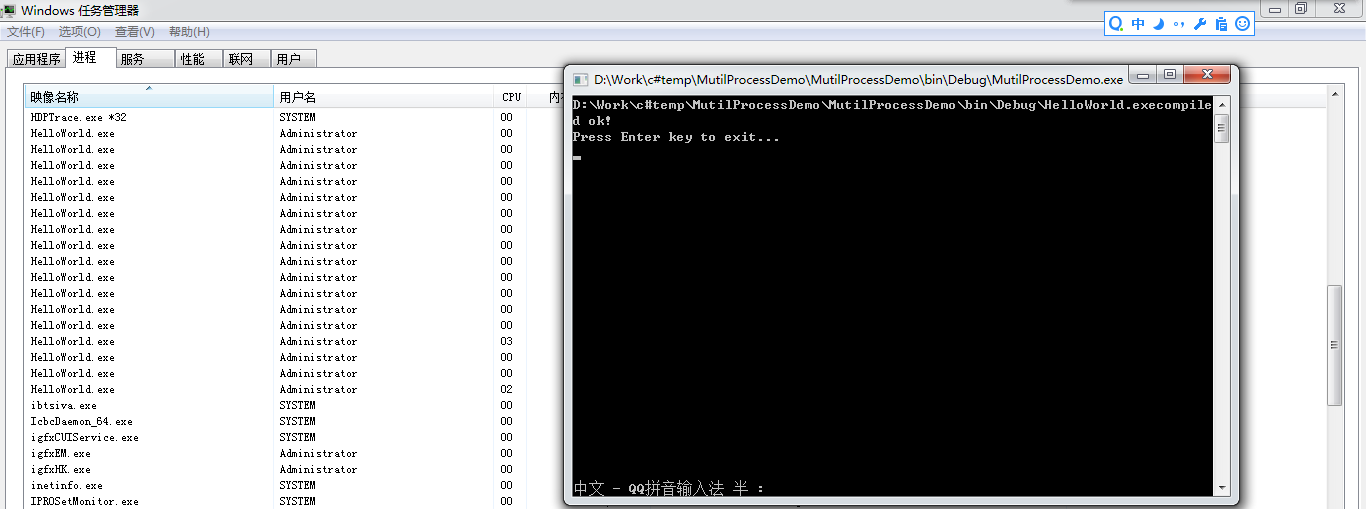
具体代码:
 using Microsoft.CSharp;

 using System;

 using System.CodeDom;

 using System.CodeDom.Compiler;

 using System.Collections.Generic;

 using System.Linq;

 using System.Reflection;

 using System.Text;

 namespace MutilProcessDemo

 {

     public class Program

     {

         static System.Timers.Timer timer = null;

         public static void Main(string[] args)

         {

             GenerateExe();

             timer = new System.Timers.Timer();

             timer.AutoReset = true;

             timer.Enabled = true;

             timer.Interval = ;

             timer.Elapsed += Timer_Elapsed;

             Console.WriteLine("Press Enter key to exit...");

             Console.ReadKey();

         }

         private static void DynamicCompiler()

         {

             // 1.CSharpCodePrivoder

             CSharpCodeProvider objCSharpCodePrivoder = new CSharpCodeProvider();

             // 2.ICodeComplier

             ICodeCompiler objICodeCompiler = objCSharpCodePrivoder.CreateCompiler();

             // 3.CompilerParameters

             CompilerParameters objCompilerParameters = new CompilerParameters();

             objCompilerParameters.ReferencedAssemblies.Add("System.dll");

             objCompilerParameters.GenerateExecutable = false;

             objCompilerParameters.GenerateInMemory = true;

             // 4.CompilerResults

             CompilerResults cr = objICodeCompiler.CompileAssemblyFromSource(objCompilerParameters, GenerateCode());

             if (cr.Errors.HasErrors)

             {

                 Console.WriteLine("编译错误:");

                 foreach (CompilerError err in cr.Errors)

                 {

                     Console.WriteLine(err.ErrorText);

                 }

             }

             else

             {

                 // 通过反射,调用HelloWorld的实例

                 Assembly objAssembly = cr.CompiledAssembly;

                 object objHelloWorld = objAssembly.CreateInstance("DynamicCodeGenerate.HelloWorld");

                 MethodInfo objMI = objHelloWorld.GetType().GetMethod("OutPut");

                 Console.WriteLine(objMI.Invoke(objHelloWorld, null));

             }

             Console.ReadLine();

         }

         static string GenerateCode()

         {

             StringBuilder sb = new StringBuilder();

             sb.Append("using System;");

             sb.Append(Environment.NewLine);

             sb.Append("namespace DynamicCodeGenerate");

             sb.Append(Environment.NewLine);

             sb.Append("{");

             sb.Append(Environment.NewLine);

             sb.Append(" public class HelloWorld");

             sb.Append(Environment.NewLine);

             sb.Append(" {");

             sb.Append(Environment.NewLine);

             sb.Append(" public string OutPut()");

             sb.Append(Environment.NewLine);

             sb.Append(" {");

             sb.Append(Environment.NewLine);

             sb.Append(" return \"Hello world!\";");

             sb.Append(Environment.NewLine);

             sb.Append(" }");

             sb.Append(Environment.NewLine);

             sb.Append(" }");

             sb.Append(Environment.NewLine);

             sb.Append("}");

             string code = sb.ToString();

             Console.WriteLine(code);

             Console.WriteLine();

             return code;

         }

         private static void Timer_Elapsed(object sender, System.Timers.ElapsedEventArgs e)

         {

             System.Diagnostics.Process[] processes = System.Diagnostics.Process.GetProcessesByName("HelloWorld");

             int maxProcessCount = ;

             // 如果超过了最大允许任务数据不再触发新的进程任务

             if (processes.Length >= maxProcessCount)

                 return;

             List<int> tasks = new List<int>();

             Random random = new Random();

             for (int i = ; i < maxProcessCount - processes.Length; i++)

             {

                 tasks.Add(random.Next());

             }

             System.Threading.Tasks.Task[] taskItems = new System.Threading.Tasks.Task[tasks.Count];

             for (int i = ; i < tasks.Count; i++)

             {

                 //TaskBase taskSubmit = new ParseMrToHdfsFileItemTask();

                 //taskItems[i] = System.Threading.Tasks.Task.Factory.StartNew(taskSubmit.Submit, new ParseMrToHdfsFileItemTaskArgument() { Task = tasks[i], ComputeNode = this.ComputeNode }, TaskCreationOptions.PreferFairness);

                 taskItems[i] = System.Threading.Tasks.Task.Factory.StartNew((object state) =>

                 {

                     System.Diagnostics.Process process = new System.Diagnostics.Process();

                 //System.Diagnostics.Process process = System.Diagnostics.Process.Start("HelloWorld.exe", state.ToString());

                 process.StartInfo = new System.Diagnostics.ProcessStartInfo();

                     process.StartInfo.CreateNoWindow = true;

                     process.StartInfo.UseShellExecute = false;

                     process.StartInfo.WindowStyle = System.Diagnostics.ProcessWindowStyle.Hidden;

                     process.StartInfo.Arguments = state.ToString();

                     process.StartInfo.FileName = "HelloWorld.exe";

                     process.Start();

                     process.WaitForExit();

                     process.Close();

                     process.Dispose();

                 }, tasks[i]);

             }

             System.Threading.Tasks.Task.WaitAll(taskItems);

         }

         private static void GenerateExe()

         {

             // 创建编译器对象

             CSharpCodeProvider p = new CSharpCodeProvider();

             ICodeCompiler cc = p.CreateCompiler();

             // 设置编译参数

             CompilerParameters options = new CompilerParameters();

             options.ReferencedAssemblies.Add("System.dll");

             options.ReferencedAssemblies.Add("MutilProcessDemo.exe");

             options.GenerateExecutable = true;

             options.OutputAssembly = "HelloWorld.exe";

             //options.ReferencedAssemblies.Add("System.Windows.Forms.dll");

             //options.EmbeddedResources.Add("Data.xml"); // 添加内置资源

             //options.CompilerOptions += " /target:winexe";

             //options.CompilerOptions += " /res:Resource1.res";

             //options.CompilerOptions += " /win32icon:test.ico";

             // 创建源码

             // 1. 使用CodeDom创建源码

             //CodeCompileUnit cu = new CodeCompileUnit();

             //CodeNamespace Samples = new CodeNamespace("Samples");

             //cu.Namespaces.Add(Samples);

             //Samples.Imports.Add(new CodeNamespaceImport("System"));

             //CodeTypeDeclaration Class1 = new CodeTypeDeclaration("Class1");

             //Samples.Types.Add(Class1);

             //CodeEntryPointMethod Start = new CodeEntryPointMethod();

             //CodeMethodInvokeExpression cs1 = new CodeMethodInvokeExpression(

             // new CodeTypeReferenceExpression("System.Console"), "WriteLine",

             // new CodePrimitiveExpression("Hello World!")

             // );

             //Start.Statements.Add(new CodeExpressionStatement(cs1));

             //Class1.Members.Add(Start);

             // 2. 直接指定源码字符串

             string code = @"

 using System;

 using MutilProcessDemo;

 namespace Samples

 {

     public class Class1

     {

         static void Main(string[] args)

         {

             Console.WriteLine(""Hello, World!"");

             MutilProcessDemo.Program.DoMethod(args);

             Console.WriteLine(DateTime.Now.ToString());

         }

     }

 }";

             CodeSnippetCompileUnit codeSnippetCompileUnit = new CodeSnippetCompileUnit(code);

             // 开始编译

             CompilerResults compilerResults = cc.CompileAssemblyFromDom(options, codeSnippetCompileUnit);

             // 显示编译信息

             if (compilerResults.Errors.Count == )

                 Console.WriteLine("{0}compiled ok!", compilerResults.CompiledAssembly.Location);

             else

             {

                 Console.WriteLine("Complie Error:");

                 foreach (CompilerError error in compilerResults.Errors)

                     Console.WriteLine(" {0}", error);

             }

         }

         public static void DoMethod(string[] args)

         {

             System.Console.WriteLine("begin ..." + args[]);

             for (int i = ; i < int.Parse(args[]); i++)

             {

                 System.Threading.Thread.Sleep();

             }

             System.Console.WriteLine("end..." + args[]);

         }

     }

 }
上边的程序运行之后会在\MutilProcessDemo\bin\Debug\下出现两个可执行的.exe:HelloWorld.exe、MutilProcessDemo.exe。
实战:

 public class Program_ForInsertATU : BaseDao

 {

     static readonly BuildingsBO buildBO = new BuildingsBO();

     static readonly FingerPrintDatabaseBO fingerPrintDatabaseBO = new FingerPrintDatabaseBO();

     static readonly GridMappingBuildingBO gridMappingBuildingBO = new GridMappingBuildingBO();

     static readonly SiteBO siteBO = new SiteBO();

     static NLog.Logger logger = new NLog.LogFactory().GetCurrentClassLogger();

     private static void GenerateExe()

     {

         // 创建编译器对象

         CSharpCodeProvider p = new CSharpCodeProvider();

         ICodeCompiler cc = p.CreateCompiler();

         // 设置编译参数

         CompilerParameters options = new CompilerParameters();

         options.ReferencedAssemblies.Add("System.dll");

         options.ReferencedAssemblies.Add("System.Data.Linq.dll");

         options.ReferencedAssemblies.Add("System.Data.dll");

         options.ReferencedAssemblies.Add("System.Core.dll");

         options.ReferencedAssemblies.Add("Dx.Business.dll");

         options.ReferencedAssemblies.Add("Dx.Model.dll");

         options.ReferencedAssemblies.Add("Dx.Utility.dll");

         options.ReferencedAssemblies.Add("Dx.Configuration.dll");

         options.ReferencedAssemblies.Add("Dx.IDAL.dll");

         options.ReferencedAssemblies.Add("Dx.DataAccess.dll");

         options.ReferencedAssemblies.Add("Dx.Data.dll");

         options.ReferencedAssemblies.Add("Dx.Framework.dll");

         options.ReferencedAssemblies.Add("ICSharpCode.SharpZipLib.dll");

         options.ReferencedAssemblies.Add("Microsoft.CSharp.dll");

         options.EmbeddedResources.Add("HelloWorld.exe.config");

         //options.CompilerOptions += " /target:winexe";

         //options.CompilerOptions += " /res:Resource1.res";

         //options.CompilerOptions += " /win32icon:test.ico";

         options.GenerateExecutable = true;

         options.OutputAssembly = "HelloWorld.exe";

         // 2. 直接指定源码字符串

         string code = @"

 using System;

 using System.Collections.Generic;

 using System.Linq;

 using System.Text;

 using System.IO;

 using System.Data;

 using System.Data.SqlClient;

 using System.Threading;

 using System.Threading.Tasks;

 using Dx.Data;

 using Dx.Business.Signal;

 using Dx.Model.FingerprintDatabase;

 using Dx.Business;

 using Dx.Model;

 using Dx.Utility;

 using Dx.Configuration;

 using Dx.Business.FingerprintDatabase.BO;

 using Dx.Business.ATU.Parse;

 using Dx.Framework.Utils;

 using System.Text.RegularExpressions;

 using ICSharpCode.SharpZipLib.GZip;

 using System.Diagnostics;

 using Dx.Business.Scheme;

 using Dx.Business.ATU;

 using Dx.Business.SiChuan;

 using Dx.Model.SiChuan;

 using System.CodeDom;

 using System.CodeDom.Compiler;

 using Microsoft.CSharp;

 namespace Samples

 {

 public class Class1

 {

     static void Main(string[] args)

     {

         ConfigurationManger.Init(ConfigurationType.WindowsService);

         EnumsRegister.Register();

         Dx.Business.SiChuan.GridInnerDoorAnalysis.GridInnerDoorAnalysis bo=new Dx.Business.SiChuan.GridInnerDoorAnalysis.GridInnerDoorAnalysis();

         bo.ComputeGridInnerDoor(args[0]);

     }

 }

 }";

         CodeSnippetCompileUnit codeSnippetCompileUnit = new CodeSnippetCompileUnit(code);

         // 开始编译

         CompilerResults compilerResults = cc.CompileAssemblyFromDom(options, codeSnippetCompileUnit);

         // 显示编译信息

         if (compilerResults.Errors.Count == )

             Console.WriteLine("{0} compiled ok!", compilerResults.CompiledAssembly.Location);

         else

         {

             Console.WriteLine("Complie Error:");

             foreach (CompilerError error in compilerResults.Errors)

                 Console.WriteLine(" {0}", error);

         }

     }

     public static void SubmitTask(object state)

     {

         List<string> ids = state as List<string>;

         System.Threading.Tasks.Task[] taskItems = new System.Threading.Tasks.Task[ids.Count];

         for (int i = ; i < ids.Count; i++)

         {

             taskItems[i] = System.Threading.Tasks.Task.Factory.StartNew((object argument) =>

             {

                 System.Diagnostics.Process process = new System.Diagnostics.Process();

                 process.StartInfo = new System.Diagnostics.ProcessStartInfo();

                 process.StartInfo.CreateNoWindow = true;

                 process.StartInfo.UseShellExecute = false;

                 process.StartInfo.WindowStyle = System.Diagnostics.ProcessWindowStyle.Hidden;

                 process.StartInfo.Arguments = argument.ToString();

                 process.StartInfo.FileName = "HelloWorld.exe";

                 process.Start();

                 //Console.WriteLine(process.ProcessName);

                 process.WaitForExit();

                 process.Close();

                 process.Dispose();

             }, ids[i]);

         }

         System.Threading.Tasks.Task.WaitAll(taskItems);

     }

     public static void Main(string[] args)

     {

         ConfigurationManger.Init(ConfigurationType.WindowsService);

         EnumsRegister.Register();

         Console.WriteLine(DateTime.Now.ToString("yyyy-MM-dd HH:mm:ss"));

         GenerateExe();

         List<BuildingVector> allBuildingVectors = buildBO.GetAllBuildingsAsGridInnerDoorAnalysis();

         // 将 指纹库数据拷贝到GridMappingBuildings

         // gridMappingBuildingBO.CopyFingerPrinterDatabase();

         List<string> tasks = new List<string>();

         int take = ;

         for (var i = ; i <= allBuildingVectors.Count / take; i++)

         {

             tasks.Add(string.Join(",", allBuildingVectors.Skip(i * take).Take(take).Select(m => m.BuildingID).ToArray()));

         }

         int skipCount = ;

         while (true)

         {

             System.Diagnostics.Process[] processes2 = System.Diagnostics.Process.GetProcessesByName("HelloWorld");

             int maxProcessCount = ;

             // 如果超过了最大允许任务数据不再触发新的进程任务

             if (processes2.Length >= maxProcessCount)

             {

                 Thread.Sleep();

                 continue;

             }

             // submit task

             int submitTaskCount = maxProcessCount - processes2.Length;

             List<string> submitTasks = tasks.Skip(skipCount).Take(submitTaskCount).ToList();

             if(submitTasks.Count==){

                 break;

             }

             System.Threading.ThreadPool.QueueUserWorkItem(SubmitTask, submitTasks);

             Thread.Sleep();

             skipCount += submitTaskCount;

             Console.WriteLine("complete task count:{0}*25,total task count:{1}*25", skipCount, tasks.Count);

         }

         Console.WriteLine("Complete...");

         Console.WriteLine(DateTime.Now.ToString("yyyy-MM-dd HH:mm:ss"));

         Console.ReadKey();

      }
     }
参考文章:
c#动态编译,程序集的动态创建(http://www.360doc.com/content/14/1014/11/5054188_416763069.shtml)
c#:实现动态编译,并实现动态MultiProcess功能(来自python multiprocess的想法)的更多相关文章
- Java 动态编译组件 & 类动态加载
1.JDK6 动态编译组件 Java SE 6 之后自身集成了运行时编译的组件:javax.tools,存放在 tools.jar 包里,可以实现 Java 源代码编译,帮助扩展静态应用程序.该包中提 ...
- JIT(动态编译)和AOT(静态编译)编译技术比较
Java 应用程序的性能经常成为开发社区中的讨论热点.因为该语言的设计初衷是使用解释的方式支持应用程序的可移植性目标,早期 Java 运行时所提供的性能级别远低于 C 和 C++ 之类的编译语言.尽管 ...
- 关于cshtml中的js对动态编译支持的问题
问题:MVC4中支持对ViewBag.ViewDate等的动态编译,但是在js中对它的支持就是有问题.虽然是可以动态编译,但是动态编译之后,断点无法获取. $.getJSON("/api/A ...
- 动态代理 原理简析(java. 动态编译,动态代理)
动态代理: 1.动态编译 JavaCompiler.CompilationTask 动态编译想理解自己查API文档 2.反射被代理类 主要使用Method.invoke(Object o,Object ...
- gcc 动态编译 动态库路径
gcc 动态编译(共享库) 动态编译的可执行文件需要附带一个的动态链接库,在执行时,需要调用其对应动态链接库中的命令优点:体积小,编译快缺点:依赖性高 代码如下: [root@74-82-173-21 ...
- 8.3(java学习笔记)动态编译(DynamicCompiler)与动态运行(DynamicRun)
一.动态编译 简单的说就是在运行一个java程序的过程中,可以通过一些API来编译其他的Java文件. 下面主要说动态编译的实现: 1.获取java编译编译器 2.运行编译器(须指定编译文件) 获取编 ...
- 让C#语言充当自身脚本!——.NET中的动态编译
原文:让C#语言充当自身脚本!--.NET中的动态编译 代码的动态编译并执行是.NET平台提供给我们的很强大的一个工具,用以灵活扩展(当然是面对内部开发人员)复杂而无法估算的逻辑,并通过一些额外的代码 ...
- (转载)JAVA动态编译--字节代码的操纵
在一般的Java应用开发过程中,开发人员使用Java的方式比较简单.打开惯用的IDE,编写Java源代码,再利用IDE提供的功能直接运行Java 程序就可以了.这种开发模式背后的过程是:开发人员编写的 ...
- ZKWeb网站框架的动态编译的实现原理
ZKWeb网站框架是一个自主开发的网页框架,实现了动态插件和自动编译功能. ZKWeb把一个文件夹当成是一个插件,无需使用csproj或xproj等形式的项目文件管理,并且支持修改插件代码后自动重新编 ...
随机推荐
- 笔记:I/O流-文件操作
Java库中使用 Path 和 Files 类封装了在用户机器上处理文件系统所需要的所有功能,可以使用Paths来获取一个具体的Path对象,来表示具体的路径. 路径 Path表示的是一个目录名序列, ...
- 不root手机的情况下查看Android数据库
最近写Android的时候发现想要读取数据库很不方便,使用adb工具的方法需要root手机,而华为手机root十分麻烦,需要解除密码,一些品牌手机即使root了也没有sqlite3命令,总之十分麻烦. ...
- Intellij idea操作maven时控制台中文乱码
只留存记录 windows环境下,Intellij idea12中maven操作时,控制台中文乱码问题(编译报错或者clean install时出现的其他错误描述乱码) 在cmd中mvn中文正常显示, ...
- Webpack 引入bootstrap
Bootstrap中是一种事实上的界面标准,标准到现在的网站大量的使用它.如果可以使用webpack引入的bootstrap.css,就可以一个npm install完成项目的依赖,而不必手工的添加到 ...
- java排序算法(二):直接选择排序
java排序算法(二) 直接选择排序 直接选择排序排序的基本操作就是每一趟从待排序的数据元素中选出最小的(或最大的)一个元素,顺序放在已排好序的数列的最后,直到全部待排序的数据元素排完,它需要经过n- ...
- Android,资料分享(2015 版)
Java 学习 我要再次强调,一定要有Java 基础(虽然现在使用其他语言也可以开发Android,但毕竟是很小众),也不要认为学习Java 两三周就可以不用管了,这会在以后的深入学习中暴露出问题,所 ...
- Oracle创建用户、角色、授权、建表
oracle数据库的权限系统分为系统权限与对象权限.系统权限( database system privilege )可以让用户执行特定的命令集.例如,create table权限允许用户创建表,gr ...
- “Swift Language Version” (SWIFT_VERSION) build setting must be set to a supported value for targets which use Swift
使用cocopod导入第三方swift包后,编译报以下错误: The "Swift Language Version" (SWIFT_VERSION) build setting ...
- 键值编码KVC
动态设置:setValue:属性值 forKey:属性名用于简单路径:setValue:属性值 forKeyPath:属性路径用于复合路径,例如Person有一个Account类型的属性,那么pers ...
- Jmeter返回参数值写入文件《一》
在用Jmeter做自动化测试的时候,某些特殊情况下我们需要将Jmeter的返回的某个特殊值写入的文件中,那么我们该如何做呢? 对于Jmeter这个工具来说,我们不难知道,它是一个java开源的可扩展的 ...