
iOS-隐藏Navigationbar【导航栏无缝圆滑的隐藏】
1.ViewController
.m
- (void)viewDidLoad {

    [super viewDidLoad];

    self.title = @"隐藏导航栏";

    UIButton *button = [UIButton buttonWithType:UIButtonTypeCustom];

    button.backgroundColor = [UIColor lightGrayColor];

    button.frame = CGRectMake(, , , );

    [button addTarget:self action:@selector(buttonClick) forControlEvents:UIControlEventTouchUpInside];

    [self.view addSubview:button];

    self.navigationController.delegate = self;

}

- (void)buttonClick{

    ///跳转到KKViewController

    [self performSegueWithIdentifier:@"pusht" sender:nil];

}
头部代理
@interface ViewController ()<UINavigationControllerDelegate>
代理方法
- (void)navigationController:(UINavigationController *)navigationController willShowViewController:(UIViewController *)viewController animated:(BOOL)animated {

    [self.navigationController setNavigationBarHidden: [self hiddenBarVc: viewController] animated: animated];

}

- (BOOL)hiddenBarVc:(UIViewController *)viewController {

    BOOL needHideNaivgaionBar = NO;

    if ([viewController isKindOfClass: [KKViewController class]]) {

        needHideNaivgaionBar = YES;

    }

    return needHideNaivgaionBar;

}
2.KKViewController(目标ViewController)
新建一个KKViewController
.h
@property (nonatomic,strong) id popDelegate;
.m
- (void)viewDidLoad {

    [super viewDidLoad];

    self.title = @"第二个页面";

    [self popSet];

}

- (void)popSet{

    _popDelegate = self.navigationController.interactivePopGestureRecognizer.delegate;

    SEL action = NSSelectorFromString(@"handleNavigationTransition:");

    UIPanGestureRecognizer *popPanGesture = [[UIPanGestureRecognizer alloc] initWithTarget:self.popDelegate action:action];

    popPanGesture.maximumNumberOfTouches = ;

    popPanGesture.delegate = self;

    [self.view addGestureRecognizer: popPanGesture];

}
头部代理
@interface KKViewController ()<UIGestureRecognizerDelegate>
手势代理方法
- (BOOL)gestureRecognizerShouldBegin:(UIPanGestureRecognizer *)gestureRecognizer{

    ///【下面两个方法写一个】

    ///全屏拖动

    CGPoint tragPoint = [gestureRecognizer translationInView:gestureRecognizer.view];

    if (tragPoint.x <= ){

        return NO;

    }

    else{

        if (self.navigationController.viewControllers.count <= ){

            return NO;

        }

        else{

            return YES;

        }

    }

//    ///局部允许拖动

//    CGPoint tragPoint = [gestureRecognizer locationInView:gestureRecognizer.view];

//    NSLog(@"x=%f;y=%f",tragPoint.x,tragPoint.y);

//    if (tragPoint.x > 60){///拖动的范围

//        return NO;

//    }

//    else{

//        if (self.navigationController.viewControllers.count <= 1) {

//            return NO;

//        }

//        else{

//            return YES;

//        }

//    }

}
效果图
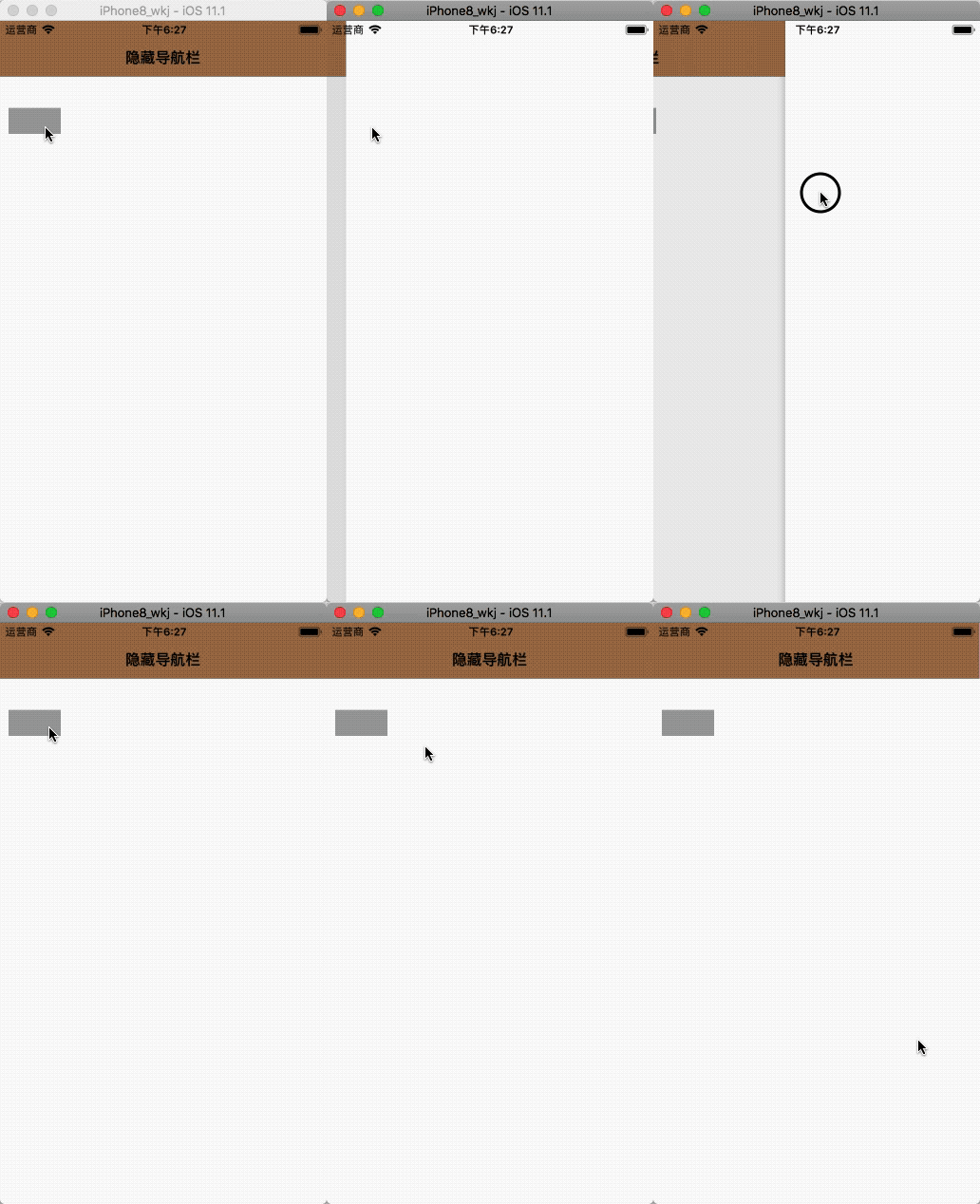
延伸
最后再推荐一个Git开源,覆盖全屏pop手势 FDFullscreenPopGesture,它里面也实现了隐藏导航栏的功能,很流畅!
iOS-隐藏Navigationbar【导航栏无缝圆滑的隐藏】的更多相关文章
- 【iOS开发-22】navigationBar导航栏,navigationItem建立:获取导航栏中的基本文本和button以及各种跳跃
(1)navigationBar导航栏可以被看作是self.navigationController一个属性导航控制器,它可以由点直接表示self.navigationController.navig ...
- iOS系统中导航栏的转场解决方案与最佳实践
背景 目前,开源社区和业界内已经存在一些 iOS 导航栏转场的解决方案,但对于历史包袱沉重的美团 App 而言,这些解决方案并不完美.有的方案不能满足复杂的页面跳转场景,有的方案迁移成本较大,为此我们 ...
- 【转】iOS中设置导航栏标题的字体颜色和大小
原文网址:http://www.360doc.com/content/15/0417/11/20919452_463847404.shtml iOS中设置导航栏标题的字体颜色和大小,有需要的朋友可以参 ...
- iOS中设置导航栏标题的字体颜色和大小
iOS中设置导航栏标题的字体颜色和大小,有需要的朋友可以参考下. 在平时开发项目的时候,难免会遇到修改导航栏字体大小和颜色的需求,一般使用自定义视图的方法,其实还存在一种方法. 方法一:(自定义视图的 ...
- unity 显示、隐藏Android导航栏
1.下面的返回.home栏可用Screen.fullScreen控制 2.导航栏的显示和隐藏用下面代码控制 private AndroidJavaObject currentActivity { ge ...
- 通过HTML+CSS+JavaScript实现鼠标移动到页面顶部导航栏出现,如果移出导航栏3秒又隐藏起来,而且不受滚动条影响(二)
通过HTML+CSS+JavaScript实现鼠标移动到页面顶部导航栏出现,如果移出导航栏3秒又隐藏起来,而且不受滚动条影响(二) 效果:默认一直隐藏导航栏,当滚动条滚到超过300px按钮出现,点击回 ...
- iOS navigationBar导航栏底部与self.view的分界线的隐藏
ios开发中经常碰到各种需求,比如要求导航栏的颜色和self.view的颜色一样,当我们直接设置navigationBar的颜色和view一样时,我们会发现navigationBar还会有一条分割线留 ...
- iOS UITableView表视图滚动隐藏UINavigationController导航栏
UITableView 继承于UIScrollView 所以UIScrollView 的代理方法相同适用于UITableView 中 隐藏导航栏的方法为: self.navigationControl ...
- iOS:自定义导航栏,随着tableView滚动显示和隐藏
自定义导航栏,随着tableView滚动显示和隐藏 一.介绍 自定义导航栏是APP中很常用的一个功能,通过自定义可以灵活的实现动画隐藏和显示效果.虽然处理系统的导航栏也可以实现,但是这个是有弊端的,因 ...
随机推荐
- lambdas了解
Lambdas了解 功能接口的一个极其宝贵的特性是可以使用lambdas实例化它们.以下是一些关于lambdas的例子: 以逗号分隔的输入列表,左边是指定类型的输入,右边是返回的块: ...
- android弹力效果菜单、组件化项目、电影票选座控件的源码
Android精选源码 android启动扫一扫和收付款的小部件源码 android弹力效果的抽屉菜单源码 对RecyclerView Item做动画 源码 android类似QQ空间,微信朋友圈,微 ...
- the method of validate slow
- 四 : springMVC各种跳页面传值
第一种方式 : 返回值为String类型的跳转页面,犯法参数里面需要写Model modelimport org.springframework.ui.Model;包下的.返回String1):字符串 ...
- 再起航,我的学习笔记之JavaScript设计模式29(节流模式)
节流模式 概念介绍 节流模式(Throttler): 对重复的业务逻辑进行节流控制,执行最后一次操作并取消其他操作,以提高性能. 优化滚动事件 有的时候我们再为滚动条添加动画的时候,会发现滚动条不停的 ...
- 从#65279字符看dede模板页面编码问题
今天一位朋友让帮忙给解决一个dede模板的问题,问题主要是:模板文件生成html文件之后会在body开头处加入一个可见的控制符,导致页面头部会出现一个空白行. 接到"& ...
- java垃圾回收的分类
1.线程数 分为串行垃圾回收器和并行垃圾回收器.串行垃圾回收器一次只使用一个线程进行垃圾回收:并行垃圾回收器一次将开启多个线程同时进行垃圾回收.在并行能力较强的 CPU 上,使用并行垃圾回收器可以缩短 ...
- 新版Azure Automation Account 浅析(一) --- 创建和Run As Account
去年年底Azure中国的Automation Account悄悄做了升级.新版本不管从功能还是end user experience方面都让人耳目一新.如果说升级前只是一个运行脚本的小工具,升级后的A ...
- python3 第二十章 - 函数式编程之Higher-order function(高阶函数)
什么是高阶函数?把函数作为参数传入或把函数做为结果值返回,这样的函数称为高阶函数,函数式编程就是指这种高度抽象的编程范式.函数式编程的特点: 函数本身可以赋值给变量,赋值后变量为函数: 允许将函数本身 ...
- mysql 列转行,合并字段
数据表: 列转行:利用max(case when then) max---聚合函数 取最大值 (case course when '语文' then score else 0 end) ---判断 ...